
写真からフェンスを削除する
動物園や野生動物公園の金網フェンス、スポーツスタジアムの安全ネット、展望台の金属製手すり、コンサート会場の金網、不動産物件の敷地のフェンスはすべて同じ問題を引き起こします。それは、カメラと被写体の間に格子状の線ができてしまい、写真の質が低下してしまうことです。 Magic Eraser の AI はフェンス構造を取り除き、その背後にあるシーン (動物の生息地、競技場、ステージ上のパフォーマー、風景、裏庭) を再構築するため、最終的な画像には、あたかもフェンスが存在しなかったかのようにシーンが表示されます。
最終更新日
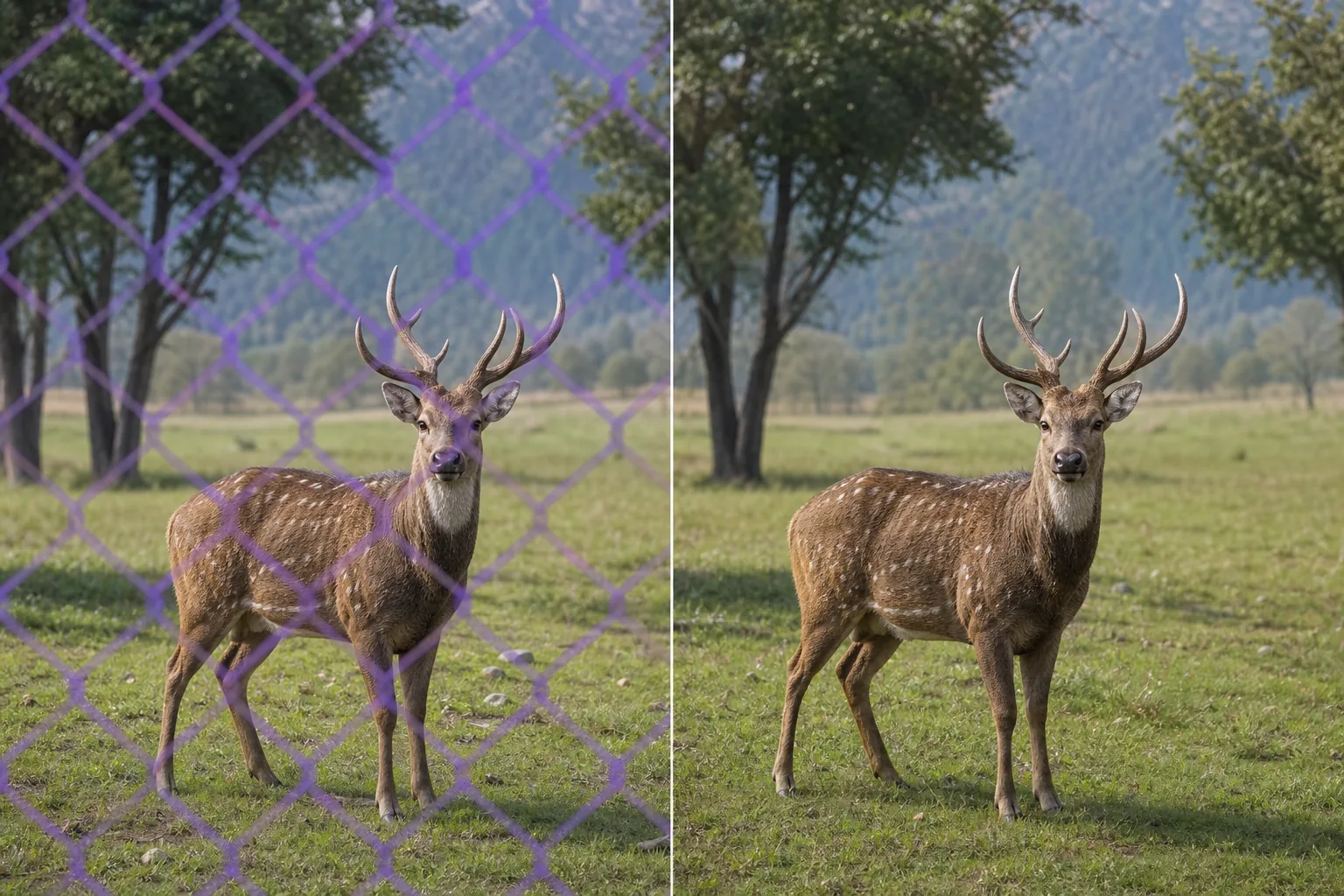
フェンスが写真を台無しにする理由と避けるのが難しい理由
フェンスは写真家が撮りたい場所にこそ存在します。動物園や野生動物保護区では、安全インフラとして来園者と動物の間に金網や金網が設置されているが、そのメッシュは、標準的な携帯電話やコンパクトカメラでは焦点がぼけずに消えてしまうほどの距離に設置されており、すべての動物の肖像画に灰色のひし形の模様が重ねて残っている。スポーツ会場では、ホームベースの後ろ、ホッケーリンクの周囲、サッカーゴール、サーキット沿いに安全ネットが使用されています。このネットは観客席に十分近い位置に設置されているため、携帯電話のカメラや、絞りを大きくしたデジタル一眼レフカメラでも完全にぼかすことができません。コンサート会場やフェスティバルでは、観客とステージの間に柵が設置されており、代わりに見晴らしの良い場所がないため、最前列の写真家は柵越しに撮影します。国立公園の美しい展望台、崖の端、橋の歩道、屋上の展望台には、景観を横切る水平線を切る安全手すりが設置されています。不動産物件には裏庭が含まれており、裏庭には敷地用フェンス(金網、木製のプライバシー、錬鉄、分割レール)が物件物件に示されている恒久的な特徴ですが、写真を閲覧する購入者は庭のスペースに注目しており、フェンスが注目を集めるのに競い合います。どの場合でも、フェンスはカメラと被写体の間に物理的にあり、フェンスは写真家が立つことを許可される場所の境界を定義するため、カメラを移動することはできません。 Photoshop で手動でフェンスを削除するのは、最も面倒なレタッチ作業の 1 つです。フェンスによって、金属が背景シーンを横切る何百もの小さな交差点が作成され、各交差点では、動物の毛皮のテクスチャ、運動場の草、パフォーマーの衣装の布地、手すりの空のグラデーションなど、フェンスが覆っていたものを個別に再構築する必要があるからです。 Magic Eraser の AI は、フェンスを繰り返しのオクルージョン パターンとして扱い、フェンスの線の間の可視部分からオクルージョンされたシーン セグメントを再構築することで、ジオメトリを処理します。
3 つのステップでフェンスを取り外します
- 1
写真をアップロードする
Web、iOS、または Android で Magic Eraser を開きます。金網越しに撮影した動物園の写真、安全ネットを付けたスポーツ写真、柵を付けたコンサート写真、手すりを付けた景色の良い俯瞰写真、敷地フェンスを付けた不動産物件の物件リスト、またはカメラと被写体の間に柵や柵が立っている画像をドロップインします。 JPEG、PNG、HEIC、WebP がサポートされています。
- 2
フェンスの境界線をブラシで乗り越える
目に見えるフェンス構造をペイントします。チェーンリンクとワイヤー メッシュの場合は、すべてのダイヤモンドまたはグリッド ラインをカバーする 1 回の連続ストロークでフェンス エリア全体をブラシします。AI はフェンス パターンとその背後にある背景シーンを区別します。広い隙間のある手すり (見下ろし位置の水平バー、間隔のある垂直フェンスピケット) の場合は、ブラシが実際の障害物と一致すると AI がよりきれいな再構築を生成するため、隙間を含むエリア全体を一括ブラシするのではなく、各バーまたはピケットを個別にブラシします。スポーツ会場の安全ネットの場合は、ネット部分をブラッシングしてください。細かいメッシュ パターンは規則的であるため、AI はネットを背景から確実に分離できます。不動産写真にある木製のプライバシー フェンスが視界を完全に遮っている場合、AI は参照しているもののみを再構築できます。フェンスが目に見える隙間なく背景を 100% カバーしている場合、ツールは実際の隠されたシーンではなく、もっともらしいテクスチャで塗りつぶします。
- 3
「消去して調整」をタップします
AIはフェンスを取り除き、フェンスの線の間に見える部分を参照してその背後のシーンを再構築します。動物園の動物上の鎖の場合、再構築された領域は動物の毛皮や皮膚の質感、生息地の背景、照明条件と一致します。スポーツフィールド上の安全ネットの場合、草のテクスチャと選手の詳細がきれいに埋められます。風光明媚な手すりの場合、空の勾配と風景が滑らかに続きます。フルズームで結果を確認してください。フェンスの交差点に小さなアーティファクトが残っている場合は、その特定のスポットを 2 回目のブラシで素早く通過することで、それらがきれいになります。フル解像度でエクスポートします。
こんな方に最適
- 動物園や野生動物公園の写真では、すべての訪問者とすべての動物の囲いの間に金網があり、本来は丈夫だった何千もの動物のポートレートが劣化します。
- ホームベースの後ろ、ホッケーリンクの周囲、サーキット沿いの安全ネットが試合の様子を覆う観客席からのスポーツ写真
- 観客とステージの間の柵がすべての出演者のショットを横切る最前列からのコンサートやフェスティバルの写真撮影
- 安全手すりが風景のパノラマや都市景観の水平線を切り取る、風光明媚な展望台と展望台の写真撮影
- 物件掲載写真で購入者の注目を集めるために、金網、錬鉄製、または木製のフェンスが庭のスペースと競合する不動産物件掲載の裏庭
- 鳥小屋のメッシュ、生息地の囲い、リハビリテーションセンターのフェンスを通した野生動物や鳥の写真。被写体が捕らえられ、唯一のカメラアングルが障壁を通してのものです。
- 保護者が子供の試合を撮影するためにダッグアウトフェンス、バックネット、サイドラインバリアを越えて撮影する学校および青少年のスポーツ写真撮影
- 建造物の建設後に近代的な安全柵が追加され、元の建築の景観を妨げている史跡、橋、記念碑での旅行写真撮影
エッジケースとヒント
フェンスの除去の品質は、背景のシーンがフェンスの隙間からどれだけ見えるかによって決まります。標準的なダイヤモンド間隔の金網メッシュ (最も一般的な動物園や敷地のフェンス タイプ) では、隙間から背景の約 85 ~ 90% が見えるため、AI が再構成するための強力な参照を提供します。これにより、最もきれいな結果が生成されます。細かいメッシュのハードウェア クロスや高密度の安全ネット (一部の野球場で使用される開口部の小さいタイプ) を使用すると、背景の多くが見えにくくなり、メッシュが最も密な領域ではわずかにソフトな再構成が生成される場合があります。目に見える隙間のない頑丈なフェンス (木製のプライバシー フェンス、コンクリートの壁) は AI に背景参照を与えません。このツールは周囲のコンテキストから推定されたもっともらしいテクスチャで埋められますが、再構築ではなく生成しているため、結果は異なります。具体的な4つのヒント。まず、フェンスの焦点が合っていない場合と焦点が合っている場合です。広口径レンズで撮影していて、フェンスが部分的にぼやけている場合(DSLR 撮影者がいる動物園ではよくあることです)、AI はぼやけた中にあるフェンスのパターンを認識し、それを除去します。ツールが機能するためにフェンスが鮮明である必要はありません。 2 番目に、フェンスの影: 金網フェンスは地面または被写体にダイヤモンド型の影を落とします。ブラシ ツールは上にペイントしたものをすべて削除するため、地面にあるフェンスの影も気になる場合は、それもブラシで塗ります。動物や被写体に影がかかる場合は、被写体の実際の特徴に影響を与えないように慎重にブラッシングしてください。 3 番目、部分的なフェンスの削除: フェンスがフレームの一部 (動物園のショットの下 3 分の 1、スポーツ写真の片側) にのみ表示される場合は、フェンスの領域のみをブラシします。画像全体を処理する必要はありません。 4 番目、二重フェンスの状況 (同じショットで内側の展示フェンスと外側の訪問者フェンスの両方が表示される): 1 回のパスで両方のレイヤーをブラシします。 AI は、重複するオクルージョン パターンを 1 つの除去ターゲットとして処理します。不動産の写真の場合、物件の写真から敷地のフェンスを削除すると、その不動産の実際の境界条件が誤って表現される可能性があることに注意してください。フェンスの存在が正確に表現されるべき重要な特徴であるかどうかについては、MLS ガイドラインを確認してください。
よくある質問
- 写真からフェンスを削除するのは無料ですか?
- はい。 Magic Eraser の無料枠は、1 日の使用量制限付きのフェンスの削除を処理します。プレミアム (年間 29.99 ドル) では制限がなくなり、高解像度でのエクスポートが可能になります。MLS 解像度要件で完全な詳細を必要とする大判の野生動物のプリント、スポーツ写真のポートフォリオ、不動産物件の一覧画像などに便利です。
- 動物園の写真から金網メッシュを削除できますか?
- はい。金網フェンスは最も一般的な除去対象の 1 つです。 85 ~ 90% のオープンスペースを持つ規則的なダイヤモンド パターンは、AI に再構築のための強力な背景参照を提供します。 1 回の連続ストロークで金網エリア全体をブラシします。AI が金属グリッドを動物、生息地、その背後にある背景から分離します。焦点の合ったチェーンリンク (携帯電話のカメラ、絞りが狭い) と部分的にぼやけたチェーンリンク (絞りが広い DSLR) の両方で機能します。
- スポーツ競技場のセーフティネットとして機能しますか?
- はい。安全ネット (野球のホームベースの後ろ、ホッケー リンクの周囲、サッカーのゴール) には規則的なメッシュ パターンがあり、AI がその背後の動作を識別して区別できます。通常、ネットは金網よりも細かいため、非常に密なメッシュ領域では再構成が若干柔らかくなる可能性がありますが、MLB/NHL/青少年スポーツ会場の標準的な安全ネットの場合、通常の表示サイズでは結果はきれいです。大判のスポーツ プリントの場合は、AI Enhance パスを使用します。
- 視界を完全に遮断する木製のプライバシーフェンスはどうでしょうか?
- 目に見える隙間がない頑丈なフェンスの場合は異なります。 AI は、参照しているもののみを再構築できます。木製のプライバシー フェンスがブラシをかけられた領域の背景を 100% 覆い、その背後にあるものが隙間なく見える場合、ツールは実際の隠されたシーンを再構築するのではなく、周囲のコンテキストに基づいて妥当な塗りつぶし (空、緑、地面のテクスチャ) を生成します。ゴールが庭全体を示している不動産物件の場合は、フェンスが完全にブロックするのではなく部分的な角度から撮影するか、フェンスの後ろの完全な再構成を期待するのではなく、フェンスの視覚的優位性を減らすためにツールを使用します。
- フェンスの影も削除されますか?
- このツールはブラシをかけたものをすべて削除します。金網フェンスは地面に、場合によっては被写体にダイヤモンド型の影を落とします。地面の影が構図から邪魔になる場合は、フェンス自体を削除した後、別のパスとしてブラシで影をブラシします。影が被写体にかかる場合 (動物園の動物の毛皮にある金網の影のパターン)、被写体の実際の特徴ではなく、影のパターンのみを覆うタイトなブラシで慎重にブラッシングします。AI は影の下の毛皮または表面を再構築します。
- デジタル一眼レフカメラの写真だけでなく、携帯電話の写真からもフェンスを削除できますか?
- はい。携帯電話のセンサーは、DSLR がフェンスを部分的にぼかすために使用する浅い被写界深度を実現できないため、実際には携帯電話のカメラが最も一般的なフェンス除去の使用例を生み出します。動物園の動物を金網越しに撮影した携帯電話の写真には、その動物の上に重なったフェンスがはっきりと焦点を合わせて写っています。まさに、Magic Eraser の AI が除去するように設計されたパターンです。 iOS および Android アプリはこれをデバイス上で処理するため、会場にいながら動物園、スポーツ、コンサートの写真をクリーンアップできます。
- 不動産物件の掲載写真からフェンスを削除することは適切でしょうか?
- それは状況と MLS ガイドラインによって異なります。物件写真から仮設の建設用フェンスを削除することは、建設が完了した後に撮影することに似ています。フェンスは永久的な物件ではありません。恒久的な敷地境界フェンスを撤去すると、フェンスはプライバシー、セキュリティ、ペットの封じ込め、近隣関係に影響を与えるため、実際の敷地の状況を偽って伝える可能性があります。一般的なガイドライン: フェンスが資産価値や機能に影響を与える永続的な特徴である場合は、それを正確に表現します。一時的または偶発的なものであれば、それを削除するのが標準的なリスト写真のクリーンアップです。