
写真からゴミ箱を削除する
商業用不動産の写真、建築写真、不動産リストからゴミ箱、ロールオフコンテナ、廃棄物収容エリアを消去します。 Magic Eraser は、ゴミ箱を撤去し、その背後にある路地、駐車場、または建物の壁を再構築して、シーンがきれいでよく維持されているように見えるようにします。
最終更新日
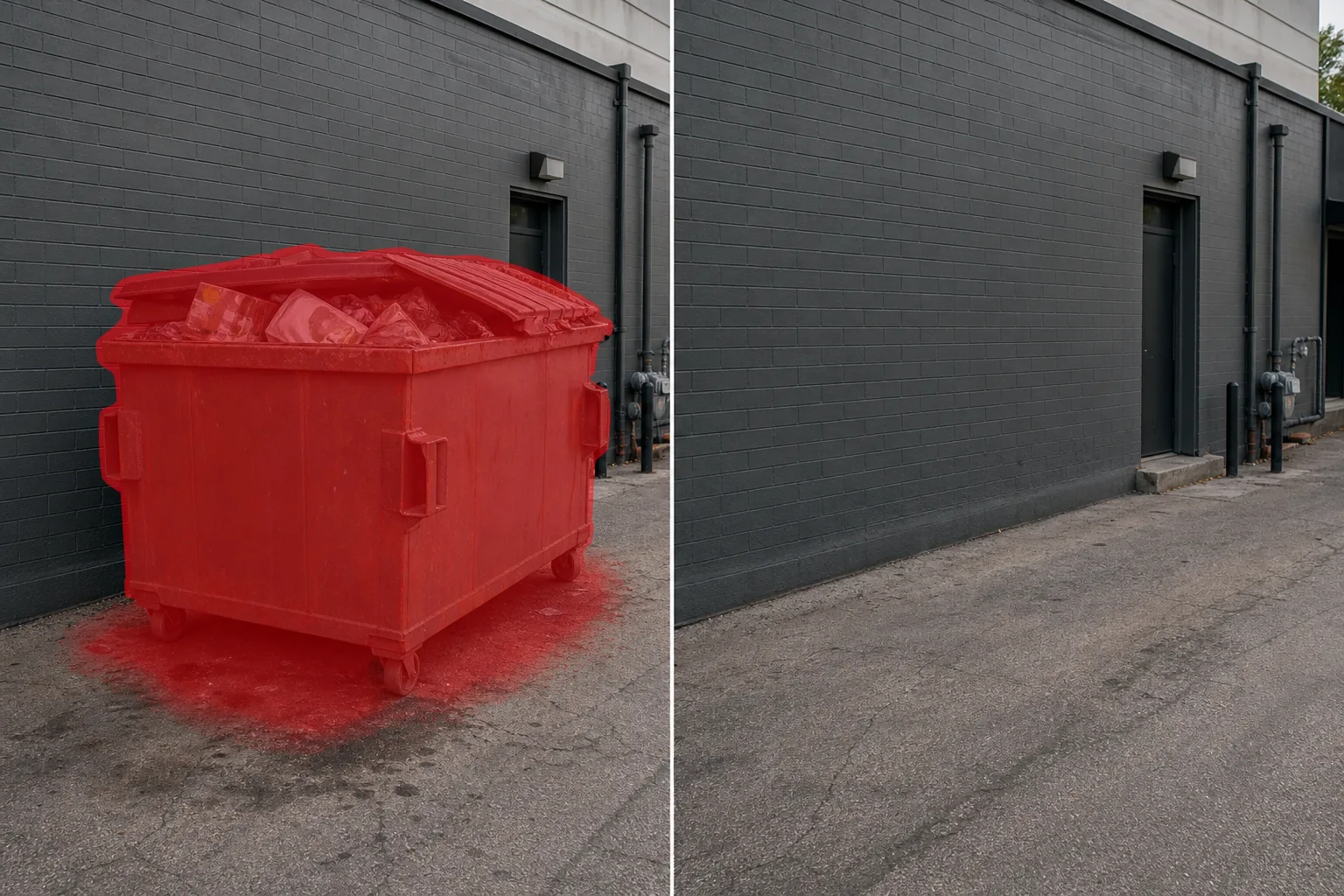
なぜ建物の後ろにゴミ箱があると物件写真の魅力が損なわれるのか
写真からゴミ収集箱(ダンプスター)を消すには、Web版・iOS版・Android版のいずれかでMagic Eraserを開き、画像をアップロードして、ゴミ箱をブラシでなぞるだけ。フタ、キャスター、下の汚れた地面、あふれたゴミまでまとめてなぞると、AIがその奥の壁・舗装・風景を自動で再現します。無料で、登録も不要です。無地の壁や空き地のような平らな背景にあるゴミ収集箱はほぼ完全に消えますが、装飾の多い建物やフェンスの前にあるものは再現すべき部分が増えるため、何回かに分けてブラシでなぞり、もう一度実行して、ズームで仕上がりを確認しましょう。 ゴミ箱は、産業用のような大きな金属製の容器で、不動産マーケティングに求められる清潔で魅力的なイメージとは正反対の、無駄や放置を伝えます。商用不動産の写真撮影では、たとえ建物自体が良好な状態にあったとしても、建物の側面や背面にゴミ箱が見えると、その不動産の知覚される品質が即座に低下します。レストランやホスピタリティのマーケティングでは、パティオのダイニング エリアや駐車場からゴミ箱が見えると、企業が伝えたいプレミアムな体験が損なわれてしまいます。住宅用不動産では、掲載物件から見える隣家のゴミ箱が外観写真では避けられない目障りになります。ゴミ箱は、建築写真でも問題になります。建築家は、遮蔽されたゴミ箱の囲いを備えた建物を設計しましたが、写真には、囲いのゲートが開いてゴミ箱が完全に見える瞬間が捉えられています。写真撮影のためにゴミ箱を移動することはできません。ゴミ箱の重さは数百ポンドあり、回収スケジュールに基づいています。 Magic Eraser は、蓋、車輪、その下の汚れた地面、あふれた瓦礫を含むゴミ箱全体を取り除き、その後ろの壁、歩道、フェンス、または景観を再構築します。
3つのステップでゴミ箱を取り除く
- 1
写真をアップロードする
ウェブ、iOS、または Android で Magic Eraser を開き、撤去したいゴミ箱のある建物の外観、駐車場、または商業施設の写真をアップロードします。 JPEG、PNG、HEIC、WebP はすべてサポートされています。
- 2
ゴミ箱をブラシで拭きます
蓋、サイドハンドル、車輪、目に見えるゴミやゴミを含むゴミ箱全体をペイントします。ゴミ箱が地面に落とす影と、その下の汚れや変色した歩道を含めます。オープンゲート付きのゴミ箱の場合は、ゲートパネルを選択に含めてください。
- 3
消去して見直す
[消去] をタップすると、Magic Eraser はゴミ箱を削除し、その背後にある建物の壁、フェンス、歩道、景観などの表面を再構築します。 100% ズームで、壁のテクスチャ、レンガのコース、またはフェンスの線が塗りつぶされた領域全体で連続していることを確認します。残っている地面の汚れに対して 2 回目のパスを実行し、最大解像度でエクスポートします。
こんな方に最適
- 目に見えるゴミ箱により、知覚される不動産の品質が低下する商業用不動産リストの写真
- 顧客に面するエリアからゴミ箱が見えるレストランおよびホスピタリティ マーケティング
- 開放的な廃棄物囲いが建物のデザイン美を壊す建築写真
- 外観写真に近所のゴミ箱や建設用コンテナが写っている住宅物件写真
- 手入れの行き届いた商業ビルや集合住宅ビルを紹介する不動産管理ポートフォリオ
自然に見えるゴミ捨てのヒント
ゴミ箱は大きなオブジェクトであり、多くの場合壁やフェンスに寄りかかるため、AI は背景の重要な領域を再構築する必要があります。最良の結果を得るための 3 つのヒント。まず、その下の地面です。ゴミ箱はアスファルトまたはコンクリートの上に置かれており、ほとんどの場合、漏れた液体、グリース、変色で汚れています。この汚れた部分をブラシマスクに含めます。ゴミ箱は取り除いても、歩道に油っぽい足跡が残ってしまっては、目的が果たせません。ブラシをゴミ箱の底から 2 ~ 3 フィート伸ばして、地面の汚れをすべて捉えます。 2 つ目は背後の壁です。ゴミ箱が建物の壁に面している場合、AI はゴミ箱の上と横にある目に見える部分をコンテキストとして使用して壁面を再構築します。結果は均一な壁面 (塗装されたブロック、レンガ、サイディング) で最適ですが、通気口、パイプ、ゴミ箱で部分的に隠された標識などの複雑な特徴がある壁の場合は、2 回目のパスが必要になる場合があります。 3 番目に、囲いの構造です。ゴミ箱の囲い (フェンスまたは網戸) を残しておき、開いたゲートから見えるゴミ箱のみを取り外したい場合は、囲い内のゴミ箱本体のみをマスクします。エンクロージャーとゴミ箱などの廃棄物エリア全体をなくしたい場合は、すべてを 1 つのユニットとしてマスクして、よりきれいに埋めます。
よくある質問
- 写真からゴミ箱を削除するのは無料ですか?
- はい。 Magic Eraser の無料枠は、1 日の使用量制限付きでゴミ箱の撤去を処理します。プレミアム (年間 29.99 ドル) では制限がなくなり、より高解像度のエクスポートが可能になります。
- ゴミ箱の下の汚れた舗道を取り除くことはできますか?
- はい。ゴミ箱と一緒に、ブラシの選択に汚れた地面の領域を含めます。 AI はエリア全体を周囲の表面と一致するきれいな舗装に置き換えます。
- ゴミ箱の後ろの壁や柵はどうですか?
- AI は、目に見える部分をコンテキストとして使用して、隠された壁やフェンスの表面を再構築します。レンガ壁の場合は、レンガのパターンとモルタルのラインが続きます。フェンスの場合、塗りつぶされた領域全体にフェンスのスタイルと間隔が拡張されます。
- ロールオフ式の建設用ゴミ箱にも対応できますか?
- はい。ロールオフコンテナは、標準的な商業用ゴミ箱と同じ方法で処理されます。レール、フック、ゴミなどを含むコンテナ全体をブラシでこすると、AI がすべてを除去し、一致する背景で塗りつぶします。