
Best Emoji Remover Tools in 2026: 6 Erasers Ranked
Temukan Penghapus emoji terbaik untuk editing foto. Kami membandingkan fitur, harga, dan kemampuan AI untuk membantu Anda memilih alat yang tepat.
Last updated
Coba Magic Eraser gratisComparison rows are editorial summaries from the latest page review, not a guarantee of current pricing, limits, watermark policy, batch support, speed, or platform availability.
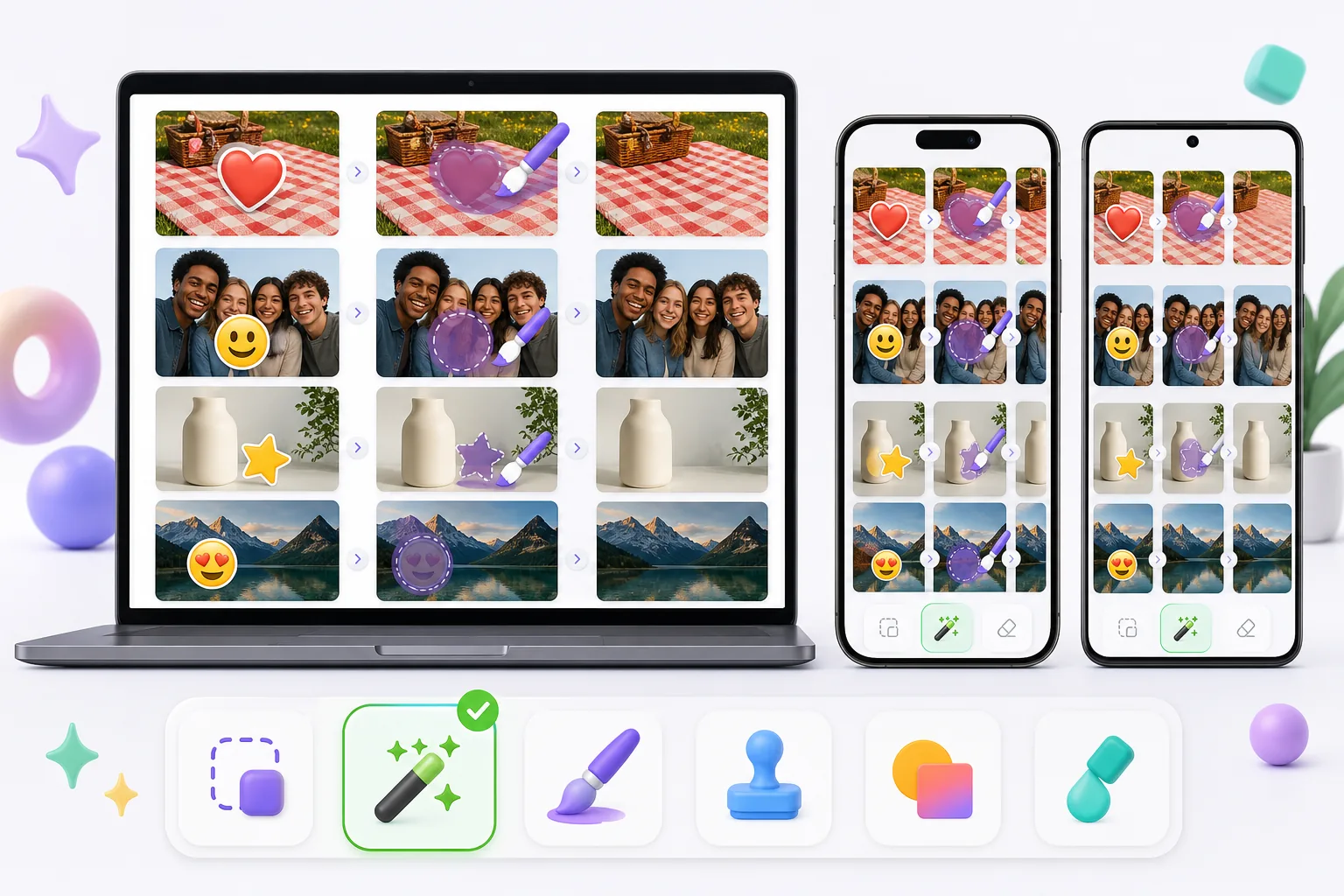
Ikhtisar
Magic Eraser adalah editor foto AI gratis berbasis web dengan penghapusan objek, penghapusan latar belakang, peningkatan foto, perluasan gambar, AI fill, AI filter, dan pemrosesan batch. Bekerja di perangkat apa pun yang memiliki browser — tanpa instalasi.
Other capable emoji removers exist, and the best one for you depends on the photo. Pixelcut, Picsart, and MyEdit pair object/emoji removal with broader editing suites; Cleanup.pictures is a simple web eraser; Snapseed's healing tool can patch small emoji on a phone. Quality, free limits, and watermark policies vary between them, so it's worth matching the tool to whether the emoji sits on plain background, skin, or a face.
Perbandingan fitur
Magic Eraser adalah editor foto AI gratis berbasis web dengan penghapusan objek, penghapusan latar belakang, peningkatan foto, perluasan gambar, AI fill, AI filter, dan pemrosesan batch. Bekerja di perangkat apa pun yang memiliki browser — tanpa instalasi.
Other capable emoji removers exist, and the best one for you depends on the photo. Pixelcut, Picsart, and MyEdit pair object/emoji removal with broader editing suites; Cleanup.pictures is a simple web eraser; Snapseed's healing tool can patch small emoji on a phone. Quality, free limits, and watermark policies vary between them, so it's worth matching the tool to whether the emoji sits on plain background, skin, or a face.
| Feature | Magic Eraser | Others |
|---|---|---|
| Free tier for emoji removal | Yes — free to start after sign-in | Often limited or trial-gated |
| No watermark on export | No watermark | Some add a watermark on the free plan |
| AI reconstruction behind the emoji | Generative inpainting rebuilds the area | Ranges from AI fill to simple clone/blur |
| Works on mobile and web | Web + iOS + Android, same engine | Many are mobile-only or web-only |
| Handles emoji over faces and busy backgrounds | Reconstructs backgrounds well; faces are AI-estimated | Varies; small/plain areas handled best |
| Remove several emoji at once (batch on one image) | Brush all, erase in one pass | Often one-at-a-time |
| Guidance for emoji-specific cases | 11 emoji how-tos (iPhone, screenshot, face, story) | General object-removal docs |
Feature rows summarize visible product positioning and should be rechecked against official product pages before purchase, migration, or compliance decisions.
- Last content review June 20, 2026
- Magic Eraser source: https://magiceraser.live/id/product/magic-eraser
- Pricing, feature availability, platform support, and limits can change; recheck official sources before relying on a buying decision.
Keunggulan Magic Eraser
Built for emoji, not just objects
Beyond a general eraser, Magic Eraser has a dedicated emoji-removal tool and 11 emoji-specific how-tos — covering iPhone photos, screenshots, Instagram stories, group shots, and emoji over faces. That focus means the workflow is tuned for the exact cases people hit: heart-eyes stickers, smiley censors, and promo stamps burned into saved images.
AI rebuilds what the emoji hid
An emoji flattens into the file, so the pixels behind it are gone. Instead of blurring or clone-stamping, Magic Eraser's generative AI reads the surrounding skin tone, pattern, and texture and synthesizes a plausible fill. On repetitive backgrounds — grass, fabric, walls, sky — the result is often seamless, which is where simpler erasers tend to smear.
Free, no watermark
Emoji removal runs on the free tier: upload, brush over the emoji, export the cleaned photo at no cost and with no watermark or account required. Some other tools gate exports behind a sign-up or stamp a watermark on free output, which defeats the point of cleaning up a photo to share.
Same tool on phone and desktop
Magic Eraser works in any mobile browser and as native iOS and Android apps, so you can erase emoji straight from your camera roll or screenshots — then switch to the desktop web version for larger images or finer brushing. The AI and results are identical across devices, with a 4.9 rating from 559,700 reviews.
Pertanyaan yang sering diajukan
Apakah Magic Eraser gratis?
+
Ya, Magic Eraser memungkinkan Anda mengedit foto secara gratis dan langsung. Tanpa pendaftaran atau instalasi. Anda bisa upgrade ke paket Pro untuk pemrosesan tanpa batas.
Bagaimana Magic Eraser dibandingkan dengan Penghapus emoji?
+
Magic Eraser menggabungkan 8 alat AI dalam satu platform — penghapusan objek, penghapusan latar belakang, peningkatan, perluasan, AI fill, AI filter, pembuatan gambar AI, dan desain. Dibandingkan Penghapus emoji, Magic Eraser menawarkan lebih banyak fitur tanpa perlu menginstal software.
Apakah Magic Eraser bisa digunakan di HP?
+
Ya, Magic Eraser tersedia di iOS, Android, dan web. Anda bisa beralih antar perangkat dengan mudah.
Apakah saya perlu membuat akun?
+
Tidak, Anda bisa langsung mulai mengedit tanpa membuat akun. Cukup buka browser dan mulai.
Siap mencoba Magic Eraser?
Edit foto pertama Anda gratis — tanpa perlu mendaftar.
Coba Magic Eraser gratisKasus penggunaan terkait
Lihat bagaimana profesional menggunakan alat ini dalam alur kerja nyata.
Foto listing yang penuh barang pribadi, mobil parkir, atau peralatan konstruksi dapat membuat pembeli menjauh. Magic Eraser menggunakan AI untuk membersihkan foto properti Anda secara instan — tanpa perlu keterampilan Photoshop.
Latar belakang buram dan foto produk berantakan membuat Anda kehilangan penjualan setiap hari. Magic Eraser membantu Anda membuat gambar produk yang bersih dan profesional dalam hitungan detik — tanpa perlu keahlian Photoshop. Cukup unggah, hapus gangguan, dan jual dengan percaya diri.
Orang asing merusak foto liburanmu? Latar belakang berantakan mengacaukan selfie-mu? Berhenti buang waktu berjam-jam di Photoshop. Magic Eraser menghapus gangguan, membersihkan jepretan yang berantakan, dan memperluas fotomu agar pas dengan format platform apa pun — semua dalam satu ketukan.
Panduan terkait
Jelajahi lebih banyak panduan terkait alur kerja ini.
Pelajari cara menggunakan Magic Eraser untuk menghapus objek, orang, teks, dan gangguan dari foto dengan hasil edit AI yang lebih bersih.
Pelajari cara menghapus orang dari foto dengan AI dalam hitungan detik. Panduan untuk foto perjalanan, properti, dan produk.
Panduan langkah demi langkah menghapus watermark dari foto Anda dengan AI. Kapan tepat dilakukan, teknik terbaik, dan cara Magic Eraser menanganinya.
Perbandingan lainnya
Lihat bagaimana Magic Eraser dibandingkan dengan alat editing foto lainnya.
Kami menguji dan membandingkan alat pengeditan foto AI teratas agar Anda tidak perlu melakukannya. Dari penghapusan objek hingga penggantian latar belakang, lihat editor mana yang memberikan hasil terbaik untuk alur kerja Anda.
Photoshop adalah standar industri untuk pengeditan gambar mendalam, tetapi banyak orang hanya butuh penghapusan objek cepat, latar belakang bersih, dan perbaikan bertenaga AI. Magic Eraser berfokus pada tugas-tugas itu dengan alur kerja yang lebih ringan, bekerja dalam hitungan detik di web dan seluler.
Adobe Photoshop memang canggih, tetapi sebagian besar orang hanya menggunakan sebagian kecil fiturnya. Magic Eraser menghadirkan alat pembersih foto yang benar-benar Anda butuhkan — penghapusan objek, penghapusan latar belakang, peningkatan dengan AI, dan generative fill — dalam antarmuka yang lebih sederhana yang berjalan di web dan perangkat seluler tanpa perlu langganan untuk memulai.
Tried to remove an object or background and hit a Pro paywall in Canva, Adobe Express/Photoshop, or Fotor? Magic Eraser does the same job — object removal, background removal, watermark cleanup, and enhancement — for free. No subscription, and no watermark stamped on your download.
Bandingkan Magic Eraser dengan magic-eraser.io. Lihat fitur, harga, dan kemudahan penggunaan secara berdampingan. Temukan mengapa Magic Eraser adalah pilihan terbaik untuk editing foto AI.
Bandingkan Magic Eraser dengan Pixelcut. Lihat fitur, harga, dan kemudahan penggunaan secara berdampingan. Temukan mengapa Magic Eraser adalah pilihan terbaik untuk editing foto AI.