
डेंटल स्माइल एन्हांसमेंट
पेशेवर पहले-और-बाद की डेंटल मार्केटिंग छवियां बनाएं जो आपके क्लिनिक के काम को प्रदर्शित करें। यह टेम्प्लेट प्राकृतिक दिखने वाला दांतों का सफेद करना लागू करता है, क्लिनिकल पृष्ठभूमि की अव्यवस्था को हटाता है, रोगी के पोर्ट्रेट पृष्ठभूमि को मानकीकृत करता है, और ऑपरेटरी फ़ोटो में आम तीखी ऊपरी रोशनी को संतुलित करता है।
यह टेम्प्लेट मुफ़्त में आज़माएंProfessional template preview
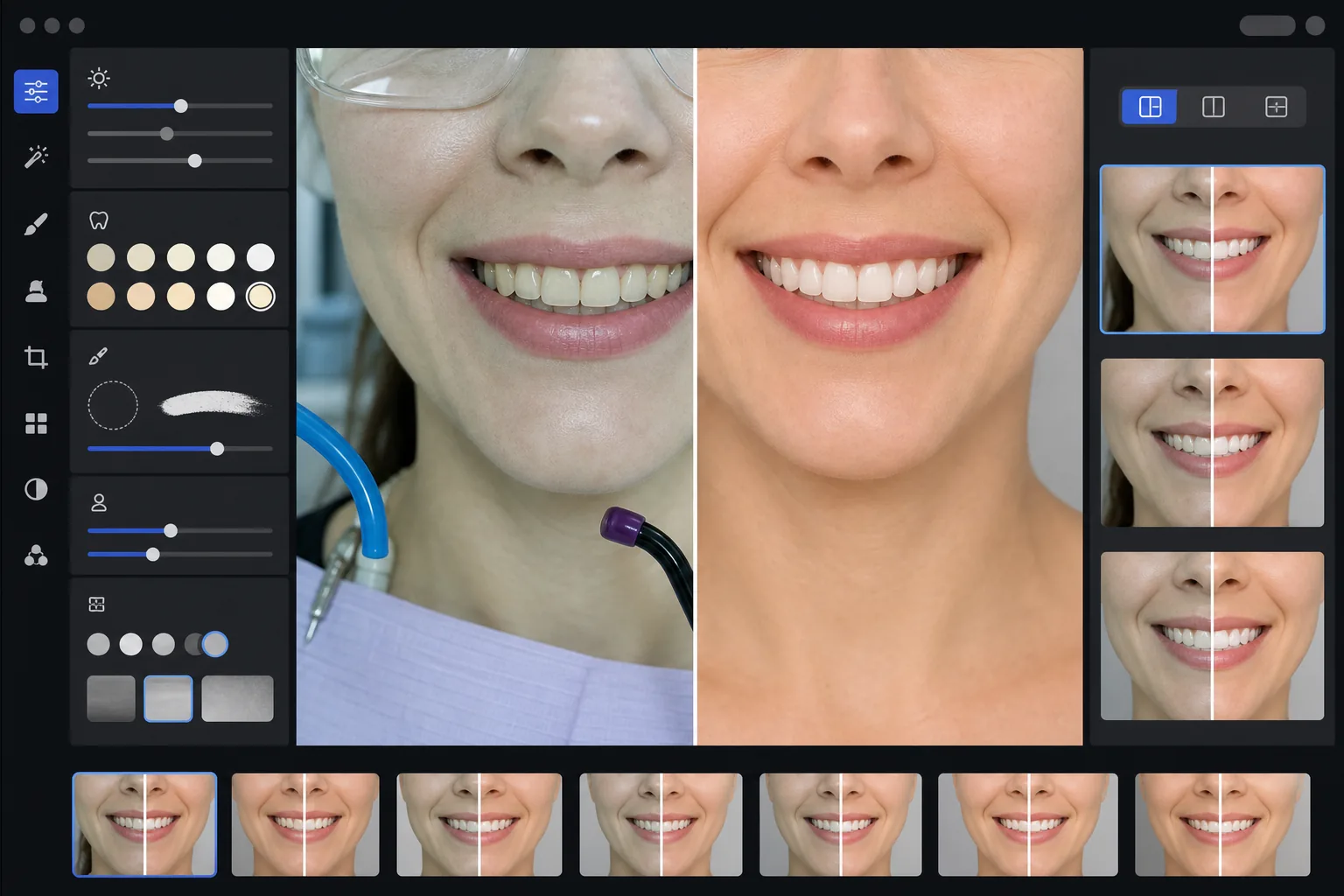
यह टेम्प्लेट क्या करता है
क्लिनिकल डेंटल फ़ोटो को क्लिनिक वेबसाइटों, सोशल मीडिया और रोगी शिक्षा सामग्री के लिए परिष्कृत मार्केटिंग छवियों में बदल देता है। AI Enhance डेंटल ऑपरेटरी रोशनी की भद्दी हरी-सफेद आभा को ठीक करता है और सूक्ष्म दांतों का सफेद करना लागू करता है जो प्राकृतिक दिखता है — दांतों को कृत्रिम दिखाए बिना 2-3 शेड उज्जवल करता है। Magic Eraser क्लिनिकल पृष्ठभूमि तत्वों जैसे सक्शन होज़, क्योरिंग लाइट्स, होंठों पर आर्टिक्युलेटिंग पेपर के निशान और सुरक्षा चश्मे को हटाता है। रोगी पोर्ट्रेट पृष्ठभूमि को आपकी पूरी केस गैलरी में एक स्वच्छ, सुसंगत पृष्ठभूमि में मानकीकृत किया जाता है।
टेम्प्लेट सेटिंग्स
| दांतों का सफेद करना | प्राकृतिक +2 से +3 शेड उठाव (पारभासकता और इनेमल बनावट को संरक्षित करता है) |
| रोशनी सुधार | डेंटल ऑपरेटरी दिन के उजाले का संतुलन (हरी-सफेद क्लिनिकल आभा को हटाता है) |
| पृष्ठभूमि | नरम विग्नेट के साथ सुसंगत तटस्थ ग्रे या सफेद पृष्ठभूमि |
| त्वचा का रंग | मुंह के आसपास गर्माहट सुधार (डेंटल रोशनी से होने वाले पीलेपन को कम करता है) |
| होंठों का रंग | प्राकृतिक संतृप्ति बहाली (फीकी पड़ी क्लिनिकल रोशनी का प्रतिकार करता है) |
इस टेम्प्लेट का उपयोग कैसे करें
क्लिनिकल फ़ोटो अपलोड करें
अपने ऑपरेटरी में ली गई मुस्कान के क्लोज़-अप, पोर्ट्रेट-शैली की पहले-और-बाद की फ़ोटो, या इंट्राओरल छवियां अपलोड करें। यह टेम्प्लेट डेंटल-विशिष्ट कैमरों, रिंग फ्लैश वाले DSLR, और ऑपरेटरी रोशनी में ली गई स्मार्टफ़ोन फ़ोटो के साथ काम करता है।
क्लिनिकल रोशनी ठीक करें
AI Enhance ऊपरी डेंटल यूनिट लाइट्स से हरी-सफेद रंग की आभा को तटस्थ करता है, मुंह के आसपास त्वचा के रंगों को गर्म करता है, और प्राकृतिक होंठ रंग को बहाल करता है। दांतों का रंग वास्तविक और ईमानदार रहते हुए परिणाम को सबसे अच्छे रूप में दिखाने के लिए सूक्ष्म रूप से उज्जवल किया जाता है।
पृष्ठभूमि और विकर्षण साफ़ करें
Magic Eraser दिखाई देने वाले होज़, क्योरिंग लाइट टिप्स, बिब क्लिप, होंठों पर आर्टिक्युलेटिंग पेपर के दाग, और पृष्ठभूमि में क्लिनिकल उपकरण हटाता है। पृष्ठभूमि को एक सुसंगत तटस्थ पृष्ठभूमि से बदल दिया जाता है जो आपके सभी पहले-और-बाद के जोड़ों में मेल खाती है।
मार्केटिंग उपयोग के लिए निर्यात करें
अलग-अलग उन्नत छवियां या साथ-साथ पहले-और-बाद की संयुक्त छवियां डाउनलोड करें। आउटपुट को वेबसाइट गैलरी, Instagram पोस्ट, Google Business Profile, और मुद्रित रोगी ब्रोशर के लिए 8x10 इंच प्रिंट के लिए उपयुक्त रिज़ॉल्यूशन के साथ आकार दिया गया है।
सर्वोत्तम परिणामों के लिए पेशेवर सुझाव
- ✓पहले-और-बाद के जोड़ों के लिए, उपचार-पूर्व और उपचार-बाद दोनों छवियों को एक ही कोण, दूरी और रोशनी स्थिति से फ़ोटोग्राफ़ करें। टेम्प्लेट दोनों के बीच एक्सपोज़र अंतर को ठीक कर सकता है, लेकिन मूल कैमरा कोण का मिलान सबसे विश्वसनीय तुलना उत्पन्न करता है।
- ✓दांतों का सफेद करना जानबूझकर रूढ़िवादी है — यह दांतों को कागज़-सफेद बनाने के बजाय 2-3 vita शेड उज्जवल करता है। यह संभावित रोगियों के लिए अधिक प्राकृतिक और विश्वसनीय दिखता है। यदि आपका वास्तविक क्लिनिकल परिणाम नाटकीय है, तो हल्के संवर्धन वाली ईमानदार फ़ोटो अति-संसाधित छवि की तुलना में अधिक प्रेरक होती है।
- ✓डेंटल काम का सबसे पूर्ण दृश्य पाने के लिए इंट्राओरल मुस्कान शॉट्स के लिए चीक रिट्रैक्टर का उपयोग करें। टेम्प्लेट त्वचा के रंगों को गर्म करके और मुस्कान क्षेत्र पर ध्यान केंद्रित करने के लिए क्रॉप करके रिट्रैक्टर-सहायता प्राप्त फ़ोटो के थोड़े क्लिनिकल रूप को संभालता है।
- ✓सभी पहले-और-बाद के जोड़ों में सुसंगत पृष्ठभूमि रंग, चमक और गर्माहट सुनिश्चित करने के लिए अपनी पूरी केस गैलरी को एक बैच में संसाधित करें। आपकी वेबसाइट पर केसों के बीच बेमेल रोशनी पेशेवर प्रभाव को कमज़ोर करती है।
सामान्य प्रश्न
क्या इसे भ्रामक डेंटल विज्ञापन माना जाता है?
+
सफेदी संवर्धन 2-3 vita शेड तक सीमित है और इनेमल की प्राकृतिक पारभासकता और सतह बनावट को संरक्षित करता है। यह उस सीमा के भीतर है जिसे पेशेवर फ़ोटोग्राफ़ी रोशनी और व्हाइट बैलेंस स्वाभाविक रूप से प्रभावित करते हैं। टेम्प्लेट दांत के आकार, संरेखण या मसूड़े की रूपरेखा को नहीं बदलता — यह केवल क्लिनिकल रोशनी के भद्दे रंग प्रभावों को ठीक करता है जो परिणामों को फ़ोटो में व्यक्तिगत रूप से देखने की तुलना में बदतर दिखाते हैं।
क्या यह साथ-साथ पहले-और-बाद की संयुक्त छवियां बना सकता है?
+
हां। टेम्प्लेट अलग-अलग उन्नत छवियां आउटपुट कर सकता है या केंद्र विभाजक, सुसंगत पृष्ठभूमि, और पहले/बाद के लेबल के साथ साथ-साथ संयुक्त छवि उत्पन्न कर सकता है। जोड़ी में दोनों छवियां समान पृष्ठभूमि उपचार प्राप्त करती हैं ताकि तुलना दृष्टिगत रूप से स्वच्छ और पेशेवर हो।
क्या यह इंट्राओरल कैमरा फ़ोटो के साथ काम करता है?
+
हां। इंट्राओरल कैमरा छवियों में आमतौर पर बहुत तीखी, सीधी रोशनी होती है जो सतह की बनावट को धुंधला कर देती है। टेम्प्लेट इनेमल विवरण को बहाल करता है, अत्यधिक सफेद आभा को ठीक करता है, और दांत की शारीरिक रचना को स्वाभाविक रूप से दिखाने के लिए कंट्रास्ट को समायोजित करता है। परिणाम कच्चे इंट्राओरल कैप्चर की तुलना में अधिक विस्तृत और अधिक प्राकृतिक दिखता है।
पेशेवर मार्केटिंग फ़ोटो के साथ अपने डेंटल काम को प्रदर्शित करें
क्लिनिकल फ़ोटो अपलोड करें और प्राकृतिक रूप से उन्नत, सुसंगत शैली वाली पहले-और-बाद की छवियां प्राप्त करें जो आपकी वेबसाइट, सोशल मीडिया और रोगी ब्रोशर के लिए तैयार हों।
मुफ़्त में आज़माएंRelated templates
More professional templates for your workflow.
प्रोफेशनल लिंक्डइन हेडशॉट टेम्पलेट. साफ़ पृष्ठभूमि, प्राकृतिक त्वचा निखार, और पॉलिश किया हुआ लुक जिससे 14 गुना अधिक प्रोफ़ाइल दृश्य मिलते हैं।
घर पर अनुरूप पासपोर्ट और वीज़ा फ़ोटो बनाएं। सफेद पृष्ठभूमि, सही सिर आकार अनुपात, 2×2 इंच अमेरिकी मानक, और 600 डीपीआई आउटपुट जो विदेश विभाग की आवश्यकताओं को पूरा करता है।
अभिनेताओं और मॉडलों के लिए व्यावसायिक हेडशॉट टेम्पलेट। 8×10 प्रिंट-रेडी आउटपुट, प्राकृतिक रीटचिंग और एजेंसी सबमिशन के लिए साफ पृष्ठभूमि के साथ कास्टिंग डायरेक्टर मानकों को पूरा करें।