
Magic Eraser + Photoshop: limpieza rápida, edición profunda
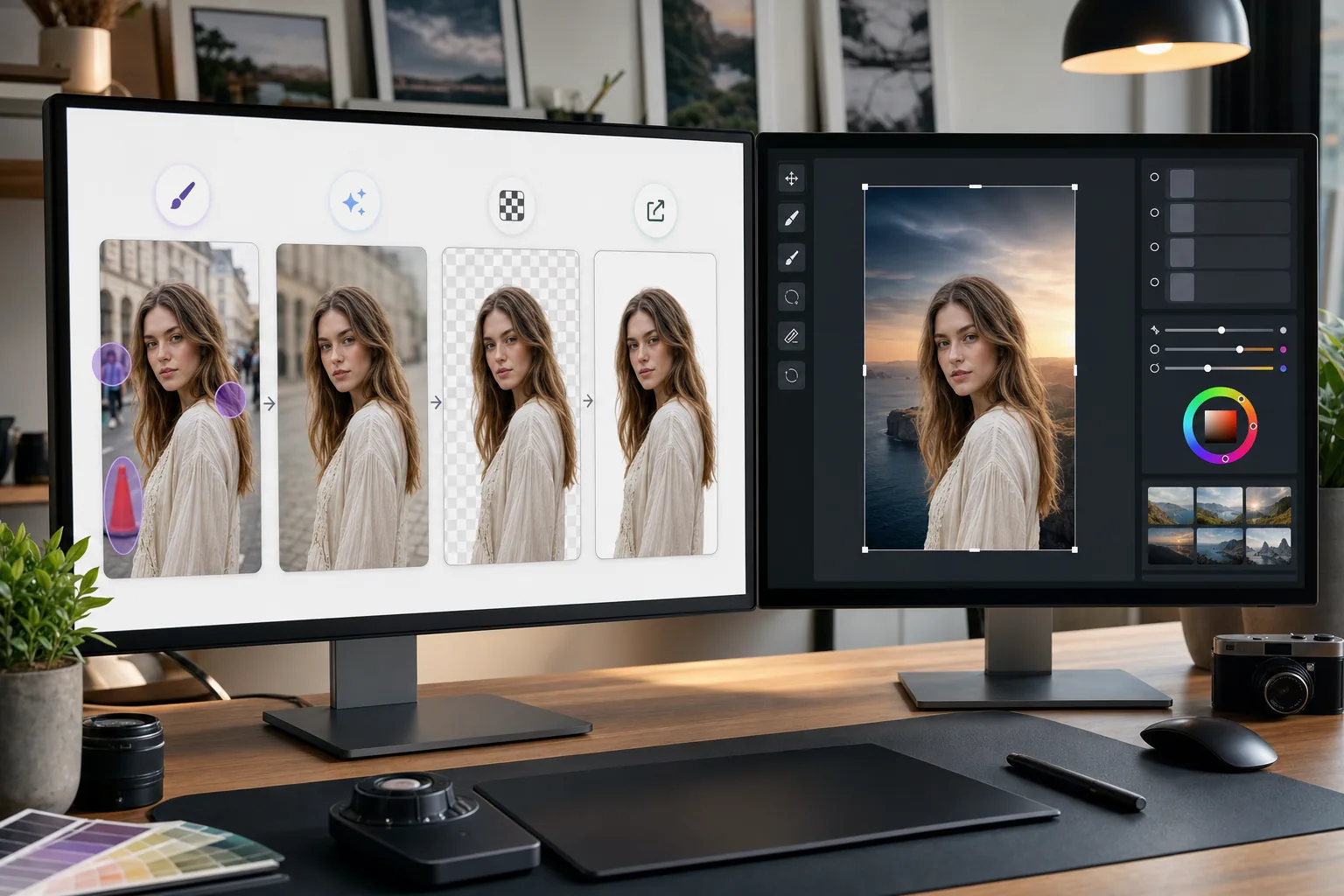
Photoshop es el estándar de la industria para la edición detallada de imágenes. Magic Eraser se encarga de las tareas de limpieza rápida (eliminar fondos, borrar objetos y rellenar huecos con IA) para que puedas pasar directamente al trabajo fino en Photoshop.
Acerca de Adobe Photoshop
Adobe Photoshop es el software de edición de imágenes profesional utilizado por fotógrafos, diseñadores y artistas digitales de todo el mundo. Proporciona herramientas avanzadas para composición, retoque, Color correction y edición a nivel de píxeles.
Beneficios
Limpieza más rápida antes de la edición detallada
Elimine objetos no deseados y distracciones en segundos con Magic Eraser en lugar de perder tiempo con el sello de clonación o el pincel corrector de Photoshop en tareas simples.
Eliminación de fondo con un solo clic
Aísle sujetos instantáneamente con la eliminación de fondo impulsada por IA de Magic Eraser. Importe el PNG transparente a Photoshop para realizar composiciones y enmascaramientos avanzados.
Relleno impulsado por IA para áreas faltantes
Utilice el relleno de IA de Magic Eraser para reconstruir áreas de forma inteligente después de eliminar objetos. Los resultados proporcionan un punto de partida claro para perfeccionar Photoshop.
Alternativa accesible para tareas sencillas
No todas las imágenes necesitan todo el poder de Photoshop. Utilice Magic Eraser en el navegador para realizar soluciones rápidas y reserve Photoshop para trabajos que requieran su conjunto de herramientas avanzado.
Cómo utilizar Magic Eraser con Photoshop
Subir a Magic Eraser
Abra Magic Eraser en su navegador y cargue la imagen que necesita una limpieza inicial antes de editarla en Photoshop.
Realizar una limpieza rápida
Elimine fondos, borre objetos no deseados o utilice el relleno AI para realizar ediciones sencillas que llevarían más tiempo en Photoshop.
Exportar con máxima calidad
Descargue la imagen limpia como PNG para preservar la transparencia o como JPEG de alta calidad para imágenes no transparentes.
Abrir en Photoshop para trabajos detallados.
Importe la imagen procesada a Photoshop y continúe con la edición avanzada, el retoque, la composición o la gradación de color.
Herramientas
Preguntas frecuentes
¿Magic Eraser se integra directamente con Photoshop?
+
No. Esta página describe un flujo manual de exportación e importación, no un plugin de Photoshop ni una integración directa. Edita la imagen en Magic Eraser, descárgala como PNG o JPEG y abre después el archivo en Photoshop.
¿Por qué usar Magic Eraser si ya tengo Photoshop?
+
Magic Eraser maneja tareas de limpieza simples en segundos sin iniciar Photoshop. Es más rápido para la eliminación de fondos, el borrado de objetos y la limpieza básica, lo que le permite utilizar Photoshop para el trabajo que realmente lo requiere.
¿Magic Eraser reemplaza a Photoshop?
+
No. Magic Eraser complementa Photoshop al manejar tareas rápidas impulsadas por IA. Photoshop sigue siendo esencial para retoques detallados, composiciones, trabajos de color y edición a nivel de píxeles.
¿Qué formatos de archivo funcionan entre las dos herramientas?
+
Exporte desde Magic Eraser como PNG (con transparencia) o JPEG de alta calidad. Ambos formatos se importan directamente a Photoshop conservando la calidad total.
¿La eliminación del fondo de Magic Eraser es tan precisa como la de Photoshop?
+
Para la mayoría de los sujetos, la eliminación del fondo de IA de Magic Eraser produce resultados limpios con un solo clic. Para imágenes con detalles extremadamente finos, como cabello ralo, es posible que desees refinar aún más los bordes en Photoshop.
¿Puedo usar Magic Eraser en un archivo PSD?
+
Magic Eraser funciona con formatos de imagen estándar como JPEG, PNG y WebP. Exporte una imagen aplanada desde Photoshop, procesela en Magic Eraser y luego tráigala nuevamente a su proyecto PSD.
Acelere su flujo de trabajo de Photoshop
Pruebe Magic Eraser gratis para eliminar rápidamente el fondo, borrar objetos y rellenar con IA antes de sumergirse en la edición detallada de Photoshop.
Prueba Magic Eraser gratisCasos de uso relacionados
Descubre cómo los profesionales utilizan estas herramientas en flujos de trabajo reales.
Las fotos de anuncios llenas de objetos personales, coches aparcados o material de obra espantan a los compradores. Magic Eraser usa IA para limpiar tus fotos de propiedades al instante — sin necesidad de Photoshop.
Los fondos desordenados y las fotos de producto descuidadas te cuestan ventas todos los días. Magic Eraser te ayuda a crear imágenes de producto profesionales en segundos — sin necesidad de saber Photoshop. Sube la foto, borra las distracciones y publica con confianza.
¿Desconocidos arruinando tus fotos de viaje? ¿Fondos desordenados matando tus selfies? Deja de perder horas en Photoshop. Magic Eraser elimina distracciones, limpia tus fotos y las adapta a cualquier formato — todo en un toque.
Comparaciones relacionadas
Mira cómo Magic Eraser se compara con herramientas similares.
TouchRetouch es una popular app móvil de pago para eliminar objetos e imperfecciones. Magic Eraser ofrece edición IA gratuita en cualquier dispositivo sin instalación. Compara funciones, precios y facilidad de uso.
Cleanup.pictures es una herramienta web gratuita para eliminar objetos rápidamente. Magic Eraser ofrece 8 herramientas de edición IA, apps móviles y procesamiento avanzado. Mira la comparación.
remove.bg es el líder del mercado en eliminación de fondos, con una potente API e integraciones con Photoshop y Figma. Magic Eraser ofrece ocho herramientas IA — desde eliminación de objetos y relleno generativo hasta mejora IA y diseño — todo en un editor.
Dos potentes editores de fotos con IA y fortalezas diferentes. Magic Eraser ofrece un conjunto más amplio de herramientas de IA generativa, mientras que Photoroom destaca en fotografía de productos para e-commerce y procesamiento por lotes.
Artículos relacionados
Consejos, guías y tutoriales sobre este tema.
Aprende a usar Magic Eraser para quitar objetos, personas, texto y distracciones de fotos con resultados de IA más limpios.
Aprende a eliminar personas de fotos con IA en segundos. Guía para fotos de viaje, inmobiliaria y productos.
Guía paso a paso para eliminar marcas de agua de tus propias fotos con IA. Cuándo es apropiado, técnicas y consejos.
Otras integraciones
Explora más plataformas que funcionan con Magic Eraser.