
Food Delivery Menu Photo
Make your delivery menu items look as appetizing as they taste. This template enhances food colors for maximum appetite appeal, removes cluttered kitchen backgrounds, boosts the visual warmth and freshness of dishes, and outputs images optimized for DoorDash, Uber Eats, Grubhub, and other delivery platforms.
Try this template freeFood template preview
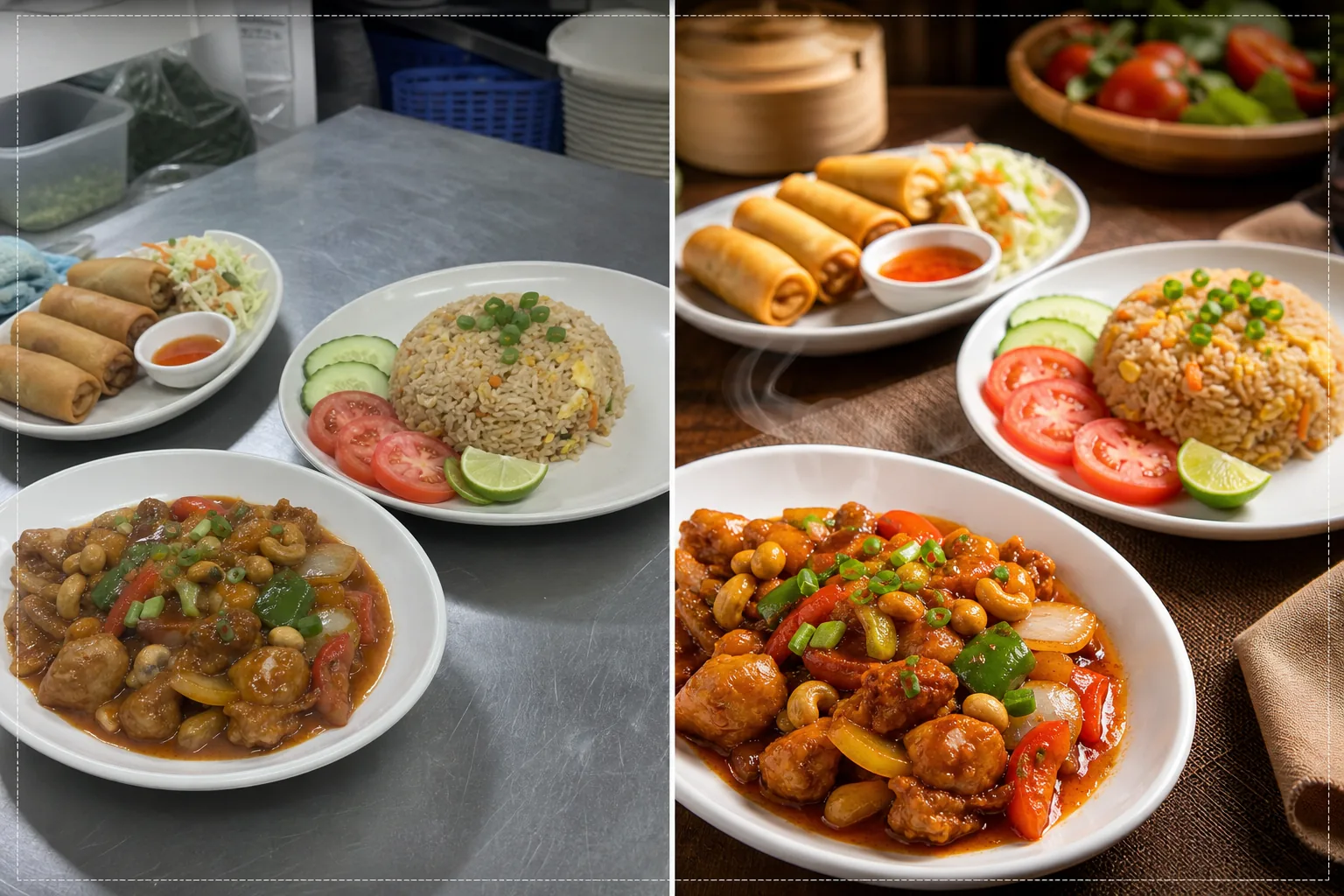
What this template does
Converts quick kitchen photos into menu-grade images that drive orders on food delivery platforms. Restaurants often photograph menu items in busy kitchens with fluorescent lighting that makes food look unappetizing — green-tinted chicken, dull brown rice, and washed-out sauces. This template corrects color temperature to warm, appetizing tones and boosts the saturation of naturally vibrant ingredients like tomatoes, greens, and peppers. Background Eraser removes cluttered kitchen backgrounds and replaces them with clean, food-appropriate surfaces. AI Enhance sharpens food textures so buyers can see the crispiness of fried items, the steam rising from hot dishes, and the freshness of garnishes.
Template settings
| Color warmth | Warm appetite tones (+15% warm shift, corrects fluorescent green) |
| Food saturation | Selective boost on reds, greens, and yellows (natural food colors) |
| Texture enhancement | Crispness, moisture, and gloss detail sharpening |
| Background | Clean table surface, solid color, or dark moody backdrop |
| Output dimensions | 1200 × 800 px (delivery platform optimal) and 1080 × 1080 px (social) |
How to use this template
Upload your dish photo
Photograph the plated dish from directly above (flat lay) or at a 45-degree angle — both compositions work well for delivery menus. Use the best available natural light or position the dish near a window. Upload directly from your phone — no studio setup needed.
Color and warmth correction
The template corrects the color cast from kitchen fluorescent and LED lighting, shifting food tones to warm, appetizing hues. Sauces look richer, proteins look golden-brown, and vegetables look fresh. The correction enhances what is naturally there rather than making food look artificially colored.
Background and texture enhancement
Background Eraser swaps the kitchen background for a clean surface — wood table, marble, slate, or simple solid color. AI Enhance sharpens food textures to emphasize crispiness on fried items, glossiness on sauces, and freshness on produce. The overall image gains a professional food photography quality.
Export for delivery platforms
Download at 1200 × 800 px for delivery platform menu listings (DoorDash, Uber Eats, Grubhub) or at 1080 × 1080 px for Instagram food posts. The warm color profile ensures the dish looks appetizing across all devices and screen types.
Pro tips for best results
- ✓Photograph dishes immediately after plating while steam, moisture, and garnish freshness are at their peak. Food photography has a window of about three to five minutes before sauces settle, garnishes wilt, and steam dissipates. The template enhances these freshness cues but cannot create them.
- ✓Use a white or light-colored plate for menu photos. White plates create the strongest contrast with food, making colors pop and allowing the AI to produce cleaner edges during background removal. Dark plates work too but reduce the color contrast advantage.
- ✓For combo meals and multi-item orders, arrange all items in a single frame at a slight distance. The template sharpens each food element individually, and showing the full order gives delivery customers a clear expectation of what they will receive.
Common questions
Can this fix photos taken under kitchen fluorescent lights?
+
Yes. Fluorescent lighting is the most common issue in restaurant food photography, creating a green-yellow cast that makes food look unappetizing. The template specifically corrects this color shift and replaces it with warm, appetizing tones that make food look naturally delicious.
Does this work for all cuisine types?
+
The template handles all food types — American, Asian, Mexican, Italian, Indian, Middle Eastern, and more. The color correction and enhancement are calibrated for the natural colors of food across all cuisine traditions, enhancing reds in tomato-based dishes, greens in salads, and golden tones in fried and baked items.
Can I process my entire menu at once?
+
Yes. Upload all menu item photos and process them in a batch. The template applies consistent color treatment, background, and dimensions across your entire menu for a uniform, professional menu gallery on delivery platforms.
Menu photos that make customers tap order now
Upload dish photos from your kitchen and get appetizing, platform-ready images that drive more delivery orders.
Try it freeRelated templates
More food templates for your workflow.
Enhance recipe photos for cookbooks and food blogs with print-quality sharpening, ingredient color accuracy, styled scene cleanup, and high-resolution output.
Create menu board graphics with food photo background removal, consistent styling, and layout-ready exports for digital displays, printed menus, and third-party delivery platforms.