
Cookbook Recipe Photo
Elevate home-cooked recipe photos to cookbook-quality standards. This template enhances ingredient colors for print accuracy, sharpens food textures for high-resolution reproduction, removes unwanted elements from styled scenes, and outputs at print-grade resolution for cookbooks, food blogs, and recipe cards.
Try this template freeFood template preview
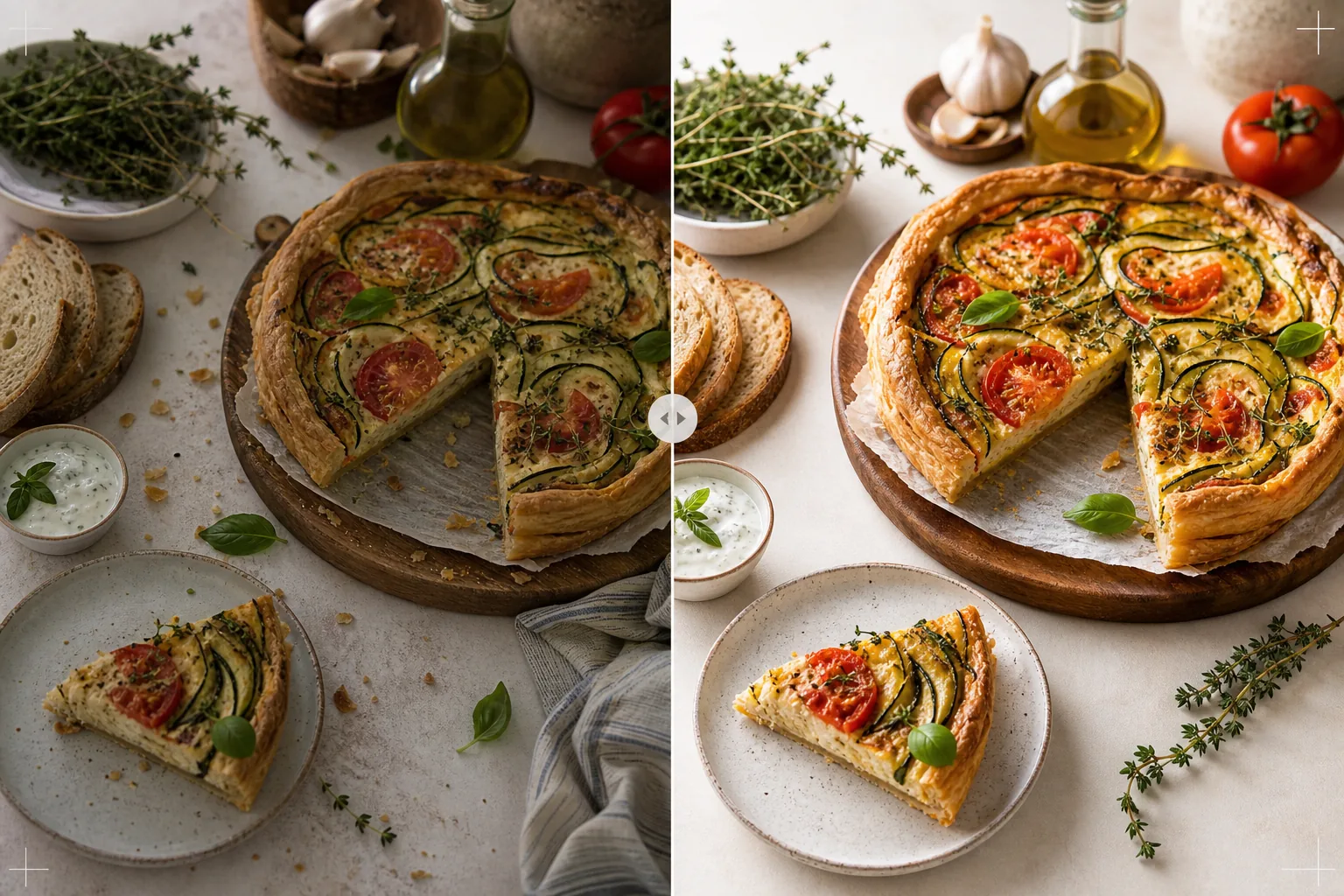
What this template does
Transforms home kitchen recipe photos into images worthy of published cookbooks and professional food blogs. Cookbook photography demands higher standards than social media — colors must be print-accurate (not just screen-attractive), textures must be sharp enough for 300 DPI printing at large sizes, and styled scenes must look intentional without visible clutter. AI Enhance applies print-calibrated color correction that ensures ingredient colors reproduce accurately on paper, not just on screens. Magic Eraser removes background clutter, stray utensils, dirty dishes visible in the scene, and imperfections in the food styling that become more obvious at print resolution. The result looks like it was shot by a cookbook photographer with years of food styling experience.
Template settings
| Color profile | Adobe RGB for print or sRGB for digital (selectable) |
| Food texture | High-frequency detail sharpening for crispness, crumb, and glaze |
| Scene cleanup | Remove stray utensils, crumbs, and background clutter |
| Color accuracy | Print-calibrated (accurate greens, reds, and browns on paper) |
| Output resolution | 6000px long edge (300 DPI for full-page cookbook spread) |
How to use this template
Upload your recipe photo
Upload the styled recipe shot — overhead flat lay, 45-degree angle, or close-up detail of the finished dish. Include props like ingredients, utensils, and textiles that are part of the intended composition. The template removes unwanted elements while preserving intentional styling.
Color and texture enhancement
AI Enhance corrects color temperature for print accuracy and sharpens food textures — the crackle of a bread crust, the gloss of a chocolate ganache, the distinct layers in a cross-section. Color calibration ensures that the greens, reds, and golden browns that look accurate on screen will also reproduce accurately when printed on paper.
Scene refinement
Magic Eraser removes elements that do not serve the composition — stray crumbs outside the intended area, a dish towel corner poking in from the edge, background clutter visible at the frame's periphery, or smudges on props and surfaces. The styled scene is refined to look intentional and polished.
Export for print or digital
Download at 6000px long edge in Adobe RGB for cookbook printing at 300 DPI up to a full-page spread, or in sRGB for food blog and recipe website use. The high resolution preserves enough detail for readers to see individual herb leaves, seed textures, and sauce consistency at print magnification.
Pro tips for best results
- ✓Shoot in natural window light from one direction, with a white reflector on the shadow side. This creates the soft directional lighting that characterizes professional food photography. The template can correct artificial lighting, but natural light produces the most authentic food colors from the start.
- ✓Plate the hero dish first and photograph within five minutes while textures and colors are at their peak. Then photograph step-by-step process shots. The template enhances freshness cues like steam and moisture but cannot restore food that has been sitting for an extended period.
- ✓Use odd numbers of props (three ingredients, one utensil, one textile) for the most visually balanced composition. The template cleans up the scene but works within your existing composition — a well-composed starting point produces a more professional final image.
- ✓For cross-section shots (cut cakes, sliced breads, split pastries), use a very sharp knife and cut just before photographing. The template sharpens layer definition and crumb texture but cannot fix a ragged cut that obscures the internal structure.
Common questions
Can this replace a professional food photographer?
+
The template brings home-shot recipe photos to a level that is suitable for self-published cookbooks, food blogs, and recipe cards. For major publisher cookbooks with strict visual standards, a professional photographer and stylist produce superior results, but the template is an excellent option for independent authors and content creators.
What about step-by-step process photos?
+
Process photos (mixing, chopping, pouring) benefit from the same color correction and cleanup. The template handles motion-blur typical of action shots by selectively sharpening the food while maintaining the natural blur of moving hands and utensils.
How does the print color calibration work?
+
The Adobe RGB output contains a wider color gamut than sRGB, preserving subtle color differences in greens and reds that are lost in sRGB conversion. When printed on a calibrated press, these colors reproduce more accurately. For home printing, the sRGB output produces better results on most consumer printers.
Recipe photos worthy of a published cookbook
Upload your food photography and get print-quality, color-accurate images with sharp textures and refined compositions.
Try it freeRelated templates
More food templates for your workflow.
Create appetizing food delivery menu photos with color vibrancy enhancement, clean backgrounds, steam and freshness effects, and platform-optimized dimensions.
Create menu board graphics with food photo background removal, consistent styling, and layout-ready exports for digital displays, printed menus, and third-party delivery platforms.