
Remove text from photos and screenshots
Wipe out meme captions, store signs, on-image labels, and subtitles burned into a frame. Magic Eraser deletes the lettering and reconstructs whatever was behind it with AI, so a clean photo is left where the words used to be — fewer manual clone-stamp touch-ups.
Last updated
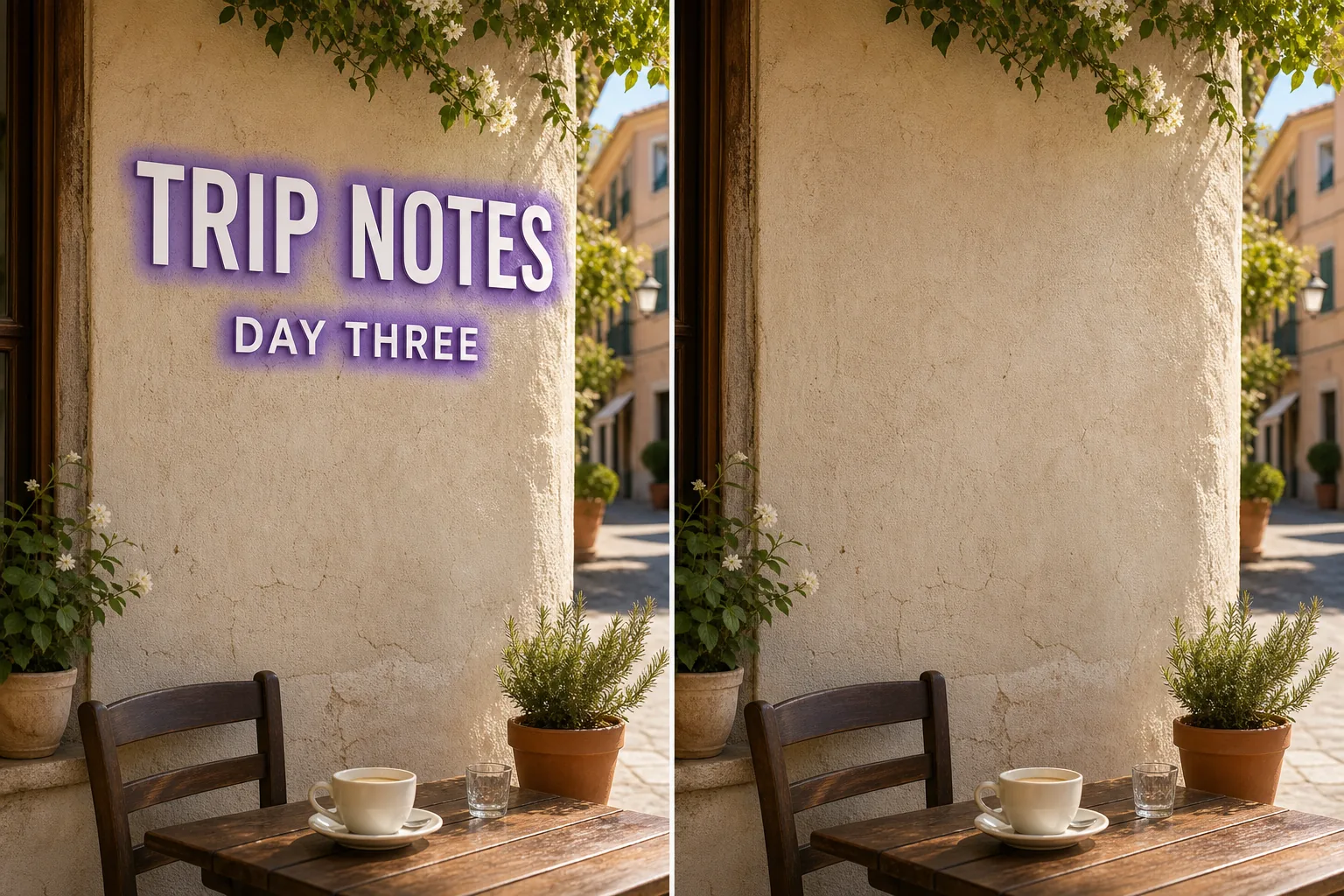
Why overlaid text is hard to remove by hand
Text on a photo is rarely just a flat sticker — it sits on top of skies, faces, brick walls, menus, and signage, and each letter hides a slightly different patch of background. Removing it cleanly means rebuilding what every stroke and serif was covering, then matching the colour, lighting, and texture of the surrounding area. Done by hand with a clone stamp, that is slow and usually leaves smears or repeated patterns. Magic Eraser handles it in one pass: you mark the words — a meme caption across the top, a watermark-style line of credit text, a street sign, a product label, or subtitles baked into a screenshot — and the AI paints them out and fills the gap with a plausible continuation of the background. The result depends heavily on what the text was sitting on, which is the honest part most tools skip over.
Remove text in three steps
- 1
Upload the image or screenshot
Open Magic Eraser on the web, iOS, or Android and upload the photo or screenshot as a JPEG, PNG, or WebP. Use the same flow for meme captions, signs, labels, date-stamp text, and burned-in subtitles.
- 2
Brush over the words
Paint across the lettering you want gone. Cover each full glyph plus any drop shadow, outline, glow, sticker edge, or logo-like mark attached to the text — leftover edges are what make a removal look unfinished. Zoom in for small subtitles so you catch every stroke.
- 3
Erase and check the fill
Tap Erase and the AI removes the text and reconstructs the background underneath. Review the patch where the words were at 100%, re-brush any faint ghosting, and export the clean image when the fill blends with the surrounding area.
Best for
- Clearing meme captions and top/bottom text from images
- Removing burned-in subtitles or hardcoded captions from screenshots
- Erasing store signs, street signs, and name plates in the background
- Deleting on-image price tags, labels, and product callouts
- Cleaning up credit lines and text-style watermarks before reusing a photo
- Wiping handwriting, dates, or notes written across a scan
- Removing app UI text and overlays from a captured screen you are allowed to edit
- Taking out a stray word or sticker text without redoing the whole frame
What reconstructs well, and what is estimated
Text removal is only as good as the background under the letters, and Magic Eraser is candid about that. Words sitting on a plain, even surface — a clear sky, a solid wall, a blurred backdrop, flat-colour packaging — reconstruct almost invisibly, because the AI only has to extend a simple, predictable texture. Words sitting on detailed or unique content are different: text laid over a person's face, dense text, fine print over a patterned fabric, or a sign whose underlying shopfront is fully hidden cannot be recovered, because that information genuinely is not in the image. There the AI estimates a plausible fill rather than restoring the true pixels, so treat the patch as a believable reconstruction, not a reveal of what was actually behind the words. For best results, upload the largest available file, brush tightly around each character, include outlines and shadows, review at 100%, and run a second pass on any ghosting. Note this is distinct from a semi-transparent watermark or a graphic logo — here you are removing readable, opaque lettering, which the AI can isolate cleanly but must rebuild from scratch underneath.
Frequently asked questions
- Can it remove text written over someone's face?
- It can erase the lettering, but the face underneath is AI-estimated, not recovered — the original pixels are hidden by the text and not stored anywhere in the file. On simple backgrounds the fill is near-invisible; over a face or fine detail it is a plausible reconstruction, so check it closely before relying on it.
- Will it get rid of burned-in subtitles?
- Yes. Upload the frame or screenshot, brush over the subtitle line including any outline or shadow around the characters, and the AI paints it out and rebuilds the frame behind it. Subtitles over a calm background clear cleanly; over busy motion or faces the fill is estimated.
- Is this the same as removing a watermark or logo?
- Related but not identical. A watermark is usually semi-transparent and a logo is a graphic mark; this is opaque, readable text. Magic Eraser isolates solid lettering well, but because the words fully cover what is behind them, the background under the text is always reconstructed rather than uncovered.
- Is text removal free?
- Yes. Magic Eraser includes limited free text-removal edits after sign-in on web, iOS, and Android. Upload the image, brush the words, and review the export options shown in the app.