
Remove sunburn from photos
Fix red, sunburned skin in vacation photos, beach portraits, and outdoor event shots. Magic Eraser removes the sunburn redness and restores natural skin tone — saving group shots, travel memories, and outdoor portraits from the lobster look.
Last updated
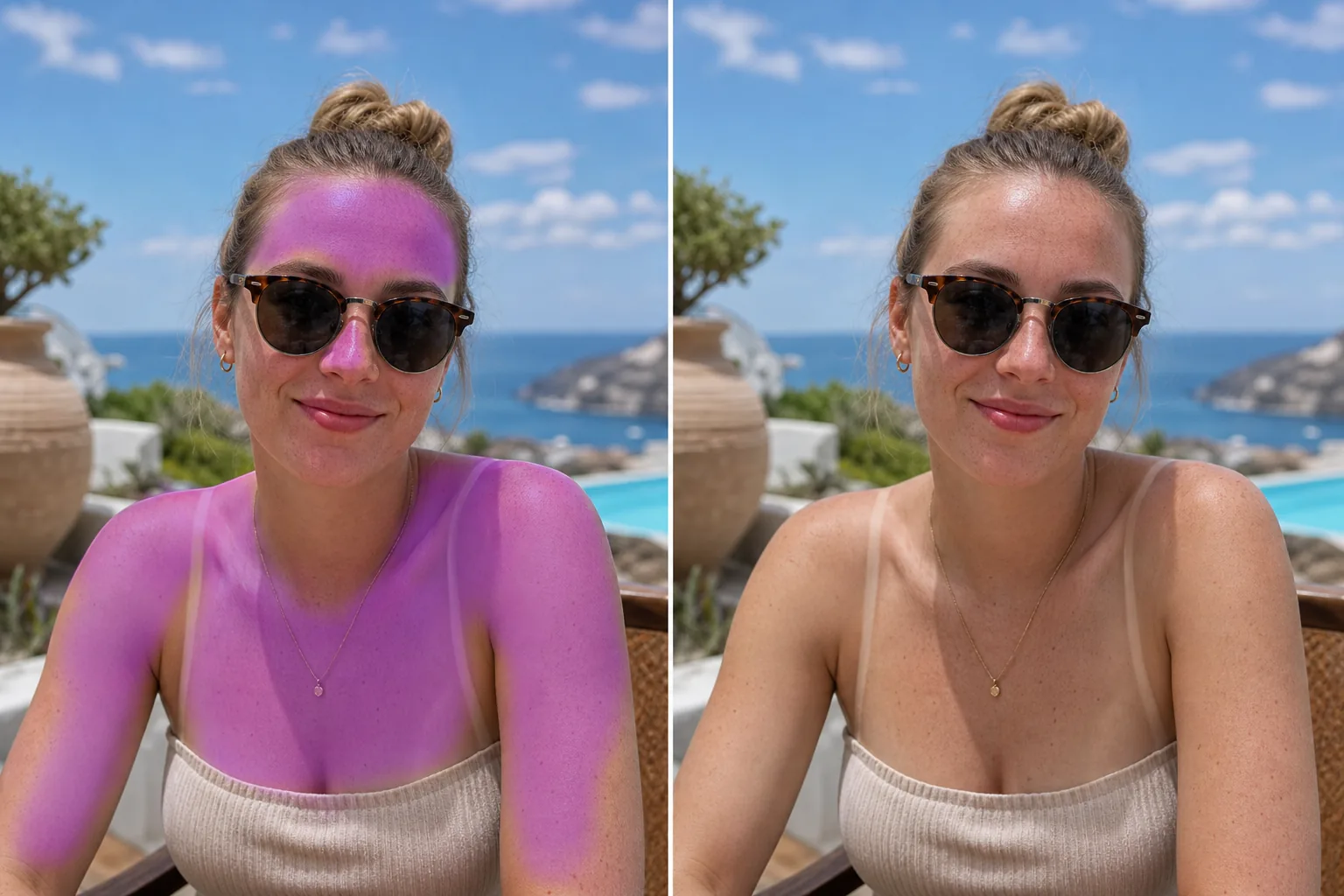
How to edit sunburn out of a photo
To edit sunburn out of a photo, open Magic Eraser on the web, iOS, or Android, upload the shot, and brush over the red or pink skin — the burned shoulders, nose, forehead, or chest. Tap Erase and the AI corrects those areas to the person's natural complexion, reading the tone from their non-burned skin elsewhere in the frame. It includes limited free edits after sign-in, and only the brushed skin changes — the sky, clothing, and everyone else stay untouched. For one sunburned person in a group shot, brush just them and leave the rest of the photo as-is. You spent the day at the beach, hiked to a scenic overlook, or attended an outdoor wedding — and the photos from the evening show bright red shoulders, a burned nose, or raccoon-eye tan lines from sunglasses. Sunburn turns otherwise great photos into memories you hesitate to print or share. The redness is especially obvious in group photos where one sunburned person stands out against everyone else's normal skin tone. Traditional color correction can shift the red tones, but it often affects the entire image — changing sky colors, clothing, and other people's skin along with the burn. Magic Eraser lets you target specifically the sunburned areas: brush over the redness, and the AI corrects the skin tone to match the person's natural complexion based on non-burned skin visible elsewhere in the photo.
Remove sunburn in three steps
- 1
Upload your photo
Open Magic Eraser on the web, iOS, or Android and upload the beach, vacation, or outdoor photo with visible sunburn.
- 2
Brush over the burned areas
Paint over the red or pink sunburned skin — shoulders, nose, forehead, chest, or wherever the burn is visible. Be precise around edges where burned skin meets normal skin to get the cleanest blend.
- 3
Erase and check
Tap Erase and the AI replaces the redness with natural skin tone matched to the person's unburned skin. Check that the corrected areas blend smoothly with surrounding skin — there should be no visible boundary between corrected and natural areas. Export the rescued photo.
Best for
- Beach and pool vacation photos with visible sunburn
- Outdoor wedding portraits where someone got too much sun
- Travel photos from sunny destinations
- Group event photos where one person has an obvious burn
- Summer sports and activity photos with red skin
- Family reunion outdoor photos in direct sun
- Resort and honeymoon photo albums
- Social media posts from sunny trips
Tips for natural sunburn correction
Sunburn correction works best when some non-burned skin is visible on the same person — the AI uses this as the reference for natural tone. If the entire visible body is burned, the AI estimates natural tone from facial features and overall complexion. Uneven burns (strap lines, watch marks, sunglasses raccoon eyes) correct well because the AI has both burned and unburned reference side by side. For peeling skin where the sunburn is in the flaking stage, the AI corrects both the redness and smooths the texture to produce clean-looking skin. Bright red lobster burns correct more dramatically than mild pink tones — both work, but the before/after difference is more striking on severe burns. If the sunburn is paired with tan lines (burned areas next to tanned areas), brush only the red/burned areas and leave the tanned skin — the AI will normalize the burned areas to match a natural sun-kissed tone.
Frequently asked questions
- Can it fix severe sunburn or just mild redness?
- Both. The AI handles everything from mild pink flush to bright red lobster burns. More severe burns produce a more dramatic correction, but both result in natural-looking skin tone.
- Will it remove tan lines too?
- Brush over any area you want corrected. For tan lines (strap marks, watch lines, goggle marks), brush over the contrasting area and the AI evens out the skin tone to match surrounding areas.
- Does it affect the rest of the photo?
- No. The correction is localized to the area you brush over. Sky, water, clothing, and other people's skin tones remain unchanged.
- Is sunburn removal free?
- Yes. Magic Eraser's free tier covers sunburn correction. Upload your photo, brush over the red areas, and export the fixed version at no cost.
- How do I edit sunburn out of a photo on my iPhone?
- Open Magic Eraser in Safari or the iOS app, load the photo from your camera roll, and pinch to zoom in on the burned skin. Brush over the red areas with your finger and tap Erase. Zooming in helps you stay on the burned skin and off the lips, eyes, or swimwear edges nearby. The result matches the desktop and Android versions, and the fix downloads straight back to your photos.
- Will it keep the person's tan and just take down the red?
- That's the goal — it matches the corrected area to the natural skin tone visible elsewhere on that person, so a healthy tan is preserved while the angry red burn is calmed. If someone is evenly tanned with no un-burned reference skin in the frame, the result leans toward their overall tone; for the most natural finish, include some non-burned skin in the shot you upload.
- Can it fix a sunburned face without making the skin look fake or smooth?
- Yes. The AI corrects color, not texture, so pores, freckles, and natural shading stay intact — it isn't a skin-smoothing filter. Brush only the reddened skin and stop at the hairline, lips, and eyes. If a corrected patch looks flat, it usually means the brush caught a shadowed area too; undo, zoom in, and brush just the sunburned tone.