
Remove motion blur from a photo
Sharpen a blurred face, pet, or object caught mid-movement, or rescue a shaky handheld shot. Magic Eraser analyzes the directional smear left by motion and reconstructs a cleaner, sharper version with AI so an almost-lost moment becomes usable again.
Last updated
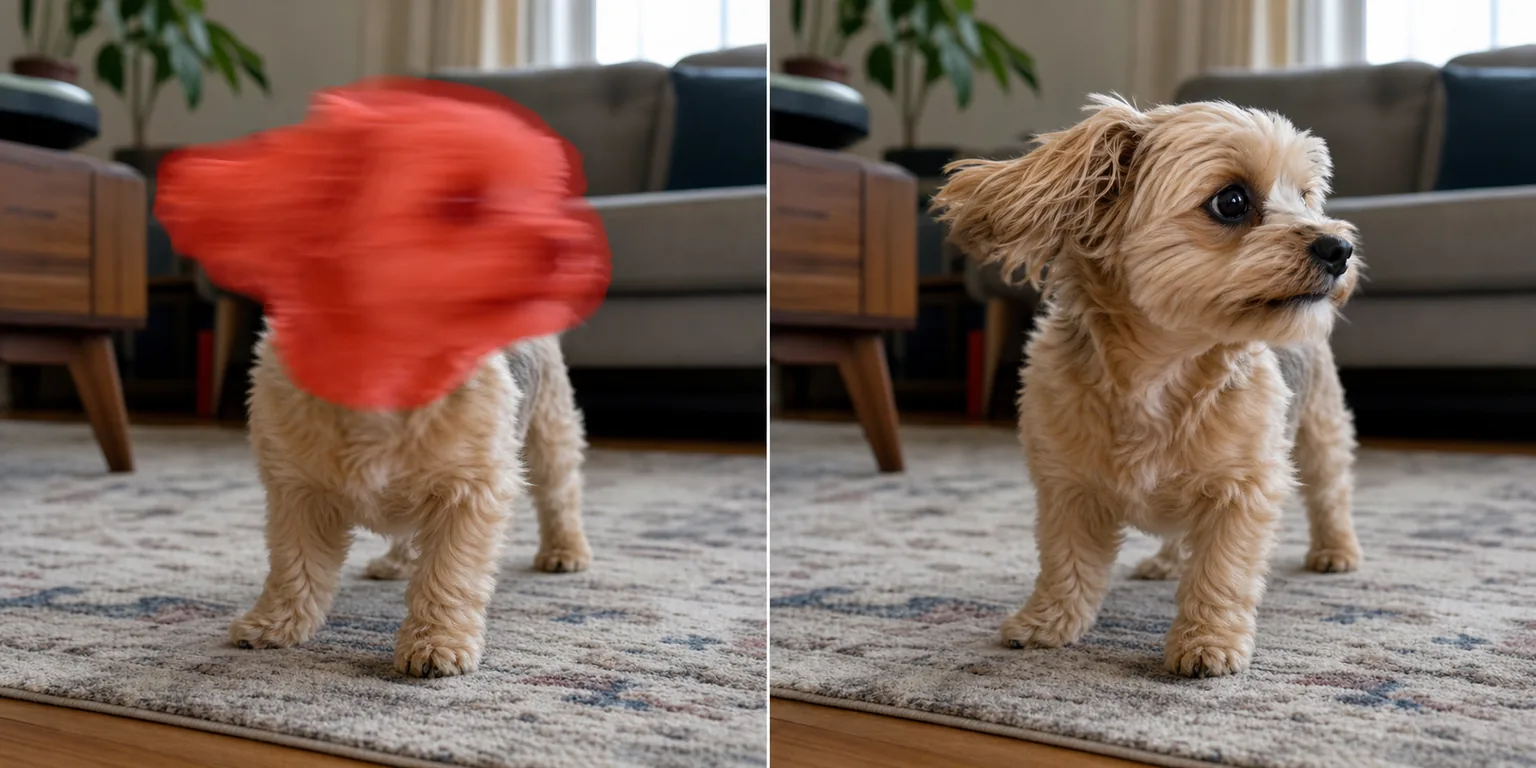
What motion blur is — and what an AI can actually do about it
Motion blur is a directional smear. It happens when the subject moves, or your hands shake, while the shutter is still open, so a single point of light gets dragged across several pixels in one direction. That is very different from grain or noise, which is random speckle scattered across the frame — motion blur has a direction and a length, and it erases edge detail along that path. Here is the honest part: a camera that never recorded a sharp edge cannot have that edge perfectly restored. True deblurring is reconstruction, not recovery. Magic Eraser does not magically un-press the shutter; it estimates the likely direction and amount of the smear, sharpens the salvageable structure, and generates a plausible sharper version of the blurred region. On mild blur — a slightly shaky portrait, a pet that twitched, a handheld low-light frame — the result can look genuinely sharp. On heavy, long-streak blur, expect a clear improvement rather than a flawless photo. Knowing that going in is the difference between being delighted and being disappointed.
Reduce motion blur in three steps
- 1
Upload the blurry photo
Open Magic Eraser on the web, iOS, or Android and upload the shot. It works on blurred faces, moving pets, fast-moving objects, and whole frames softened by camera shake.
- 2
Mark the blurred subject
Brush over the smeared area you want sharpened — the face, the moving object, or the shaky region. Targeting just the subject usually beats sharpening the whole frame, which can crisp up background grain you would rather leave alone.
- 3
Sharpen and review
Tap to process and the AI reconstructs a sharper version of the marked area. Review it at full size, because deblurring is an estimate — accept the result if it reads clean, or dial it back if reconstructed detail starts to look invented.
Best for
- Sharpening a slightly shaky handheld portrait
- Rescuing a photo of a pet or kid who moved mid-shot
- Cleaning up a moving object — a car, a ball, a passing person
- Recovering a low-light frame softened by a slow shutter
- Salvaging a one-time moment you cannot reshoot
- Tightening soft edges before cropping or printing
- Improving a blurry product or document snapshot
- Making a usable thumbnail from an otherwise-smeared frame
What reconstructs well — and what is AI-estimated
Be candid with yourself about the source image. Mild, uniform blur with the smear running in one consistent direction is what the AI handles best — it can read the motion vector and rebuild edges convincingly. Large, hard-edged structures (a jawline, the rim of a wheel, lettering on a sign) tend to reconstruct better than fine, high-frequency detail like individual eyelashes, hair strands, or distant text, which the AI has to guess at and may smooth or fabricate. Long-exposure streaks, double-image ghosting from camera shake, and subjects moving in several directions at once are the hardest cases; the tool will improve them but cannot fully invent detail the sensor never captured. Motion blur is also distinct from out-of-focus blur and from grain or noise — for speckle, use the grain or noise tools instead, since sharpening can actually amplify that. Always review reconstructed faces and text closely: when an AI estimates missing detail it can produce a plausible-but-wrong result, so trust your eyes over the promise of a perfect fix. Treat this as intelligent sharpening and reconstruction, not guaranteed recovery.
Frequently asked questions
- Can it fully fix a very blurry photo?
- Not fully. Detail the camera never captured cannot be perfectly recovered — deblurring is reconstruction, not magic. On mild blur the result can look genuinely sharp; on heavy, long-streak blur expect a clear improvement rather than a flawless image.
- How is this different from removing grain or noise?
- Motion blur is a directional smear from movement; grain and noise are random speckle. They need opposite fixes — sharpening can amplify speckle, so use the grain or noise tools for that and this tool for blur from a moving subject or shaky hands.
- Will reconstructed faces and text look real?
- Large structures reconstruct convincingly, but fine detail like eyelashes, hair, or small text is AI-estimated and can be plausible-but-wrong. Always review faces and text at full size and dial the effect back if anything looks invented.
- Is motion-blur removal free?
- Yes. Magic Eraser's free tier sharpens motion-blurred photos on web, iOS, and Android. Upload the shot, mark the blurred subject, and export the sharpened result at no cost.