
Remove heat haze from photos
Cut through the wavy heat shimmer that ripples over hot asphalt, desert sand, running engines, and far-off summer subjects. Magic Eraser eases the refractive distortion and reconstructs a steadier, sharper version of what the shimmer scrambled — so a wobbly long-lens frame reads clearly again.
Last updated
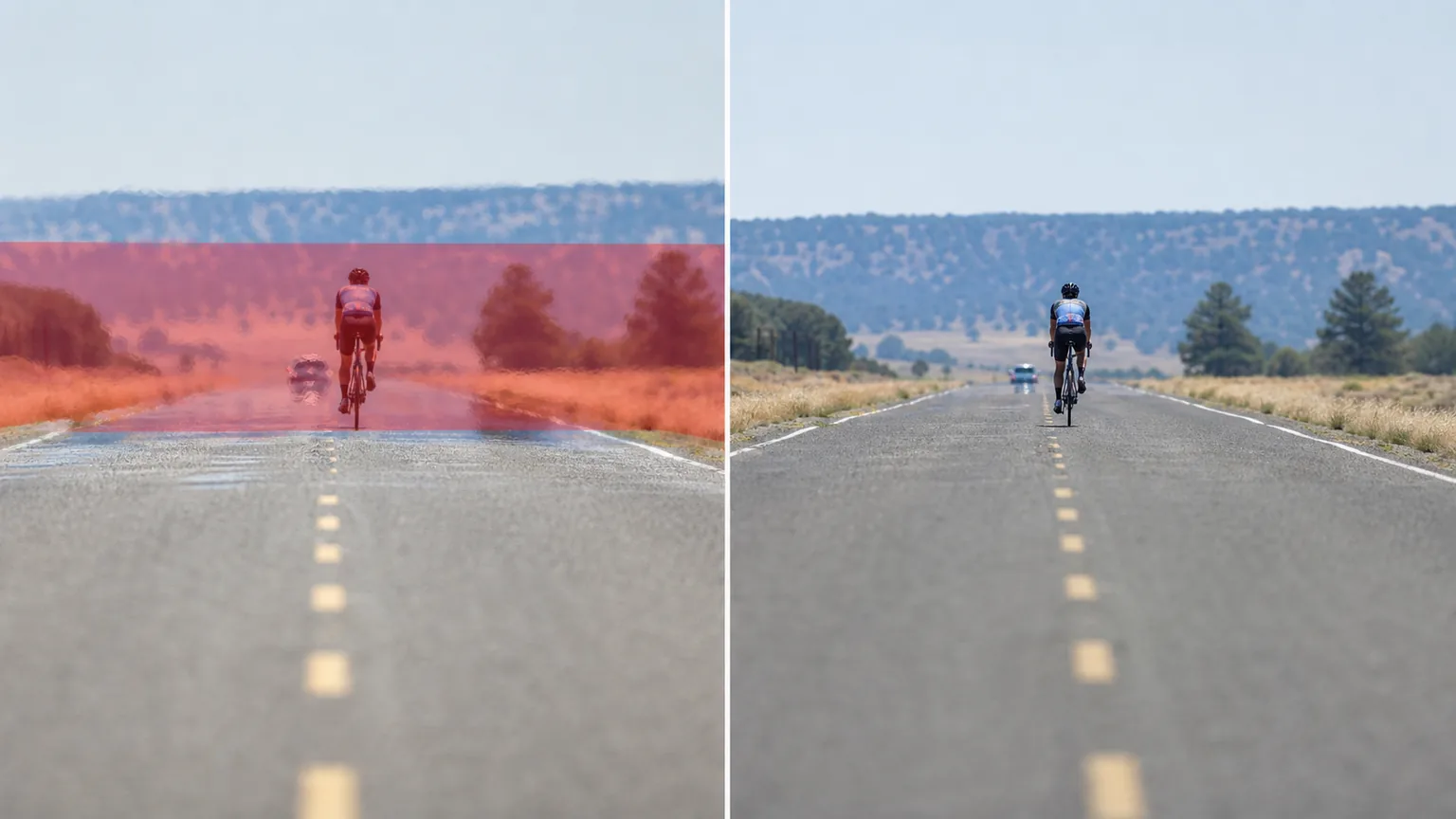
Why heat haze ruins a sharp shot
Heat haze — sometimes called heat shimmer or mirage distortion — is not dirt on the lens or a soft focus you can sharpen away. It is the air itself bending light. When sun-baked asphalt, desert sand, a tarmac runway, or a hot engine warms the air above it, pockets of different temperature refract light at slightly different angles, and that ripple lands on your sensor as a wavy, smeared wobble. Long lenses make it worse: the more atmosphere you shoot through, the more shimmer stacks up, which is why distant wildlife, aircraft, motorsport, and landscape frames suffer most in summer heat. The frustrating part is that the shimmer scrambles fine detail inconsistently across the frame — edges that should be crisp turn rubbery, text and patterns smear, and no amount of conventional sharpening brings them back because the sharpening tool has no true edge to lock onto. Magic Eraser takes a different approach: instead of trying to recover detail that the moving air destroyed, you mark the shimmering region and the AI rebuilds a stabilized, plausible version of the subject, smoothing the wave distortion and re-establishing clean contours so the photo reads as a steady shot rather than a heat-warped one.
Reduce heat haze in three steps
- 1
Upload the shimmering shot
Open Magic Eraser on the web, iOS, or Android and upload the photo. It works on long-lens summer frames, desert and roadside scenes, and shots taken over a hot engine or exhaust.
- 2
Brush the wavy distortion
Paint over the rippled, smeared area where the heat shimmer is worst — usually the zone closest to the hot surface or along the subject's edges. Cover the full wobbly band so the AI can read where the distortion starts and stops.
- 3
Erase and review
Tap Erase and the AI flattens the shimmer and reconstructs a steadier subject. Check the edges and any fine detail, ease back if the rebuild looks too smooth, and export the sharpened frame.
Best for
- Long-lens summer shots wobbling over hot asphalt or runways
- Desert and beach scenes shimmering above sun-baked sand
- Distant wildlife and bird photos softened by mirage haze
- Motorsport and aviation frames warped by track or tarmac heat
- Photos taken over a running engine, grill, or exhaust
- Landscape horizons that ripple in midday summer heat
- Mild shimmer where the subject is still mostly readable
- Cleaning up one hazy frame from a long telephoto burst
What to expect from heat-haze removal
Be honest with yourself about what the shimmer destroyed. Because heat haze bends light unpredictably from frame to frame, the sensor never recorded a single clean version of the fine detail — it captured a smeared average of a moving distortion. Magic Eraser cannot recover information that was never coherently there; instead it reconstructs a stabilized, plausible version of the subject based on the surrounding context. That means results are strongest on mild shimmer, where the contours and broad shapes survived and only the edges went rubbery — the AI has enough to anchor a believable rebuild. On heavy shimmer that has dissolved a subject into wavy mush, expect a smoothed, approximate reconstruction rather than a true recovery of the original detail: small text, license plates, fine feathers, or distant facial features may come back plausible but not necessarily accurate. Treat it as a cleanup that makes a heat-warped frame look steady and presentable, not as forensic restoration. For the best raw material, shoot earlier or later in the day, get lower atmosphere between you and the subject, and capture a burst so you have the least-distorted frame to start from.
Frequently asked questions
- Can it fully restore detail lost to heat shimmer?
- Not exactly. Shimmer scrambles fine detail inconsistently, so the sensor never recorded one clean version. Magic Eraser reconstructs a stabilized, plausible subject rather than recovering the true original — it works best on mild shimmer where the shapes survived.
- How is this different from removing fog or smoke?
- Fog is a haze that veils and lowers contrast, and smoke is a plume that covers the subject. Heat haze is wavy refractive distortion — the air bending light into ripples. So the fix is de-warping and rebuilding crisp edges, not lifting a flat veil.
- Which photos give the best results?
- Frames with mild shimmer where the subject is still mostly readable. If the contours and broad shapes are intact and only the edges have gone rubbery, the AI has enough context to anchor a clean rebuild. Heavily melted subjects come back approximate.
- Is heat-haze removal free?
- Yes. Magic Eraser's free tier handles heat-haze cleanup on web, iOS, and Android. Upload the shimmering shot, brush the wavy area, and export the steadier result at no cost.