
Remove a double chin from photos
Refine the jawline and soften a double chin in portraits, selfies, and group shots. Magic Eraser reshapes the chin-and-neck area with AI and reconstructs natural skin and shadow so the edit reads as a flattering angle, not an obvious retouch.
Last updated
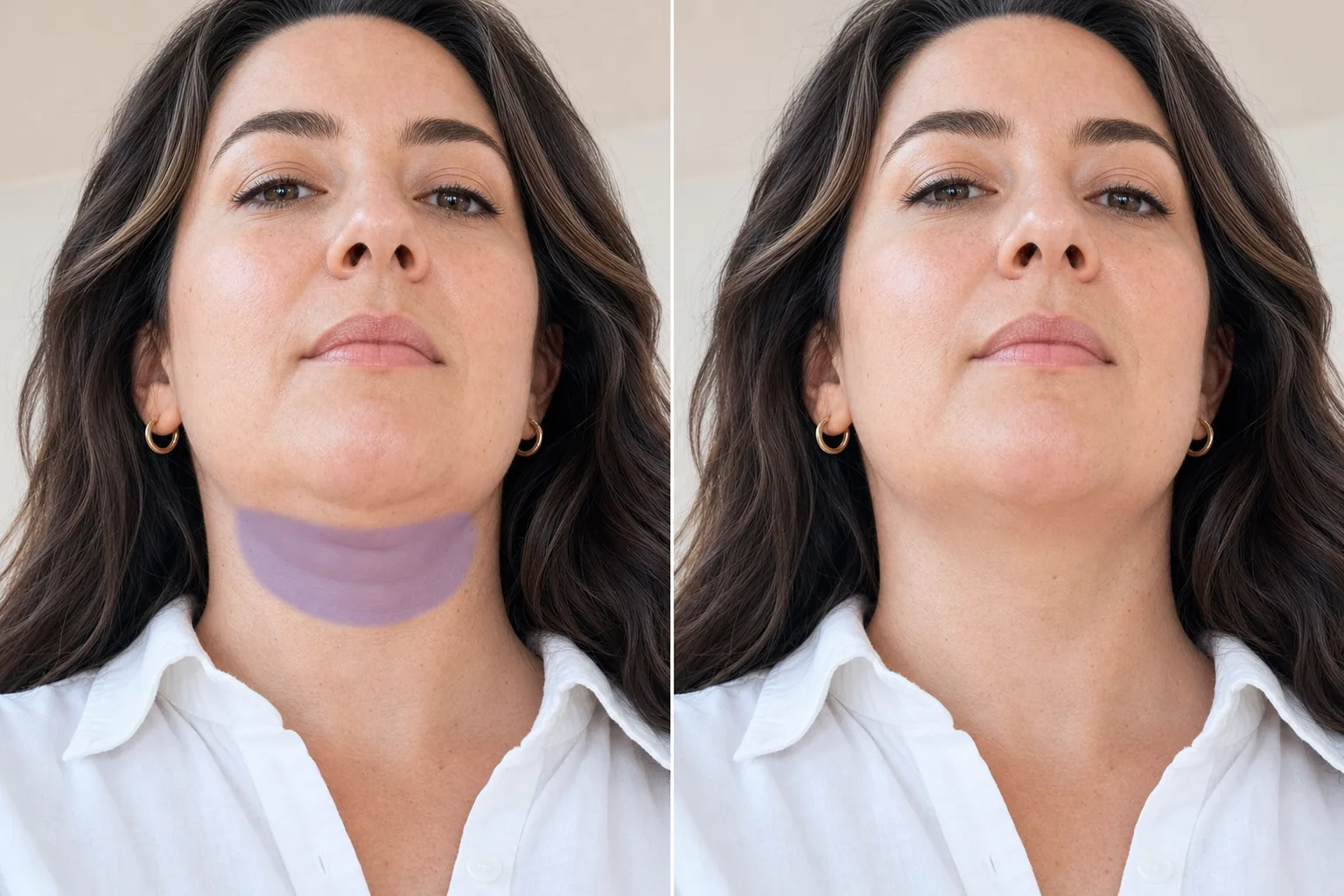
Why a double chin shows up in photos
A double chin in a photo is usually an artifact of the shot, not the person — a low camera angle, a downward head tilt, lens compression on a close selfie, or soft lighting that flattens the jaw all exaggerate the area under the chin. For a profile photo, dating-app picture, headshot, or printed portrait, that one unflattering frame can be the only usable shot from the set. Rather than reshooting, Magic Eraser lets you refine the chin-and-neck region directly: it eases the contour under the jaw, removes the shadow line that defines a double chin, and rebuilds the skin and neckline underneath so the transition stays smooth. Because it reconstructs real texture instead of blurring, the result avoids the plastic, over-smoothed look that gives away heavy retouching.
Remove a double chin in three steps
- 1
Upload your portrait
Open Magic Eraser on the web, iOS, or Android and upload the portrait or selfie. It works on close-up faces, full headshots, and people in group photos.
- 2
Brush the chin and neckline
Paint over the soft area and shadow under the jaw that you want to refine. Stay just below the natural jaw edge — brushing the actual jawline can distort the face, so cover the fold and its shadow, not the bone line.
- 3
Erase and review
Tap Erase and the AI eases the contour and reconstructs the skin and neck underneath. Review the jaw-to-neck transition for a natural blend, dial back if it looks over-done, and export the retouched portrait.
Best for
- Refining a jawline in profile photos and dating-app pictures
- Cleaning up selfies shot from a low or downward angle
- Touching up professional headshots before printing
- Softening the chin area in group photos and family portraits
- Fixing lens-compression chin distortion from close front cameras
- Preparing a flattering portrait when only one frame is usable
- Subtle retouching that keeps natural skin texture
- Evening out the neckline shadow in soft, flat lighting
What to expect from double-chin removal
Results are best when the edit is subtle and the surrounding area gives the AI plenty to work with. A defined neckline against a plain or evenly-lit background reconstructs cleanly, because the AI can extend skin tone and shadow smoothly into the refined area. Keep the brush below the jaw bone — the goal is to ease the fold and its shadow, not to reshape the actual jaw, which can warp facial proportions and look unnatural. Light, restrained edits read as a better camera angle; aggressive reshaping starts to look retouched. Busy necklines (collars, jewelry, layered hair) may need a more careful brush so the AI doesn't blend those elements into skin. As with all generative retouching, the tool produces a plausible, flattering reconstruction rather than a measured anatomical change — treat it as photo retouching, not a body-altering claim.
Frequently asked questions
- Will it look obviously edited?
- Not if you keep it subtle. Because Magic Eraser reconstructs real skin texture and shadow instead of blurring, light edits read as a flattering angle. Over-aggressive reshaping is what looks retouched — brush only the soft fold and its shadow, not the jawbone.
- Should I brush the jawline too?
- No. Stay just below the natural jaw edge. Painting over the actual jawline can distort the face. Cover the double-chin fold and the shadow line under it, and let the AI smooth the transition.
- Does it work in group photos?
- Yes. You can refine one person's chin area in a group shot — brush only that region and the AI reconstructs the skin and neckline locally without affecting the rest of the photo.
- Is double-chin removal free?
- Yes. Magic Eraser's free tier handles double-chin retouching on web, iOS, and Android. Upload your portrait, brush the area, and export the result at no cost.