
Remove barbed wire from photos
Wipe out barbed wire, razor wire, and the thin strands of a wire fence that cut across an otherwise clean view. Magic Eraser removes the wire line and reconstructs the sky, field, or building behind it, so the fence stops stealing attention from the scene you actually shot.
Last updated
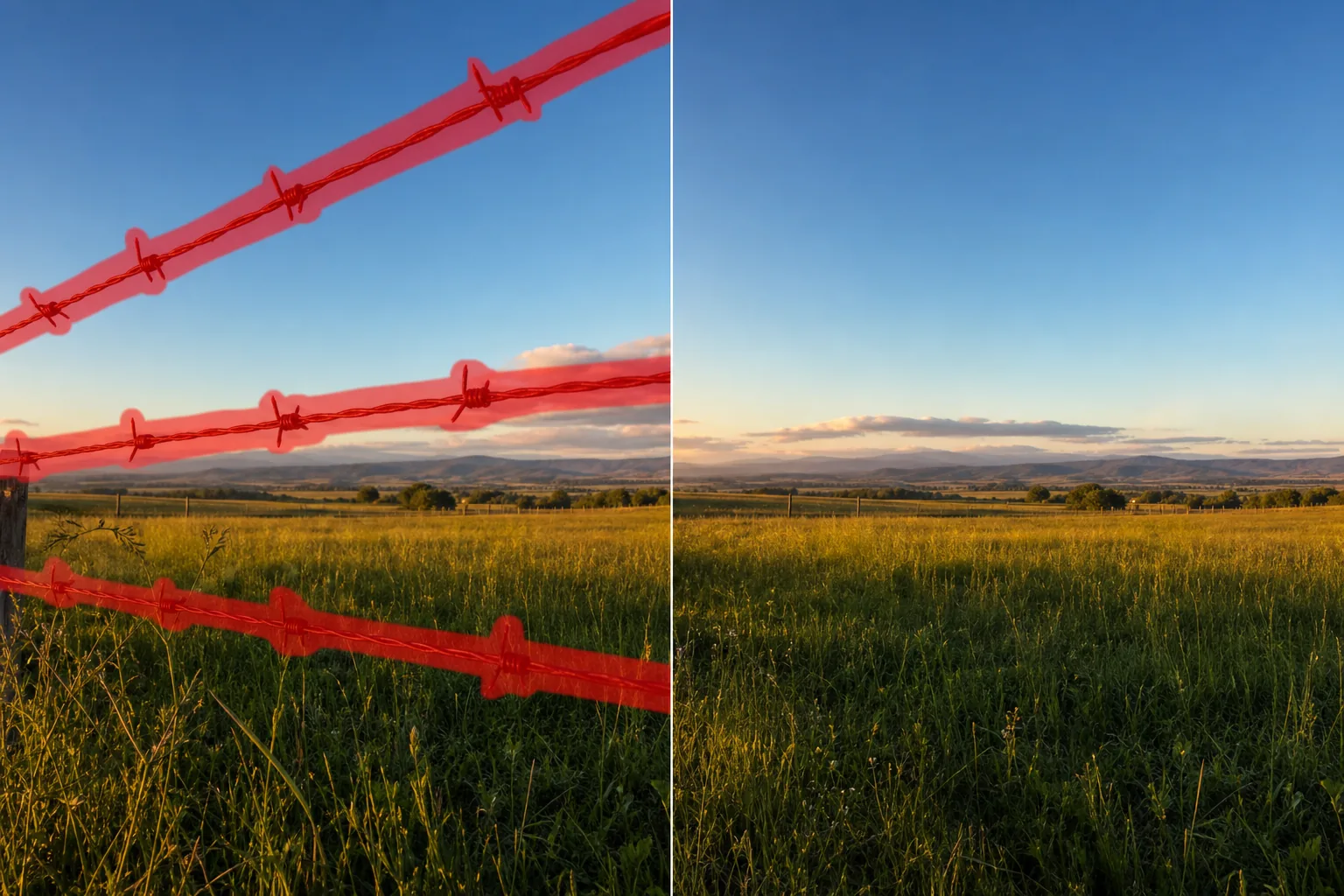
Why barbed wire ruins an otherwise good shot
Barbed wire is one of the most stubborn distractions in outdoor photography precisely because it is so thin. A single fence line strung between posts will slice across a hilltop sunset, a pasture, a historic ruin, or the view from a trailhead, and the eye snaps straight to it. Real-estate photos of rural lots, acreage, and farm property suffer the same problem: the listing wants to show open land, but a strand of wire reading horizontally across the frame makes the parcel feel fenced-in and small. Travel shots near borders, old battlefields, ranches, and railway lines are full of razor coils and barbed strands that you cannot move and cannot reshoot around. Because barbed wire is mostly thin line over a continuous background — sky, grass, stone, water — it is exactly the kind of subject Magic Eraser reconstructs well. The strand covers very little of the actual scene, so once the wire is brushed out the AI only has to extend the texture that surrounds it: a few centimetres of sky here, a patch of field there. Unlike a solid panel fence that hides large blocks of background, a wire line leaves the scene behind it almost fully visible, which means the rebuild has plenty of real context to copy from and the result usually reads as if the fence was never there.
Remove barbed wire in three steps
- 1
Upload your photo
Open Magic Eraser on the web, iOS, or Android and upload the shot — a landscape, a real-estate exterior, or a travel photo with a wire fence cutting through it.
- 2
Brush the wire and barbs
Paint along each strand, following the line across the frame, and cover the barbs and any razor coils. Don't worry about being pixel-perfect on such a thin subject — overlap the wire slightly so no fragment is left behind, and include attached fence posts if you want those gone too.
- 3
Erase and review
Tap Erase and the AI deletes the wire and rebuilds the sky, field, or wall behind it. Scan the line where the strand used to be for any leftover dots or shadow, re-brush any missed barbs, and export the clean shot.
Best for
- Clearing a fence line from landscape and sunset photos
- Cleaning up rural and acreage real-estate listing shots
- Removing razor wire from travel and border-area photos
- Erasing wire fencing across pastures, ruins, and trailheads
- Tidying barbed strands in front of historic buildings or monuments
- Taking a single horizontal wire out of an open-field horizon
- Removing wire and its posts from a hillside or vineyard view
- Cleaning up railway and ranch shots cluttered with fencing
What to expect from barbed-wire removal
Barbed wire is close to an ideal case for generative removal: the strand is thin, so the background behind it is mostly intact, and the AI only needs to extend a continuous texture across a narrow gap. A single wire over plain sky, an even field, or a smooth wall rebuilds almost invisibly. Results get harder as the wire gets denser or the background gets busier. Tightly coiled razor wire stacked in front of fine detail — foliage, brickwork, a crowd — hides more of the scene, so the AI has to invent more and may leave a soft or smeared patch where the coil was thickest. Where a strand crosses a hard edge, like the line between a roof and the sky or the join of two walls, that edge can bend slightly as it is reconstructed; brush a little wider there and check the seam. Out-of-focus or motion-blurred wire often vanishes more cleanly than a tack-sharp foreground strand, because there is less high-contrast detail for the eye to catch. As with any AI cleanup, the tool produces a plausible reconstruction of what was likely behind the wire, not a recovery of hidden pixels — on simple backgrounds that reconstruction is convincing, and on cluttered ones it is best treated as a strong starting point you may want to touch up.
Frequently asked questions
- Does it work on thin, hard-to-select wire?
- Yes — thin wire is its strongest case. You don't need to trace the strand exactly; brush loosely along the line and overlap it a little so no fragment is missed. Because the wire covers so little of the scene, the AI has plenty of surrounding background to rebuild from.
- Can it handle razor wire and tight coils?
- It can, but dense coils are harder than a single strand because they hide more of the background. Over plain sky or an open field the rebuild is clean; over fine detail like foliage or brick, the thickest part of the coil may need a touch-up after erasing.
- Will it remove the fence posts too?
- Only if you brush them. The wire and the posts are separate — paint just the strands to keep the posts, or cover the posts as well if you want the whole fence line gone and a fully open view.
- Is barbed-wire removal free?
- Yes. Magic Eraser's free tier handles barbed-wire and fence-line cleanup on web, iOS, and Android. Upload your photo, brush the wire, and export the clean shot at no cost.