
Remove an Emoji From Your Profile Picture
That laughing emoji or heart sticker covering your face was fun in the group chat, but it does not belong on your LinkedIn, work badge, or dating profile. Magic Eraser's AI inpainting lifts the emoji off your headshot and reconstructs a clean, plausible background so your avatar looks intentional and polished.
Last updated
Remove emoji now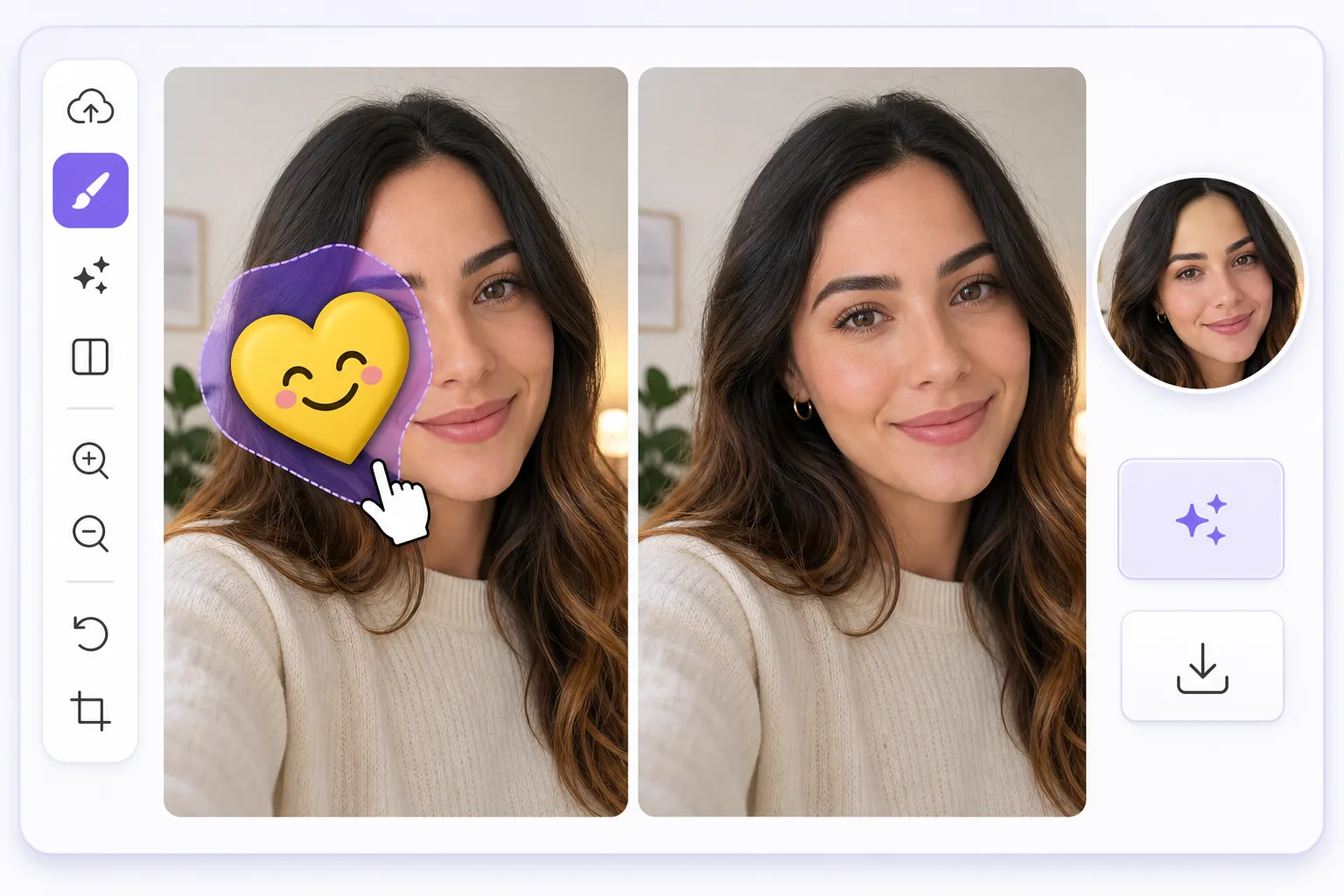
Turn a meme-covered selfie into a clean headshot
We have all done it: slapped a sunglasses emoji over our eyes or a sticker across a forehead before posting a selfie, then later wished we had the plain version for a real profile picture. Often that decorated image is the only good shot you have. Magic Eraser fixes this by erasing the emoji or sticker and using AI inpainting to fill in what was behind it. One honest note up front: the AI synthesizes a believable reconstruction of skin, hair, or background, it does not recover the literal pixels that were hidden underneath. For an emoji parked over a cheek, forehead, shoulder, or in the corner of the frame, that reconstruction is usually seamless and avatar-ready. For an emoji sitting directly over your eyes, nose, or mouth, the result is a flattering composite rather than your true hidden features, so pick a shot where the emoji is off to the side when you can. It works the same on web, iOS, and Android, with a free tier and no watermark, so the headshot you export is ready to drop straight into any profile.
Before you start
Clean your profile picture in 3 steps
Start with upload the decorated headshot. The result preview above and tips below use this guide's existing content; no separate before-and-after proof is assumed.
- 1
Upload the decorated headshot
Open Magic Eraser on web, iOS, or Android and load the selfie or portrait that has the emoji or sticker on it. A higher-resolution shot gives the AI more facial and background detail to work with for a sharper final avatar.
- 2
Brush over the emoji
Use your finger or cursor to paint over the emoji, sticker, or text overlay sitting on your face or shoulder. Stay tight to its edges so the AI rebuilds only the covered area and keeps the rest of your headshot untouched.
- 3
Review and export your clean avatar
Tap erase and let the AI inpaint the gap. Check the reconstructed area at full zoom, re-brush any soft spots, then export the watermark-free image and set it as your new profile picture.
Best for
- Reusing a great selfie for LinkedIn or a work profile after a sunglasses or laughing emoji covered part of your face
- Cleaning a heart or sticker off a dating-app photo so your avatar looks genuine, not gimmicky
- Removing a Snapchat or Instagram sticker from a portrait you want as a clean Slack or Teams avatar
- Erasing a censoring emoji a friend added before reusing the shot as a polished headshot
- Tidying a meme-style overlay or text off a casual photo so it works as a professional profile picture
Tips for a natural-looking avatar
Choose a source photo where the emoji sits over a simple area like a cheek, shoulder, or plain background rather than across your eyes or mouth, since the AI reconstructs those flat regions most convincingly. Brush slightly beyond the emoji's edge to catch its drop shadow or glow, which otherwise leaves a faint halo. If the first pass looks blurry, undo and erase in smaller sections so the inpainting blends skin tone and lighting step by step. For headshots, crop after erasing so the cleaned region sits comfortably inside the avatar frame and the join is harder to notice on a small thumbnail.
Frequently asked questions
- Can Magic Eraser show my real face if an emoji covered it?
- No. If the emoji covered your eyes, nose, or mouth, the AI generates a plausible reconstruction of those features, not your true hidden face. It is great for a clean avatar, but it cannot recover the actual pixels that were behind the emoji.
- Will the cleaned photo work as a LinkedIn or dating-app profile picture?
- Yes. The export is full resolution with no watermark on the free tier, so you can set it directly as a LinkedIn, dating-app, Slack, or work-badge profile picture. Cropping to the avatar frame after erasing gives the most seamless result.
- Do I need an app, or can I do this from my phone browser?
- Either works. Magic Eraser runs on the web and as iOS and Android apps, so you can clean an emoji off your headshot from a phone browser or a dedicated app, then save the polished profile picture wherever you are.