
Remove the Emoji Hiding One Face in Your Group Photo
Group photos have a way of getting one face stamped with a laughing or sunglasses emoji — a sibling's edit, a privacy sticker, a meme reply. Magic Eraser targets that single covered face among everyone else and reconstructs the area so the whole crew looks present again, without touching the people standing beside them.
Last updated
Remove emoji now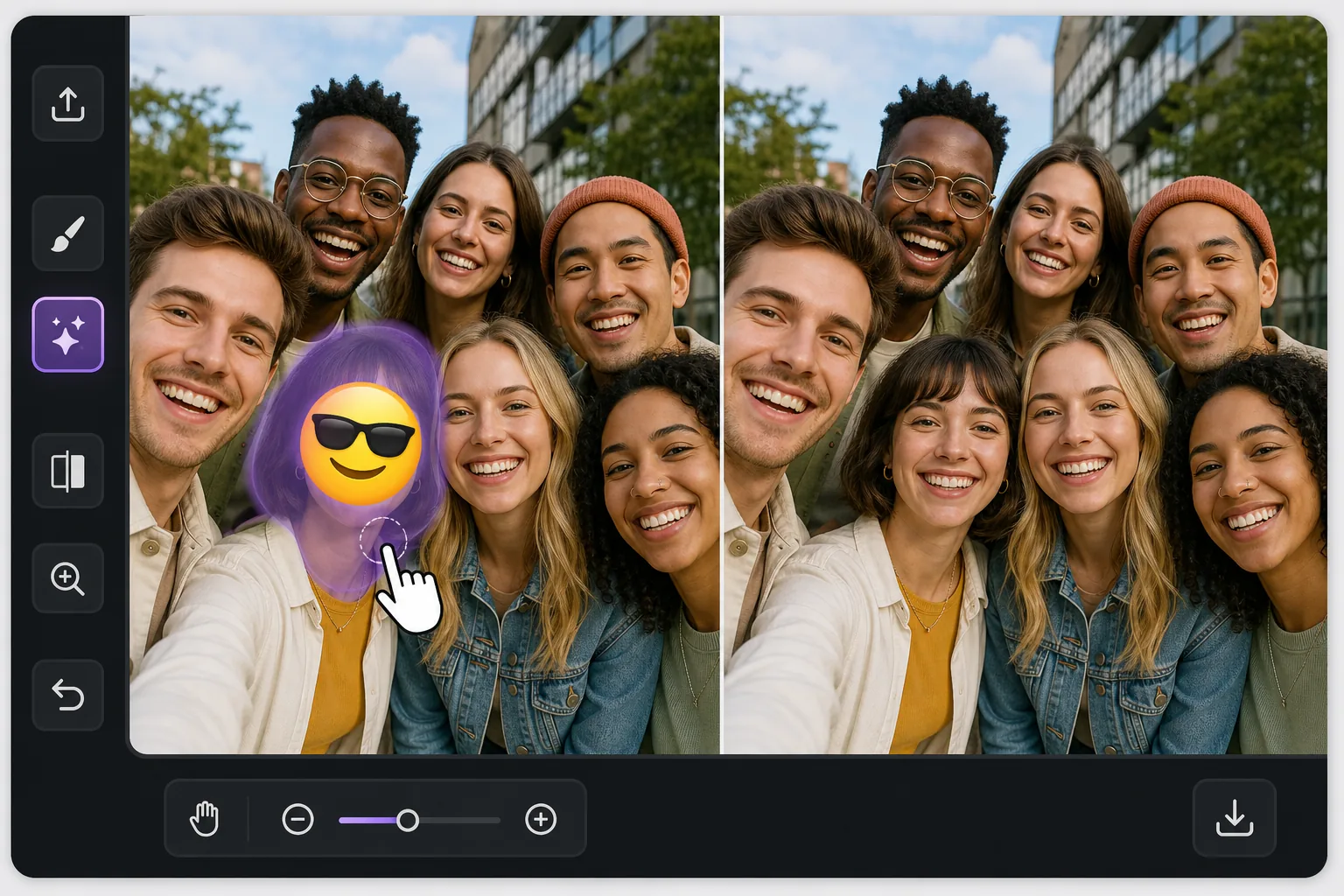
One face covered, everyone else fine
In a busy group photo, an emoji over a single person is awkward in a specific way: the rest of the shot is perfect, so the one covered face stands out even more. Magic Eraser is built for exactly this kind of pinpoint fix. You brush only the emoji sitting on that one person, and the AI inpaints the small area it covered — matching the surrounding skin tone, hair edges, and the shoulder of the person tucked in next to them. Be clear about what happens here: the AI does not recover the real hidden face. It synthesizes a plausible reconstruction of that region based on the rest of the image. In a tight group shot where the covered head is small and partly framed by neighbors, that often reads as natural at a glance. Magic Eraser works free on web, iOS, and Android with no watermark, so you can fix the group photo on whatever device the picture lives on.
Before you start
Reconstruct the one covered face
Start with open the group photo and zoom to the covered person. The result preview above and tips below use this guide's existing content; no separate before-and-after proof is assumed.
- 1
Open the group photo and zoom to the covered person
Upload the group shot to Magic Eraser on web, iOS, or Android. Pinch or scroll to zoom in tight on the single face the emoji is covering — working zoomed in keeps you from accidentally brushing the people on either side.
- 2
Brush only the emoji, not the neighbors
Paint over the emoji and its edges with a brush slightly larger than the sticker. Stay off the adjacent faces, shoulders, and hair. The cleaner your selection hugs that one person, the more the AI has to work with for the reconstruction.
- 3
Erase, inspect the rebuilt area, refine
Tap erase and let the AI inpaint the spot the emoji hid. Zoom in to check the rebuilt face against the neighbors' lighting and the background. If hair edges or a jaw line look off, brush again to nudge it, then export the full-resolution group photo.
Best for these group-photo situations
- A friend stamped a laughing or sunglasses emoji on one person in a shared group selfie
- A privacy sticker was placed over a single face but you now have permission to show them
- A meme reply covered one person's face and you want the clean original group shot back
- Restoring a reunion or team photo where one head got hidden behind a reaction emoji
- Reposting a group picture and needing the one covered face to blend in with everyone else
Tips for a believable result among many faces
The reconstruction is most convincing when the covered head is small relative to the group and partly bordered by neighbors — the AI has nearby skin, hair, and lighting to imitate. If the emoji covers a large front-and-center face, expect a softer, more invented result and consider cropping instead. Brush a touch beyond the emoji's edge so no colored fringe survives, but stop short of the people on either side. Match expectations honestly: this rebuilds the region plausibly, it does not restore the true expression or identity of the person who was hidden. For shared photos, get that person's okay before reposting a reconstructed version of their face.
Group-photo emoji removal FAQ
- Will it bring back the actual face that was under the emoji in my group photo?
- No. Magic Eraser synthesizes a plausible reconstruction of the covered area using the surrounding image — it cannot recover the real hidden face or that person's true expression. In a group shot where the head is small and framed by neighbors, the result usually blends in well.
- Can I do this on my phone, or do I need a computer?
- Either works. Magic Eraser runs on web, iOS, and Android with a free, no-watermark tier, so you can fix the group photo right where it lives — straight from your camera roll on the phone or uploaded on the web app.
- Will erasing the emoji affect the people standing next to the covered person?
- Not if you brush carefully. Zoom in and paint only the emoji on that one face, keeping the brush off adjacent shoulders, hair, and faces. The AI only rebuilds the region you selected, leaving the rest of the group untouched.