
Menütafel-Design
Erstellen Sie professionelle Menütafel-Grafiken aus Ihren eigenen Lebensmittelfotos. Diese Vorlage isoliert einzelne Gerichte aus Tischdekorationen und unruhigen Hintergründen, vereinheitlicht das Erscheinungsbild aller Artikel für eine stimmige Speisekarte und exportiert layoutfertige Bilder, die für digitale Menütafeln, gedruckte Speisekarten und Einträge auf Lieferplattformen wie DoorDash, Uber Eats und Grubhub optimiert sind.
Diese Vorlage kostenlos testenFood template preview
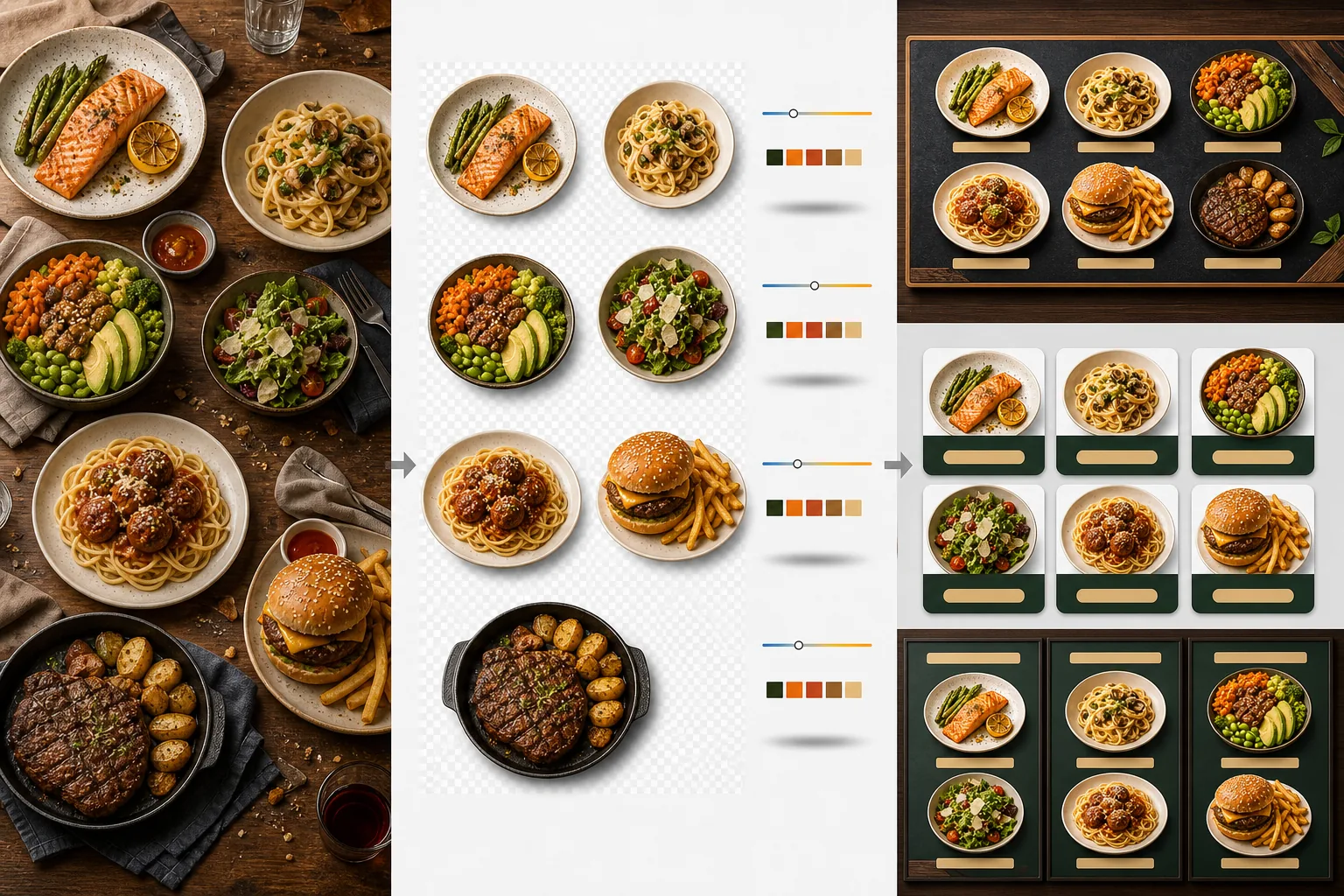
Was diese Vorlage macht
Verwandelt uneinheitliche Lebensmittelfotos, die zu unterschiedlichen Zeiten, bei unterschiedlichem Licht und auf unterschiedlichen Tischen aufgenommen wurden, in einen einheitlichen Satz menütauglicher Bilder. Background Eraser isoliert jedes Gericht — Teller, Schüssel oder Verpackung — aus seiner ursprünglichen Tischdekoration und ersetzt den Hintergrund durch eine einheitliche Farbe oder Textur, die zum Branding Ihres Restaurants passt. Die Farbtemperatur wird über alle Artikel hinweg normalisiert, sodass Fotos, die unter warmem Glühlampenlicht, kühlen LED-Panels und natürlichem Fensterlicht aufgenommen wurden, alle einheitlich wirken. Die Lebensmittelfarben werden so verstärkt, dass sie appetitlich aussehen, ohne ins Unrealistische abzudriften — Grüntöne sind kräftig, Fleisch ist warm und saftig, und Saucen glänzen. Das Ergebnis ist ein Bildersatz, der als einheitliches visuelles Menüsystem funktioniert und nicht als zufällige Sammlung von Handyfotos.
Vorlageneinstellungen
| Hintergrund | Einfarbig (auf die Marke abgestimmt), Holztextur, Schiefer oder transparent |
| Farbtemperatur-Normalisierung | Alle Artikel auf 5000K Tageslicht-Weißabgleich angleichen |
| Verstärkung der Lebensmittelfarben | Appetitlicher Boost (warme Proteine, kräftige Grüntöne, glänzende Saucen) |
| Schattenstil | Dezenter Schlagschatten für Tiefe auf einfarbigen Hintergründen |
| Ausgabegrößen | 1200×1200px (Lieferplattformen), 800×600px (digitale Menütafeln), benutzerdefiniert |
So verwenden Sie diese Vorlage
Lebensmittelfotos hochladen
Laden Sie Fotos einzelner Menüpunkte hoch. Handyfotos, die während des Service aufgenommen wurden, professionelle Food-Fotoshootings und Fotos aus Lieferplattform-Einträgen funktionieren alle. Die Vorlage verarbeitet jedes Gericht einzeln, um über Ihre gesamte Speisekarte hinweg einheitliche Ergebnisse zu erzielen.
Gerichte vom Hintergrund isolieren
Background Eraser trennt jedes Gericht von seinem Tisch, Platzset oder seiner Thekenfläche. Die Kantenerkennung folgt dem Tellerrand, dem Schüsselrand oder der Verpackungskontur präzise. Garnierungen und Toppings, die über den Tellerrand hinausragen — ein Petersilienzweig, ein Spritzer Sauce — bleiben erhalten.
Farbe und Stil vereinheitlichen
Die Farbtemperatur wird normalisiert, sodass alle Gerichte unter derselben einheitlichen Beleuchtung erscheinen. Die Lebensmittelfarben werden für mehr Appetitanregung verstärkt. Unter jedem Gericht wird ein dezenter Schatten hinzugefügt, für einen geerdeten, dreidimensionalen Look auf dem neuen Hintergrund.
Für Speisekarten und Plattformen exportieren
Laden Sie in 1200×1200px für DoorDash-, Uber Eats- und Grubhub-Einträge herunter. Exportieren Sie in 800×600px für digitale Menütafeln und TV-Displays. Transparente PNG-Exporte stehen für Grafikdesigner bereit, die individuelle gedruckte Speisekarten und Beschilderung gestalten.
Profi-Tipps für die besten Ergebnisse
- ✓Fotografieren Sie Gerichte direkt von oben (Flat Lay) oder in einem Winkel von 45 Grad. Diese beiden Winkel erzeugen die sauberste Hintergrundentfernung, weil die Tellerkontur vollständig sichtbar ist und die KI das Gericht präzise vom Tisch trennen kann.
- ✓Wischen Sie den Tellerrand vor dem Fotografieren sauber. Saucenspuren und Krümel am Tellerrand werden Teil des isolierten Bildes und wirken auf dem neuen, sauberen Hintergrund unordentlich.
- ✓Verarbeiten Sie alle Menüpunkte in einem einzigen Stapel mit denselben Einstellungen. Die Einheitlichkeit über jedes Gerichtsfoto hinweg ist es, was eine Speisekarte professionell aussehen lässt — nicht zusammenpassende Farbtemperaturen und Hintergrundtöne lassen selbst großartige Speisen amateurhaft wirken.
Häufige Fragen
Kann ich das für Getränke verwenden?
+
Ja. Gläser, Tassen, Flaschen und Cocktails werden mit derselben Präzision isoliert wie angerichtete Gerichte. Transparente Getränke wie Wasser, Wein und klare Cocktails behalten ihre Durchsichtigkeit auf dem neuen Hintergrund.
Sehen die Speisen künstlich bearbeitet aus?
+
Die Farbverstärkung ist so kalibriert, dass Speisen ihr appetitlichstes Aussehen erhalten, ohne ins Unrealistische abzudriften. Stellen Sie sich den Unterschied zwischen einem unter grellem Neonlicht fotografierten Gericht und einem bei natürlichem Tageslicht fotografierten Gericht vor — die Vorlage lässt jedes Gericht so aussehen, als wäre es unter idealen Bedingungen aufgenommen worden.
Funktioniert das für Menüfotos auf Lieferplattformen?
+
Ja. Die quadratische Ausgabe in 1200×1200px erfüllt die Bildanforderungen von DoorDash, Uber Eats, Grubhub und Postmates. Restaurants mit professionell wirkenden Menüfotos auf Lieferplattformen erzielen durchweg höhere Bestellraten als solche mit unbearbeiteten Handyschnappschüssen.
Erstellen Sie eine Speisekarte, die jedes Gericht unwiderstehlich aussehen lässt
Laden Sie Lebensmittelfotos hoch und erhalten Sie einheitliche, appetitliche Menübilder, die bereit sind für digitale Tafeln, gedruckte Speisekarten und Lieferplattformen.
Kostenlos testenRelated templates
More food templates for your workflow.
Erstellen Sie appetitliche Menüfotos für die Essenslieferung mit verbesserter Farbbrillanz, klaren Hintergründen, Dampf- und Frischeeffekten und plattformoptimierten Abmessungen.
Verbessern Sie Rezeptfotos für Kochbücher und Food-Blogs durch Schärfung in Druckqualität, Farbgenauigkeit der Zutaten, gestylte Szenenbereinigung und hochauflösende Ausgabe.