
Kochbuch-Rezeptfoto
Heben Sie selbst gekochte Rezeptfotos auf Kochbuch-Qualitätsniveau. Diese Vorlage verbessert die Zutatenfarben für Druckgenauigkeit, schärft Lebensmitteltexturen für die hochauflösende Reproduktion, entfernt unerwünschte Elemente aus inszenierten Szenen und gibt in Druckqualität für Kochbücher, Food-Blogs und Rezeptkarten aus.
Diese Vorlage kostenlos testenFood template preview
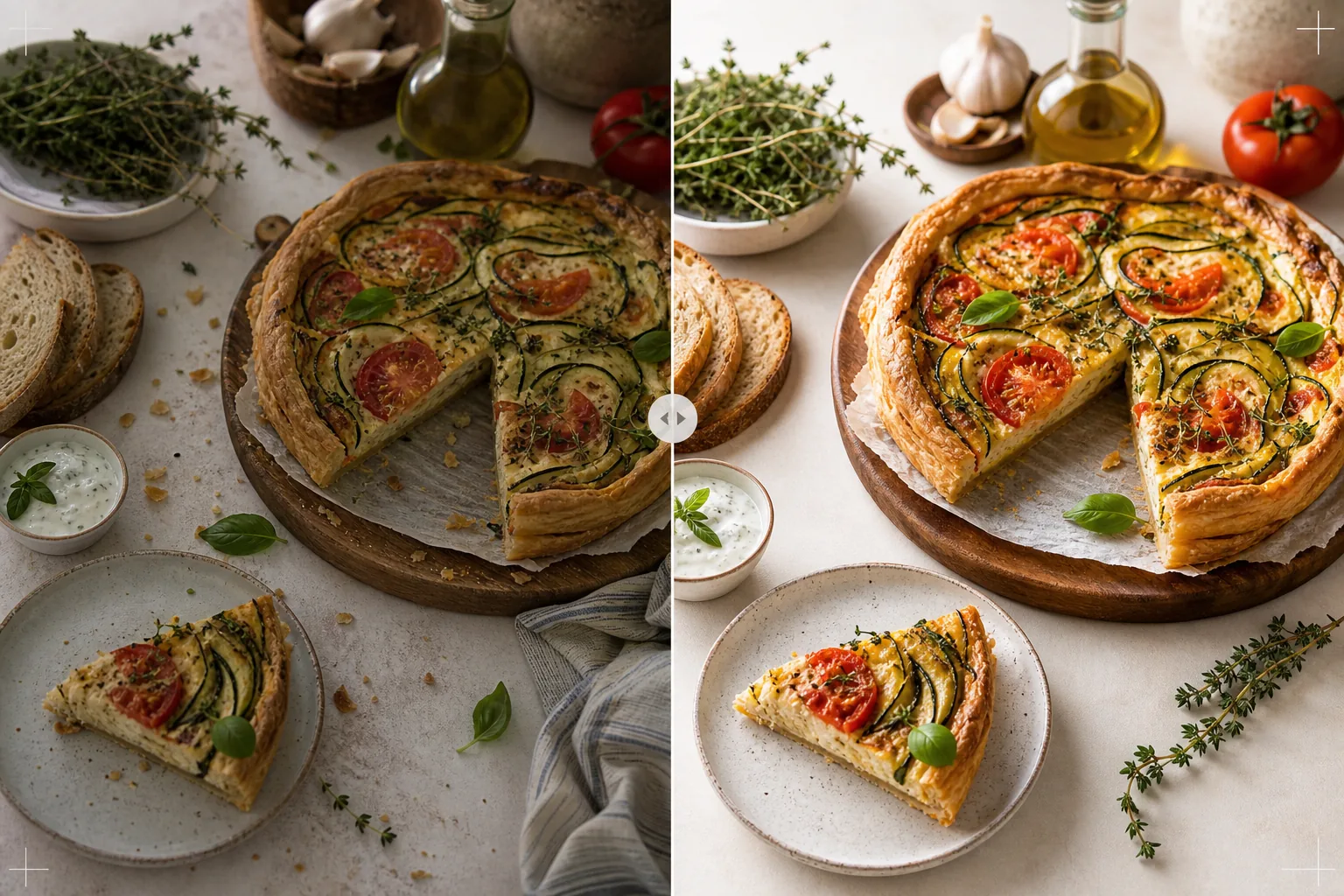
Was diese Vorlage macht
Verwandelt Rezeptfotos aus der heimischen Küche in Bilder, die veröffentlichten Kochbüchern und professionellen Food-Blogs würdig sind. Die Kochbuchfotografie stellt höhere Ansprüche als soziale Medien — Farben müssen druckgenau sein (nicht nur am Bildschirm ansprechend), Texturen müssen für den Druck mit 300 DPI in großen Formaten scharf genug sein, und inszenierte Szenen müssen ohne sichtbare Unordnung absichtlich wirken. AI Enhance wendet eine druckkalibrierte Farbkorrektur an, die sicherstellt, dass die Zutatenfarben nicht nur auf Bildschirmen, sondern auch auf Papier exakt wiedergegeben werden. Magic Eraser entfernt Unordnung im Hintergrund, verirrte Utensilien, schmutziges Geschirr in der Szene und Unvollkommenheiten im Food-Styling, die bei Druckauflösung deutlicher hervortreten. Das Ergebnis sieht aus, als hätte es ein Kochbuchfotograf mit jahrelanger Erfahrung im Food-Styling aufgenommen.
Vorlageneinstellungen
| Farbprofil | Adobe RGB für den Druck oder sRGB für digital (auswählbar) |
| Lebensmitteltextur | Hochfrequente Detailschärfung für Knusprigkeit, Krume und Glasur |
| Szenenbereinigung | Verirrte Utensilien, Krümel und Hintergrundunordnung entfernen |
| Farbgenauigkeit | Druckkalibriert (genaue Grün-, Rot- und Brauntöne auf Papier) |
| Ausgabeauflösung | 6000px lange Kante (300 DPI für eine ganzseitige Kochbuch-Doppelseite) |
So verwenden Sie diese Vorlage
Laden Sie Ihr Rezeptfoto hoch
Laden Sie die inszenierte Rezeptaufnahme hoch — Aufnahme von oben (Flat Lay), 45-Grad-Winkel oder Nahaufnahme des fertigen Gerichts. Beziehen Sie Requisiten wie Zutaten, Utensilien und Textilien ein, die Teil der beabsichtigten Komposition sind. Die Vorlage entfernt unerwünschte Elemente und bewahrt dabei das absichtliche Styling.
Farb- und Texturverbesserung
AI Enhance korrigiert die Farbtemperatur für Druckgenauigkeit und schärft Lebensmitteltexturen — das Knistern einer Brotkruste, den Glanz einer Schokoladenganache, die deutlichen Schichten in einem Querschnitt. Die Farbkalibrierung stellt sicher, dass die Grün-, Rot- und goldbraunen Töne, die am Bildschirm genau aussehen, auch beim Druck auf Papier exakt wiedergegeben werden.
Szenenverfeinerung
Magic Eraser entfernt Elemente, die der Komposition nicht dienen — verirrte Krümel außerhalb des beabsichtigten Bereichs, eine Geschirrtuchecke, die am Rand hereinragt, im Bildrand sichtbare Hintergrundunordnung oder Flecken auf Requisiten und Oberflächen. Die inszenierte Szene wird verfeinert, damit sie absichtlich und poliert wirkt.
Für Druck oder digital exportieren
Laden Sie mit 6000px langer Kante in Adobe RGB für den Kochbuchdruck mit 300 DPI bis zu einer ganzseitigen Doppelseite herunter, oder in sRGB für die Verwendung auf Food-Blogs und Rezept-Websites. Die hohe Auflösung bewahrt genug Details, damit Leser einzelne Kräuterblätter, Samentexturen und die Konsistenz von Saucen bei Druckvergrößerung erkennen können.
Profi-Tipps für die besten Ergebnisse
- ✓Fotografieren Sie bei natürlichem Fensterlicht aus einer Richtung, mit einem weißen Reflektor auf der Schattenseite. Das erzeugt das weiche, gerichtete Licht, das die professionelle Food-Fotografie kennzeichnet. Die Vorlage kann künstliche Beleuchtung korrigieren, aber natürliches Licht erzeugt von Anfang an die authentischsten Lebensmittelfarben.
- ✓Richten Sie zuerst das Hauptgericht an und fotografieren Sie es innerhalb von fünf Minuten, solange Texturen und Farben auf ihrem Höhepunkt sind. Fotografieren Sie anschließend die schrittweisen Prozessaufnahmen. Die Vorlage verstärkt Frischehinweise wie Dampf und Feuchtigkeit, kann aber kein Essen wiederherstellen, das längere Zeit gestanden hat.
- ✓Verwenden Sie eine ungerade Anzahl an Requisiten (drei Zutaten, ein Utensil, ein Textil) für die visuell ausgewogenste Komposition. Die Vorlage bereinigt die Szene, arbeitet aber innerhalb Ihrer bestehenden Komposition — ein gut komponierter Ausgangspunkt liefert ein professionelleres Endbild.
- ✓Verwenden Sie für Querschnittsaufnahmen (angeschnittene Kuchen, geschnittenes Brot, geteiltes Gebäck) ein sehr scharfes Messer und schneiden Sie erst kurz vor dem Fotografieren. Die Vorlage schärft die Schichtdefinition und Krumentextur, kann aber keinen unsauberen Schnitt korrigieren, der die innere Struktur verdeckt.
Häufige Fragen
Kann dies einen professionellen Food-Fotografen ersetzen?
+
Die Vorlage bringt zu Hause aufgenommene Rezeptfotos auf ein Niveau, das für selbst veröffentlichte Kochbücher, Food-Blogs und Rezeptkarten geeignet ist. Für Kochbücher großer Verlage mit strengen visuellen Standards liefern ein professioneller Fotograf und Stylist bessere Ergebnisse, aber die Vorlage ist eine ausgezeichnete Option für unabhängige Autoren und Content-Ersteller.
Was ist mit schrittweisen Prozessfotos?
+
Prozessfotos (Mischen, Hacken, Gießen) profitieren von derselben Farbkorrektur und Bereinigung. Die Vorlage bewältigt die für Actionaufnahmen typische Bewegungsunschärfe, indem sie das Essen selektiv schärft und dabei die natürliche Unschärfe sich bewegender Hände und Utensilien beibehält.
Wie funktioniert die Druckfarbkalibrierung?
+
Die Adobe-RGB-Ausgabe enthält einen größeren Farbumfang als sRGB und bewahrt subtile Farbunterschiede in Grün- und Rottönen, die bei der sRGB-Konvertierung verloren gehen. Beim Druck auf einer kalibrierten Druckmaschine werden diese Farben genauer wiedergegeben. Für den Druck zu Hause liefert die sRGB-Ausgabe auf den meisten Consumer-Druckern bessere Ergebnisse.
Rezeptfotos, die eines veröffentlichten Kochbuchs würdig sind
Laden Sie Ihre Food-Fotografie hoch und erhalten Sie Bilder in Druckqualität mit genauen Farben, scharfen Texturen und verfeinerten Kompositionen.
Kostenlos testenRelated templates
More food templates for your workflow.
Erstellen Sie appetitliche Menüfotos für die Essenslieferung mit verbesserter Farbbrillanz, klaren Hintergründen, Dampf- und Frischeeffekten und plattformoptimierten Abmessungen.
Erstellen Sie Speisekartengrafiken mit Hintergrundentfernung für Lebensmittelfotos, einheitlichem Design und Layout-fähigen Exporten für digitale Displays, gedruckte Speisekarten und Lieferplattformen von Drittanbietern.