
Foto fürs Lieferdienst-Menü
Lassen Sie die Gerichte auf Ihrer Lieferkarte so appetitlich aussehen, wie sie schmecken. Diese Vorlage verstärkt die Farben der Speisen für maximalen Appetit, entfernt unaufgeräumte Küchenhintergründe, hebt die optische Wärme und Frische der Gerichte hervor und gibt Bilder aus, die für DoorDash, Uber Eats, Grubhub und andere Lieferplattformen optimiert sind.
Diese Vorlage kostenlos testenFood template preview
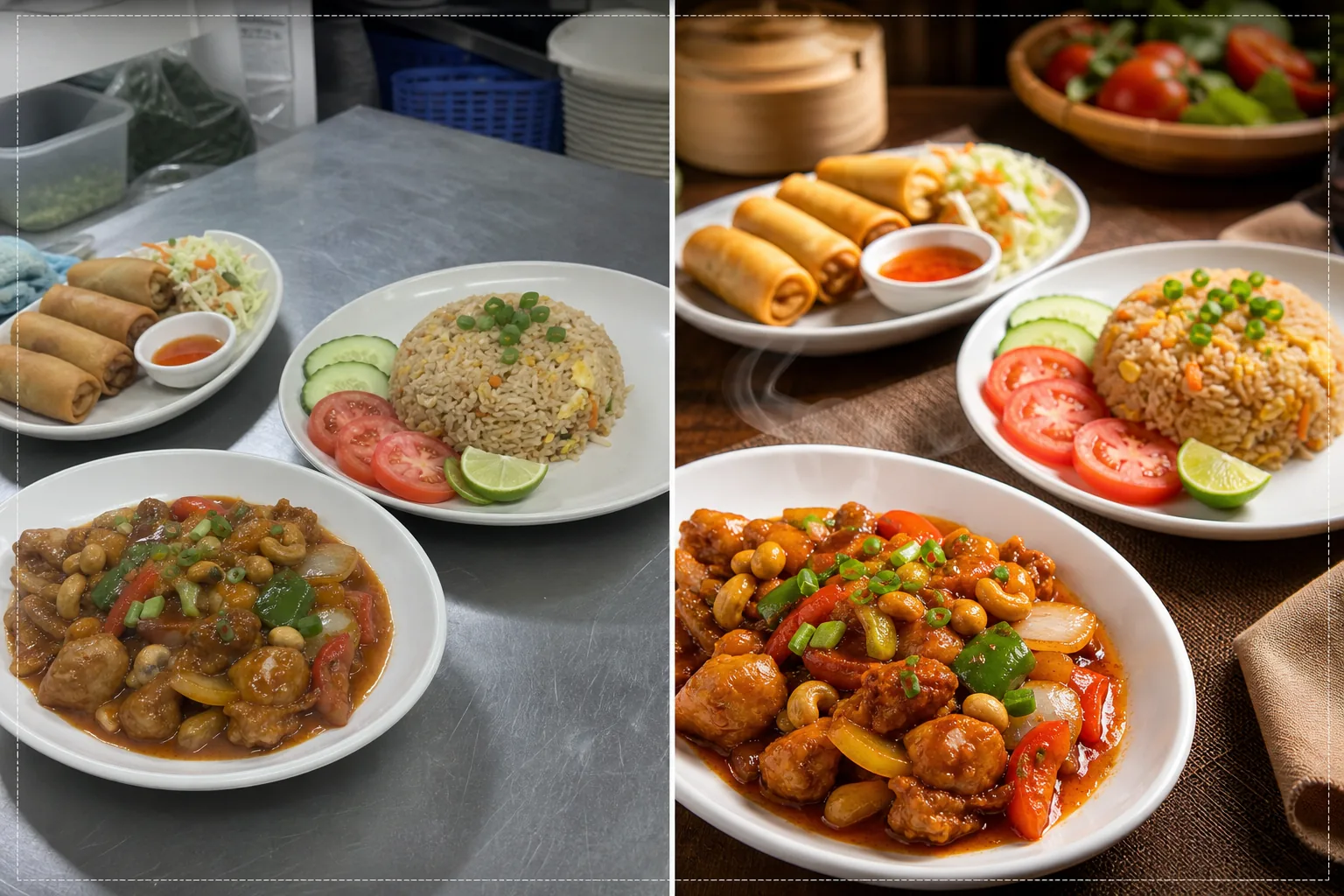
Was diese Vorlage macht
Verwandelt schnelle Küchenfotos in Bilder in Menüqualität, die Bestellungen auf Lieferplattformen ankurbeln. Restaurants fotografieren ihre Gerichte oft in hektischen Küchen mit Leuchtstoffröhren, die das Essen unappetitlich wirken lassen — grünstichiges Hähnchen, fahler brauner Reis und ausgewaschene Saucen. Diese Vorlage korrigiert die Farbtemperatur zu warmen, appetitlichen Tönen und verstärkt die Sättigung von natürlich kräftigen Zutaten wie Tomaten, grünem Gemüse und Paprika. Background Eraser entfernt unaufgeräumte Küchenhintergründe und ersetzt sie durch saubere, zum Essen passende Oberflächen. AI Enhance schärft die Texturen der Speisen, sodass Käufer die Knusprigkeit von Frittiertem, den von heißen Gerichten aufsteigenden Dampf und die Frische der Garnituren sehen können.
Vorlageneinstellungen
| Farbwärme | Warme, appetitanregende Töne (+15 % Warmverschiebung, korrigiert Leuchtstoffgrün) |
| Speisensättigung | Selektive Verstärkung von Rot-, Grün- und Gelbtönen (natürliche Lebensmittelfarben) |
| Texturverbesserung | Schärfung von Details bei Knusprigkeit, Feuchtigkeit und Glanz |
| Hintergrund | Saubere Tischfläche, einfarbig oder dunkler, stimmungsvoller Hintergrund |
| Ausgabeabmessungen | 1200 × 800 px (optimal für Lieferplattformen) und 1080 × 1080 px (Social Media) |
So verwenden Sie diese Vorlage
Laden Sie Ihr Gerichtsfoto hoch
Fotografieren Sie das angerichtete Gericht direkt von oben (Flat Lay) oder im 45-Grad-Winkel — beide Kompositionen eignen sich gut für Lieferkarten. Nutzen Sie das beste verfügbare natürliche Licht oder stellen Sie das Gericht ans Fenster. Laden Sie direkt von Ihrem Telefon hoch — kein Studio-Aufbau nötig.
Farb- und Wärmekorrektur
Die Vorlage korrigiert den Farbstich von Leuchtstoff- und LED-Beleuchtung in der Küche und verschiebt die Speisentöne zu warmen, appetitlichen Farbtönen. Saucen wirken kräftiger, Proteine goldbraun und Gemüse frisch. Die Korrektur hebt das hervor, was natürlich vorhanden ist, statt das Essen künstlich gefärbt aussehen zu lassen.
Hintergrund- und Texturverbesserung
Background Eraser tauscht den Küchenhintergrund gegen eine saubere Oberfläche aus — Holztisch, Marmor, Schiefer oder eine einfache einfarbige Fläche. AI Enhance schärft die Texturen der Speisen, um die Knusprigkeit von Frittiertem, den Glanz von Saucen und die Frische von Produkten hervorzuheben. Das Gesamtbild erhält die Qualität professioneller Food-Fotografie.
Für Lieferplattformen exportieren
Laden Sie mit 1200 × 800 px für Menüeinträge auf Lieferplattformen (DoorDash, Uber Eats, Grubhub) oder mit 1080 × 1080 px für Instagram-Food-Posts herunter. Das warme Farbprofil sorgt dafür, dass das Gericht auf allen Geräten und Bildschirmtypen appetitlich aussieht.
Profi-Tipps für beste Ergebnisse
- ✓Fotografieren Sie Gerichte sofort nach dem Anrichten, solange Dampf, Feuchtigkeit und die Frische der Garnituren auf dem Höhepunkt sind. Food-Fotografie hat ein Zeitfenster von etwa drei bis fünf Minuten, bevor sich Saucen setzen, Garnituren welken und der Dampf verfliegt. Die Vorlage verstärkt diese Frischemerkmale, kann sie aber nicht erzeugen.
- ✓Verwenden Sie einen weißen oder hellen Teller für Menüfotos. Weiße Teller erzeugen den stärksten Kontrast zum Essen, lassen Farben hervortreten und ermöglichen der KI sauberere Kanten beim Entfernen des Hintergrunds. Dunkle Teller funktionieren auch, mindern aber den Vorteil des Farbkontrasts.
- ✓Bei Kombimenüs und Bestellungen mit mehreren Gerichten ordnen Sie alle Elemente in einem einzigen Bildausschnitt mit etwas Abstand an. Die Vorlage schärft jedes Speisenelement einzeln, und das Zeigen der vollständigen Bestellung gibt Lieferkunden eine klare Vorstellung davon, was sie erhalten werden.
Häufige Fragen
Kann das Fotos korrigieren, die unter Leuchtstoffröhren in der Küche aufgenommen wurden?
+
Ja. Leuchtstoffbeleuchtung ist das häufigste Problem in der Restaurant-Food-Fotografie und erzeugt einen grün-gelben Stich, der das Essen unappetitlich wirken lässt. Die Vorlage korrigiert gezielt diese Farbverschiebung und ersetzt sie durch warme, appetitliche Töne, die das Essen natürlich köstlich aussehen lassen.
Funktioniert das für alle Küchenrichtungen?
+
Die Vorlage verarbeitet alle Speisearten — amerikanisch, asiatisch, mexikanisch, italienisch, indisch, nahöstlich und mehr. Die Farbkorrektur und -verbesserung sind auf die natürlichen Farben von Speisen aller Küchentraditionen abgestimmt und verstärken Rottöne in Gerichten auf Tomatenbasis, Grüntöne in Salaten und Goldtöne in Frittiertem und Gebackenem.
Kann ich meine gesamte Speisekarte auf einmal verarbeiten?
+
Ja. Laden Sie alle Fotos der Menügerichte hoch und verarbeiten Sie sie im Stapel. Die Vorlage wendet eine einheitliche Farbbehandlung, einen einheitlichen Hintergrund und einheitliche Abmessungen auf Ihre gesamte Speisekarte an, für eine einheitliche, professionelle Menügalerie auf Lieferplattformen.
Menüfotos, die Kunden sofort auf Bestellen tippen lassen
Laden Sie Gerichtsfotos aus Ihrer Küche hoch und erhalten Sie appetitliche, plattformbereite Bilder, die mehr Lieferbestellungen erzielen.
Kostenlos testenRelated templates
More food templates for your workflow.
Verbessern Sie Rezeptfotos für Kochbücher und Food-Blogs durch Schärfung in Druckqualität, Farbgenauigkeit der Zutaten, gestylte Szenenbereinigung und hochauflösende Ausgabe.
Erstellen Sie Speisekartengrafiken mit Hintergrundentfernung für Lebensmittelfotos, einheitlichem Design und Layout-fähigen Exporten für digitale Displays, gedruckte Speisekarten und Lieferplattformen von Drittanbietern.