
تحرير صور الكتاب السنوي باستخدام أدوات الذكاء الاصطناعي
تحتاج صور الكتاب السنوي إلى خلفيات متناسقة، وحتى الإضاءة، وصور شخصية نظيفة. Magic Eraser يساعد المدارس والاستوديوهات وأولياء الأمور في الحصول على نتائج ذات مظهر احترافي دون الحاجة إلى عمليات تنقيح مكلفة.
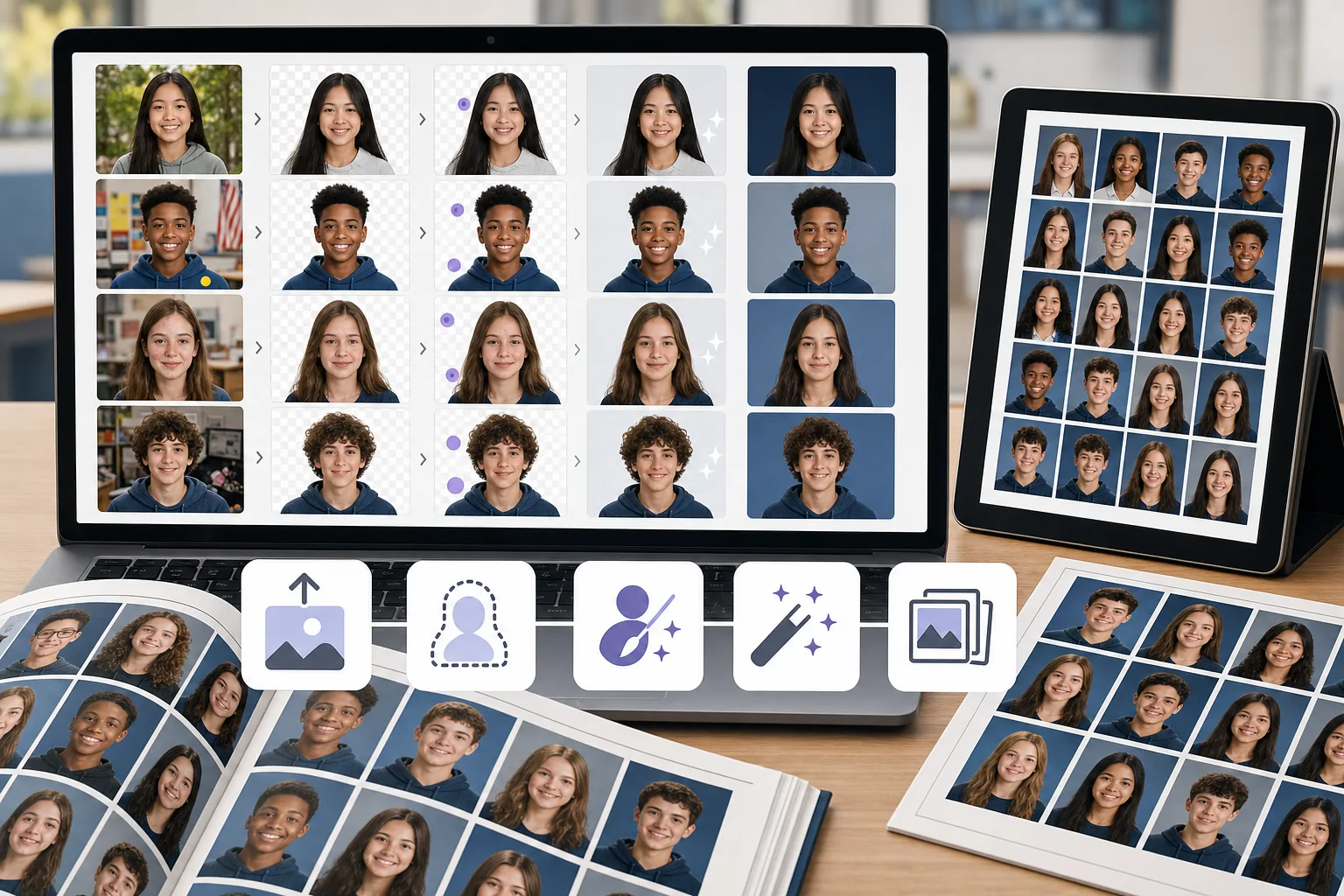
خلفيات غير متناسقة عبر الصور
يتم تصوير الطلاب المختلفين في مواقع مختلفة أو في أيام مختلفة مما يعني أن الخلفيات تختلف في اللون والملمس والإضاءة. ويستغرق توحيدها يدويًا وقتًا طويلاً.
العيوب والانحرافات في الصور
الشعر الشارد، وعيوب الجلد، والملصقات على الملابس، والأشياء الخلفية كلها تحتاج إلى تنظيف لإنتاج صور مصقولة للكتاب السنوي.
أحجام دفعات كبيرة مع مواعيد نهائية ضيقة
تقوم فرق الكتاب السنوي بمعالجة مئات الصور في الموعد النهائي. يتضاعف أي اختناق في عملية التحرير لكل صورة عبر قائمة الفصل الدراسي بالكامل.
كيف يساعد Magic Eraser في صور الكتاب السنوي
قم بتحميل الصورة
افتح Magic Eraser وقم بتحميل صورة الطالب أو مجموعة من الصور التي تحتاج إلى التنظيف.
إزالة الخلفية أو استبدالها
استخدم إزالة الخلفية لعزل الموضوع، ثم ضعه على خلفية الكتاب السنوي النظيفة والمتسقة.
تنظيف الانحرافات
قم بمسح العيوب أو الأشياء الضالة أو آثار الإضاءة غير المستوية باستخدام أداة الممحاة المدعومة بالذكاء الاصطناعي.
تعزيز وتصدير
قم بتطبيق AI Enhancement لزيادة وضوح الصورة الشخصية وتوازن التعريض الضوئي، ثم قم بالتصدير بدقة الطباعة.
الأسئلة المتداولة
هل يمكن لـ Magic Eraser استبدال خلفيات صور الكتاب السنوي؟
+
نعم. استخدم إزالة الخلفية لعزل الطالب، ثم ضع الصورة على أي خلفية صلبة أو ذات علامة تجارية للحصول على مظهر متسق للكتاب السنوي.
هل هذا مناسب لفرق الكتاب السنوي المدرسية؟
+
نعم. Magic Eraser سهل بما فيه الكفاية ليستخدمه أعضاء لجنة الكتاب السنوي وأولياء الأمور المتطوعين دون خبرة تحريرية احترافية.
هل يمكنني إزالة العيوب من صور الطلاب؟
+
نعم. تعمل أداة الممحاة بشكل جيد لإزالة عيوب البشرة والملصقات والمشتتات الصغيرة من اللقطات الشخصية.
هل يعمل Magic Eraser مع الصور الجماعية أيضًا؟
+
نعم. يمكنك تنظيف الصور الجماعية عن طريق إزالة عوامل التشتيت في الخلفية وتحسين الإضاءة وإصلاح مشكلات التكوين.
ما الدقة التي يمكنني تصدير صور الكتاب السنوي بها؟
+
يعتمد حجم التصدير المتاح على خيارات التحسين والحساب المحددة. قبل تسليم الملفات، قارن أبعاد الصورة المنزّلة بالبكسل مع متطلبات الحجم وDPI الخاصة بمطبعة الكتاب السنوي.
احصل على صور الكتاب السنوي لتبدو في أفضل حالاتها
جرّب Magic Eraser خلفيات مجانية ونظيفة، وقم بإصلاح عوامل التشتيت وتحسين صور الطلاب بدون برامج باهظة الثمن.
جرب Magic Eraser مجانًاحالات استخدام ذات صلة
شاهد كيف يستخدم المحترفون هذه الأدوات في مهام العمل الفعلية.
صور الإعلانات المزدحمة بالأغراض الشخصية أو السيارات المركونة أو معدات البناء قد تنفّر المشترين. يستخدم Magic Eraser الذكاء الاصطناعي لتنظيف صور عقارك فورًا — دون الحاجة إلى مهارات Photoshop.
الخلفيات المشوشة ولقطات المنتجات الفوضوية تكلفك مبيعات كل يوم. يساعدك Magic Eraser على إنشاء صور منتجات احترافية ونظيفة في ثوانٍ — دون الحاجة إلى مهارات Photoshop. ما عليك سوى الرفع، ومسح العناصر المشتتة، والإدراج بثقة.
ترفض مكاتب جوازات السفر والتأشيرات آلاف الصور يومياً بسبب الخلفيات غير الصحيحة. يزيل Magic Eraser أي خلفية ويستبدلها باللون الدقيق الذي تحتاجه — أبيض أو رمادي فاتح أو أزرق — في ثوانٍ.
مقارنات ذات صلة
شاهد كيف يقارن Magic Eraser بالأدوات المشابهة.
TouchRetouch هو تطبيق جوال مدفوع شائع لإزالة الكائنات والعيوب. يوفّر Magic Eraser تحريرًا مجانيًا مدعومًا بالذكاء الاصطناعي على أي جهاز دون الحاجة إلى التثبيت. اطّلع على كيفية مقارنتهما من حيث الميزات والأسعار وسهولة الاستخدام.
Cleanup.pictures هي أداة ويب مجانية لإزالة الكائنات بسرعة. يذهب Magic Eraser إلى أبعد من ذلك مع 8 أدوات تحرير مدعومة بالذكاء الاصطناعي AI وتطبيقات للهاتف المحمول ومعالجة متقدمة. اطلع على المقارنة بين الاثنين.
يُعد remove.bg الرائد في السوق لإزالة الخلفية، حيث يوفر واجهة برمجة تطبيقات قوية وتكاملات مع Photoshop و Figma. ويذهب Magic Eraser إلى أبعد من ذلك بثماني أدوات تحرير مدعومة بالذكاء الاصطناعي — من إزالة الكائنات والتعبئة التوليدية إلى التحسين والتصميم بالذكاء الاصطناعي — كل ذلك في محرر واحد.
محرران قويان للصور بالذكاء الاصطناعي بنقاط قوة مختلفة. يقدم Magic Eraser مجموعة أوسع من أدوات الذكاء الاصطناعي التوليدية، بينما يتفوق Photoroom في تصوير منتجات التجارة الإلكترونية والمعالجة الدفعية. اعرف أيهما يناسب سير عملك.
أدلة ذات صلة
استكشف المزيد من الأدلة والمحتوى المتعلق بسير العمل هذا.
تعرّف على كيفية استخدام Magic Eraser لإزالة العناصر والأشخاص والنصوص والمشتتات من الصور بنتائج ذكاء اصطناعي أنظف.
تعلّم كيفية إزالة الأشخاص من الصور بالذكاء الاصطناعي في ثوانٍ. دليل لصور السفر والعقارات والمنتجات.
دليل خطوة بخطوة لإزالة العلامات المائية من صورك باستخدام الذكاء الاصطناعي. متى يكون ذلك مناسبًا، وأفضل التقنيات، وكيف يتعامل Magic Eraser معها.