
تنقيح البشرة الطبيعي
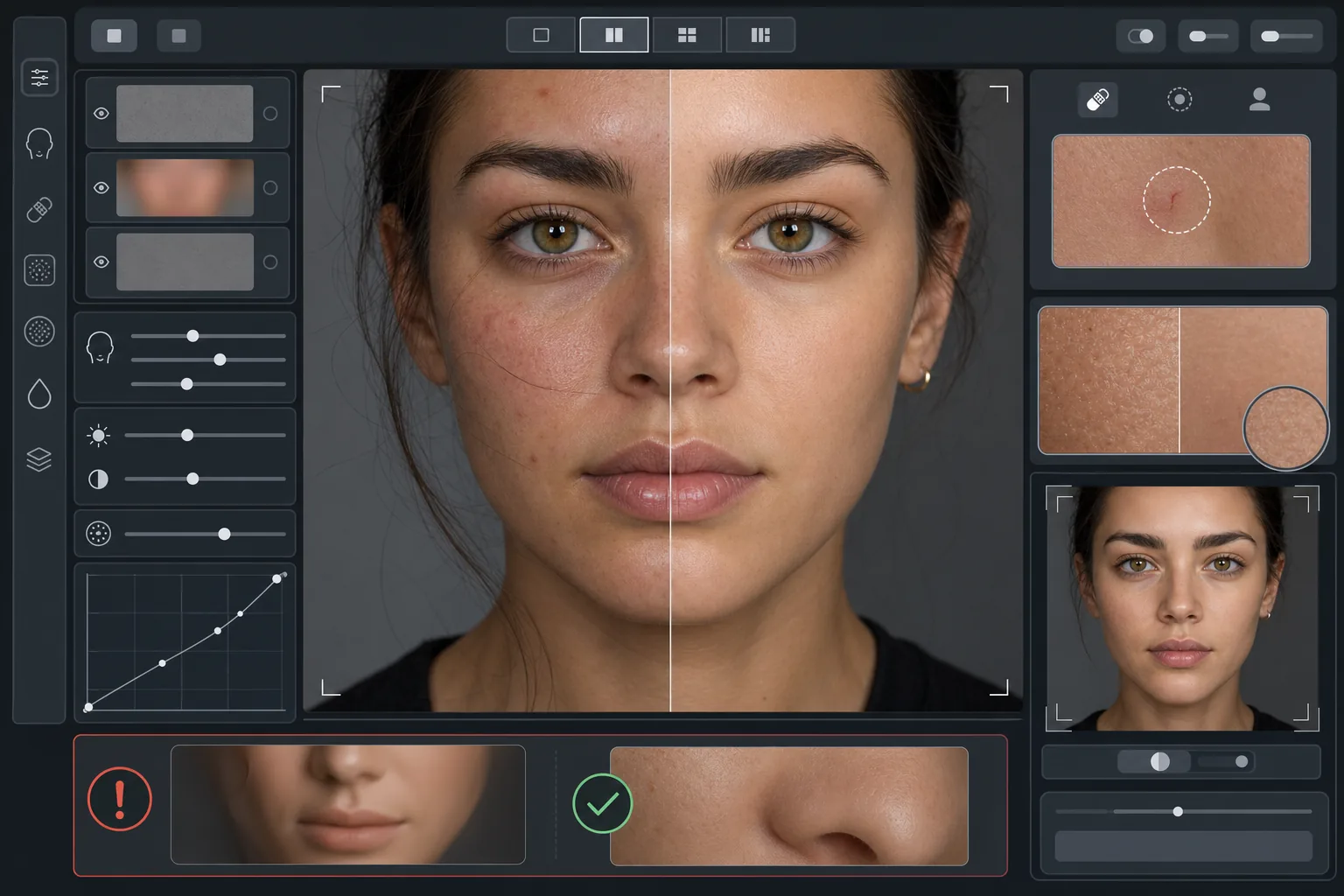
حسّن الصور الشخصية دون المظهر البلاستيكي. يزيل هذا القالب العيوب المؤقتة، ويوحّد لون البشرة، ويُنعّم تفاوتات الإضاءة مع الحفاظ المتعمّد على المسام والخطوط الدقيقة والملمس الطبيعي الذي يجعل البشرة تبدو حقيقية. والنتيجة صورة شخصية يبدو فيها الشخص بأفضل صورة له في أفضل أيامه — وليس دمية من صنع الذكاء الاصطناعي.
جرّب هذا القالب مجانًاPortrait template preview
ما الذي يفعله هذا القالب
يطبّق تنقيحًا للبشرة قائمًا على الترددات يفصل الملمس عن اللون. يزيل AI Enhance العيوب المؤقتة (البثور والاحمرار والهالات تحت العينين) مع الحفاظ على ملمس البشرة الدقيق — المسام والزغب والتفاوت الطبيعي — الذي تراه العين أصيلًا. ويتولى Magic Eraser الإزالة الموضعية المحددة حين يكون تحسين الذكاء الاصطناعي واسعًا أكثر من اللازم، مثل إزالة خدش واحد أو لدغة حشرة دون التأثير على البشرة المحيطة. التأثير العام هو بشرة متجانسة وصحية المظهر تجتاز اختبار التكبير.
إعدادات القالب
| شدة التنقيح | طبيعية — تستهدف العيوب والاحمرار وتحافظ على الملمس |
| الحفاظ على المسام | كامل — يحافظ على كل ملمس البشرة الطبيعي على مستوى البكسل |
| توحيد اللون | معتدل — يقلل البقع والاحمرار دون تسطيح تفاوت الألوان |
| تصحيح ما تحت العينين | خفيف — يُفتّح الهالات الداكنة دون إزالة الظل الطبيعي |
| تنعيم الإضاءة | يملأ الظلال الحادة ويقلل بقع الضوء الناتجة عن الفلاش المباشر |
| دقة الإخراج | مطابقة للأصل (تحافظ على كامل التفاصيل للاقتصاص والتكبير) |
كيفية استخدام هذا القالب
ارفع صورة شخصية
استخدم صورة شخصية جيدة الإضاءة يكون فيها الوجه بتركيز حاد. يعمل القالب على أفضل وجه عندما يكون ملمس البشرة الطبيعي مرئيًا في الأصل — فالصور ذات التركيز الناعم أو المضغوطة بشدة توفر ملمسًا أقل للذكاء الاصطناعي للحفاظ عليه.
طبّق التنقيح الطبيعي
يتعرّف AI Enhance على العيوب المؤقتة والاحمرار غير المتساوي وتفاوتات اللون ويصحّحها مع إبقاء ملمس البشرة الأساسي سليمًا تمامًا. تظل المسام والخطوط الدقيقة وتفاوت اللون الطبيعي مرئية — ولا يتغير سوى العيوب.
صحّح مناطق محددة موضعيًا
استخدم Magic Eraser لأي علامات فردية متبقية تريد إزالتها — خدش في طور الالتئام، أو طفح جلدي مؤقت، أو شعرة شاردة على الوجه. تندمج كل عملية إزالة مع ملمس البشرة الطبيعي المحيط بها.
راجع بالتكبير الكامل وصدّر
كبّر إلى 100% للتحقق من سلامة ملمس البشرة — ينبغي أن تكون المسام مرئية وطبيعية. إذا بدت أي منطقة ناعمة أكثر من اللازم، فقلّل شدة التنقيح وأعد المعالجة. صدّر بالدقة الكاملة للحفاظ على التفاصيل الطبيعية.
نصائح احترافية لأفضل النتائج
- ✓ابدأ بأقل شدة تنقيح وزدها فقط عند الحاجة — فإضافة التنعيم أسهل بكثير من استعادة ملمس تمت معالجته وإزالته.
- ✓بالنسبة للأشخاص المصابين بحب الشباب أو الوردية، يزيل القالب العيوب الفردية دون تغيير لون البشرة الأساسي — وتبدو النتيجة كيوم بشرة صافية، وليست شخصًا مختلفًا.
- ✓تجنّب دمج هذا القالب مع مرشحات التجميل بكاميرا الهاتف — فالتنعيم المدمج في كثير من كاميرات الهواتف يقلل الملمس بالفعل، والمعالجة المزدوجة تخلق المظهر البلاستيكي الذي صُمّم هذا القالب لتجنبه.
- ✓صوّر بصيغة RAW إن أمكن وحوّلها إلى JPEG قبل الرفع — فصيغة RAW تلتقط بيانات أكثر عن ملمس البشرة يستطيع الذكاء الاصطناعي الحفاظ عليها أثناء التنقيح.
الأدوات
أسئلة شائعة
كيف يختلف هذا عن مرشحات التجميل التي تُنعّم البشرة؟
+
تطبّق مرشحات التجميل ضبابية موحّدة تمحو المسام والخطوط الدقيقة والملمس الطبيعي — مما يخلق المظهر البلاستيكي الذي لا تخطئه العين. يستخدم هذا القالب معالجة قائمة على الترددات تفصل الملمس عن اللون، فيزيل العيوب من طبقة اللون مع ترك طبقة الملمس دون مساس. وتبدو النتيجة كبشرة حقيقية، وليست سطحًا مُصيّرًا.
هل سيغيّر هذا شكل ملامح الوجه؟
+
لا. يؤثر القالب فقط على مظهر سطح البشرة — اللون والعيوب وتجانس الإضاءة. ولا يعيد أبدًا تشكيل الأنف أو الفك أو العينين أو أي بنية في الوجه. يبدو الشخص تمامًا كما هو، فقط ببشرة أنقى وإضاءة أكثر تجانسًا.
هل يمكنني استخدام هذا لصور البورتريه الاحترافية وأعمال المعرض؟
+
نعم. يلبي معيار التنقيح الطبيعي التوقعات الاحترافية لصور البورتريه المؤسسية ومعارض الممثلين وملفات المواعدة ووسائل التواصل الاجتماعي حيث تهم الأصالة. سيبدو الشخص مثل صورته على أرض الواقع — وهذا هو الهدف الكامل من التنقيح الطبيعي.
بشرة أفضل، وما زلت أنت
ارفع صورة شخصية واحصل على تنقيح طبيعي للبشرة يحافظ على الملمس في ثوانٍ. بلا مظهر بلاستيكي، وبلا تنعيم مريب — فقط أنت في أفضل أيامك.
جرّبه مجانًاRelated templates
More portrait templates for your workflow.
قالب تنقيح الصورة المدرسية المناسب للعمر. إزالة العيوب بشكل طبيعي، وخلفيات متسقة، ومخرجات قياسية للكتاب السنوي مع معالجة الدفعات للفصول بأكملها.
قالب صورة للحيوانات الأليفة بجودة الاستوديو. يعالج حواف الفراء، ويزيل المقاود والمقاود، ويستبدل الخلفيات، ويزيد من حدة عيون الكلاب والقطط والحيوانات الأخرى.
قم بتحسين صور الأطفال حديثي الولادة والأطفال بألوان دافئة ناعمة، وتنعيم البشرة بلطف، وإزالة الدعامات والمشتتات، وحجم جاهز للطباعة للإعلانات وفن الجدران.
قم بتنميق صور الأمومة باستخدام تنعيم لطيف للبشرة، وإضاءة متوهجة ناعمة، وتبسيط الخلفية، وتدرج الألوان الدافئة للحصول على مظهر صورة الحمل الخالدة.
قم بتنظيف الصور العائلية عن طريق إزالة عوامل التشتيت في الخلفية، وإصلاح التعرض غير المتساوي، وتنعيم البشرة بشكل طبيعي، وضمان ظهور الجميع بأفضل حالاتهم في نفس الإطار.