
تنقيح صور البورتريه المدرسية
امنح كل طالب صورة بورتريه يشعر بالرضا عنها مع الحفاظ على مظهر طبيعي ومناسب لعمره. يتعامل هذا القالب مع المشكلات الشائعة في التصوير المدرسي — العيوب المؤقتة، والإضاءة غير المتساوية على مدار الجلسة، والخلفيات غير المتسقة — وينتج صورًا جاهزة للكتاب السنوي بجودة احترافية موحدة لكل طالب في الفصل.
جرّب هذا القالب مجانًاPortrait template preview
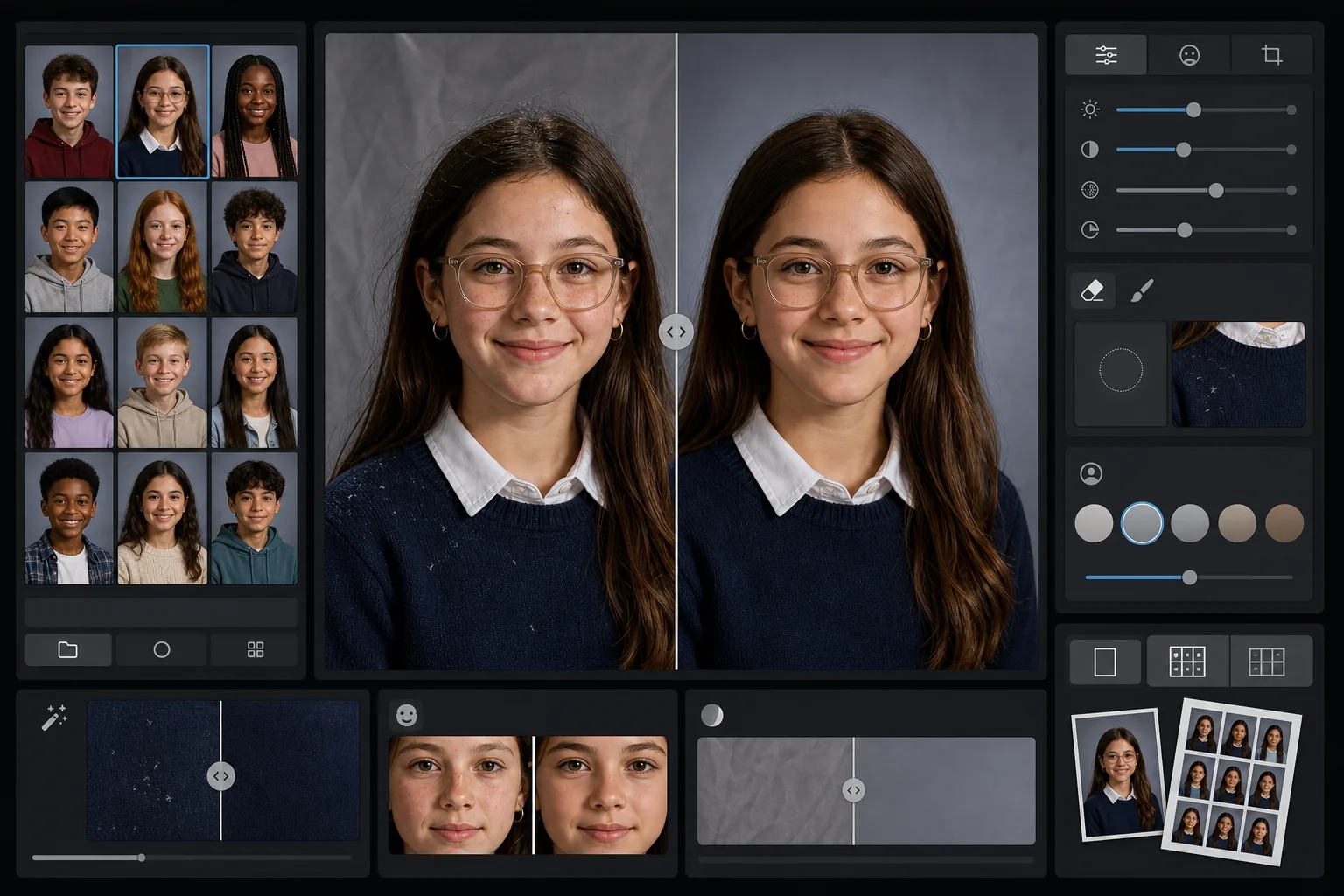
ماذا يفعل هذا القالب
يطبّق على صور البورتريه المدرسية تنقيحًا لطيفًا ومناسبًا للعمر يُنعّم العيوب المؤقتة مع الحفاظ على المظهر الطبيعي لكل طالب. يصحّح AI Enhance التعرّض غير المتساوي وتحوّلات الألوان التي تحدث عند تصوير عشرات الطلاب تحت إعداد إضاءة واحد على مدار الجلسة. ويزيل Magic Eraser الشعيرات المتناثرة على الملابس، وحواف الياقة المعوجّة، وتجاعيد الخلفية على الخلفيات المحمولة.
إعدادات القالب
| مستوى التنقيح | خفيف — يزيل العيوب المؤقتة فقط، ويحافظ على النمش والملامح الطبيعية |
| حجم الإخراج | 1200×1500px (بورتريه قياسي 4:5، 300 DPI بحجم المحفظة) |
| توحيد الخلفية | يطابق درجة لون الخلفية عبر جميع الصور في الدفعة |
| تصحيح التعرّض | تلقائي — يعوّض انحراف الإضاءة على مدار جلسة التصوير |
| اتساق الألوان | توازن أبيض موحّد عبر جميع صور البورتريه المعالَجة |
| تنظيف التفاصيل المتناثرة | يزيل الشعيرات الطائرة على الكتفين، والوبر، وتجاعيد الخلفية |
كيفية استخدام هذا القالب
ارفع صور بورتريه الفصل
ارفع صورة بورتريه واحدة أو دفعة كاملة للفصل. يتعامل القالب مع الصور الفردية أو المجموعات، مطبّقًا معيار التنقيح نفسه على جميع الصور للحصول على قسم متّسق في الكتاب السنوي.
طبّق تنقيحًا مناسبًا للعمر
يُنعّم AI Enhance بلطف العيوب المؤقتة مثل ظهور حبّ أو خدش مع إبقاء كل طالب يبدو على طبيعته. يُحتفظ دائمًا بالنمش والوحمات وتقويم الأسنان والنظارات — الهدف هو نسخة مصقولة من مظهرهم الحقيقي.
وحّد التعرّض والخلفية
تتغيّر ظروف الإضاءة على مدار جلسة البورتريه مع انحراف الإعدادات. يصحّح القالب التعرّض وتوازن الأبيض بحيث يظهر كل طالب مضاءً بشكل متّسق، وتتطابق درجة لون الخلفية عبر الدفعة بأكملها.
نظّف وصدّر
يزيل Magic Eraser المشتّتات الصغيرة — وبرة على سترة داكنة، شعرة متناثرة على الجبين، تجعّد في الخلفية المحمولة. صدّر بدقة معيار الكتاب السنوي للطباعة أو بصيغة JPEG بدقة أقل لمعرض المدرسة عبر الإنترنت.
نصائح احترافية لأفضل النتائج
- ✓عالِج دفعة الفصل بأكملها معًا بدلًا من صورة واحدة في كل مرة — يستخدم القالب المجموعة لمعايرة تعرّض ولون متّسقَين عبر جميع صور البورتريه.
- ✓بالنسبة للطلاب الذين يرتدون نظارات، ينبغي أن تُظهر الصورة الأصلية الطالب وهو يميل بذقنه قليلًا للأسفل لتقليل الوهج — يعمل التحسين بالذكاء الاصطناعي بأفضل صورة عندما تكون العينان مرئيتين خلف العدسات.
- ✓شغّل دفعة اختبارية من 5 إلى 10 صور بورتريه قبل معالجة مدرسة كاملة للتأكد من أن مستوى التنقيح يلبي معايير لجنة الكتاب السنوي لديك.
- ✓احتفظ بالملفات الأصلية غير المنقّحة إلى جانب النسخ المعالَجة — يفضّل بعض الآباء الصورة غير المعدَّلة تمامًا للاستخدام الشخصي.
الأدوات
أسئلة شائعة
هل التنقيح مناسب للأطفال والمراهقين؟
+
نعم. القالب مصمَّم خصيصًا للأشخاص في سن المدرسة. فهو يزيل العيوب المؤقتة فقط مثل ظهور حبّ في يوم التصوير — ولا يعيد أبدًا تشكيل الملامح أو يغيّر لون البشرة أو يطبّق نوع التنعيم المستخدَم في تنقيح جمال البالغين. يبدو كل طالب على طبيعته.
هل يمكنني معالجة فصل أو مدرسة كاملة دفعة واحدة؟
+
نعم. ارفع حتى مئات صور البورتريه في دفعة واحدة. يطبّق القالب معايير تنقيح متطابقة ويوحّد التعرّض واللون واتساق الخلفية عبر كل صورة بحيث يبدو قسم الكتاب السنوي موحّدًا.
هل سيزيل هذا تقويم الأسنان أو النظارات أو المعينات السمعية؟
+
لا. صُمِّم القالب للحفاظ على جميع الملامح الدائمة وشبه الدائمة بما في ذلك تقويم الأسنان والنظارات والمعينات السمعية والأجهزة الطبية. وهو يعالج فقط العيوب السطحية المؤقتة والمشتّتات البيئية مثل الوبر وتجاعيد الخلفية.
قدّم صور بورتريه جاهزة للكتاب السنوي في دقائق
ارفع صور البورتريه المدرسية فرديًا أو حسب الفصل واحصل على صور متّسقة، منقّحة بشكل طبيعي، وجاهزة للطباعة. يبدو كل طالب في أفضل حالاته.
جرّبه مجانًاRelated templates
More portrait templates for your workflow.
قالب صورة للحيوانات الأليفة بجودة الاستوديو. يعالج حواف الفراء، ويزيل المقاود والمقاود، ويستبدل الخلفيات، ويزيد من حدة عيون الكلاب والقطط والحيوانات الأخرى.
قالب تنميق البشرة بشكل طبيعي يزيل العيوب مع الحفاظ على المسام والملمس. إضاءة متجانسة، بدون مظهر بلاستيكي، فقط مظهر أفضل على الكاميرا.
قم بتحسين صور الأطفال حديثي الولادة والأطفال بألوان دافئة ناعمة، وتنعيم البشرة بلطف، وإزالة الدعامات والمشتتات، وحجم جاهز للطباعة للإعلانات وفن الجدران.
قم بتنميق صور الأمومة باستخدام تنعيم لطيف للبشرة، وإضاءة متوهجة ناعمة، وتبسيط الخلفية، وتدرج الألوان الدافئة للحصول على مظهر صورة الحمل الخالدة.
قم بتنظيف الصور العائلية عن طريق إزالة عوامل التشتيت في الخلفية، وإصلاح التعرض غير المتساوي، وتنعيم البشرة بشكل طبيعي، وضمان ظهور الجميع بأفضل حالاتهم في نفس الإطار.