
تنظيف صورة العائلة
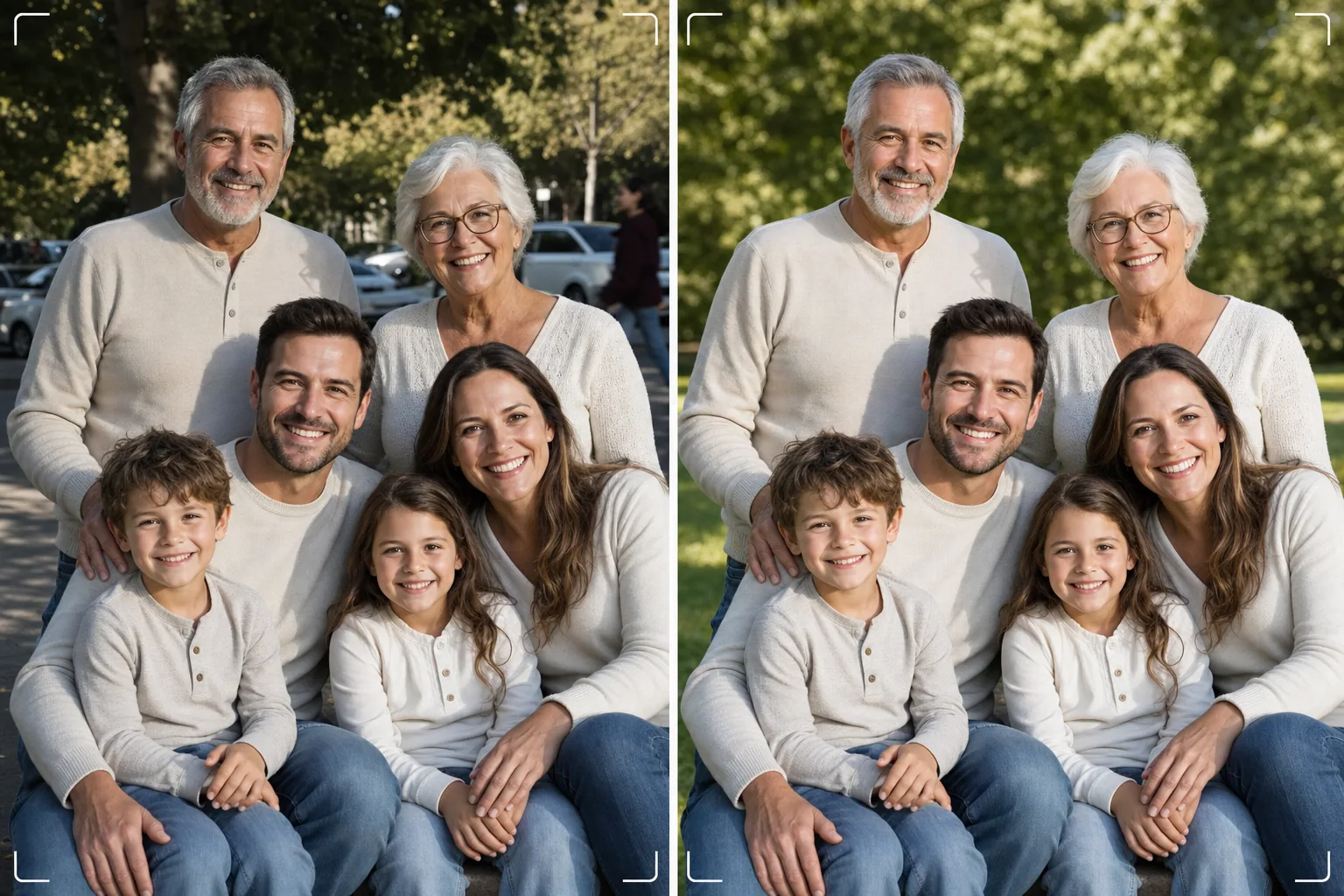
احصل على صورة العائلة المثالية دون الحاجة إلى مئة لقطة. يزيل هذا القالب عوامل التشتيت في الخلفية، ويصحح الإضاءة غير المتساوية عبر المجموعة بأكملها، ويقلل من العيوب بشكل طبيعي على كل وجه، وينظف العيوب الصغيرة التي تمنع لقطة جماعية جيدة من أن تصبح رائعة.
جرّب هذا القالب مجانًاPortrait template preview
ما الذي يفعله هذا القالب
يحل المشكلة الشائعة في صور العائلة، وهي جعل الجميع يبدون رائعين في إطار واحد. يزيل Magic Eraser الأشخاص الذين يقتحمون الصورة، وصناديق القمامة، ولافتات الخروج، وخطوط الكهرباء، والسيارات المتوقفة، وغيرها من عوامل التشتيت التي تفسد التكوينات الجماعية الجيدة. يصحح AI Enhance الإضاءة غير المتساوية التي تحدث عندما يكون بعض أفراد العائلة في الظل بينما يكون آخرون تحت أشعة الشمس المباشرة، ليصل بالجميع إلى تعرّض متسق وجذاب. يقلل تنعيم البشرة الطبيعي من العيوب والهالات السوداء تحت العينين والاحمرار على كل وجه دون أن يبدو أي شخص وكأنه خضع لتجميل مصطنع. والنتيجة هي صورة العائلة التي تخيلتها عندما جمعت الجميع معًا.
إعدادات القالب
| تنظيف الخلفية | اكتشاف عوامل التشتيت وإزالتها تلقائيًا (أشخاص، لافتات، أشياء) |
| موازنة التعرض | إضاءة متساوية على جميع الأشخاص (ملء الظلال + استعادة الإضاءات العالية) |
| تحسين البشرة | تقليل العيوب بشكل طبيعي لكل وجه (مع الحفاظ على الملامح الفريدة) |
| تصحيح الألوان | توازن أبيض موحد عبر اللقطات الجماعية ذات الإضاءة المختلطة |
| زيادة الحدة | زيادة حدة تراعي الوجوه (تعطي الأولوية للعيون والابتسامات) |
| دقة الإخراج | 6000 بكسل للحافة الطويلة (طباعة جدارية بدقة 300 نقطة في البوصة حتى 20×13 بوصة) |
كيفية استخدام هذا القالب
حمّل صورة العائلة
حمّل الصورة الجماعية الملتقطة في تجمع عائلي أو عطلة أو لمّ شمل أو جلسة تصوير شخصية. يتعامل القالب مع المجموعات من شخصين إلى ثلاثين شخصًا. للحصول على أفضل النتائج، اختر الإطار الذي ينظر فيه أكبر عدد من الوجوه إلى الكاميرا بتعابير لطيفة — يصلح القالب الخلفية والإضاءة لكنه لا يستطيع تغيير تعابير الوجه أو فتح العيون المغلقة.
أزل عوامل التشتيت في الخلفية
يحدد Magic Eraser ويزيل الغرباء واللافتات المشتتة والقمامة والمركبات وغيرها من العناصر غير المرغوب فيها من خلف المجموعة العائلية. يعيد الذكاء الاصطناعي بناء الخلفية بشكل طبيعي، فيملأ العشب أو السماء أو الجدران أو الأرضية خلف الأشياء التي تمت إزالتها.
وازن الإضاءة وحسّن الوجوه
يصحح AI Enhance اختلافات التعرض بين أفراد العائلة — لا مزيد من نصف المجموعة في الظل والنصف الآخر يحدّق بصعوبة في الشمس. يحصل كل وجه على تقليل فردي للعيوب وتفتيح خفيف للعينين مع الحفاظ على الملامح الفريدة والمظهر الطبيعي لكل شخص.
صدّر للطباعة أو المشاركة
نزّل بحافة طويلة 6000 بكسل لمطبوعات الجدران الكبيرة، أو بدقة 2000 بكسل لوسائل التواصل الاجتماعي وبطاقات المعايدة الرقمية. يصدّر القالب بصيغة sRGB للعرض على الشاشة أو Adobe RGB للطباعة الاحترافية. تتوفر نسب اقتصاص متعددة (4:5، 5:7، 8:10) لأحجام الإطارات الشائعة.
نصائح احترافية لأفضل النتائج
- ✓التقط من ثلاث إلى خمس لقطات متتالية بسرعة. اختر اللقطة التي يكون فيها أكبر عدد من الأشخاص بعيون مفتوحة وتعبير طبيعي — يتولى القالب كل شيء آخر، لكن لا يمكن تغيير التعابير وحالة فتح العينين بعد التصوير.
- ✓ضع العائلة في ظل مفتوح — تحت ظلة شجرة أو على الجانب المظلل من مبنى — بدلًا من مزيج من الشمس والظل. يمنح هذا القالب نقطة انطلاق مضاءة بشكل متساوٍ تنتج أكثر تحسين طبيعي.
- ✓للمجموعات الكبيرة (عشرة أشخاص أو أكثر)، رتّب الأشخاص في صفوف متداخلة مع وضع الأطول في الخلف. يخلق هذا التدرج الطبيعي عمقًا ويضمن ظهور كل وجه. يمكن للقالب تفتيح الوجوه في الصفوف الخلفية التي تكون أغمق قليلًا بسبب بُعدها عن مصدر الضوء.
الأدوات
الأسئلة الشائعة
هل يمكن لهذا إصلاح العيون المغلقة أو التعابير السيئة؟
+
لا. يحسّن القالب الإضاءة ويزيل عوامل التشتيت وينعّم البشرة، لكنه لا يستطيع تغيير تعابير الوجه أو فتح العيون المغلقة أو إعادة وضع الأشخاص. اختر الإطار صاحب أفضل تعبير قبل التحميل — سيجعل القالب ذلك الإطار يبدو بأفضل صورة ممكنة.
ماذا عن مجموعات لمّ الشمل الكبيرة؟
+
يتعامل القالب مع المجموعات التي تصل إلى نحو ثلاثين شخصًا. بالنسبة للمجموعات الكبيرة جدًا، يصبح تحسين كل وجه على حدة أكثر دقة بسبب صغر حجم الوجوه في الإطار، لكن تنظيف الخلفية وتصحيح الإضاءة يظلان فعّالين تمامًا مع أي حجم مجموعة.
هل يمكنني إزالة شخص من صورة العائلة؟
+
نعم، يمكن لـ Magic Eraser إزالة أفراد محددين من المجموعة. حدد الشخص الذي تريد إزالته وسيعيد الذكاء الاصطناعي بناء الخلفية خلفه. يعمل هذا بشكل أفضل عندما يكون الشخص على حافة المجموعة وليس في المنتصف بين الآخرين.
صورة العائلة المثالية على بُعد عملية تنظيف واحدة
حمّل صورك الجماعية واحصل على صور عائلية نظيفة ومضاءة بالتساوي ومحسّنة بشكل طبيعي وجاهزة للتعليق على الجدار.
جرّبه مجانًاRelated templates
More portrait templates for your workflow.
قالب تنقيح الصورة المدرسية المناسب للعمر. إزالة العيوب بشكل طبيعي، وخلفيات متسقة، ومخرجات قياسية للكتاب السنوي مع معالجة الدفعات للفصول بأكملها.
قالب صورة للحيوانات الأليفة بجودة الاستوديو. يعالج حواف الفراء، ويزيل المقاود والمقاود، ويستبدل الخلفيات، ويزيد من حدة عيون الكلاب والقطط والحيوانات الأخرى.
قالب تنميق البشرة بشكل طبيعي يزيل العيوب مع الحفاظ على المسام والملمس. إضاءة متجانسة، بدون مظهر بلاستيكي، فقط مظهر أفضل على الكاميرا.
قم بتحسين صور الأطفال حديثي الولادة والأطفال بألوان دافئة ناعمة، وتنعيم البشرة بلطف، وإزالة الدعامات والمشتتات، وحجم جاهز للطباعة للإعلانات وفن الجدران.
قم بتنميق صور الأمومة باستخدام تنعيم لطيف للبشرة، وإضاءة متوهجة ناعمة، وتبسيط الخلفية، وتدرج الألوان الدافئة للحصول على مظهر صورة الحمل الخالدة.