
إزالة العين الحمراء من الصور
إصلاح العين الحمراء الناتجة عن فلاش الكاميرا في الصور الشخصية والصور الجماعية ولقطات الأحداث. Magic Eraser يزيل الوهج الأحمر ويستعيد لون القزحية الطبيعي وتفاصيله - مما يؤدي إلى نتيجة تبدو كما لو لم يتم تشغيل الفلاش مطلقًا.
آخر تحديث
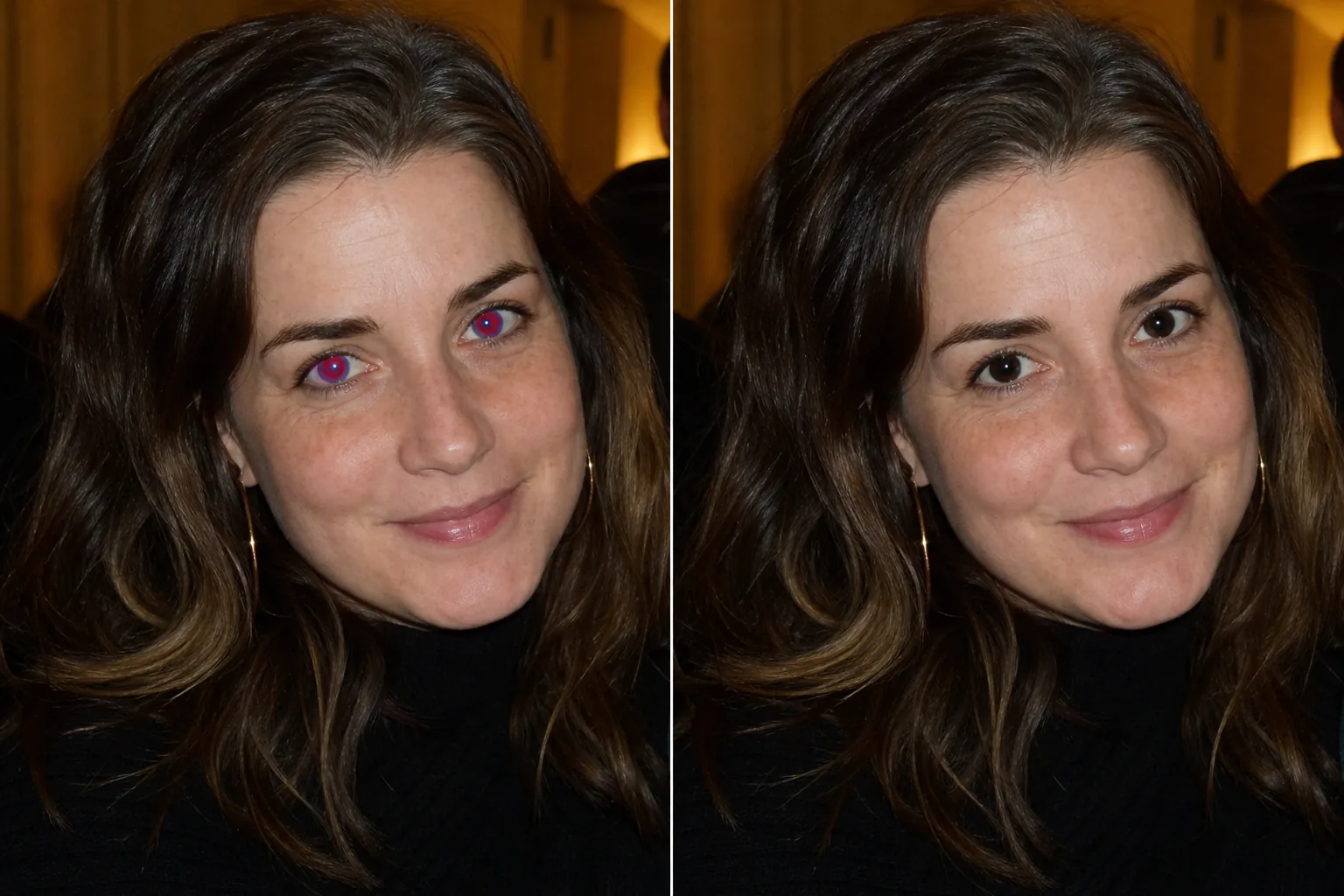
كيفية إزالة العين الحمراء من الصورة
لإزالة العيون الحمراء من صورة، افتح Magic Eraser على الويب أو iOS أو Android، وارفع صورة الفلاش، ثم مرّر الفرشاة فوق كل بؤبؤ أحمر واضغط على Erase — يستبدل الذكاء الاصطناعي التوهّج الأحمر ببؤبؤ داكن طبيعي ولون قزحية واقعي خلال ثوانٍ. الأداة مجانية، بدون تسجيل ولا علامة مائية، وتعمل مع الصور الفردية واللقطات الجماعية والمطبوعات الممسوحة ضوئيًا. ولأن التصحيح يتم لكل عين على حدة، يمكنك معالجة شخص واحد أو غرفة كاملة من ضيوف الحفلة ذوي العيون الحمراء في المرّة نفسها. تحدث العين الحمراء عندما ينعكس فلاش الكاميرا عن شبكية العين، مما يتسبب في توهج بؤبؤ العين باللون الأحمر في الصورة. في حين أن الهواتف الحديثة تستخدم الفلاش المسبق والتصوير الحسابي لتقليل العين الحمراء، إلا أنها لا تزال تظهر بشكل متكرر في صور الأحداث منخفضة الإضاءة ولقطات الفلاش الداخلية والصور الملتقطة بكاميرات قديمة أو فلاشات خارجية. تكون الصور الجماعية معرضة للخطر بشكل خاص - حيث ينطلق الفلاش لإضاءة الجميع، ويحصل الأشخاص الذين ينظرون مباشرة إلى الكاميرا على انعكاس الشبكية الكامل. الأطفال والأشخاص ذوو العيون الفاتحة هم أكثر عرضة للإصابة لأن تلاميذهم يميلون إلى أن يكونوا أكبر في الظروف المظلمة. إن مطبوعات الأفلام الممسوحة ضوئيًا من عصر كاميرات التصوير والتقاط الصور مليئة بلقطات العين الحمراء التي لم يتم تصحيحها أبدًا. يكتشف الذكاء الاصطناعي لـ Magic Eraser نمط العين الحمراء - التوهج الأحمر في منطقة حدقة العين - ويستبدله بلون قزحية طبيعي المظهر وتفاصيل حدقة داكنة، مما يحافظ على إبرازات العين الطبيعية وعمقها.
إصلاح العين الحمراء في ثلاث خطوات
- 1
قم بتحميل صورتك
افتح Magic Eraser على الويب أو iOS أو Android وقم بتحميل صورة الفلاش بالعين الحمراء. تعمل الأداة على الصور الفردية واللقطات الجماعية والمطبوعات الممسوحة ضوئيًا.
- 2
فرشاة على العيون الحمراء
قم بالطلاء على كل عين متأثرة. قم بتغطية المنطقة الحمراء بأكملها بما في ذلك أي حواف برتقالية أو صفراء حول الحواف. بالنسبة للصور الجماعية، قم بتنظيف عيون كل شخص على حدة.
- 3
محو والتحقق
اضغط على "مسح" وسيقوم الذكاء الاصطناعي باستبدال التوهج الأحمر بلون العين الطبيعي. يتحول لون حدقة العين إلى اللون الأسود، وتكتسب القزحية لونًا طبيعيًا، ويتم الحفاظ على ضوء الكشاف (انعكاس الفلاش الأبيض الصغير) لإبقاء العيون حية. قم بالتكبير للتأكد من أن كلتا العينين تبدو طبيعية، ثم قم بالتصدير.
الأفضل ل
- تم التقاط صور الأحداث والحفلات الداخلية باستخدام الفلاش
- صور جماعية حيث يكون لدى العديد من الأشخاص عيون حمراء
- طباعة الأفلام الممسوحة ضوئيًا من كاميرات التوجيه والتقاط الصور
- صور الأطفال ملتقطة في الإضاءة الخافتة
- تصوير حفلات الزفاف والاستقبال فلاش
- صور يوم المدرسة مع فلاش الاستوديو
- صور الحيوانات الأليفة مع توهج العين (انعكاس أخضر أو أصفر)
- يتم رقمنة الصور العائلية المؤرشفة واستعادتها
نصائح لتصحيح العين الحمراء بشكل طبيعي
يعمل تصحيح العين الحمراء بشكل أفضل عندما تقوم بالفرشاة بدقة على المنطقة المصابة - قم بتغطية التوهج الأحمر ولكن حاول ألا يمتد بعيدًا إلى الجلد أو الجفن المحيط. يستخدم الذكاء الاصطناعي الأجزاء غير الحمراء من العين (حافة القزحية، بياض العين، خط الجفن) لإعادة بناء اللون الطبيعي. بالنسبة للعين الحمراء الشديدة حيث تظهر القزحية بأكملها باللون الأحمر، يقوم الذكاء الاصطناعي بتقدير لون العين الطبيعي بناءً على درجات الألوان المحيطة ويطبق ظلًا واقعيًا. إذا كنت تعرف لون عين الشخص الفعلي وكانت النتيجة غير متطابقة، فإن تمريرة ثانية باستخدام فرشاة أكثر إحكامًا يمكن أن تؤدي إلى تحسين اللون. يتبع توهج عين الحيوانات الأليفة (عادةً ما يكون باللون الأخضر أو الأصفر من البساط الصافي) نفس العملية - قم بالفرشاة فوق المنطقة المتوهجة ويستعيد الذكاء الاصطناعي عيون الحيوانات ذات المظهر الطبيعي. بالنسبة للمطبوعات الممسوحة ضوئيًا ذات العين الحمراء، تأكد من أن دقة المسح الضوئي لا تقل عن 300 نقطة في البوصة حتى يكون لدى الذكاء الاصطناعي تفاصيل كافية للعمل معها في منطقة العين الصغيرة.
الأسئلة المتداولة
- هل يعمل على توهج عين الحيوانات الأليفة أيضًا؟
- نعم. غالبًا ما تتوهج عيون الحيوانات الأليفة باللون الأخضر أو الأصفر أو الأبيض من الوميض (الناجم عن البساط الصافي). قم بتمرير الفرشاة فوق المنطقة المتوهجة وسيستعيد الذكاء الاصطناعي لون عين الحيوان الطبيعي.
- هل يحافظ على لون العين الطبيعي؟
- يقوم الذكاء الاصطناعي بتقدير لون القزحية الطبيعي بناءً على تفاصيل العين المحيطة والمناطق غير المتضررة. في معظم الحالات تبدو النتيجة طبيعية. إذا كنت بحاجة إلى لون معين للعين، فإن استخدام فرشاة دقيقة على المنطقة الحمراء فقط يمنح الذكاء الاصطناعي أفضل المعلومات المرجعية.
- هل يمكنني إصلاح العين الحمراء في صورة جماعية مع 20 شخصًا؟
- نعم. قم بالفرشاة على العيون المتضررة لكل شخص على حدة. يعالج الذكاء الاصطناعي كل تصحيح بشكل مستقل، وبالتالي تكون الجودة متسقة بغض النظر عن عدد الأشخاص الذين يحتاجون إلى الإصلاح.
- هل إزالة العين الحمراء مجانية؟
- نعم. يغطي المستوى المجاني لـ Magic Eraser تصحيح العين الحمراء. قم بتحميل صورة الفلاش الخاصة بك، ثم قم بالفرشاة فوق العيون الحمراء، وقم بتصدير النسخة المصححة دون أي تكلفة.
- كيف أزيل العيون الحمراء من صورة على هاتفي؟
- افتح Magic Eraser في أي متصفّح على الجوال أو عبر تطبيق iOS أو Android، وحمّل الصورة من معرض الكاميرا، ثم باعِد بإصبعيك للتكبير على الوجه ومرّر الفرشاة فوق كل بؤبؤ أحمر. اضغط على Erase ليُستبدل التوهّج الأحمر ببؤبؤ داكن طبيعي. العمل على الهاتف غالبًا أسهل من سطح المكتب لتصحيح العيون الحمراء، لأنك تستطيع التكبير بإصبعين وتمرير الفرشاة بدقة على منطقة العين الصغيرة. والنتائج متطابقة بين الهاتف وسطح المكتب.
- لماذا لا أستخدم أداة تصحيح العيون الحمراء المدمجة في هاتفي؟
- تكتشف الأدوات المدمجة دائرة حمراء وتقوم بتعتيمها، وهذا ينجح مع بؤبؤ أحمر نظيف ومعزول لكنه كثيرًا ما يفشل مع الاحمرار الجزئي أو التوهّج البرتقالي أو الكهرماني أو العيون المائلة أو الحيوانات الأليفة. كما تميل إلى ترك نقطة سوداء مسطّحة بلا تفاصيل قزحية ولا بريق، ما يجعل العين تبدو خاملة. أما الذكاء الاصطناعي في Magic Eraser فيعيد بناء لون القزحية الطبيعي ويحافظ على لمعة الفلاش البيضاء، فتظل العين المُصحّحة تبدو حيّة بدل أن تكون معتّمة.
- هل يمكنه تصحيح العيون الحمراء في الصور القديمة الممسوحة ضوئيًا ومطبوعات الأفلام؟
- نعم — المطبوعات الممسوحة ضوئيًا من كاميرات الأفلام البسيطة هي من أكثر مصادر العيون الحمراء شيوعًا، والخطوات نفسها: مرّر الفرشاة فوق كل بؤبؤ أحمر واضغط على Erase. للحصول على أفضل نتيجة، امسح الصورة بدقة 300 نقطة في البوصة أو أعلى ليكون في منطقة العين الصغيرة عدد كافٍ من البكسلات يتيح للذكاء الاصطناعي إعادة بناء التفاصيل. أما عمليات المسح منخفضة الدقة جدًا أو الباهتة بشدة فتترك للذكاء الاصطناعي مادة أقل، لذا فإن المسح بجودة أعلى يحسّن التصحيح مباشرة.
- ماذا لو كان جزء من البؤبؤ فقط أحمر، أو كان التوهّج برتقاليًا بدل الأحمر؟
- مرّر الفرشاة فوق المنطقة المتأثرة بالكامل، لا فوق المركز الأحمر الواضح فقط — واشمل أي حواف برتقالية أو كهرمانية أو صفراء حول الأطراف، لأن هذا التلوّن ناتج عن انعكاس الشبكية نفسه. التمرير الجزئي قد يترك هالة ملوّنة. يعامل الذكاء الاصطناعي المنطقة المُمرَّر عليها كلها كتصحيح واحد ويمزجها مع القزحية المحيطة، لذا فإن تغطية التوهّج كاملًا تمنح أكثر نتيجة طبيعية بغض النظر عن لونه الدقيق.