
Ảnh hồ sơ Tinder
Làm cho ảnh hồ sơ hẹn hò của bạn trông tự nhiên cuốn hút mà không bị chỉnh sửa quá tay. Mẫu này cải thiện ánh sáng và tông da, xóa nền gây xao nhãng, khắc phục mắt đỏ và bóng đổ gắt do đèn flash, đồng thời áp dụng phân loại màu tinh tế tôn dáng mà không trông như đã qua lọc.
Dùng thử mẫu này miễn phíSocial Media template preview
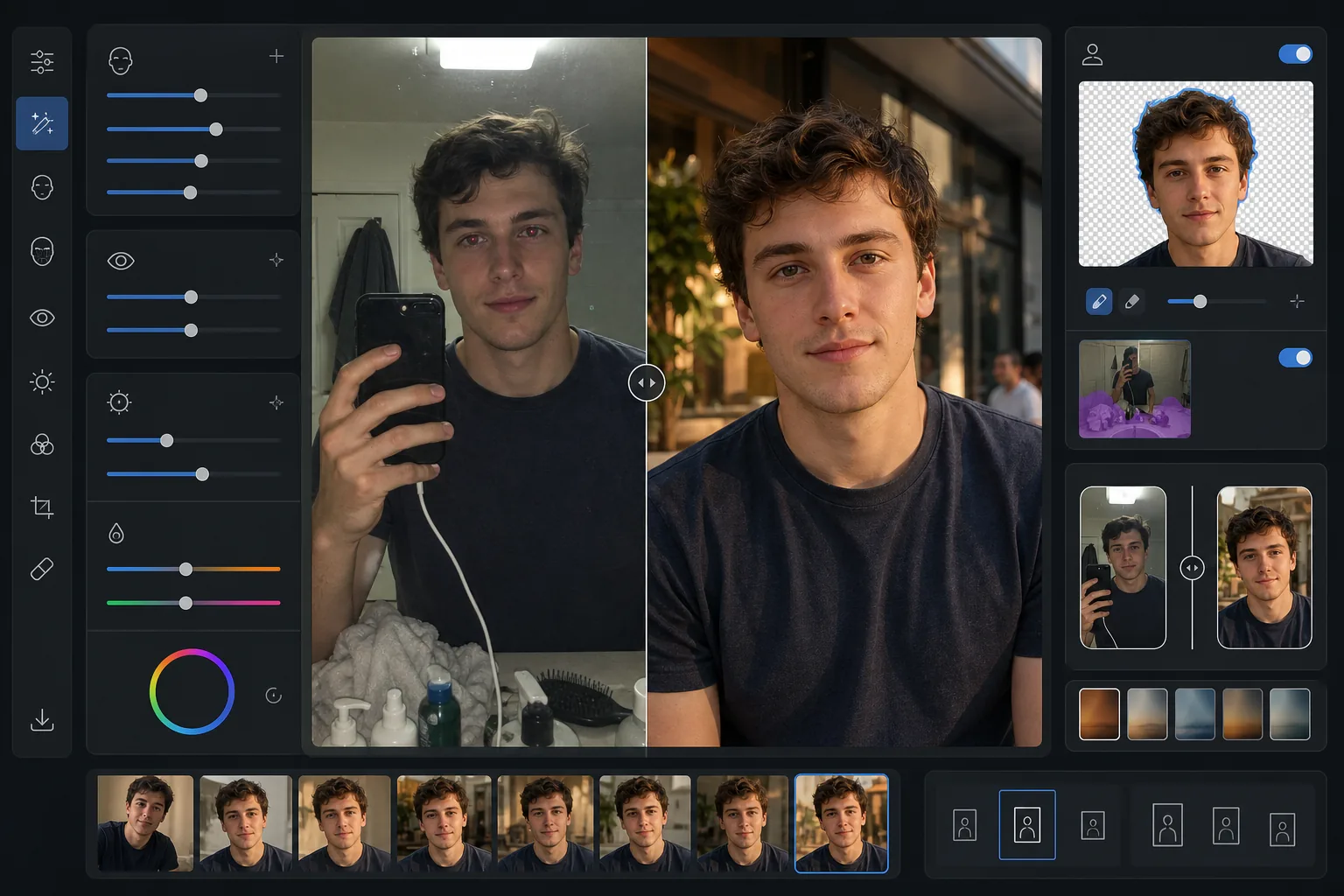
Mẫu này làm gì
Tối ưu ảnh dành riêng cho các ứng dụng hẹn hò như Tinder, Bumble và Hinge, nơi ấn tượng đầu tiên hình thành trong chưa đầy hai giây. Mẫu này áp dụng các cải thiện trông tự nhiên giúp bạn đẹp nhất mà không có vẻ ngoài đã qua lọc rõ rệt báo hiệu sự thiếu chân thực. AI Enhance làm sáng vùng dưới mắt, làm đều tông da và sửa ánh sáng gắt từ đèn flash hoặc đèn huỳnh quang trên đầu. Background Eraser có thể thay phông nền selfie gương phòng tắm bừa bộn bằng một bối cảnh trung tính, sạch sẽ, giữ trọng tâm vào bạn. Kết quả trông như một bức ảnh tự nhiên tuyệt đẹp được chụp dưới ánh sáng dịu tôn dáng.
Cài đặt mẫu
| Cải thiện da | Làm mịn tự nhiên (giữ lỗ chân lông và kết cấu, giảm khuyết điểm) |
| Cải thiện mắt | Làm sáng tinh tế + sửa mắt đỏ |
| Chỉnh sửa ánh sáng | Mô phỏng ánh sáng phụ giờ vàng (hơi ấm dịu theo hướng) |
| Tùy chọn nền | Làm sạch hoặc thay sang bối cảnh ngoài trời/đô thị/trung tính |
| Kích thước đầu ra | 1080 × 1350 px (chân dung 4:5, tối ưu cho ứng dụng hẹn hò) |
| Phân loại màu | Ấm tự nhiên (tinh tế — không lộ vẻ đã lọc) |
Cách sử dụng mẫu này
Tải ảnh của bạn lên
Tải lên ảnh selfie, ảnh chân dung hoặc ảnh toàn thân. Mẫu hoạt động tốt nhất với ảnh có khuôn mặt hiện rõ và sắc nét. Có thể dùng ảnh nhóm — chọn chính bạn và mẫu sẽ tách bạn khỏi nhóm rồi cải thiện hình ảnh.
Cải thiện tự nhiên
AI Enhance làm đều tông da, giảm khuyết điểm tạm thời, làm sáng mắt một cách tinh tế và sửa ánh sáng flash hoặc đèn trên đầu kém tôn dáng. Việc cải thiện vẫn giữ kết cấu da tự nhiên gồm lỗ chân lông và nếp nhăn mảnh — mục tiêu là trông như chính bạn vào ngày đẹp nhất, chứ không phải một người khác.
Làm sạch hoặc thay nền
Chọn làm sạch nền hiện có (xóa lộn xộn, người khác, đồ bừa bãi) hoặc thay hoàn toàn bằng bối cảnh ngoài trời, quán cà phê hoặc đô thị sạch sẽ. Background Eraser tạo các đường viền chuyển tiếp trông tự nhiên ở ranh giới tóc và quần áo để việc thay nền trông liền mạch.
Xuất cho hồ sơ của bạn
Tải xuống ở 1080 × 1350 px theo tỷ lệ chân dung 4:5 mà các ứng dụng hẹn hò hiển thị đẹp nhất. Hình ảnh được tối ưu cho màn hình di động, nơi diễn ra phần lớn việc lướt, với chi tiết được giữ trong cả vùng sáng lẫn vùng tối cho mọi mức độ sáng màn hình.
Mẹo chuyên nghiệp để có kết quả tốt nhất
- ✓Hãy dùng ảnh chụp dưới ánh sáng ban ngày tự nhiên gần cửa sổ để có điểm khởi đầu tôn dáng nhất. Mẫu có thể sửa ánh sáng nhân tạo gắt, nhưng ảnh chụp ánh sáng tự nhiên cần ít chỉnh sửa hơn và cho kết quả cuối cùng trông chân thực nhất.
- ✓Tránh đeo kính râm đậm trong ảnh hồ sơ chính. Mẫu có thể làm sáng vùng mắt, nhưng điều này chỉ hiệu quả khi nhìn thấy mắt. Kính râm cũng khiến đối tượng tiềm năng khó cảm nhận được sự kết nối cá nhân.
- ✓Hãy tải lên ít nhất một ảnh toàn thân cùng với ảnh chân dung. Nghiên cứu về ứng dụng hẹn hò cho thấy hồ sơ có sự kết hợp giữa ảnh khuôn mặt và ảnh toàn thân nhận được nhiều lượt vuốt phải hơn đáng kể so với hồ sơ chỉ có ảnh selfie cận cảnh.
- ✓Đừng dùng ảnh nhóm làm ảnh đầu tiên. Dù mẫu có thể tách bạn khỏi nhóm, việc cắt cúp cần thiết để có khung hình một người có thể làm giảm chất lượng ảnh so với khi bắt đầu bằng một ảnh chụp riêng.
Công cụ
Câu hỏi thường gặp
Việc cải thiện có trông lộ liễu không?
+
Không. Mẫu được hiệu chỉnh riêng cho sự tinh tế. Nó giữ kết cấu da tự nhiên, lỗ chân lông và nếp nhăn mảnh, đồng thời chỉ giảm khuyết điểm tạm thời và làm đều ánh sáng không đều. Kết quả trông như một bức ảnh đẹp thật sự, không phải ảnh đã chỉnh sửa.
Tôi có thể dùng ảnh selfie gương phòng tắm không?
+
Có. Mẫu có thể thay nền phòng tắm bằng một bối cảnh sạch sẽ hơn. Tuy nhiên, tư thế selfie qua gương và chiếc điện thoại trên tay bạn sẽ vẫn còn — để có kết quả tốt nhất, hãy cắt cúp sát hoặc dùng ảnh do người khác chụp hoặc chụp bằng hẹn giờ.
Điều này có hiệu quả với mọi tông da không?
+
Mô hình cải thiện AI được huấn luyện trên nhiều tông da đa dạng và hoạt động chính xác trên toàn dải. Việc chỉnh màu và làm mịn da thích ứng với tông da cụ thể trong ảnh của bạn thay vì áp dụng một bộ lọc đồng nhất cho mọi người.
Trông đẹp tự nhiên nhất trên mọi ứng dụng hẹn hò
Tải ảnh của bạn lên và nhận ảnh hồ sơ được cải thiện tự nhiên, tối ưu phông nền để thu hút nhiều lượt ghép đôi hơn.
Dùng thử miễn phíRelated templates
More social media templates for your workflow.
Mẫu cắt hình vuông được tối ưu hóa cho Instagram ở độ phân giải 1080×1080px. Nền sạch sẽ, màu sắc rực rỡ và chi tiết sắc nét nổi bật trong nguồn cấp dữ liệu.
Mẫu biểu ngữ YouTube ở 2560×1440px với hướng dẫn vùng an toàn. Xóa nền rõ ràng cho ảnh của người sáng tạo, bố cục nhận biết thiết bị và hình ảnh kênh nhất quán với thương hiệu.
Mẫu ảnh bìa Facebook có kích thước 820×312px cho máy tính để bàn và 640×360px cho thiết bị di động. Làm sạch hình ảnh thương hiệu bằng các vùng an toàn thích hợp để xếp chồng ảnh hồ sơ và đặt nút CTA.
Tạo hình ảnh tiêu đề Twitter/X chuyên nghiệp ở kích thước chính xác 1500×500px. Tài khoản chồng ảnh hồ sơ, hoạt động ở cả chế độ tối và chế độ sáng.
Tạo hình ảnh ghim Pinterest gây cảm giác cuộn cuộn với nền rõ ràng, kích thước dọc 2:3 tối ưu, cải tiến màu sắc rực rỡ và bố cục sẵn sàng ghim.
Tạo ảnh bìa video TikTok bắt mắt với nền rõ ràng, khung chủ đề đậm nét và kích thước dọc 9:16 được tối ưu hóa để đảm bảo tính nhất quán của lưới hồ sơ.