
Hình ảnh ghim Pinterest
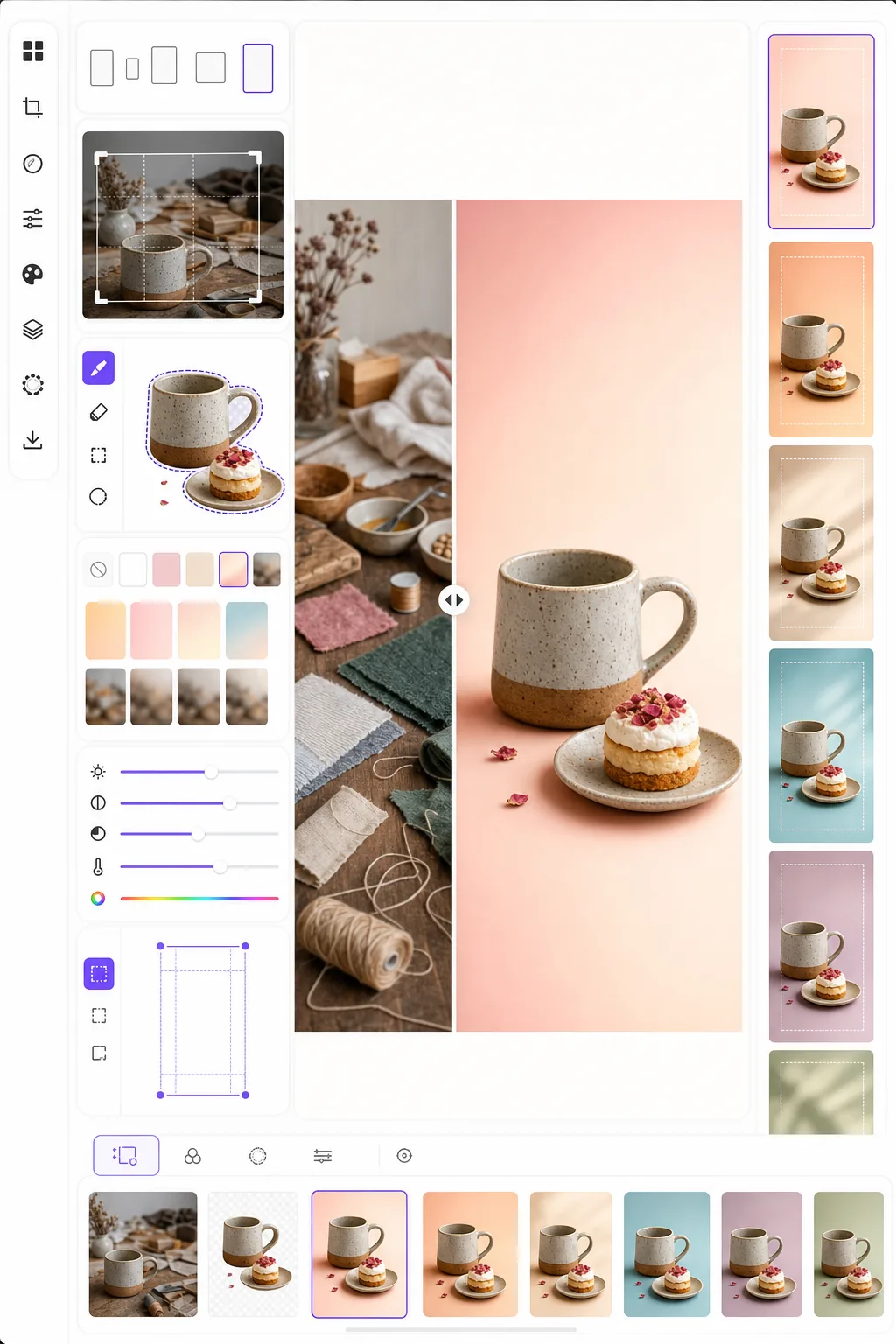
Tạo những hình ảnh ghim khiến người dùng dừng cuộn và lưu lại. Mẫu này định dạng ảnh theo tỷ lệ dọc 2:3 tối ưu của Pinterest, xóa nền rối mắt để có bố cục sạch sẽ tập trung vào sản phẩm, tăng độ rực rỡ của màu sắc cho bảng tin Pinterest và xuất ra hình ảnh sẵn sàng để ghim, trông sắc nét trên cả thiết bị di động lẫn máy tính.
Dùng thử mẫu này miễn phíSocial Media template preview
Mẫu này làm gì
Tối ưu hóa hình ảnh để đạt mức tương tác cao nhất trên Pinterest, nơi những ghim cao và bắt mắt vượt trội hơn ảnh ngang tiêu chuẩn từ ba đến năm lần về tỷ lệ lưu. Background Eraser tách chủ thể của bạn — sản phẩm, món ăn theo công thức, trang phục hoặc đồ thủ công — và đặt nó lên nền sạch, nền màu hoặc nền chuyển sắc giúp chủ thể nổi bật trong một bảng tin đông đúc. Độ rực rỡ của màu sắc được tăng lên để phù hợp với xu hướng ưu ái nội dung tươi sáng, bão hòa của thuật toán Pinterest. Mẫu xuất ra ở kích thước 1000 × 1500 px, đúng kích thước Pinterest khuyến nghị cho ghim tiêu chuẩn.
Cài đặt mẫu
| Tỷ lệ khung hình | 2:3 dọc (1000 × 1500 px — tiêu chuẩn Pinterest) |
| Tùy chọn nền | Trắng sạch, màu đơn sắc, nền chuyển sắc nhẹ hoặc nền gốc làm mờ |
| Tăng màu | +20% độ bão hòa để hiển thị nổi bật trên bảng tin (có thể điều chỉnh) |
| Khung chủ thể | Tự động căn giữa với khoảng đệm 10% cho không gian phủ chữ |
| Định dạng xuất | PNG (để phủ chữ) hoặc JPEG (để tải lên trực tiếp) |
Cách sử dụng mẫu này
Tải lên ảnh nguồn của bạn
Tải lên ảnh sản phẩm, ảnh món ăn, ảnh trang phục hoặc bất kỳ hình ảnh nào bạn muốn biến thành ghim Pinterest. Mẫu chấp nhận ảnh ngang, vuông hoặc dọc và sẽ định khung lại theo tỷ lệ dọc 2:3 tối ưu với cách cắt thông minh giữ chủ thể ở giữa.
Nền và bố cục
Background Eraser tách chủ thể của bạn và đặt nó lên nền sạch. Chọn từ trắng tinh, màu thương hiệu đơn sắc, nền chuyển sắc nhẹ hoặc phiên bản làm mờ của nền gốc. Chủ thể được tự động định vị để chừa khoảng trống ở trên và dưới cho phần phủ chữ.
Tối ưu màu sắc và độ sắc nét
Màu sắc được tăng 20% độ bão hòa để nổi bật trên bảng tin Pinterest, nơi những hình ảnh nhạt nhòa thường bị cuộn qua. Độ sắc nét được tăng cường cho chủ thể trong khi nền vẫn mềm mại, tạo chiều sâu thị giác thu hút ánh nhìn vào chủ thể chính.
Xuất ghim của bạn
Tải xuống ở kích thước 1000 × 1500 px dưới dạng PNG (nếu bạn định thêm chữ phủ trong Canva hoặc trình chỉnh sửa khác) hoặc JPEG (để tải trực tiếp lên Pinterest). Hồ sơ màu được đặt thành sRGB để hiển thị chính xác trên mọi thiết bị và trình duyệt.
Mẹo chuyên nghiệp để có kết quả tốt nhất
- ✓Hãy chừa 20% phần trên và 15% phần dưới của ghim tương đối sạch để phủ chữ. Mẫu định vị chủ thể của bạn để chừa khoảng trống này, nhưng chọn nền đơn sắc hoặc nền chuyển sắc ở những vùng này giúp chữ dễ đọc hơn so với nền ảnh rối mắt.
- ✓Dùng nền tông ấm (hồng phấn, đất nung, kem) cho ghim phong cách sống và ẩm thực, và tông trung tính mát (trắng, xám nhạt, xanh nhạt) cho ghim sản phẩm và công nghệ. Dữ liệu tương tác của Pinterest luôn cho thấy những ghim có bảng màu chủ đích vượt trội hơn những ghim có nền ngẫu nhiên.
- ✓Tạo nhiều phiên bản ghim cho cùng một nội dung — cùng chủ thể với màu nền và cách cắt khác nhau. Pinterest tưởng thưởng sự đa dạng nội dung, và việc thử nghiệm hai đến ba thiết kế ghim cho mỗi nội dung giúp xác định phong cách thị giác nào gây ấn tượng với khán giả của bạn.
Công cụ
Câu hỏi thường gặp
Tôi có thể thêm chữ vào ghim không?
+
Mẫu xuất ra một hình ảnh sạch được tối ưu để phủ chữ nhưng không thêm chữ trực tiếp. Hãy xuất dưới dạng PNG và thêm chữ trong Canva, Photoshop hoặc bất kỳ công cụ thiết kế nào. Chủ thể được định vị để chừa khoảng trống cho tiêu đề ở trên và lời kêu gọi hành động ở dưới.
Còn Idea Pins (video) thì sao?
+
Mẫu này dành cho ghim tĩnh tiêu chuẩn. Idea Pins (trước đây là Story Pins) sử dụng định dạng video và nhiều trang đòi hỏi công cụ khác. Kết quả của mẫu hoạt động tốt làm khung bìa cho Idea Pins nếu bạn cần một ảnh thu nhỏ tĩnh.
Điều này có hiệu quả với ghim kiểu đồ họa thông tin không?
+
Đối với ghim đồ họa thông tin, mẫu được dùng tốt nhất để chuẩn bị từng hình ảnh hoặc ảnh sản phẩm riêng lẻ mà sau đó bạn sắp xếp thành bố cục đồ họa thông tin cao hơn (1000 × 2100 px hoặc cao hơn). Mỗi yếu tố có thể được xử lý riêng rồi kết hợp trong một công cụ thiết kế.
Tạo những ghim Pinterest khiến người dùng dừng cuộn
Tải lên bất kỳ hình ảnh nào và nhận bố cục dọc sẵn sàng để ghim với nền sạch và màu sắc được tối ưu để có nhiều lượt lưu và nhấp nhất.
Dùng thử miễn phíRelated templates
More social media templates for your workflow.
Mẫu cắt hình vuông được tối ưu hóa cho Instagram ở độ phân giải 1080×1080px. Nền sạch sẽ, màu sắc rực rỡ và chi tiết sắc nét nổi bật trong nguồn cấp dữ liệu.
Mẫu biểu ngữ YouTube ở 2560×1440px với hướng dẫn vùng an toàn. Xóa nền rõ ràng cho ảnh của người sáng tạo, bố cục nhận biết thiết bị và hình ảnh kênh nhất quán với thương hiệu.
Mẫu ảnh bìa Facebook có kích thước 820×312px cho máy tính để bàn và 640×360px cho thiết bị di động. Làm sạch hình ảnh thương hiệu bằng các vùng an toàn thích hợp để xếp chồng ảnh hồ sơ và đặt nút CTA.
Tạo hình ảnh tiêu đề Twitter/X chuyên nghiệp ở kích thước chính xác 1500×500px. Tài khoản chồng ảnh hồ sơ, hoạt động ở cả chế độ tối và chế độ sáng.
Nâng cao chất lượng ảnh hồ sơ hẹn hò với tính năng làm mịn da tự nhiên, làm sạch nền, chỉnh sửa ánh sáng và phân loại màu tinh tế để trông chân thực — không qua lọc.
Tạo ảnh bìa video TikTok bắt mắt với nền rõ ràng, khung chủ đề đậm nét và kích thước dọc 9:16 được tối ưu hóa để đảm bảo tính nhất quán của lưới hồ sơ.