
Ảnh danh mục hình xăm
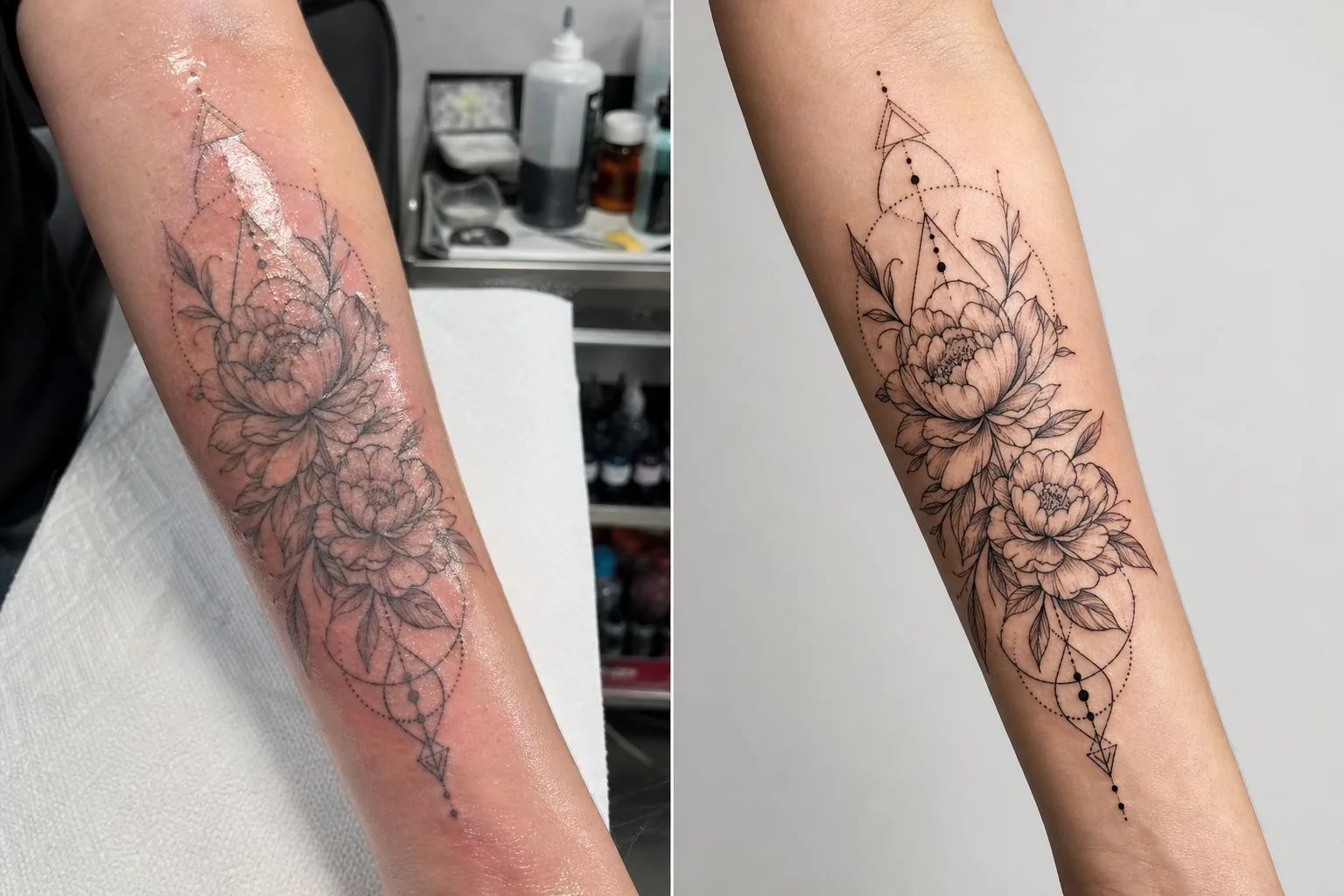
Trưng bày tác phẩm hình xăm với độ chi tiết và độ chính xác màu sắc thu hút khách hàng mới. Mẫu này tăng cường độ bão hòa của mực và độ sắc nét của đường nét, giảm đỏ và sưng da sau buổi xăm, hiệu chỉnh ánh sáng studio để màu mực chân thực, và tạo nên bản trình bày danh mục sạch sẽ để tác phẩm tự lên tiếng.
Dùng thử mẫu này miễn phíBusiness template preview
Mẫu này làm gì
Giải quyết những thách thức nhiếp ảnh cụ thể mà nghệ sĩ xăm gặp phải khi ghi lại tác phẩm của họ. Hình xăm mới được chụp trong điều kiện studio với ánh sáng hỗn hợp, và vùng da quanh mực mới thì đỏ, sưng và phủ đầy mực thừa cùng thuốc mỡ — không điều nào phản ánh kết quả cuối cùng khi đã lành. Mẫu này dùng AI Enhance để hiệu chỉnh ánh sáng sao cho màu mực hiện ra như khi đã lành, làm sắc nét các đường nét mảnh và chi tiết chấm điểm, đồng thời giảm đỏ và sưng quanh hình xăm mới. Magic Eraser loại bỏ phông nền lộn xộn của bàn xăm, gồm chai mực, khăn giấy, găng tay và thiết bị, tạo nên một phông nền sạch tập trung hoàn toàn sự chú ý vào tác phẩm.
Cài đặt mẫu
| Tăng cường mực | Tăng độ bão hòa màu cho các phong cách xăm đen, màu và màu nước |
| Làm sắc nét đường nét | Tăng cường vi chi tiết cho đường nét mảnh và chấm điểm |
| Hiệu chỉnh da | Giảm đỏ, sưng và độ bóng thuốc mỡ quanh hình xăm mới |
| Hiệu chỉnh ánh sáng | Hiệu chỉnh ánh sáng studio hỗn hợp về ánh sáng ban ngày trung tính để màu mực chân thực |
| Phông nền | Phông nền đồng màu hoặc mờ sạch sẽ (loại bỏ lộn xộn của bàn xăm) |
| Kích thước đầu ra | 2000 × 2000 px (vuông Instagram) hoặc 4000px để in danh mục |
Cách sử dụng mẫu này
Tải lên ảnh hình xăm của bạn
Tải lên ảnh của hình xăm đã hoàn thành — mới hoặc đã lành. Chụp hình xăm trực diện để giảm thiểu biến dạng phối cảnh. Mẫu này xử lý ảnh chi tiết cận cảnh, ảnh tổng quan toàn tác phẩm và bố cục quấn quanh trên các bề mặt cơ thể cong như tay, chân và sườn.
Tăng cường mực và đường nét
AI Enhance tăng độ bão hòa mực để hình xăm đen trông sâu và đậm trong khi hình xăm màu thể hiện trọn vẹn độ rực rỡ. Các đường nét mảnh, chấm điểm và họa tiết hình học được làm sắc nét để cho thấy độ chính xác trong kỹ thuật kim của bạn. Việc tăng cường tôn trọng các phong cách xăm khác nhau — truyền thống đậm nét, đường nét mảnh, màu nước và blackwork đều được xử lý phù hợp.
Hiệu chỉnh da và phông nền
Đối với hình xăm mới, độ đỏ và sưng quanh mực được giảm để gần với diện mạo khi đã lành. Độ bóng thuốc mỡ và mực thừa trên vùng da xung quanh được làm dịu. Magic Eraser loại bỏ phông nền bàn xăm — cốc mực, khăn giấy, găng tay và thiết bị — thay bằng một phông nền sạch.
Xuất cho danh mục và mạng xã hội
Tải về dạng vuông 2000 × 2000 px cho bài đăng danh mục Instagram, hoặc 4000px cạnh dài cho danh mục trên website và lookbook in. Hồ sơ màu giữ trọn dải màu mực xăm bao gồm những biến đổi sắc độ tinh tế trong phong cách màu nước và neo-traditional.
Mẹo chuyên nghiệp để có kết quả tốt nhất
- ✓Chụp hình xăm dưới ánh sáng cân bằng ban ngày (5000–5500K) từ một góc nhất quán. Điều này cung cấp cho mẫu dữ liệu màu chính xác nhất để xử lý. Ánh sáng tungsten ấm khiến mực trông vàng cam hơn, và việc hiệu chỉnh dù hiệu quả vẫn cho kết quả tốt hơn khi bắt đầu từ ánh sáng trung tính.
- ✓Lau sạch mực thừa và thuốc mỡ khỏi bề mặt da trước khi chụp. Mẫu này giảm độ bóng thuốc mỡ, nhưng một bề mặt sạch, thấm khô sẽ thể hiện tác phẩm mực rõ ràng hơn và cho kết quả tăng cường tốt hơn.
- ✓Chụp cả phiên bản mới và đã lành của cùng một hình xăm khi có thể. Ảnh mới được xử lý qua mẫu cho bạn nội dung danh mục ngay lập tức, còn ảnh đã lành xác nhận kết quả ổn định thực tế. Cả hai phiên bản trong danh mục thể hiện sự chuyên nghiệp.
- ✓Đối với các tác phẩm lớn quấn quanh chi, hãy chụp nhiều ảnh chi tiết chồng lấp bên cạnh ảnh tổng quan toàn tác phẩm. Mẫu này làm sắc nét chi tiết bị mất trong ảnh tổng quan rộng, và cận cảnh các yếu tố nổi bật tạo nên những bài đăng danh mục riêng lẻ hấp dẫn.
Công cụ
Câu hỏi thường gặp
Mẫu này có thể làm hình xăm mới trông như đã lành không?
+
Mẫu này giảm đỏ và sưng để gần với diện mạo khi đã lành, nhưng kết quả là một sự tăng cường chứ không phải dự đoán hoàn hảo về quá trình lành. Việc lành của mỗi người khác nhau tùy loại da, loại mực và vị trí trên cơ thể. Ảnh mới được tăng cường sẽ trông gần với đã lành nhưng có thể không giống hệt kết quả lành thực tế.
Mẫu này có hiệu quả với mọi phong cách xăm không?
+
Có. Mẫu này nhận diện và tăng cường phù hợp các phong cách truyền thống đậm nét, Nhật Bản, đường nét mảnh, chấm điểm, hình học, màu nước, neo-traditional, blackwork và chân dung tả thực. Mỗi phong cách nhận được cách làm sắc nét và xử lý màu khác nhau, được hiệu chỉnh sao cho đẹp nhất với từng thẩm mỹ.
Còn hình xăm che phủ thì sao?
+
Hình xăm che phủ được xử lý giống như bất kỳ hình xăm nào khác. Mẫu này tăng cường phần mực hiển thị, chính là thiết kế che phủ. Nếu bạn muốn cho thấy trước-và-sau (bản gốc so với che phủ), hãy xử lý từng ảnh riêng để có bản trình bày danh mục nhất quán nhất.
Một danh mục giúp ghế xăm của bạn luôn kín lịch
Tải lên ảnh hình xăm và nhận hình ảnh danh mục sắc nét chi tiết, chính xác màu sắc, thể hiện tay nghề của bạn và thu hút khách hàng mới.
Dùng thử miễn phíRelated templates
More business templates for your workflow.
Các bức ảnh của nhóm công ty Ba Lan có phông nền nhất quán, hiệu chỉnh ánh sáng chuyên nghiệp, phân loại màu phù hợp với thương hiệu và chất lượng hình ảnh đồng nhất trong toàn nhóm.
Nâng cao hình ảnh phòng tập thể dục và thể dục bằng cách nâng cao độ nét của cơ, hiệu chỉnh ánh sáng động, làm sạch nền và phân loại màu thể thao có độ tương phản cao.
Tạo một bản sơ yếu lý lịch đẹp mắt với tính năng thay thế nền, làm mịn da và chỉnh sửa ánh sáng. Lý tưởng cho CV, cổng thông tin việc làm và thư mục công ty.
Tạo ảnh đội tuyển và cá nhân cầu thủ chuyên nghiệp với tính năng thay nền, cải thiện màu áo thi đấu và phông nền sân vận động hoặc trường quay cho danh sách và chương trình.
Tạo ảnh quảng cáo cho ban nhạc và nhạc sĩ chuyên nghiệp với tính năng thay nền, tăng cường ánh sáng ấn tượng và kết quả đầu ra sẵn sàng để in cho bộ tài liệu báo chí và địa điểm gửi.
Trưng bày nghệ thuật làm móng với tính năng nâng cao chi tiết ở cấp độ vĩ mô, độ chính xác của màu sơn và gel thực cũng như vị trí bàn tay rõ ràng cho danh mục đầu tư và trang đặt phòng trên Instagram.