
Ảnh nhóm công ty
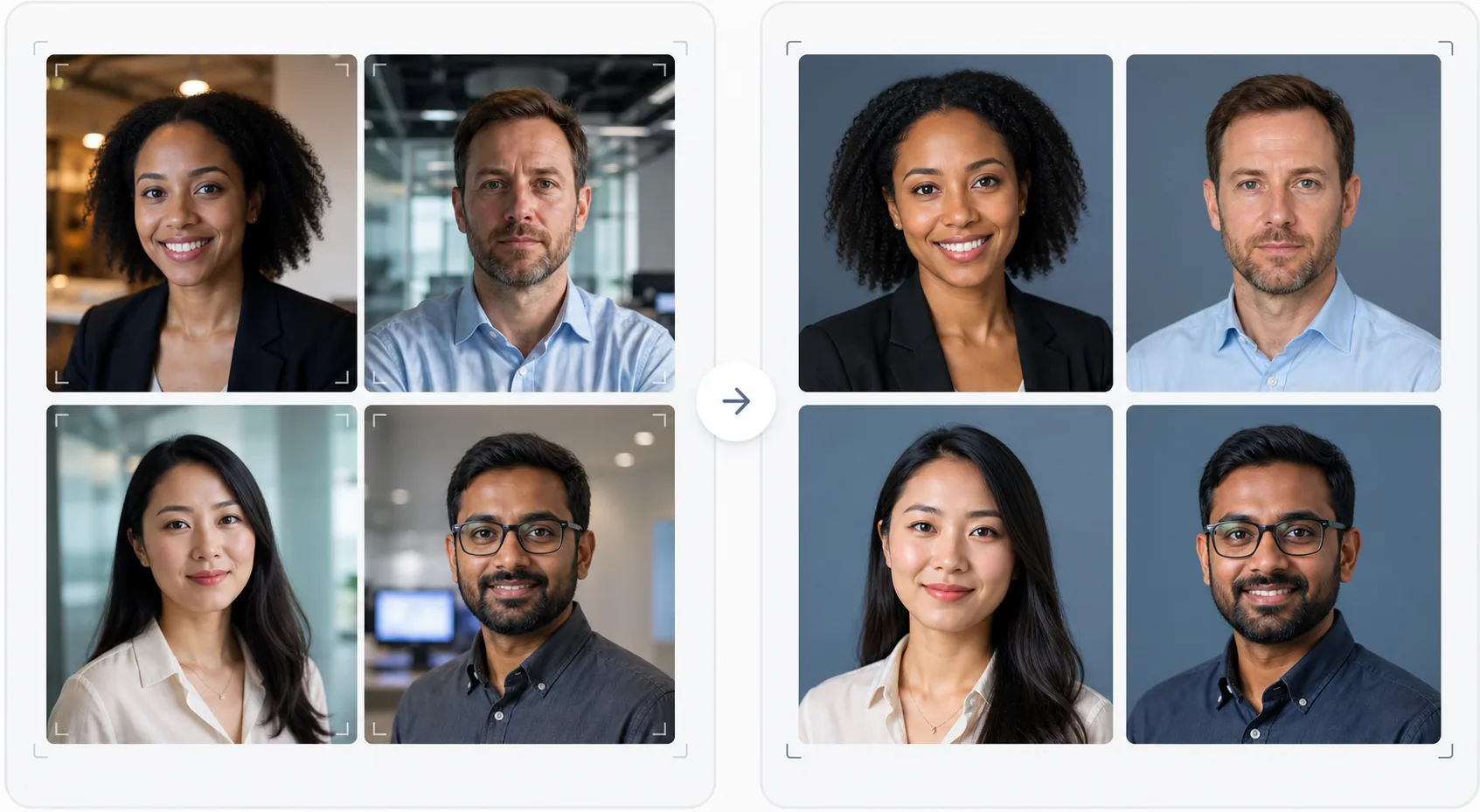
Mang đến cho trang giới thiệu đội ngũ của bạn vẻ ngoài chuyên nghiệp và nhất quán mà không cần thuê nhiếp ảnh gia tốn kém. Mẫu này chuẩn hóa phông nền cho từng ảnh chân dung cá nhân, hiệu chỉnh ánh sáng văn phòng pha tạp về tông màu chuyên nghiệp trung tính, làm mịn da một cách tinh tế và đảm bảo ảnh của mọi thành viên đều có cùng phong cách và chất lượng.
Dùng thử mẫu này miễn phíBusiness template preview
Mẫu này làm gì
Tạo ra những bức ảnh nhóm nhất quán về mặt thị giác cho website công ty, trang công ty trên LinkedIn và tài liệu tiếp thị. Khi ảnh chân dung của đội ngũ được chụp vào những thời điểm khác nhau, bởi những người khác nhau, bằng các máy ảnh khác nhau, kết quả là một trang đội ngũ không đồng nhất trông thiếu chuyên nghiệp. Mẫu này giải quyết điều đó bằng cách chuẩn hóa phông nền, nhiệt độ màu, phong cách ánh sáng và khung cắt trên tất cả ảnh chân dung. Background Eraser xóa các phông nền văn phòng đa dạng và thay thế chúng bằng phông nền đơn sắc hoặc chuyển sắc nhất quán theo màu thương hiệu của bạn. AI Enhance chuẩn hóa độ phơi sáng, hiệu chỉnh sắc xanh từ đèn huỳnh quang văn phòng và làm mịn da một cách tinh tế để mọi thành viên trông chỉn chu và chuyên nghiệp.
Cài đặt mẫu
| Phông nền | Màu đơn sắc, chuyển sắc hoặc làm mờ văn phòng nhất quán (có thể tùy chỉnh theo thương hiệu) |
| Khung cắt | Đầu và vai, căn giữa, nhất quán trên tất cả ảnh nhóm |
| Chuẩn hóa ánh sáng | Chuyên nghiệp trung tính (hiệu chỉnh đèn huỳnh quang, LED và ánh sáng cửa sổ pha trộn) |
| Tăng cường làn da | Giảm khuyết điểm tinh tế và hiệu chỉnh quầng thâm mắt |
| Kích thước đầu ra | 800 × 800 px (trang đội ngũ trên web) và 400 × 400 px (danh bạ) |
Cách sử dụng mẫu này
Tải lên ảnh các thành viên
Tải lên ảnh chân dung của các thành viên — chúng có thể đến từ các máy ảnh, địa điểm và khoảng thời gian khác nhau. Mẫu này xử lý mọi thứ từ ảnh chân dung chuyên nghiệp đến ảnh tự chụp bằng điện thoại tại bàn làm việc. Tải lên hàng loạt toàn bộ đội ngũ để xử lý hiệu quả.
Chuẩn hóa phông nền
Background Eraser xóa phông nền gốc của mỗi ảnh và thay thế bằng một tùy chọn nhất quán trên tất cả thành viên. Chọn từ màu thương hiệu đơn sắc, chuyển sắc chuyên nghiệp hoặc hiệu ứng làm mờ văn phòng chuẩn hóa. Tất cả ảnh đều được xử lý phông nền giống nhau để đồng nhất về mặt thị giác.
Chuẩn hóa ánh sáng và tăng cường
AI Enhance hiệu chỉnh ánh sáng của mỗi ảnh về một tông màu chuyên nghiệp trung tính nhất quán. Sắc xanh huỳnh quang, sắc vàng ấm và ánh sáng pha trộn đều được hiệu chỉnh. Làm mịn da tinh tế giảm khuyết điểm và quầng thâm mắt. Đôi mắt được làm sáng nhẹ nhàng để tạo vẻ ngoài cuốn hút, dễ gần.
Xuất cho web và danh bạ
Tải xuống toàn bộ bộ ảnh ở kích thước 800 × 800 px cho trang đội ngũ trên website và 400 × 400 px cho danh bạ nội bộ và chữ ký email. Tất cả hình ảnh được xuất với cùng cấu hình màu, độ nén và quy ước đặt tên tệp để dễ dàng tải lên hàng loạt vào CMS của bạn.
Mẹo chuyên nghiệp để có kết quả tốt nhất
- ✓Gửi cho các thành viên một hướng dẫn chụp ảnh đơn giản: nhìn thẳng vào máy ảnh, mặc áo màu trơn tương phản với phông nền, đảm bảo ánh sáng tốt trên khuôn mặt (quay mặt về phía cửa sổ nếu có thể) và giữ biểu cảm tự nhiên với nụ cười nhẹ. Ảnh nguồn tốt hơn sẽ cần ít hiệu chỉnh AI hơn.
- ✓Chọn một màu phông nền xuất hiện trong bộ nhận diện thương hiệu của bạn — thường là xám trung tính, xanh navy hoặc màu phụ của thương hiệu. Điều này biến trang đội ngũ thành một tài sản thương hiệu thay vì chỉ là một tập hợp ảnh.
- ✓Xử lý các thành viên mới qua mẫu này khi họ gia nhập, sử dụng cùng cài đặt. Điều này duy trì sự nhất quán về mặt thị giác theo thời gian ngay cả khi đội ngũ phát triển và thay đổi.
- ✓Đối với ban lãnh đạo cấp cao, hãy cân nhắc khung hình hơi khác (cắt sát hơn, tông màu ấm hơn một chút) để phân biệt trực quan ban lãnh đạo với đội ngũ rộng hơn trong khi vẫn giữ cùng phông nền và phong cách.
Công cụ
Câu hỏi thường gặp
Tôi có thể xử lý toàn bộ đội ngũ cùng lúc không?
+
Có. Tải lên tất cả ảnh thành viên trong một lô duy nhất. Mẫu này áp dụng cùng phông nền, hiệu chỉnh ánh sáng và khung hình cho mọi ảnh, đảm bảo sự nhất quán hoàn hảo. Ảnh được trả về với kích thước, độ nén và cấu hình màu khớp nhau.
Nếu các thành viên có chất lượng ảnh rất khác nhau thì sao?
+
Mẫu này chuẩn hóa sự khác biệt về chất lượng giữa ảnh tự chụp bằng điện thoại và ảnh chân dung DSLR bằng cách điều chỉnh độ sắc nét, khử nhiễu và độ nén. Mặc dù nguồn DSLR luôn cho kết quả sắc nét hơn một chút, nhưng các bản xử lý đầu ra đủ nhất quán về mặt thị giác để sự khác biệt về chất lượng không lộ rõ trên lưới ảnh của website.
Cách này có hiệu quả với đội ngũ làm việc từ xa không?
+
Đây là trường hợp sử dụng lý tưởng cho các đội ngũ làm việc từ xa khi việc chụp ảnh trực tiếp là không thực tế. Mỗi thành viên tự chụp ảnh hoặc nhờ ai đó chụp tại nhà, và mẫu này chuẩn hóa tất cả để trông như thể chúng được chụp trong cùng một buổi chụp tại studio.
Trang đội ngũ chuyên nghiệp mà không cần buổi chụp ảnh
Tải lên các ảnh chân dung cá nhân từ bất kỳ nguồn nào và nhận một bộ ảnh nhóm nhất quán về mặt thị giác, phù hợp với thương hiệu, sẵn sàng cho website của bạn.
Dùng thử miễn phíRelated templates
More business templates for your workflow.
Nâng cao hình ảnh phòng tập thể dục và thể dục bằng cách nâng cao độ nét của cơ, hiệu chỉnh ánh sáng động, làm sạch nền và phân loại màu thể thao có độ tương phản cao.
Nâng cao hình ảnh danh mục hình xăm với độ sống động của màu mực, làm sắc nét chi tiết đường nét, giảm đỏ da và hình nền rõ ràng cho danh mục nghệ sĩ và Instagram.
Tạo một bản sơ yếu lý lịch đẹp mắt với tính năng thay thế nền, làm mịn da và chỉnh sửa ánh sáng. Lý tưởng cho CV, cổng thông tin việc làm và thư mục công ty.
Tạo ảnh đội tuyển và cá nhân cầu thủ chuyên nghiệp với tính năng thay nền, cải thiện màu áo thi đấu và phông nền sân vận động hoặc trường quay cho danh sách và chương trình.
Tạo ảnh quảng cáo cho ban nhạc và nhạc sĩ chuyên nghiệp với tính năng thay nền, tăng cường ánh sáng ấn tượng và kết quả đầu ra sẵn sàng để in cho bộ tài liệu báo chí và địa điểm gửi.
Trưng bày nghệ thuật làm móng với tính năng nâng cao chi tiết ở cấp độ vĩ mô, độ chính xác của màu sơn và gel thực cũng như vị trí bàn tay rõ ràng cho danh mục đầu tư và trang đặt phòng trên Instagram.