
Trước & Sau Y tế
Tạo ảnh trước và sau được tiêu chuẩn hóa về mặt lâm sàng cho các phòng khám da liễu, phẫu thuật thẩm mỹ, nha khoa và y học thẩm mỹ. Mẫu này chuẩn hóa ánh sáng và màu sắc giữa các cặp ảnh so sánh, thay thế bối cảnh phòng khám không nhất quán bằng phông nền lâm sàng sạch sẽ, đồng thời cung cấp các công cụ cắt ảnh và che thông tin có ý thức về quyền riêng tư — mang lại cho hình ảnh tiếp thị của phòng khám sự nhất quán và chuyên nghiệp giúp xây dựng niềm tin của bệnh nhân.
Dùng thử mẫu này miễn phíBusiness template preview
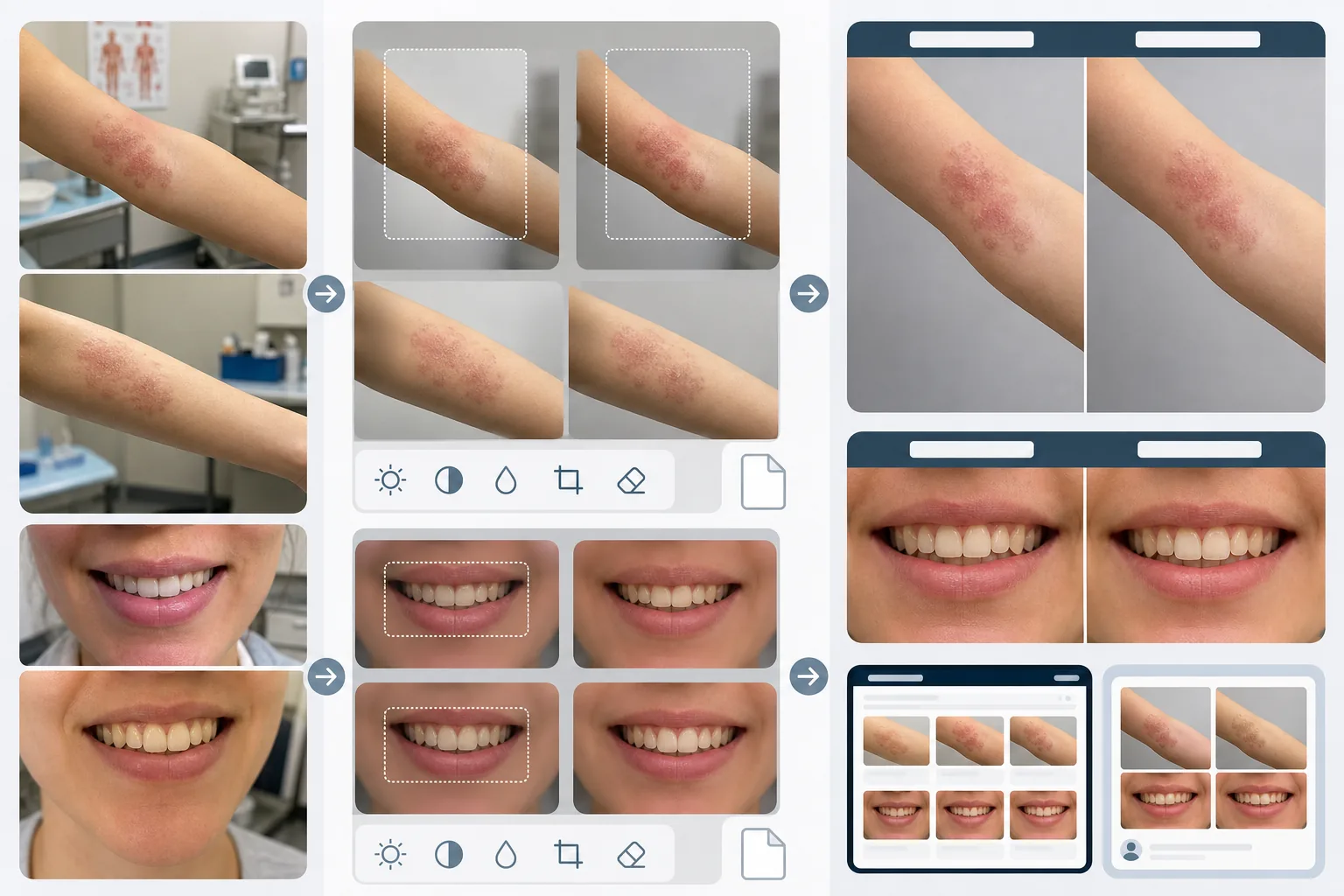
Mẫu này làm gì
Tạo sự nhất quán về hình ảnh khiến các so sánh trước và sau y tế trở nên đáng tin cậy và thuyết phục. Vấn đề lớn nhất với nhiếp ảnh lâm sàng là ảnh trước và sau được chụp cách nhau nhiều tuần hoặc nhiều tháng trong các điều kiện ánh sáng khác nhau, với các máy ảnh khác nhau và đôi khi ở các phòng khác nhau. AI Enhance chuẩn hóa độ phơi sáng, nhiệt độ màu và cân bằng trắng trên cả hai ảnh để mọi khác biệt nhìn thấy được là do thủ thuật, chứ không phải do nhiếp ảnh. Magic Eraser loại bỏ sự lộn xộn của phòng khám — dụng cụ y tế trên quầy, biểu đồ trên tường, xe đẩy thiết bị ở hậu cảnh — và thay thế bằng phông nền lâm sàng trung tính. Các tính năng bảo mật bao gồm tự động phát hiện và che các dấu hiệu nhận dạng, khả năng cắt theo các vùng cơ thể cụ thể và loại bỏ siêu dữ liệu để bảo vệ dữ liệu bệnh nhân.
Cài đặt mẫu
| Chuẩn hóa ánh sáng | Khớp độ phơi sáng, nhiệt độ màu và cân bằng trắng giữa cặp ảnh trước/sau |
| Phông nền | Xám trung tính lâm sàng, trắng sạch hoặc khăn phẫu thuật màu xanh |
| Che thông tin riêng tư | Tự động làm mờ các đặc điểm nhận dạng bên ngoài vùng điều trị |
| Nhất quán tỷ lệ | Khớp khung hình và độ phóng đại giữa ảnh trước và sau |
| Loại bỏ siêu dữ liệu | Xóa dữ liệu vị trí, thiết bị và dấu thời gian EXIF để tuân thủ HIPAA |
| Độ phân giải đầu ra | 2400×1600px mỗi ảnh (ảnh ghép cạnh nhau ở 4800×1600px) |
Cách sử dụng mẫu này
Tải lên ảnh trước và sau
Tải lên ảnh trước và ảnh sau tương ứng. Mẫu này xử lý được ảnh chụp bằng thiết bị máy ảnh lâm sàng, điện thoại thông minh và máy ảnh ngắm-chụp. Hãy tải lên thành cặp để AI có thể khớp các cài đặt chuẩn hóa giữa cả hai ảnh.
Chuẩn hóa ánh sáng và khung hình
AI Enhance khớp độ phơi sáng, nhiệt độ màu và cân bằng trắng giữa hai ảnh. Nếu khung hình khác nhau — cận hơn ở một ảnh, rộng hơn ở ảnh kia — mẫu sẽ điều chỉnh việc cắt để vùng điều trị có cùng tỷ lệ và vị trí trong cả hai ảnh, mang lại một so sánh trực quan công bằng.
Làm sạch phông nền và áp dụng bảo mật
Magic Eraser loại bỏ sự lộn xộn của phòng khám và thay thế phông nền bằng một phông nền lâm sàng trung tính. Tính năng che thông tin làm mờ hoặc cắt bỏ các đặc điểm nhận dạng bên ngoài vùng điều trị. Siêu dữ liệu EXIF chứa vị trí, thông tin thiết bị và dấu thời gian sẽ bị loại bỏ.
Xuất để tiếp thị phòng khám
Tải xuống từng ảnh riêng lẻ hoặc ảnh ghép cạnh nhau với tiêu đề 'Before' và 'After' được ghi nhãn. Đầu ra được định cỡ cho thư viện trên website, màn hình phòng tư vấn và mạng xã hội. Cách trình bày lâm sàng nhất quán xây dựng uy tín với các bệnh nhân tiềm năng đang xem qua thư viện kết quả của bạn.
Mẹo chuyên nghiệp để có kết quả tốt nhất
- ✓Thiết lập một trạm chụp ảnh nhất quán trong phòng khám với ánh sáng cố định và phông nền trung tính. Mặc dù mẫu có thể chuẩn hóa các điều kiện ánh sáng khác nhau, việc bắt đầu từ một thiết lập nhất quán sẽ tạo ra so sánh chính xác nhất và giảm nguy cơ xuất hiện lỗi chuẩn hóa.
- ✓Sử dụng cùng tiêu cự và khoảng cách máy ảnh cho ảnh trước và sau. Mẫu điều chỉnh sự khác biệt về khung hình, nhưng biến dạng phối cảnh do khoảng cách ống kính-đến-chủ thể khác nhau có thể thay đổi tinh tế cách các đặc điểm khuôn mặt hoặc đường nét cơ thể hiện ra, điều này có thể làm suy giảm độ tin cậy của so sánh.
- ✓Luôn xin sự đồng ý bằng văn bản của bệnh nhân cho việc chụp ảnh trước và sau cũng như mục đích sử dụng dự kiến trước khi xử lý ảnh. Mẫu cung cấp các tính năng bảo mật nhưng không thay thế yêu cầu pháp lý về sự đồng ý có hiểu biết.
Công cụ
Câu hỏi thường gặp
Điều này có tuân thủ HIPAA không?
+
Mẫu cung cấp các tính năng có ý thức về quyền riêng tư — loại bỏ siêu dữ liệu, che các đặc điểm nhận dạng và cắt theo vùng điều trị — hỗ trợ việc tuân thủ HIPAA. Tuy nhiên, việc tuân thủ HIPAA là trách nhiệm của tổ chức. Mẫu là một công cụ, không phải một chương trình tuân thủ. Hãy tham khảo cán bộ phụ trách tuân thủ của bạn về các yêu cầu cụ thể của phòng khám.
Tôi có thể xử lý ảnh nha khoa trước và sau không?
+
Có. Mẫu xử lý ảnh trong khoang miệng, ảnh cận cảnh nụ cười và ảnh nha khoa toàn mặt. Việc chuẩn hóa ánh sáng đặc biệt hữu ích cho ảnh nha khoa, khi ảnh trước thường được chụp dưới ánh sáng phòng khám trong khi ảnh sau được chụp bằng đèn flash vòng.
Sự khác biệt về kết cấu da có được giữ chính xác không?
+
Có. Việc chuẩn hóa điều chỉnh ánh sáng và màu sắc mà không làm mịn kết cấu da. Điều này rất quan trọng — những cải thiện về kết cấu da từ các thủ thuật da liễu phải nhìn thấy được trong so sánh. Mẫu cố ý không áp dụng chỉnh sửa da cho ảnh y tế trước và sau.
Xây dựng niềm tin của bệnh nhân với nhiếp ảnh lâm sàng nhất quán
Tải lên ảnh trước và sau và nhận các ảnh so sánh được tiêu chuẩn hóa, có ý thức về quyền riêng tư cho việc tiếp thị phòng khám của bạn.
Dùng thử miễn phíRelated templates
More business templates for your workflow.
Các bức ảnh của nhóm công ty Ba Lan có phông nền nhất quán, hiệu chỉnh ánh sáng chuyên nghiệp, phân loại màu phù hợp với thương hiệu và chất lượng hình ảnh đồng nhất trong toàn nhóm.
Nâng cao hình ảnh phòng tập thể dục và thể dục bằng cách nâng cao độ nét của cơ, hiệu chỉnh ánh sáng động, làm sạch nền và phân loại màu thể thao có độ tương phản cao.
Nâng cao hình ảnh danh mục hình xăm với độ sống động của màu mực, làm sắc nét chi tiết đường nét, giảm đỏ da và hình nền rõ ràng cho danh mục nghệ sĩ và Instagram.
Tạo một bản sơ yếu lý lịch đẹp mắt với tính năng thay thế nền, làm mịn da và chỉnh sửa ánh sáng. Lý tưởng cho CV, cổng thông tin việc làm và thư mục công ty.
Tạo ảnh đội tuyển và cá nhân cầu thủ chuyên nghiệp với tính năng thay nền, cải thiện màu áo thi đấu và phông nền sân vận động hoặc trường quay cho danh sách và chương trình.
Tạo ảnh quảng cáo cho ban nhạc và nhạc sĩ chuyên nghiệp với tính năng thay nền, tăng cường ánh sáng ấn tượng và kết quả đầu ra sẵn sàng để in cho bộ tài liệu báo chí và địa điểm gửi.