
Макет обложки книги
Создавайте фотореалистичные макеты обложки вашей книги, размещённой в жизненных сценах, на полках или представленной в виде отдельного 3D-рендера с естественными тенями. Этот шаблон берёт плоскую графику вашей обложки и превращает её в рекламные изображения для анонсов в социальных сетях, авторских сайтов, контента Amazon A+ и пресс-китов — без какого-либо 3D-программного обеспечения.
Попробовать этот шаблон бесплатноDesign template preview
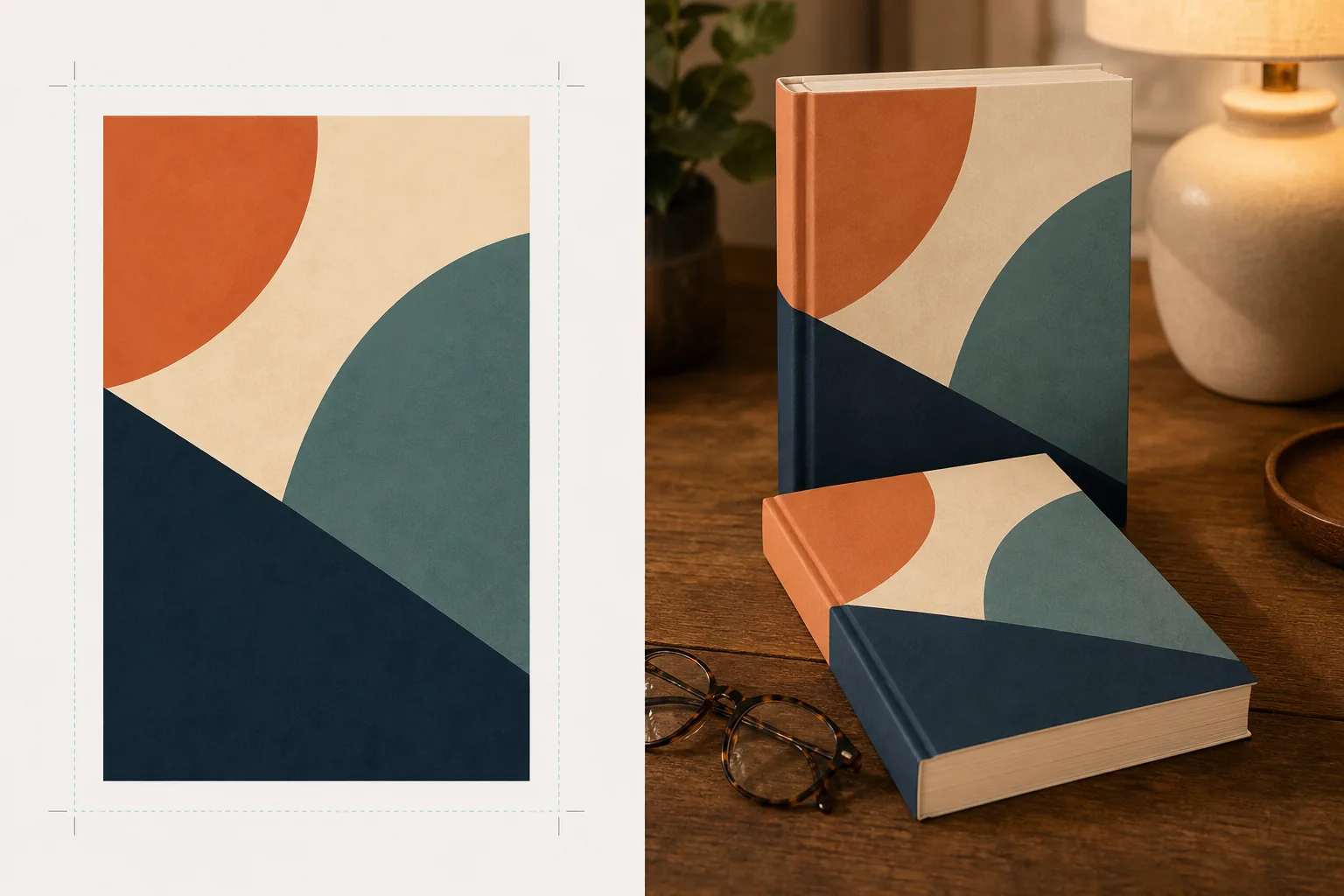
Что делает этот шаблон
Преобразует плоские дизайны обложек книг в рекламные макетные изображения, которые выглядят как профессиональная предметная фотосъёмка. Загрузите графику обложки в виде плоского JPEG или PNG, и шаблон наложит её на реалистичную форму книги с правильной перспективой, толщиной страниц и изгибом корешка. Затем макет помещается в жизненные сцены — журнальный столик с очками для чтения, книжная полка магазина, прикроватная тумбочка с тёплым светом лампы — или визуализируется как отдельный продукт на чистом фоне с естественной тенью. Для серий или продвижения нескольких книг несколько обложек можно расположить в ряд или сложить стопкой с единой перспективой. Направление света и теней соответствует окружению сцены, поэтому книга выглядит физически присутствующей, а не смонтированной.
Настройки шаблона
| Формат книги | Мягкая обложка, твёрдый переплёт или твёрдый переплёт с суперобложкой |
| Вид по количеству страниц | Тонкая (100 стр.), средняя (250 стр.), толстая (400+ стр.) — влияет на ширину корешка и обреза страниц |
| Тип сцены | Отдельно с тенью, журнальный столик, книжная полка, прикроватная тумбочка или в руке |
| Угол перспективы | Фронтальный, три четверти или лёгкий наклон сверху |
| Разрешение вывода | 3000×3000px (1:1 для соцсетей) или 2400×1600px (баннер 16:10) |
Как использовать этот шаблон
Загрузите графику обложки
Загрузите обложку книги в виде плоского изображения — как минимум переднюю обложку. Для макетов твёрдого переплёта с суперобложкой вы также можете загрузить корешок и заднюю обложку. Шаблон принимает файлы JPEG, PNG и PDF. Размеры обложки определяются автоматически, а пропорции книги масштабируются соответствующим образом.
Выберите формат книги и сцену
Выберите между форматами мягкой обложки, твёрдого переплёта или суперобложки. Выберите диапазон количества страниц, чтобы ширина корешка и обреза страниц соответствовала вашей реальной книге. Затем выберите сцену: отдельно с тенью, жизненную обстановку или произвольный цвет фона.
Настройте перспективу и выполните рендеринг
Выберите угол обзора — фронтальный для чёткости миниатюр, три четверти для визуальной глубины или наклон сверху для плоских постов в соцсетях. Шаблон визуализирует макет с подходящим освещением, текстурой обреза страниц и направлением тени, соответствующим выбранной сцене.
Скачайте рекламные изображения
Экспортируйте в формате 1:1 для Instagram, 16:9 для заголовков Twitter/Facebook или в произвольных размерах для раздела hero вашего сайта. Каждый экспорт включает макет книги с опцией прозрачного фона, чтобы вы могли размещать его в своих собственных макетах.
Профессиональные советы для наилучших результатов
- ✓Загружайте обложку в максимально доступном разрешении. Преобразование 3D-перспективы снижает видимое разрешение на уходящей вглубь грани книги, поэтому начало работы с источником высокого разрешения гарантирует, что текст на корешке и обложке останется разборчивым.
- ✓Для контента Amazon A+ используйте отдельный макет на белом фоне. Это придаёт книге вид премиальной предметной фотосъёмки, что отличает её от плоского изображения обложки, уже показанного на странице товара.
- ✓Создайте раскладку серии, загрузив все обложки серии. Шаблон располагает их в ряд с единой перспективой и интервалами, что гораздо более эффектно визуально для продвижения серии, чем показ обложек по отдельности.
Инструменты
Частые вопросы
Могу ли я создать макет электронной книги или планшета, отображающего мою обложку?
+
Шаблон ориентирован на макеты физических книг — форматы мягкой обложки и твёрдого переплёта. Для макетов с отображением на электронной книге или планшете вы бы наложили плоскую обложку на фотографию устройства отдельно.
Будет ли читаемым текст на корешке?
+
Да, при условии, что исходный файл обложки включает графику корешка. Шаблон оборачивает графику корешка вокруг края книги с перспективой, соответствующей углу передней обложки. Для тонких книг (менее 150 страниц) корешок узкий, и мелкий текст может стать трудночитаемым при малых размерах отображения.
Можно ли использовать это для продвижения аудиокниги или подкаста?
+
Да. Квадратный формат обложки, используемый для аудиокниг и подкастов, можно визуализировать как макет в стиле CD-бокса или как отдельный квадрат с объёмной тенью, придавая ему физическое присутствие, которого нет у плоской графики обложки.
Превратите графику вашей обложки в потрясающие рекламные изображения
Загрузите плоскую графику обложки и получите фотореалистичные макеты книг для социальных сетей, авторских сайтов и маркетинговых кампаний.
Попробовать бесплатноRelated templates
More design templates for your workflow.
Создавайте прозрачные логотипы PNG с четкими краями и экспортируйте их в разные размеры для веб-сайтов, печати, социальных сетей и значков приложений. Работает с фотографиями напечатанных логотипов и цифровыми файлами.
Создавайте обложки подкастов, соответствующие спецификациям Apple Podcasts и Spotify, с заменой фона, изоляцией портрета хоста и готовыми к типографике макетами.
Подготовьте цифровые произведения искусства и фотографии к широкоформатной печати с помощью масштабирования AI, расширения холста, цветопробы и экспорта файлов, готовых к печати.
Подготовьте фотографии для отправки в стоковое агентство с удалением товарных знаков, редактированием соответствия модели, проверкой технического качества и соблюдением требований к формату, специфичных для агентства.