
Удалить (или заменить) небо на фотографии
Поменяйте плоское, пасмурное или затуманенное небо на драматический закат, темно-синий или любой другой фон. Magic Eraser обнаруживает горизонт, поднимает исходное небо и использует AI Fill, чтобы добавить новое, соответствующее освещению и цветовому оттенку фотографии.
Последнее обновление
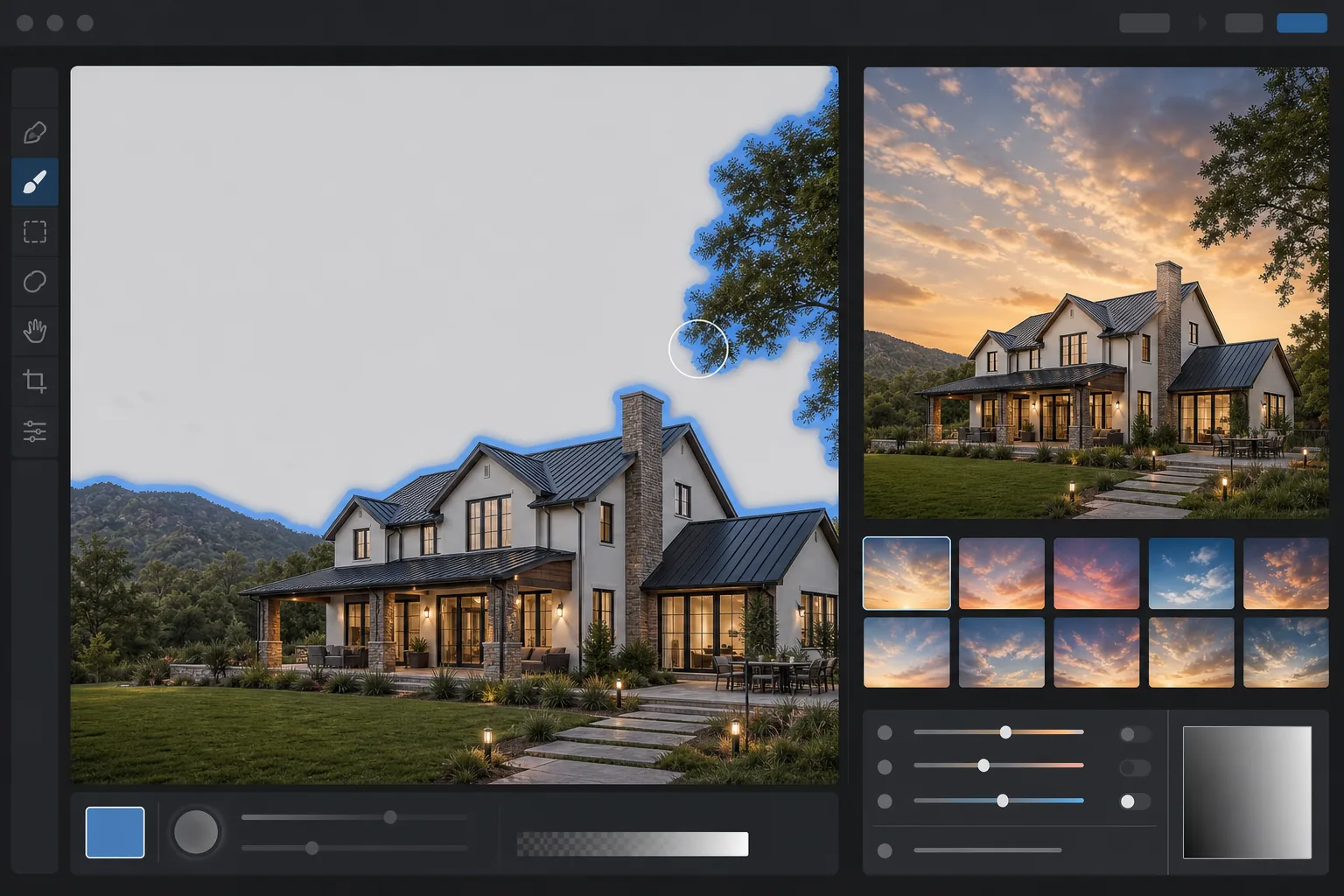
Как удалить или заменить небо на фотографии
Чтобы убрать небо с фото, откройте Magic Eraser в браузере, на iOS или Android, загрузите изображение — и ИИ автоматически определит область неба, после чего вы сможете стереть его, получив чистое вырезание, или заменить новым небом за один шаг. Это бесплатно и без регистрации. Автоопределение следует по линии горизонта и аккуратно обрабатывает сложные края — ветки, провода, контуры крыш, — так что плоское серое или выбеленное небо за секунды превращается в ясное голубое (или любое на ваш выбор). Подходит для фасадов недвижимости, пейзажей, съёмки автомобилей и пасмурных тревел-снимков. Традиционная замена неба в Photoshop или Luminar требует тщательной маскировки вокруг зданий, деревьев и линии горизонта — 20-минутная работа для одной фотографии. Инструменты искусственного интеллекта автоматически определяют область неба и за считанные секунды создают четкую границу, включая такие сложные случаи, как тонкие ветки, строительные леса и линии антенн. Один и тот же рабочий процесс используется для экстерьеров недвижимости, пейзажной фотографии, автомобильной съемки и снимков из путешествий, сделанных в пасмурные дни.
Удалите или замените небо в три шага
- 1
Загрузите фотографию
Откройте Magic Eraser AI. Заполните и вставьте фотографию. Искусственный интеллект сканирует изображение и обнаруживает область неба, включая частично закрытое небо за ветками, проводами и архитектурными объектами.
- 2
Выберите замену (или оставьте поле пустым)
Выберите предустановленный вариант неба (закат, темно-синий, драматический шторм, золотой час), загрузите собственную фотографию неба или оставьте поле пустым, чтобы получить чистый вырез, который можно будет скомпоновать позже.
- 3
Запустите AI Fill и настройте
ИИ меняет небо и подсвечивает передний план в соответствии с новой цветовой температурой. Если новое освещение кажется вам неподходящим, уменьшите интенсивность повторного освещения, чтобы сохранить исходную экспозицию переднего плана.
Лучшее для
- Фотографии экстерьера недвижимости, снятые под ровным серым небом
- Пейзажная фотография, требующая драматической атмосферы позднего освещения
- Фотографии из путешествий, сделанные в пасмурную или дождливую погоду
- Фотографии автомобилей и продуктов, которым нужен более чистый фон
- Снимки архитектуры, на которых небо засвечено или отвлекающе занято.
Советы и ограничения
Замена неба с помощью ИИ выглядит убедительно, если новое небо соответствует времени суток и направлению света в остальной части сцены. Яркий закат за зданием, освещенным резким полуденным солнцем, выглядит неправильно, даже если маска края идеальна — выберите небо, соответствующее исходному освещению. Для списков недвижимости правила MLS в некоторых регионах требуют раскрытия существенных изменений, включая замену неба; проверьте местные правила. В журналистике и документальной фотографии стандартной практикой является полный отказ от замены неба.
Часто задаваемые вопросы
- Разрешена ли замена неба в объявлениях о недвижимости?
- В большинстве регионов MLS допускается замена неба при раскрытии информации, но правила различаются. Некоторые ассоциации MLS требуют либо раскрытия информации, либо политики отсутствия изменений. Перед публикацией проверьте местные правила.
- Magic Eraser снова освещает передний план после замены?
- Да. AI Fill регулирует цветовой оттенок переднего плана и направление теней в соответствии с освещением нового неба. Вы можете вернуть подсветку обратно, если предпочитаете сохранить исходный передний план без изменений.
- Могу ли я использовать свою собственную фотографию неба?
- Да. Загрузите фотографию неба в качестве замены, и ИИ масштабирует ее, подберет цвета и смешает ее с очищенной областью.
- Что происходит с тонкими объектами, такими как провода и ветки деревьев?
- Обнаружение границ ИИ в большинстве случаев обрабатывает провода, ветки и антенны. Очень мелкие детали с низкой контрастностью могут нуждаться в доработке после замены.
- Как убрать небо с изображения бесплатно?
- Откройте Magic Eraser в браузере, на iOS или Android и загрузите фото. ИИ определит небо автоматически — и вы сможете стереть его до прозрачного или однотонного фона либо заменить новым, а затем экспортировать без оплаты, без регистрации и без водяного знака. Это удобно, когда нужно аккуратно вырезать только передний план (здание, линию деревьев, автомобиль) на фоне тусклого или отвлекающего неба.
- Можно ли заменить небо, а не просто удалить его?
- Да. После того как ИИ выделит небо, выберите замену — ясное голубое небо, эффектный закат, пасмурное настроение или собственное фото неба — и Magic Eraser подставит его за линию горизонта. Для самого правдоподобного результата выбирайте небо, направление света на котором совпадает с передним планом, и дайте инструменту сгладить горизонт, чтобы замена не выглядела наклеенной.
- Не будет ли заменённое небо смотреться фальшиво или заметно отредактированным?
- Оно выглядит естественно, когда освещение и цветовая температура нового неба совпадают со сценой: тёплый закат над тёпло освещёнными зданиями, холодная синева над холодным передним планом. Выдают подмену несовпадающее свечение у горизонта или передний план, всё ещё освещённый под старое небо. Выбирайте небо, которое вписывается в имеющийся свет, и перед экспортом проверьте край горизонта на полном увеличении — нет ли ореола.