
Magic Eraser + Figma: 모든 디자인을 위한 깔끔한 자산
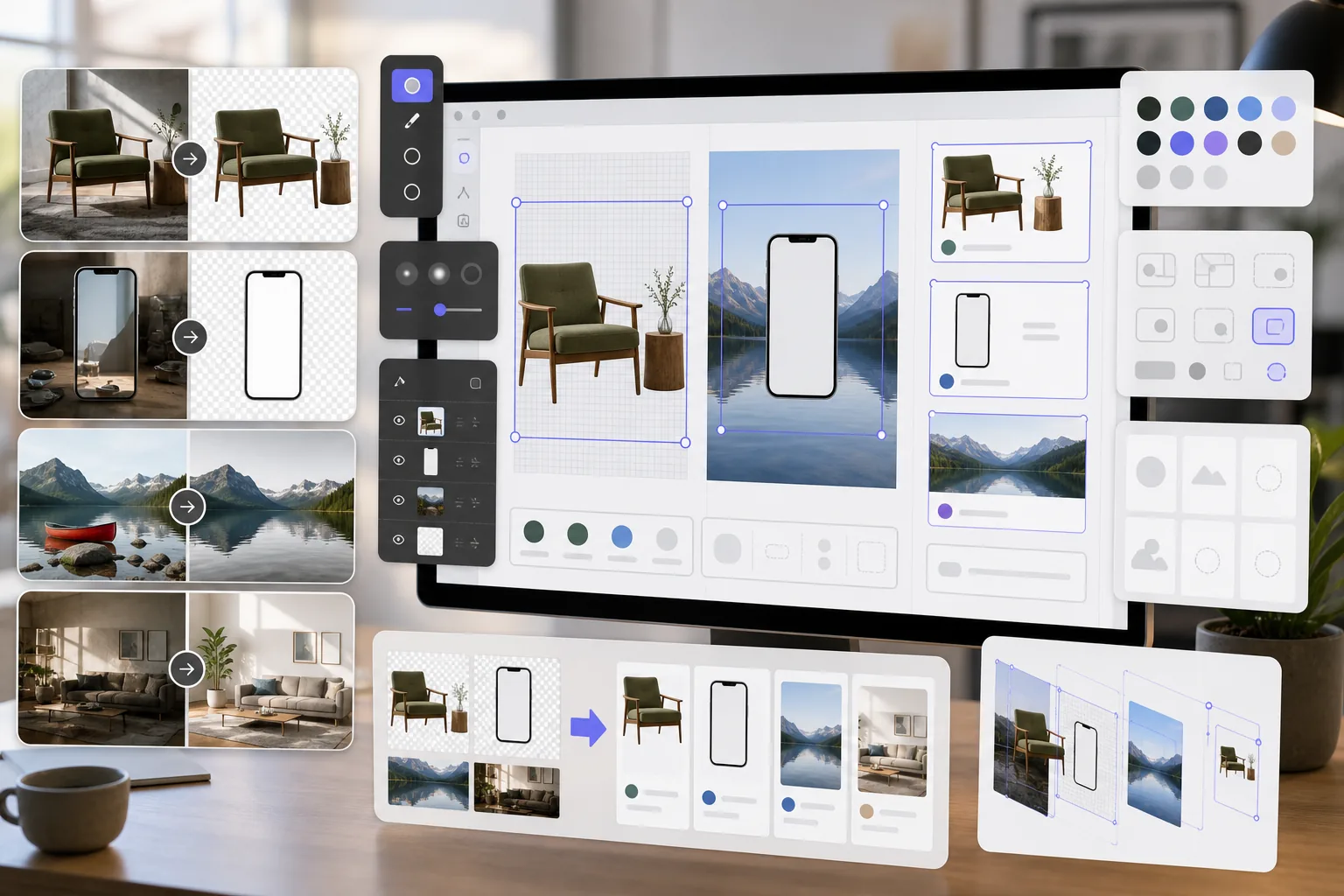
Figma 디자이너에게는 모형, 프로토타입, 프로덕션 디자인을 위한 깔끔한 이미지 자산이 필요합니다. Magic Eraser은 투명한 PNG의 배경을 제거하고, 참조 이미지를 정리하고, Figma 프로젝트가 처음부터 세련되게 보이도록 사진 자산을 준비합니다.
소개 Figma
Figma는 제품팀, UI/UX 디자이너, 대행사가 인터페이스 디자인, 프로토타이핑 및 디자인 시스템 관리를 위해 사용하는 협업 브라우저 기반 디자인 도구입니다. 실시간 협업 및 플러그인 통합을 지원합니다.
장점
모형 및 프로토타입을 위한 투명 PNG
제품 사진, 장치 화면 및 UI 요소에서 배경을 제거하여 Figma 프레임 및 구성 요소에 깔끔하게 겹쳐지는 투명한 PNG를 만듭니다.
정리된 참조 이미지
Figma 디자인 파일에 배치하기 전에 참조 이미지와 스크린샷에서 워터마크, 주석, 주의를 산만하게 하는 요소를 삭제하세요.
제작 준비가 완료된 사진 자산
이미지 품질을 향상시키고 사진을 Figma 디자인의 자산으로 가져오기 전에 사진에서 원하지 않는 개체를 제거하여 이해관계자의 수정 주기를 단축합니다.
더 빠른 자산 준비
Figma로 가져오기 전에 별도의 소프트웨어에서 수동으로 마스킹하고 수정하는 대신 AI 기반 도구를 사용하여 몇 초 안에 이미지 자산을 준비하세요.
Figma에서 Magic Eraser을 사용하는 방법
이미지 업로드
Magic Eraser을 열고 Figma 디자인 프로젝트를 위해 준비하려는 사진이나 자산을 업로드하세요.
이미지 처리
디자인 요구 사항에 따라 투명한 자산의 배경을 제거하고, 원하지 않는 요소를 지우거나 품질을 향상할 수 있습니다.
PNG로 다운로드
투명도를 유지하려면 처리된 이미지를 PNG로 내보내고 전체 배경 이미지의 경우 JPEG로 내보냅니다.
Figma로 가져오기
처리된 이미지를 Figma 파일로 드래그하거나 이미지 배치 기능을 사용하여 프레임과 구성 요소에 추가하세요.
자주 묻는 질문
Magic Eraser은 Figma와 직접 통합되나요?
+
Magic Eraser과 Figma는 내보내기-가져오기 작업 흐름을 통해 함께 작동합니다. Magic Eraser에서 이미지를 준비하고 다운로드한 다음 파일을 캔버스로 드래그하여 Figma로 가져옵니다.
Figma 구성요소에 대해 투명한 PNG를 만들 수 있나요?
+
예. Magic Eraser의 배경 제거 기능은 완전한 알파 채널 지원을 통해 Figma로 가져오는 투명한 PNG를 생성하며 구성 요소, 모형 및 레이어 디자인에 이상적입니다.
Figma용으로 어떤 해상도를 내보내야 합니까?
+
Magic Eraser은 원본 이미지 해상도를 유지합니다. Figma 디자인의 경우 일반적으로 이것으로 충분합니다. 프레젠테이션이나 핸드오프를 위해 더 높은 해상도의 자산이 필요한 경우 AI Enhancement을(를) 사용하여 업스케일하세요.
모형용 스톡 사진에서 워터마크를 제거할 수 있나요?
+
Magic Eraser은 이미지에서 시각적 요소를 제거할 수 있습니다. 그러나 스톡 사진을 디자인에 사용하기 전에 항상 스톡 사진에 대한 적절한 라이센스가 있는지 확인하십시오.
이것이 Figma에 내장된 이미지 도구를 사용하는 것보다 더 빠릅니까?
+
예. Figma의 이미지 도구는 기본적인 자르기 및 색상 조정으로 제한됩니다. Magic Eraser은 Figma가 기본적으로 수행할 수 없는 배경 제거, 개체 삭제 및 AI Enhancement를 처리합니다.
Figma 디자인을 위한 더 나은 자산 준비
Magic Eraser을(를) 무료로 사용해 투명한 PNG를 만들고, 참조 이미지를 정리하고, Figma 프로젝트의 사진 자산을 향상하세요.
Magic Eraser을 무료로 사용해 보세요관련 사용 사례
전문가들이 실제 워크플로에서 이러한 도구를 어떻게 활용하는지 확인하세요.
개인 물품, 주차된 차량, 공사 장비가 잔뜩 찍힌 매물 사진은 매수자의 관심을 떨어뜨립니다. Magic Eraser는 AI로 매물 사진을 즉시 깔끔하게 만들어 줍니다 — 포토샵 기술 불필요.
지저분한 배경과 정리되지 않은 상품 사진은 매일 매출을 갉아먹습니다. Magic Eraser로 몇 초 만에 프로 수준의 상품 이미지를 만들 수 있습니다. 포토샵 실력이 필요 없습니다. 업로드하고, 불필요한 부분을 지우고, 바로 등록하세요.
여권 및 비자 사무소는 매일 수천 장의 사진을 배경 불량으로 반려합니다. Magic Eraser는 모든 배경을 제거하고 흰색, 밝은 회색 또는 파란색 등 필요한 색상으로 몇 초 만에 교체합니다.
관련 비교
Magic Eraser와 유사한 도구의 비교를 확인하세요.
TouchRetouch는 객체 및 결점 제거에 특화된 인기 유료 모바일 앱입니다. Magic Eraser는 설치 없이 모든 기기에서 무료 AI 편집을 제공합니다. 기능, 가격, 사용 편의성을 비교해 보세요.
remove.bg는 강력한 API와 Photoshop, Figma 플러그인을 제공하는 배경 제거 시장 리더입니다. Magic Eraser는 객체 제거, 생성 채우기, AI 향상, 디자인 등 8가지 AI 도구를 하나의 편집기에서 제공합니다.
서로 다른 강점을 가진 두 가지 강력한 AI 사진 편집기. Magic Eraser는 더 넓은 범위의 생성형 AI 도구를 제공하고, Photoroom은 이커머스 상품 사진과 일괄 처리에 뛰어납니다. 어떤 것이 내 워크플로우에 맞는지 확인해 보세요.
주요 AI 사진 편집 도구를 테스트하고 비교했습니다. 개체 제거부터 배경 교체까지, 어떤 편집기가 최고의 결과를 제공하는지 확인하세요.
관련 기사
이 주제와 관련된 팁, 가이드, 튜토리얼.
다른 연동
Magic Eraser와 함께 사용할 수 있는 다른 플랫폼을 확인하세요.