
タトゥー ポートフォリオ写真
新しい顧客を引き寄せるディテールと色の正確さでタトゥー作品を見せましょう。このテンプレートはインクの彩度と線のシャープさを高め、施術後の肌の赤みや腫れを軽減し、スタジオ照明を補正して本来のインクの色を再現し、作品そのものに語らせる洗練されたポートフォリオ表現を作り出します。
このテンプレートを無料で試すBusiness template preview
このテンプレートの機能
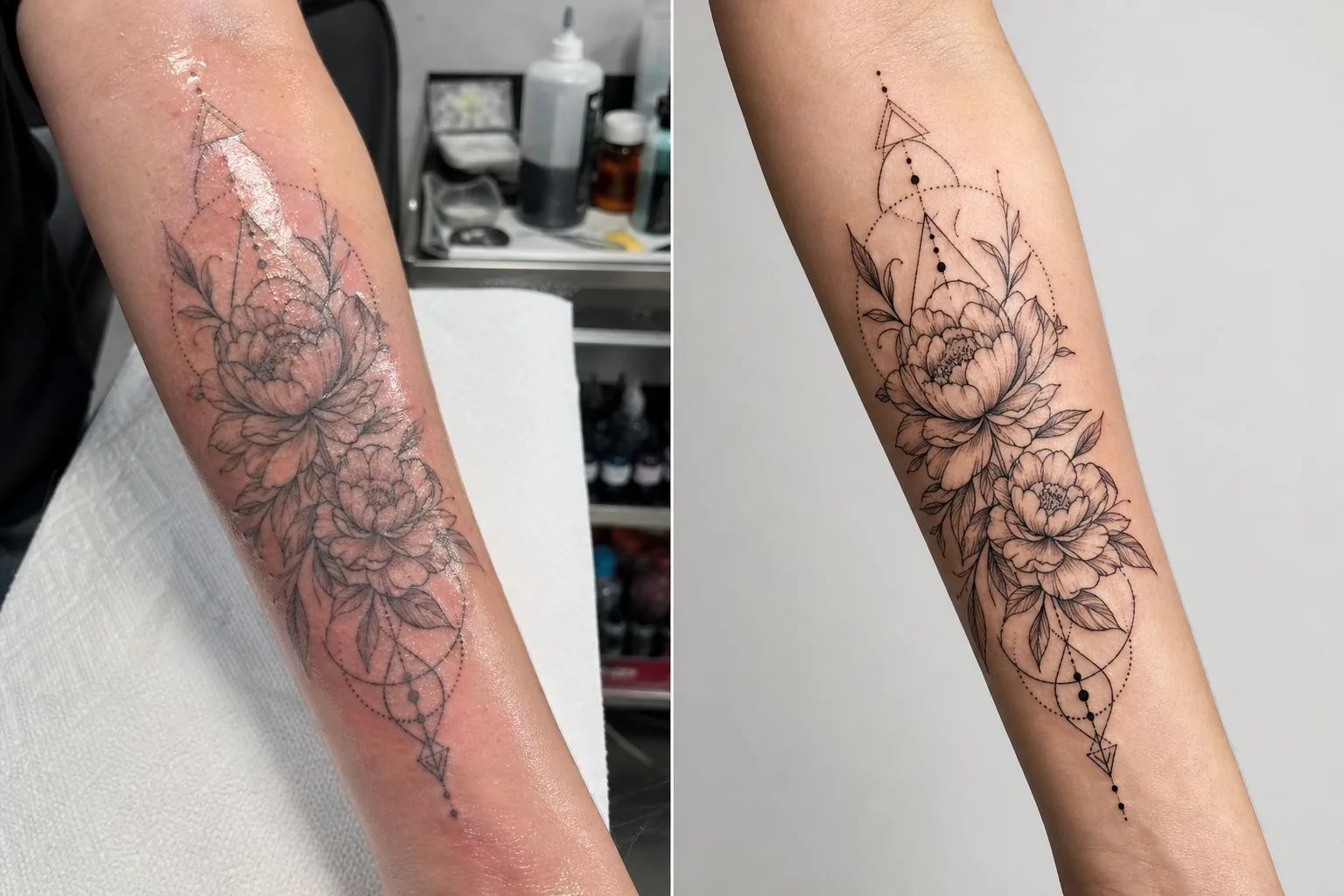
タトゥーアーティストが作品を記録する際に直面する特有の撮影上の課題に対応します。施したばかりのタトゥーは混合光のスタジオ環境で撮影され、新しいインクの周りの肌は赤く腫れ、余分なインクと軟膏で覆われています — そのどれもが最終的に治癒した状態を表していません。このテンプレートは AI Enhance を使って照明を補正し、治癒後に見えるとおりのインクの色を再現し、細い線やドットワークのディテールをシャープにし、施したばかりのタトゥー周りの赤みと腫れを軽減します。Magic Eraser はインクボトル、ペーパータオル、手袋、機材などタトゥーステーションの雑然とした背景を取り除き、注意を作品だけに向けるきれいな背景を作り出します。
テンプレート設定
| インク強調 | 黒、カラー、水彩タトゥースタイル向けの色彩度ブースト |
| 線のシャープ化 | 細い線とドットワークの微細ディテール強調 |
| 肌補正 | 施したばかりのタトゥー周りの赤み、腫れ、軟膏の光沢を軽減 |
| 照明補正 | 混合スタジオ照明を中性の昼光に補正し本来のインクの色を再現 |
| 背景 | きれいな単色またはぼかし背景(ステーションの雑然さを除去) |
| 出力サイズ | 2000 × 2000 px(Instagram スクエア)またはポートフォリオ印刷用に 4000px |
このテンプレートの使い方
タトゥー写真をアップロード
完成したタトゥーの写真 — 施術直後でも治癒後でも — をアップロードします。遠近の歪みを最小限に抑えるため、タトゥーを正面から撮影してください。このテンプレートはクローズアップのディテール写真、全体の概観写真、腕、脚、肋骨など曲面の身体に巻き付く構図に対応します。
インクと線の強調
AI Enhance はインクの彩度を高め、黒のタトゥーは深く濃く見え、カラータトゥーは本来の鮮やかさを発揮します。細い線、ドットワーク、幾何学模様がシャープにされ、針仕事の精密さが際立ちます。強調は異なるタトゥースタイルを尊重し、ボールド トラディショナル、ファイン ライン、水彩、ブラックワークそれぞれに適切な処理を施します。
肌と背景の補正
施したばかりのタトゥーでは、インク周りの赤みと腫れが軽減され、治癒後の見た目に近づけます。軟膏の光沢や周囲の肌の余分なインクは抑えられます。Magic Eraser はタトゥーステーションの背景 — インクカップ、ペーパータオル、手袋、機材 — を取り除き、きれいな背景に置き換えます。
ポートフォリオとSNS向けに書き出し
Instagram のポートフォリオ投稿用に 2000 × 2000 px スクエアで、またはウェブサイトのポートフォリオや印刷ルックブック用に長辺 4000px でダウンロードします。カラープロファイルは水彩やネオトラディショナルスタイルの微妙な色合いの違いを含め、タトゥーインクの全色域を保持します。
最良の結果を得るためのプロのヒント
- ✓タトゥーは昼光バランスの照明(5000〜5500K)で一定の角度から撮影してください。これによりテンプレートが最も正確な色データで処理できます。暖色のタングステン照明はインクをより黄オレンジに見せ、補正は効果的ではあるものの、中性の照明から始めた方が良い結果が得られます。
- ✓撮影前に肌表面の余分なインクと軟膏を拭き取ってください。テンプレートは軟膏の光沢を軽減しますが、きれいに拭き取った乾いた表面の方がインクワークがより明瞭に見え、より良い強調結果が得られます。
- ✓可能な限り同じタトゥーの施術直後と治癒後の両方を撮影してください。テンプレートで処理した施術直後の写真はすぐに使えるポートフォリオ素材になり、治癒後の写真は実際に落ち着いた結果を確認できます。両方をポートフォリオに載せることでプロ意識が伝わります。
- ✓手足に巻き付く大きな作品では、全体の概観に加えて重なり合うディテール写真を複数撮影してください。テンプレートは広い概観写真で失われがちなディテールをシャープにし、際立つ要素のクローズアップは魅力的な個別ポートフォリオ投稿になります。
よくある質問
施したばかりのタトゥーを治癒後のように見せられますか?
+
このテンプレートは赤みと腫れを軽減して治癒後の見た目に近づけますが、結果はあくまで強調であり、治癒の完璧な予測ではありません。治癒は肌のタイプ、インクのタイプ、身体の部位によって個人差があります。強調された施術直後の写真は治癒後に近く見えますが、実際の治癒結果と同一とは限りません。
すべてのタトゥースタイルで機能しますか?
+
はい。このテンプレートはボールド トラディショナル、和彫り、ファイン ライン、ドットワーク、幾何学、水彩、ネオトラディショナル、ブラックワーク、リアリスティックなポートレートのスタイルを認識し、適切に強調します。各スタイルにはその美学に最も映えるよう調整された異なるシャープ化と色処理が施されます。
カバーアップのタトゥーはどうですか?
+
カバーアップのタトゥーも他のタトゥーと同様に処理されます。テンプレートは見えているインク、つまりカバーアップのデザインを強調します。ビフォーアフター(元のデザイン対カバーアップ)を見せたい場合は、最も一貫したポートフォリオ表現のために各写真を別々に処理してください。
Related templates
More business templates for your workflow.
一貫した背景、プロによる照明補正、ブランドに適したカラー グレーディング、チーム全体で均一な画質を備えたポーランドの企業チームの写真。
筋肉の鮮明度の向上、動的照明補正、背景のクリーンアップ、およびハイコントラストの運動用カラー グレーディングを使用して、ジムやフィットネスの写真を強化します。
背景の置換、肌のスムージング、照明補正を使用して、洗練された履歴書の顔写真を作成します。履歴書、求人ポータル、企業ディレクトリに最適です。
背景の置き換え、ジャージの色の強調、名簿やプログラム用のスタジアムやスタジオの背景を使用して、プロのチームや個々のプレーヤーの写真を作成します。
背景の置き換え、劇的な照明の強化、プレスキットや会場への提出用の印刷準備の整った出力を備えた、プロのバンドやミュージシャンのプロモーション写真を作成します。
Instagram のポートフォリオや予約ページ向けに、マクロレベルのディテール強化、本物のジェルとポリッシュの色の正確さ、きれいな手の位置を備えたネイル アートを紹介します。