
履歴書の顔写真
カジュアルな写真を、履歴書、LinkedInプロフィール、求人応募ポータル向けの採用担当者に好印象を与える顔写真に変えましょう。このテンプレートは気が散る背景を取り除き、すっきりとした単色またはグラデーションの背景に置き換え、自然な肌のレタッチを施し、不均一な照明を補正するので、どの応募でも自信に満ち親しみやすく見えます。
このテンプレートを無料で試すBusiness template preview
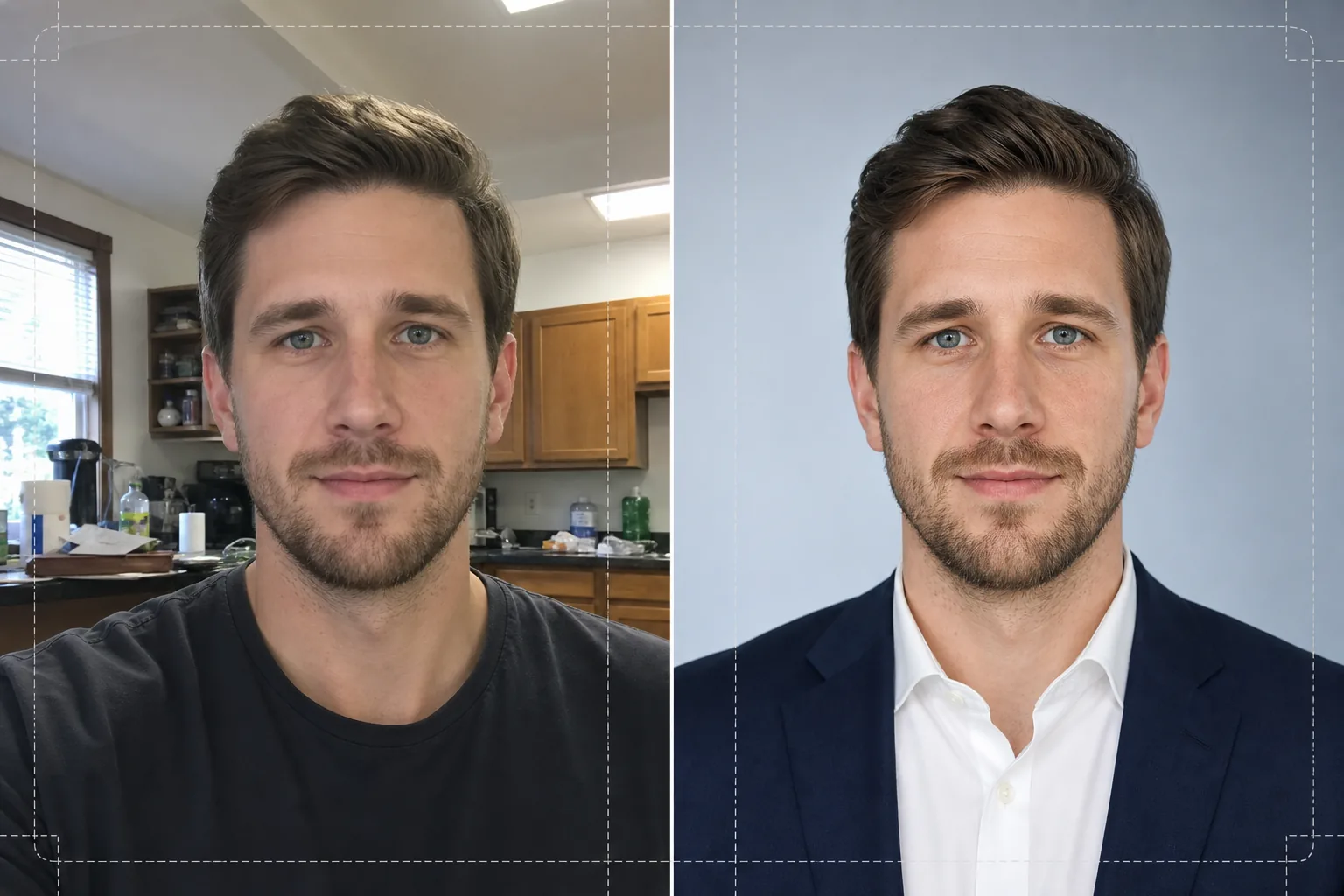
このテンプレートでできること
自撮り写真、スマートフォンのスナップ、カジュアルなポートレートを、履歴書やプロフィールにふさわしい洗練された顔写真に変えます。Background Eraserは、キッチン、公園、オフィスの個室といったあらゆる環境からあなたの頭と肩を切り抜き、企業の慣習に合う単色の白、ライトグレー、または淡い青のグラデーション背景に置き換えます。続いてAI Enhanceが、天井の蛍光灯や強い窓明かりによる露出のばらつきを補正し、自然な毛穴のディテールを残しながら肌の質感を滑らかにし、見る人の視線が顔に向くよう目をシャープにします。その結果、均一に照らされた気が散らないポートレートが完成し、履歴書では2x2インチで鮮明に印刷され、求人サイトでは400x400のアバターとしてくっきり表示されます。
テンプレートの設定
| 背景 | 単色の白、ライトグレー(#F0F0F0)、または淡い青のグラデーション |
| 肌のレタッチ | ナチュラルスムーズ(肌荒れを軽減し、毛穴の質感を保持) |
| 照明補正 | 目に微かなキャッチライトを入れた均一なフロントフィル |
| 切り抜き比率 | 3:4 縦長(標準的な履歴書の顔写真の比率) |
| 出力解像度 | 1200x1600px(300 DPIで最大4x5.3インチまで印刷可能) |
このテンプレートの使い方
写真をアップロード
顔と肩がはっきり写っている写真をアップロードしてください。自撮り、ウェブカメラの写真、トリミングした集合写真もすべて使えます。このテンプレートはあらゆるデバイスの画像に対応し、スマートフォンの前面カメラによくあるレンズの歪みを補正します。
背景の除去と置き換え
Background Eraserがあなたの頭と肩を自動的に検出し、背後にあるものをすべて取り除きます。単色の白、ニュートラルなグレー、または控えめな青のグラデーション背景を選べます。エッジ検出により後れ毛や襟のディテールが保たれ、自然な切り抜きになります。
補正とレタッチ
AI Enhanceが顔全体の照明を整え、あごや鼻の下にできる強い影を抑えます。肌のレタッチは一時的な肌荒れを取り除き、プラスチックのような不自然さを出さずに肌の色ムラを整えます。目のシャープ化により微かなキャッチライトが加わり、ポートレートが生き生きとして集中した印象になります。
ダウンロードして使用
完成した顔写真を1200x1600pxで書き出します。このファイルは印刷(300 DPIでの履歴書への挿入)とデジタル(LinkedIn、Indeed、Glassdoorのプロフィール写真)の両方に最適化されています。JPEGとPNG形式が利用でき、カスタムレイアウトで背景を透明に保ちたい場合はPNGをお使いください。
最良の結果を得るためのプロのヒント
- ✓肩を少し斜めにしてカメラに正対した写真を使いましょう。わずかに四分の三向きにすると立体感が出て、完全な正面よりも自然に見えます。
- ✓強い逆光の写真は避けてください。明るい窓の前に立つと顔がシルエットになり、AIが影の部分のディテールを復元できる範囲が限られます。
- ✓使う予定の背景と対照的な単色のトップスを着ましょう。白い背景に白いシャツでは肩のあたりで溶け込み、体の輪郭が失われます。
よくある質問
スマートフォンで撮った自撮り写真を使えますか?
+
はい。このテンプレートは、鼻を実際より広く見せる前面カメラのわずかな樽型歪みを補正します。また、スマートフォンのカメラに特有の浅い被写界深度にも対応するので、耳や肩もシャープに保たれます。
レタッチは不自然に見えますか?
+
いいえ。肌のレタッチは自然な毛穴の質感を残し、シミや赤みなどの一時的な肌荒れだけを取り除きます。仕上がりは、良い照明のもとで調子の良い日のあなた本来の姿のようで、加工しすぎた印象にはなりません。
企業向けの履歴書にはどの背景色を選ぶべきですか?
+
印刷する履歴書には単色の白が最も無難です。ライトグレーは画面上のプロフィールに適しており、バックライト付きのディスプレイで純白の強いコントラストを避けられます。青のグラデーションはテック系やクリエイティブ系の業界に向いています。
Related templates
More business templates for your workflow.
一貫した背景、プロによる照明補正、ブランドに適したカラー グレーディング、チーム全体で均一な画質を備えたポーランドの企業チームの写真。
筋肉の鮮明度の向上、動的照明補正、背景のクリーンアップ、およびハイコントラストの運動用カラー グレーディングを使用して、ジムやフィットネスの写真を強化します。
インクの色の鮮やかさ、線の細部の鮮明化、肌の赤みの軽減、アーティストのポートフォリオや Instagram のきれいな背景により、タトゥー ポートフォリオの写真を強化します。
背景の置き換え、ジャージの色の強調、名簿やプログラム用のスタジアムやスタジオの背景を使用して、プロのチームや個々のプレーヤーの写真を作成します。
背景の置き換え、劇的な照明の強化、プレスキットや会場への提出用の印刷準備の整った出力を備えた、プロのバンドやミュージシャンのプロモーション写真を作成します。
Instagram のポートフォリオや予約ページ向けに、マクロレベルのディテール強化、本物のジェルとポリッシュの色の正確さ、きれいな手の位置を備えたネイル アートを紹介します。