
企業チーム写真
高額なカメラマンを雇わずに、チーム紹介ページにプロフェッショナルで統一感のある印象を与えます。このテンプレートは、個々の顔写真の背景を統一し、混在したオフィスの照明をニュートラルでプロフェッショナルなトーンに補正し、控えめな肌の補正を適用して、すべてのメンバーの写真が同じスタイルと品質になるようにします。
このテンプレートを無料で試すBusiness template preview
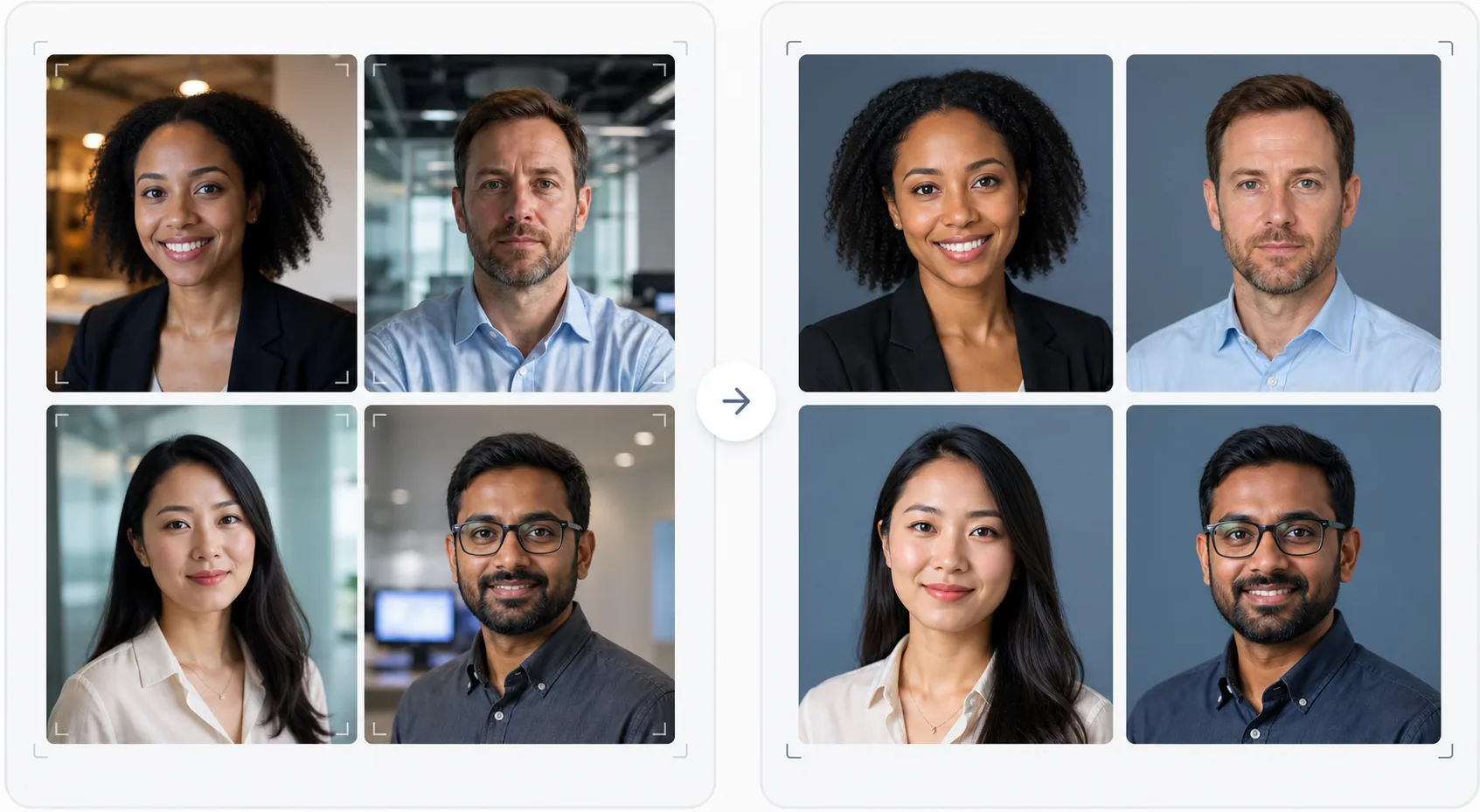
このテンプレートでできること
企業ウェブサイト、LinkedIn の会社ページ、マーケティング資料向けに、視覚的に統一感のあるチーム写真を作成します。チームの顔写真が異なる時期に、異なる人物によって、異なるカメラで撮影されると、結果として不統一でプロフェッショナルに見えないチームページになってしまいます。このテンプレートは、すべての顔写真で背景、色温度、照明スタイル、トリミング構図を統一することでこれを解決します。Background Eraser は多様なオフィス背景を取り除き、ブランドカラーの統一された単色またはグラデーション背景に置き換えます。AI Enhance は露出を正規化し、蛍光灯のオフィス照明による緑がかった色合いを補正し、控えめな肌の補正を適用して、すべてのメンバーが洗練されてプロフェッショナルに見えるようにします。
テンプレート設定
| 背景 | 統一された単色、グラデーション、またはオフィスのぼかし(ブランドに応じて設定可能) |
| トリミング構図 | 頭と肩、中央配置、すべてのチーム写真で統一 |
| 照明の正規化 | ニュートラルでプロフェッショナル(蛍光灯、LED、窓からの光の混在を補正) |
| 肌の補正 | 控えめな肌荒れの軽減と目の下のクマの補正 |
| 出力サイズ | 800 × 800 px(ウェブチームページ用)および 400 × 400 px(ディレクトリ用) |
このテンプレートの使い方
メンバーの写真をアップロード
メンバーの顔写真をアップロードします。異なるカメラ、場所、時期に撮影されたものでも構いません。このテンプレートは、プロのポートレートからデスクで撮影したスマートフォンの自撮りまで、あらゆるものに対応します。効率的に処理するために、チーム全体を一括アップロードしましょう。
背景を統一する
Background Eraser は各写真の元の背景を取り除き、すべてのメンバーで統一された選択肢に置き換えます。単色のブランドカラー、プロフェッショナルなグラデーション、または標準化されたオフィスのぼかし効果から選べます。すべての写真が同じ背景処理を受け、視覚的な統一感が生まれます。
照明を正規化して補正する
AI Enhance は各写真の照明を統一されたニュートラルでプロフェッショナルなトーンに補正します。緑がかった蛍光灯の色合い、暖色の白熱灯の色合い、混在した照明がすべて補正されます。控えめな肌の補正で肌荒れや目の下のクマを軽減します。目はやわらかく明るくされ、生き生きとして親しみやすい印象を与えます。
ウェブとディレクトリ向けに書き出す
ウェブサイトのチームページ用に 800 × 800 px、社内ディレクトリやメール署名用に 400 × 400 px で、フルセットをダウンロードできます。すべての画像は同じカラープロファイル、圧縮、ファイル命名規則で書き出されるため、CMS への一括アップロードが簡単です。
最適な結果を得るためのプロのヒント
- ✓メンバーには簡単な撮影ガイドを送りましょう。カメラを正面から見つめ、背景と対照的な単色のトップスを着用し、顔に十分な光が当たるようにし(可能であれば窓に向かって)、軽い笑顔で自然な表情を保つこと。良い元写真ほど AI による補正が少なくて済みます。
- ✓ブランドガイドラインに登場する背景色を選びましょう。通常はニュートラルなグレー、ネイビー、またはブランドのセカンダリーカラーです。これにより、チームページが単なる写真の集まりではなく、ブランド資産になります。
- ✓新しいメンバーが加わったら、同じ設定でこのテンプレートを通して処理しましょう。これにより、チームが成長し変化しても、時間の経過とともに視覚的な統一感が維持されます。
- ✓経営幹部やリーダーシップについては、背景とスタイルを統一しつつ、リーダーシップを広いチームと視覚的に区別するために、少し異なる構図(よりタイトなトリミング、わずかに暖かいトーン)を検討しましょう。
よくある質問
チーム全体を一度に処理できますか?
+
はい。すべてのメンバーの写真を一括でアップロードできます。このテンプレートはすべての画像に同じ背景、照明補正、構図を適用し、完璧な統一感を実現します。写真は一致した寸法、圧縮、カラープロファイルで返されます。
メンバーの写真品質が大きく異なる場合はどうなりますか?
+
このテンプレートは、シャープネス、ノイズ除去、圧縮を調整することで、スマートフォンの自撮りと DSLR のポートレート間の品質の違いを正規化します。DSLR のソースは常にわずかにシャープな結果になりますが、処理後の出力は視覚的に十分統一されているため、ウェブサイトのグリッド上では品質の違いが目立ちません。
リモートチームでも機能しますか?
+
対面での撮影が現実的でないリモートチームにとって、これは理想的な使用例です。各メンバーが自宅で自撮りをするか誰かに撮ってもらい、このテンプレートがそれらすべてを、同じスタジオセッションで撮影されたかのように統一します。
撮影なしでプロフェッショナルなチームページを
あらゆるソースから個々の顔写真をアップロードして、ウェブサイト用にすぐに使える、視覚的に統一されブランドに沿ったチーム写真セットを手に入れましょう。
無料で試すRelated templates
More business templates for your workflow.
筋肉の鮮明度の向上、動的照明補正、背景のクリーンアップ、およびハイコントラストの運動用カラー グレーディングを使用して、ジムやフィットネスの写真を強化します。
インクの色の鮮やかさ、線の細部の鮮明化、肌の赤みの軽減、アーティストのポートフォリオや Instagram のきれいな背景により、タトゥー ポートフォリオの写真を強化します。
背景の置換、肌のスムージング、照明補正を使用して、洗練された履歴書の顔写真を作成します。履歴書、求人ポータル、企業ディレクトリに最適です。
背景の置き換え、ジャージの色の強調、名簿やプログラム用のスタジアムやスタジオの背景を使用して、プロのチームや個々のプレーヤーの写真を作成します。
背景の置き換え、劇的な照明の強化、プレスキットや会場への提出用の印刷準備の整った出力を備えた、プロのバンドやミュージシャンのプロモーション写真を作成します。
Instagram のポートフォリオや予約ページ向けに、マクロレベルのディテール強化、本物のジェルとポリッシュの色の正確さ、きれいな手の位置を備えたネイル アートを紹介します。