
ストックフォトの準備
最初の提出でストックフォト代理店に写真を受け入れてもらいましょう。このテンプレートは、却下の原因となる商標、ロゴ、ブランド要素を削除し、品質審査で不合格となる技術的な欠点を整え、Shutterstock、Adobe Stock、Getty、iStockが要求する正確な仕様でファイルを書き出します。写真がストックライブラリから却下される最も一般的な理由を排除します。
このテンプレートを無料で試すDesign template preview
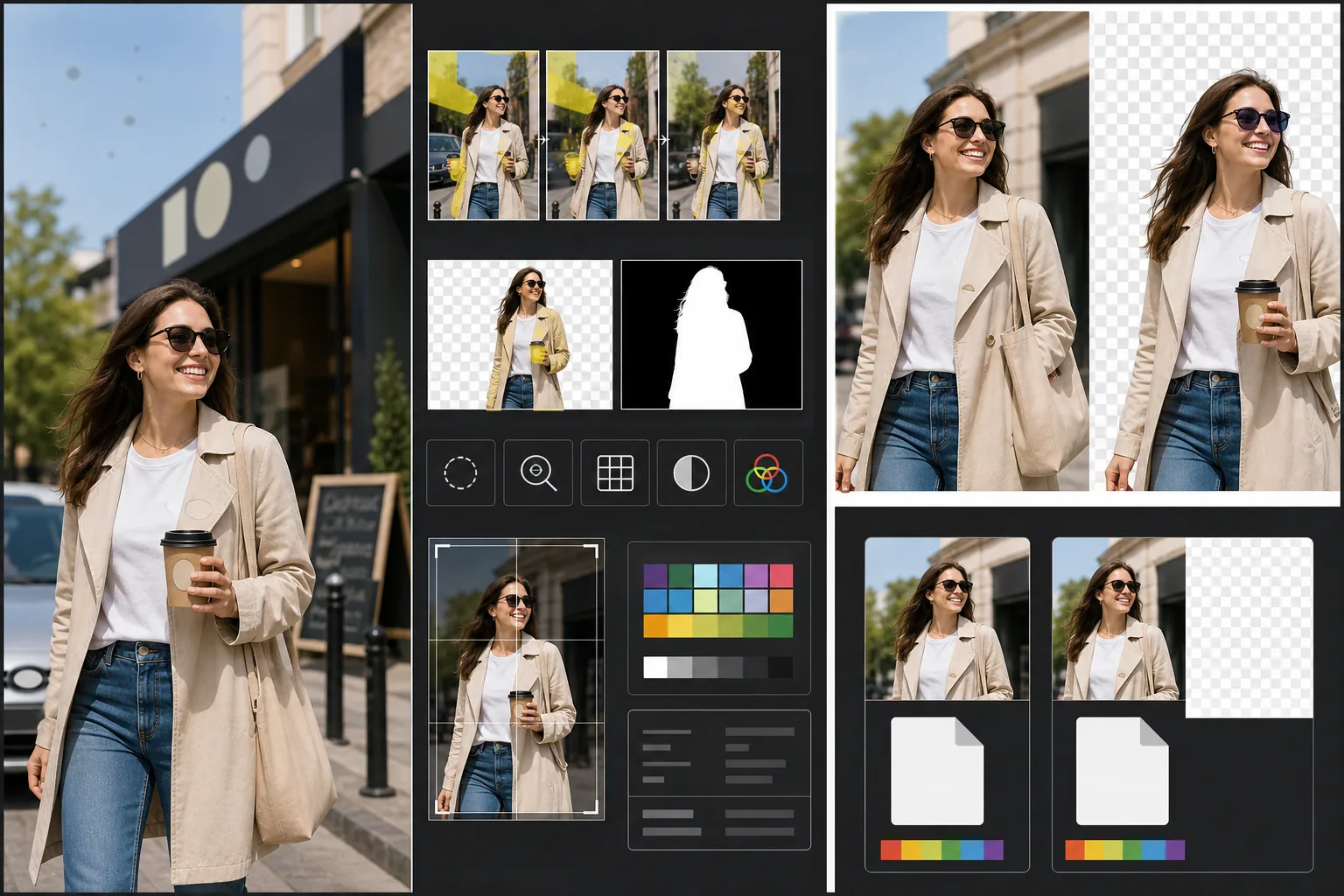
このテンプレートの機能
ストックフォトの却下を招く具体的な技術的・法的要件に対処します。Magic Eraserは、物件使用許諾が必要になったり、即座に却下されたりする原因となる、目に見える商標、ブランドロゴ、製品ラベル、ブランド看板を検出して削除します。これには、衣服のロゴ、車のエンブレム、店舗の看板、パッケージのブランド名が含まれます。Background Eraserは切り抜き用途の画像にクリーンな分離を提供し、RGB画像と、ストック代理店が要求する別個のアルファマスクの両方を生成します。技術的品質チェックでは、ノイズレベル、シャープネス、色収差、センサーのほこりの斑点を確認します。これらはすべて一般的な却下の引き金です。AIは可能な範囲で補正し、再撮影が必要な問題にはフラグを立てます。最終的な書き出しは、ファイル形式、カラープロファイル、解像度、メタデータの埋め込みについて代理店の仕様に適合します。
テンプレート設定
| 商標検出 | 目に見えるロゴ、ブランド名、製品ラベルを自動検出して削除 |
| 技術的品質チェック | ノイズ、シャープネス、色収差、センサーのほこりを確認 |
| 分離マスク | 切り抜き画像用のアルファチャンネルを生成(透過付きPNG) |
| カラープロファイル | sRGB(ほとんどのストック代理店で必須) |
| メタデータ | タイトル、説明、キーワードのIPTCフィールドを埋め込み |
| 出力形式 | 最高品質のJPEG(レベル12)またはTIFF(可逆、Getty推奨) |
このテンプレートの使い方
写真をアップロード
ストック代理店に提出したい写真をアップロードします。このテンプレートはRAW、JPEG、TIFF、PNGファイルに対応しています。利用可能な最高品質のバージョンをアップロードしてください。ストック代理店はフル解像度で技術的品質を評価し、繰り返し保存による圧縮アーティファクトが見られる画像を却下します。
商標とブランドを削除
Magic Eraserは目に見える商標、ロゴ、ブランド名、製品ラベルを画像内でスキャンします。検出された項目は確認用にハイライト表示されます。承認された削除は、AIが各商標の背後にある面を再構築して実行されます。衣服のロゴの下の生地の織り目、エンブレムの下の車のボディ、店舗看板の下の壁面などです。
技術的品質チェックを実行
このテンプレートは、ストック代理店の却下を一般的に招く技術的問題について画像を分析します。影部のノイズ、シャープネス不足、高コントラストの縁での色収差、センサーのほこりの斑点、ホワイトバランスのエラーなどです。補正可能な問題は自動的に修正されます。補正できない問題(激しい手ブレなど)は、提出前に分かるようフラグが立てられます。
代理店のメタデータ付きで書き出し
対象の代理店を選択すると、テンプレートはその代理店が推奨する形式と仕様で書き出します。タイトル、説明、キーワードのIPTCメタデータフィールドは書き出し前に埋め込めます。ファイルはShutterstock、Adobe Stock、Getty/iStock、Alamyの寄稿者ポータルに直接アップロードする準備が整っています。
最良の結果を得るためのプロのヒント
- ✓最初から商標を意識して撮影しましょう。AIはロゴを効果的に削除しますが、ブランド要素が少ないシーンほど補完が少なくて済み、より自然に見えます。衣服のラベルを内側に折り込み、ブランドのない小道具を選び、可能な場合は店舗の看板が写り込まないようにカメラを配置しましょう。
- ✓カメラが生成できる最高解像度で提出しましょう。ストック代理店は検索結果を部分的に解像度でランク付けします。同じ検索クエリでは、購入者が柔軟なトリミングや大判用途のために大きなファイルを好むため、5000万画素の画像が1200万画素の画像より上位に表示されます。
- ✓可能な場合はストックフォトに人物を含めましょう。識別可能な人物の被写体(モデルリリース付き)が写った画像は、人物のいない同様のシーンよりも一貫して多くの収益を得ます。このテンプレートの肌のレタッチは最小限になるよう調整されており、過度に加工された肌よりもストック代理店に好まれます。
よくある質問
車のエンブレムを削除しても自然に見えますか?
+
はい。AIはエンブレムの背後にある車のボディを再構築し、塗装色、反射、表面の曲率を合わせます。一般的なエンブレムの位置(フロントグリル、トランク、ホイールセンター)では、再構築は非常にきれいです。珍しい配置や非常に大きなエンブレムでは、縁の部分に手早い手動修正が必要な場合があります。
提出用のキーワードを生成できますか?
+
このテンプレートは、タイトル、説明、キーワードを入力できるIPTCメタデータフィールドを埋め込みます。キーワードの自動生成は行いません。ストックのキーワード最適化は、購入者がどのように検索するかの理解に依存する専門的なスキルであり、自動生成されたキーワードは売上を促進する商業的な概念を見落とすことがよくあります。
どの代理店に対応していますか?
+
書き出しプリセットはShutterstock、Adobe Stock、Getty Images、iStock、Alamy、Dreamstime、500pxに対応しています。各プリセットは、その特定の代理店の提出要件に合わせて、正しいファイル形式、カラープロファイル、最大ファイルサイズ、メタデータの埋め込みを設定します。
Related templates
More design templates for your workflow.
Web、印刷物、ソーシャル メディア、アプリのアイコン用に、きれいなエッジを調整してマルチサイズにエクスポートできる透明な PNG ロゴを作成します。印刷されたロゴの写真やデジタル ファイルを処理します。
著者のマーケティングや出版社のプロモーション用に、3D パースペクティブ、シャドウ レンダリング、ライフスタイルの背景を使用してリアルな本の表紙のモックアップを生成します。
背景の置き換え、ホストのポートレートの分離、タイポグラフィ対応のレイアウトを備えた Apple Podcast と Spotify の仕様を満たすポッドキャスト カバー アートをデザインします。
AI アップスケーリング、キャンバス拡張、色の正確な校正、印刷可能なファイルのエクスポートを使用して、デジタル アートや写真を大判印刷用に準備します。