
アートプリントの準備
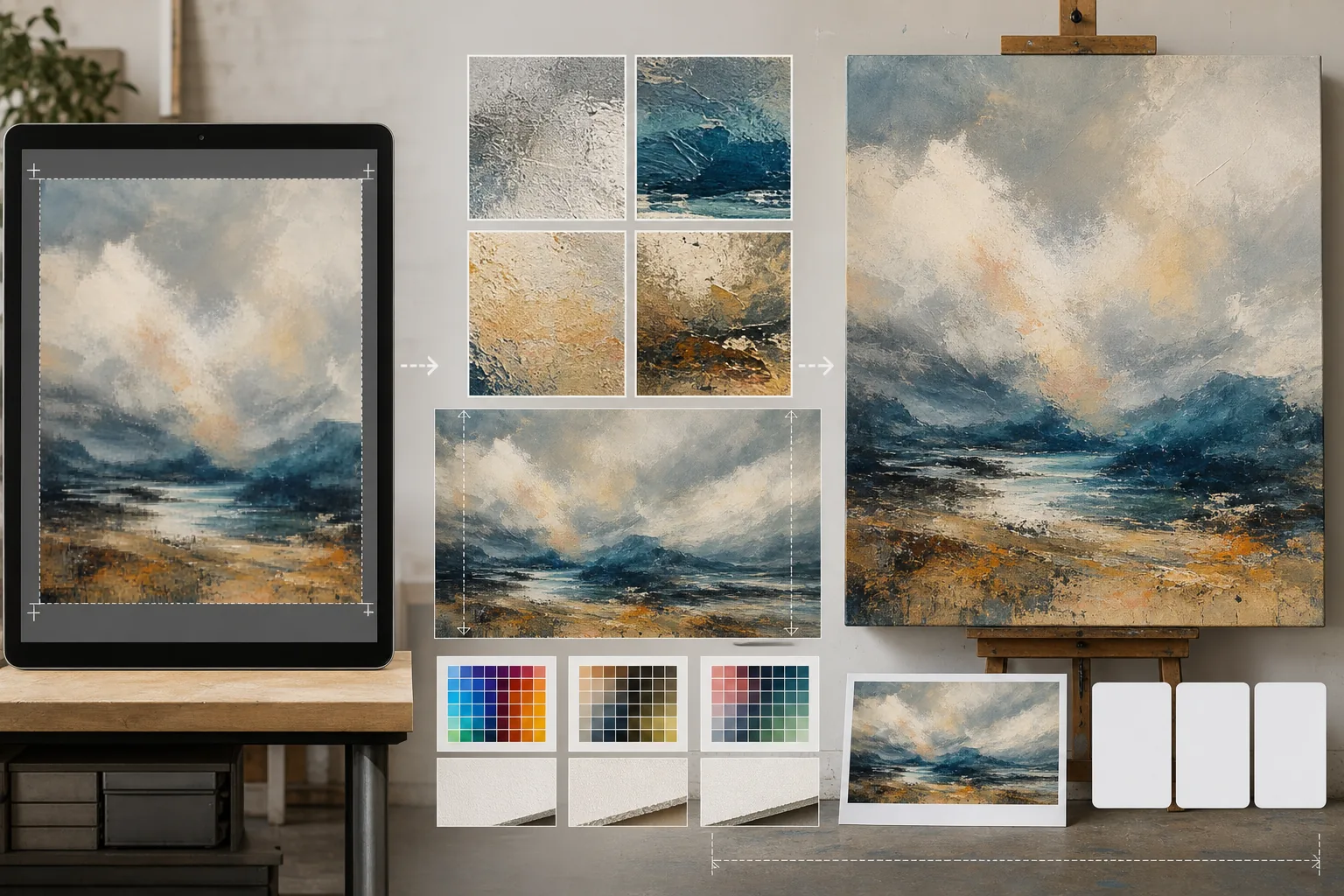
デジタルアートワーク、写真、イラストを大判のギャラリープリント、キャンバスラップ、ポスター制作向けに準備します。このテンプレートは AI Enhance を使って画質を損なうことなく画像を印刷に適した解像度へアップスケールし、AI Expand でキャンバスの端を拡張してギャラリーラップ用の余白を作成します。すべてプロ仕様の印刷に向けた色精度を保ちながら行えます。
このテンプレートを無料で試すDesign template preview
このテンプレートの機能
画面解像度のデジタルファイルと、物理的な印刷制作が求める厳しい解像度要件との間のギャップを埋めます。AI Enhance は細部 — 絵画の筆致、写真の粒状構造、イラストの線描 — を保ちながら画像を2倍から4倍にアップスケールし、単純な補間にありがちなぼやけやノイズを生じさせません。AI Expand はアートワークのシームレスな延長を生成してキャンバスの端を拡張し、画像が張り枠を包み込むギャラリーキャンバスラップに必要な追加の余白を提供します。カラープロファイルは CMYK または Adobe RGB に変換され、最終的な印刷が紙、キャンバス、金属素材でどう見えるかを示すソフトプルーフが可能です。
テンプレート設定
| アップスケール倍率 | 2倍、3倍、または4倍(大判印刷では長辺最大16000pxまで) |
| キャンバス拡張 | 1.5インチ、2インチ、またはギャラリーラップの裁ち落とし用カスタム余白 |
| ディテールの保持 | 適応型:絵画には筆致、写真には粒状、イラストには線 |
| カラープロファイル | sRGB(画面)、Adobe RGB(写真印刷)、または CMYK(商業印刷) |
| 出力形式 | TIFF(可逆印刷)、PNG(透過)、または JPEG(ウェブプレビュー) |
このテンプレートの使い方
アートワークをアップロード
デジタルファイル — 絵画、写真、イラスト、ミックスメディア — をアップロードします。テンプレートは JPEG、PNG、TIFF、PSD ファイルに対応しています。最良のアップスケール結果を得るには、印刷要件を下回っていても、手持ちで最も高解像度のバージョンから始めてください。
印刷解像度へアップスケール
目標の印刷サイズに応じてアップスケール倍率を選びます。24×36インチを300 DPIで印刷するには7200×10800ピクセルが必要です。AI は元の特徴を保ちながらアップスケールします — 筆致は筆致のまま、フィルムの粒状感は粒状のまま、ピクセルアートはその四角い味わいを保ちます。
ギャラリーラップ用にキャンバスを拡張
ギャラリーラップでキャンバスに印刷する場合、AI Expand は四辺すべての周囲にアートワークのシームレスな延長を生成します。拡張された余白は元のスタイル、配色、質感に一致するため、包み込まれた端は引き伸ばしたり反転したりしたものではなく、意図的に見えます。
プルーフして書き出す
目標のカラープロファイルで画像がどう表示されるかを示すソフトプルーフを確認します — オフセットやジクレー印刷には CMYK、ファインアートのインクジェットには Adobe RGB。印刷所向けには TIFF、さらなる編集には PNG として書き出します。ファイルには正確な色再現のための ICC プロファイルデータが埋め込まれます。
最良の結果を得るためのプロのヒント
- ✓必ず元のファイルをネイティブ解像度のまま使い始めてください。ウェブ表示用にすでに圧縮・ダウンサンプリングされたファイルをアップスケールすると、処理の世代ごとに積み重なるノイズが生じます。
- ✓ギャラリーラップのキャンバス印刷では、張り枠の奥行きが1.5インチであっても2インチの拡張余白を依頼してください。余分な半インチが、張り込み時のわずかなずれで画像の端が露出するのを防ぐ余裕を生みます。
- ✓大判制作に踏み切る前に、小さいサイズで実物のプルーフ印刷を依頼してください。画面表示と紙の印刷では色の出方が異なり、5×7のプルーフは30×40のキャンバスのほんの一部の費用で済む一方、修正が必要な色のずれを明らかにしてくれます。
よくある質問
スマートフォンの写真からどのくらい大きく印刷できますか?
+
一般的な1200万画素のスマートフォン写真(4000×3000px)は、300 DPIで13×10インチにきれいに印刷できます。2倍の AI アップスケールでこれが2倍の26×20インチになります。4倍のアップスケールなら、スマートフォンの写真でも40×30インチの鮮明な印刷 — ギャラリー展示に適したもの — が得られます。
アップスケールすると作品の見た目は変わりますか?
+
AI はコンテンツの種類に応じてアップスケール方法を調整します。絵画は目に見える筆致と質感を保ちます。写真は粒状構造とシャープさの特性を維持します。イラストは線の太さの一貫性を保ちます。目標は元の作品のように見える、より大きなバージョンであり、再解釈ではありません。
キャンバスの片側だけを拡張できますか?
+
はい。どの端をどれだけ拡張するかを指定できます。これは印刷内で構図をずらしたいときに便利です — たとえば、風景の上に空を加えてタイトル用の余白を作る、あるいは地平線が多い構図のバランスを取るために前景を加える、といった具合です。
Related templates
More design templates for your workflow.
Web、印刷物、ソーシャル メディア、アプリのアイコン用に、きれいなエッジを調整してマルチサイズにエクスポートできる透明な PNG ロゴを作成します。印刷されたロゴの写真やデジタル ファイルを処理します。
著者のマーケティングや出版社のプロモーション用に、3D パースペクティブ、シャドウ レンダリング、ライフスタイルの背景を使用してリアルな本の表紙のモックアップを生成します。
背景の置き換え、ホストのポートレートの分離、タイポグラフィ対応のレイアウトを備えた Apple Podcast と Spotify の仕様を満たすポッドキャスト カバー アートをデザインします。
商標の削除、モデルリリース準拠の編集、技術的品質チェック、および代理店固有の形式要件を備えた、証券代理店への提出用の写真を準備します。