
ブックカバーのモックアップ
本の表紙をライフスタイルのシーンに配置したり、棚に並べたり、自然な影を伴う単体の3Dレンダーとして表示したりする、写真のようにリアルなモックアップを作成します。このテンプレートは、平面の表紙アートワークを、SNSの告知、著者ウェブサイト、Amazon A+ コンテンツ、プレスキット向けの宣伝画像へと変換します。3Dソフトウェアは一切不要です。
このテンプレートを無料で試すDesign template preview
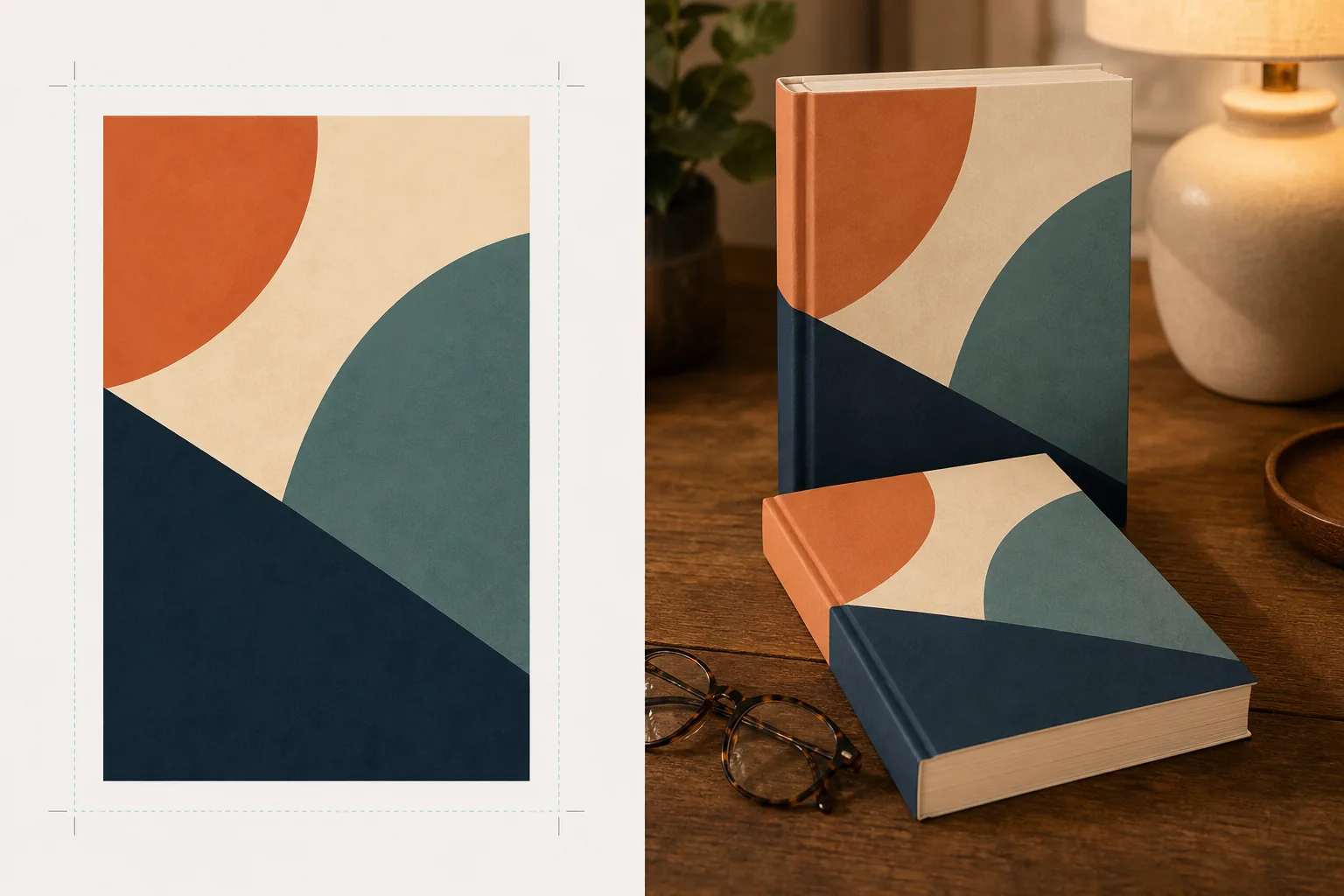
このテンプレートでできること
平面の表紙デザインを、プロの製品撮影のように見える宣伝用モックアップ画像に変換します。表紙アートワークを平面のJPEGまたはPNGとしてアップロードすると、テンプレートが適切なパースペクティブ、ページの厚み、背表紙の曲面を備えたリアルな本の形にマッピングします。次にモックアップは、ライフスタイルのシーン — 老眼鏡を置いたコーヒーテーブル、書店の棚、温かなランプの灯る枕元 — に配置されるか、自然な影を伴うすっきりとした背景の上に単体の製品としてレンダリングされます。シリーズや複数巻のプロモーションでは、複数の表紙を一貫したパースペクティブで横一列に並べたり積み重ねたりできます。光と影の向きがシーンの環境に一致するため、本は合成されたものではなく、物理的に存在しているように見えます。
テンプレート設定
| 本の判型 | ペーパーバック、ハードカバー、またはダストジャケット付きハードカバー |
| ページ数の見え方 | 薄い(100ページ)、中程度(250ページ)、厚い(400ページ以上)— 背表紙とページ端の幅に影響します |
| シーンの種類 | 影付きの単体、コーヒーテーブル、本棚、枕元、または手持ち |
| パースペクティブの角度 | 正面、四分の三、またはわずかに上からの傾き |
| 出力解像度 | 3000×3000px(1:1 SNS用)または 2400×1600px(16:10 バナー) |
このテンプレートの使い方
表紙アートワークをアップロード
本の表紙を平面の画像としてアップロードします — 最低でも表紙が必要です。ダストジャケット付きハードカバーのモックアップでは、背表紙と裏表紙もアップロードできます。テンプレートはJPEG、PNG、PDFに対応しています。表紙の寸法は自動的に検出され、本の比率がそれに合わせて調整されます。
本の判型とシーンを選択
ペーパーバック、ハードカバー、ダストジャケットの判型から選びます。背表紙とページ端の幅が実際の本に一致するよう、ページ数の範囲を選択してください。次にシーンを選びます:影付きの単体、ライフスタイルの設定、またはカスタム背景色。
パースペクティブを調整してレンダリング
視点の角度を選びます — サムネイルの明瞭さには正面、視覚的な奥行きには四分の三、平置きのSNS投稿には上からの傾き。テンプレートは、適切な照明、ページ端のテクスチャ、選択したシーンに一致する影の向きでモックアップをレンダリングします。
宣伝画像をダウンロード
Instagram用に1:1、Twitter/Facebookのヘッダー用に16:9、またはウェブサイトのヒーローセクション用のカスタム寸法で書き出します。各書き出しには透明背景オプション付きの本のモックアップが含まれるため、独自のカスタムレイアウトに配置できます。
最良の結果を得るためのプロのヒント
- ✓表紙は利用可能な最高解像度でアップロードしてください。3Dパースペクティブ変換により本の後退する面の見かけの解像度が低下するため、高解像度のソースから始めることで背表紙や表紙の文字が読みやすく保たれます。
- ✓Amazon A+ コンテンツには、白背景の単体モックアップを使用してください。これにより、本に高級な製品撮影の雰囲気が生まれ、商品ページにすでに表示されている平面の表紙画像と差別化できます。
- ✓シリーズのすべての表紙をアップロードして、シリーズの並びを作成しましょう。テンプレートはそれらを一貫したパースペクティブと間隔で横一列に配置し、表紙を個別に表示するよりもはるかに視覚的なインパクトのあるシリーズ宣伝になります。
よくある質問
電子書籍リーダーやタブレットに表紙を表示したモックアップは作れますか?
+
このテンプレートは物理的な本のモックアップ — ペーパーバックとハードカバーの判型 — に焦点を当てています。電子書籍リーダーやタブレット表示のモックアップでは、平面の表紙をデバイスの写真に別途合成することになります。
背表紙の文字は読めますか?
+
はい、ソースの表紙ファイルに背表紙のアートワークが含まれていれば可能です。テンプレートは表紙の角度に一致するパースペクティブで背表紙のアートワークを本の端に巻き付けます。薄い本(150ページ未満)では背表紙が狭く、小さな文字は小さな表示サイズでは読みにくくなる場合があります。
オーディオブックやポッドキャストの宣伝に使えますか?
+
はい。オーディオブックやポッドキャストに使われる正方形の表紙形式は、CDケース風のモックアップとして、または立体的な影を伴う単体の正方形としてレンダリングでき、平面の表紙アートにはない物理的な存在感を与えます。
表紙アートを魅力的な宣伝画像に変えましょう
平面の表紙アートワークをアップロードして、SNS、著者ウェブサイト、マーケティングキャンペーン向けの写真のようにリアルな本のモックアップを手に入れましょう。
無料で試すRelated templates
More design templates for your workflow.
Web、印刷物、ソーシャル メディア、アプリのアイコン用に、きれいなエッジを調整してマルチサイズにエクスポートできる透明な PNG ロゴを作成します。印刷されたロゴの写真やデジタル ファイルを処理します。
背景の置き換え、ホストのポートレートの分離、タイポグラフィ対応のレイアウトを備えた Apple Podcast と Spotify の仕様を満たすポッドキャスト カバー アートをデザインします。
AI アップスケーリング、キャンバス拡張、色の正確な校正、印刷可能なファイルのエクスポートを使用して、デジタル アートや写真を大判印刷用に準備します。
商標の削除、モデルリリース準拠の編集、技術的品質チェック、および代理店固有の形式要件を備えた、証券代理店への提出用の写真を準備します。