
医療の前後写真
皮膚科、形成外科、歯科、美容医療のクリニック向けに、臨床的に標準化された前後の写真を作成します。このテンプレートは比較ペア全体で照明と色を統一し、ばらつきのある診察室の背景を清潔な臨床背景に置き換え、プライバシーに配慮したトリミングや黒塗りツールを提供します。これにより、患者の信頼を築く一貫性とプロフェッショナルさをクリニックのマーケティング画像にもたらします。
このテンプレートを無料で試すBusiness template preview
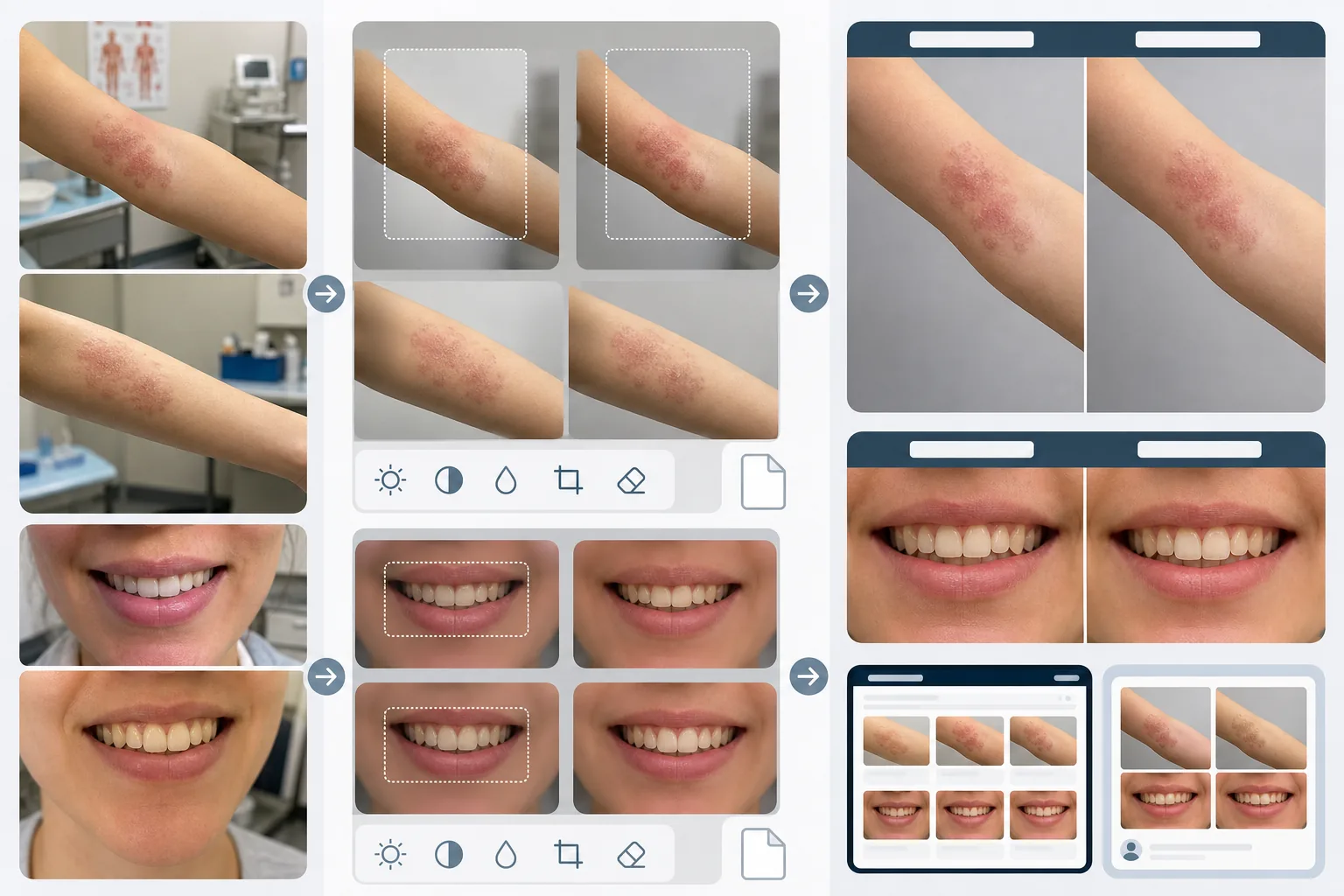
このテンプレートの機能
医療の前後比較を信頼でき説得力のあるものにする視覚的な一貫性を作り出します。臨床写真の最大の問題は、前後の画像が数週間あるいは数か月離れて、異なる照明条件で、異なるカメラで、ときには異なる部屋で撮影されることです。AI Enhance は両方の画像の露出、色温度、ホワイトバランスを統一するため、目に見える違いはすべて処置によるものであり、撮影によるものではなくなります。Magic Eraser は診察室の雑然としたもの — カウンターの上の医療器具、壁のチャート、背景の機材カート — を取り除き、中立的な臨床背景に置き換えます。プライバシー機能には、識別可能な特徴の自動検出と黒塗り、特定の身体部位へのトリミング、患者データ保護のためのメタデータ削除が含まれます。
テンプレート設定
| 照明の統一 | 前後ペア全体で露出、色温度、ホワイトバランスを一致させる |
| 背景 | 臨床的な中立グレー、清潔な白、または青い手術用ドレープ |
| プライバシー黒塗り | 治療部位以外の識別可能な特徴を自動的にぼかす |
| スケールの一貫性 | 前後の画像間でフレーミングと拡大率を一致させる |
| メタデータの削除 | HIPAA に配慮して EXIF の位置情報、デバイス、タイムスタンプデータを削除 |
| 出力解像度 | 1画像あたり2400×1600px(横並び合成は4800×1600px) |
このテンプレートの使い方
前後の写真をアップロード
前の画像と対応する後の画像をアップロードします。このテンプレートは臨床用カメラ機材、スマートフォン、コンパクトカメラで撮影した写真に対応しています。AI が両方の画像間で統一設定を合わせられるよう、ペアでアップロードしてください。
照明とフレーミングを統一
AI Enhance は2枚の画像間で露出、色温度、ホワイトバランスを一致させます。フレーミングが異なる場合 — 一方が近く、もう一方が広い場合 — テンプレートはトリミングを調整し、治療部位が両方の画像で同じスケールと位置になるようにして、公平な視覚的比較を実現します。
背景を整えてプライバシーを適用
Magic Eraser は診察室の雑然としたものを取り除き、背景を中立的な臨床背景に置き換えます。プライバシー黒塗りは治療部位以外の識別可能な特徴をぼかすかトリミングで除去します。位置情報、デバイス情報、タイムスタンプを含む EXIF メタデータは削除されます。
クリニックのマーケティング用に書き出し
個別の画像、または 'Before' と 'After' のラベル付きヘッダーが付いた横並び合成画像をダウンロードします。出力はウェブサイトのギャラリー、相談室のディスプレイ、ソーシャルメディア向けのサイズになっています。一貫した臨床的な提示は、結果ギャラリーを閲覧する見込み患者からの信頼を築きます。
最良の結果を得るためのプロのヒント
- ✓固定照明と中立的な背景を備えた一貫した撮影ステーションをクリニックに設けましょう。テンプレートは異なる照明条件を統一できますが、一貫したセットアップから始めることで最も正確な比較が得られ、統一処理による不自然さのリスクが減ります。
- ✓前後の撮影で同じ焦点距離とカメラ距離を使用してください。テンプレートはフレーミングの違いを調整しますが、レンズと被写体の距離が異なることによる遠近の歪みは、顔の特徴や体の輪郭の見え方を微妙に変え、比較の信頼性を損なう可能性があります。
- ✓画像を処理する前に、前後写真の撮影とその使用目的について、必ず患者から書面による同意を得てください。テンプレートはプライバシー機能を提供しますが、インフォームドコンセントという法的要件に代わるものではありません。
よくある質問
これは HIPAA に準拠していますか?
+
テンプレートはプライバシーに配慮した機能 — メタデータの削除、識別可能な特徴の黒塗り、治療部位へのトリミング — を提供し、HIPAA 準拠を支援します。ただし、HIPAA 準拠は組織の責任です。テンプレートはツールであり、コンプライアンスプログラムではありません。クリニック固有の要件については、コンプライアンス担当者にご相談ください。
歯科の前後写真を処理できますか?
+
はい。テンプレートは口腔内写真、笑顔のクローズアップ、顔全体の歯科写真に対応しています。照明の統一は特に歯科写真で価値があります。前の画像は診察室の光の下で撮影されることが多く、後の画像はリングフラッシュで撮影されることが多いためです。
肌の質感の違いは正確に保たれますか?
+
はい。統一処理は肌の質感を滑らかにすることなく照明と色を調整します。これは極めて重要です — 皮膚科処置による肌の質感の改善は比較で見えなければなりません。テンプレートは意図的に医療の前後画像に肌のレタッチを適用しません。
Related templates
More business templates for your workflow.
一貫した背景、プロによる照明補正、ブランドに適したカラー グレーディング、チーム全体で均一な画質を備えたポーランドの企業チームの写真。
筋肉の鮮明度の向上、動的照明補正、背景のクリーンアップ、およびハイコントラストの運動用カラー グレーディングを使用して、ジムやフィットネスの写真を強化します。
インクの色の鮮やかさ、線の細部の鮮明化、肌の赤みの軽減、アーティストのポートフォリオや Instagram のきれいな背景により、タトゥー ポートフォリオの写真を強化します。
背景の置換、肌のスムージング、照明補正を使用して、洗練された履歴書の顔写真を作成します。履歴書、求人ポータル、企業ディレクトリに最適です。
背景の置き換え、ジャージの色の強調、名簿やプログラム用のスタジアムやスタジオの背景を使用して、プロのチームや個々のプレーヤーの写真を作成します。
背景の置き換え、劇的な照明の強化、プレスキットや会場への提出用の印刷準備の整った出力を備えた、プロのバンドやミュージシャンのプロモーション写真を作成します。