
ゲームのビジュアルをレベルアップ
ストリーマー、e スポーツ チーム、ゲーム コンテンツ クリエーターは、目を引くサムネイル、オーバーレイ、プロモーション グラフィックを必要としています。 Magic Eraser は、背景を削除し、スクリーンショットをクリーンアップし、文字を分離して、混雑したフィードの中でコンテンツを目立たせるようにします。
Last updated
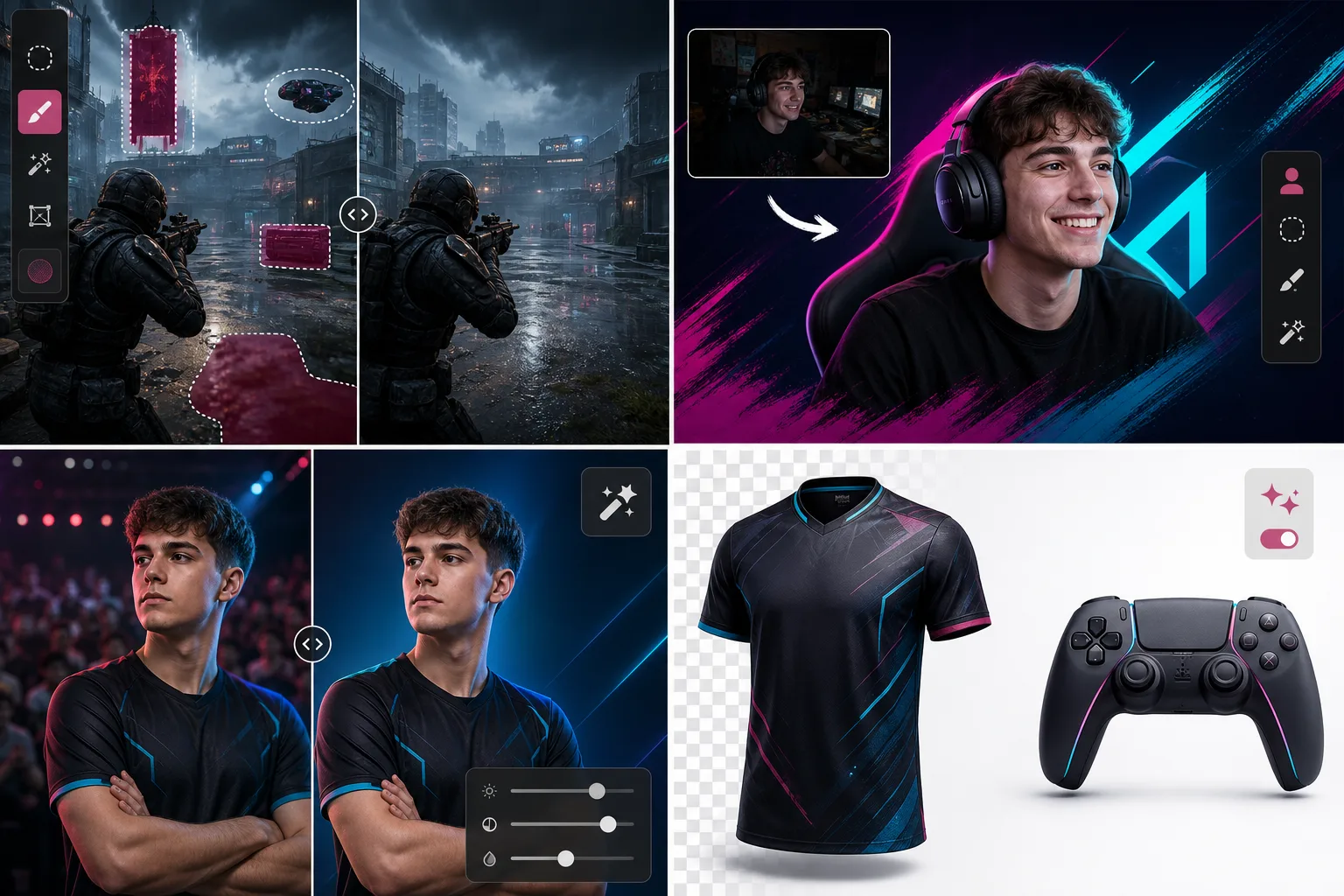
ゲームクリエイターがMagic Eraserを選ぶ理由
ゲームでは、ビジュアルがクリックを促進します。魅力的なサムネイルは閲覧数を 2 倍にすることができ、プロのチームのブランディングはスポンサーを惹きつけます。 Magic Eraser は、クリエイターや e スポーツ組織に、Photoshop を学習しなくても洗練されたグラフィックを作成できる編集機能を提供します。ゲームや e スポーツの視聴者は、あらゆるタッチポイントでプロフェッショナルな制作品質を期待しています。ストリーム オーバーレイからトーナメントの報道、グッズ ストアに至るまで、視覚的な一貫性が正当でよく組織された運営であることを示します。クリーンな画像は視聴者の信頼を築き、洗練されたブランド パートナーを求めるスポンサーを惹きつけます。
ゲームと e スポーツにとっての主な利点
ストリーム、トーナメント、コミュニティ参加のためのプロフェッショナルなビジュアル コンテンツを作成します。
ストリームオーバーレイとサムネイルの作成
背景を削除し、主題を分離することで、ストリームのサムネイル、YouTube カバー、ソーシャル投稿用のクリーンなベース画像を作成します。
トーナメントやイベントの写真撮影
会場の乱雑さ、スポンサーの競合、背景の邪魔になるものを取り除き、LAN イベント、トーナメント、交流会からの写真をクリーンアップします。
チームと選手のポートレート
名簿ページ、プレスキット、トーナメントプロフィール用に、洗練された顔写真ときれいな背景を備えたチーム写真を作成します。
グッズ商品ショット
ジャージ、周辺機器、ブランド商品の写真を撮影し、背景を削除してきれいな e コマース リストや販促資料にします。
コミュニティコンテンツの磨き上げ
バックグラウンドのクリーンアップと機能強化により、ファンが投稿したコミュニティ コンテンツをアップグレードして、公式チャンネルに再投稿します。
一貫したブランドプレゼンテーション
Twitch、YouTube、Discord、視聴者がプロレベルのコンテンツを期待するソーシャル プラットフォーム全体で均一なビジュアル品質を維持します。
一般的な使用例
ストリームオーバーレイとパネル
フェイスカメラの写真やチームのロゴを透明な背景に分離して、Twitch、YouTube、Kick のカスタム オーバーレイ、パネル、アラートを作成します。
YouTube とソーシャル サムネイル
スクリーンショットやフェイスカメラのショットから乱雑な背景を削除して、Boost クリック率の高い、クリック可能な高コントラストのサムネイルを作成します。
eスポーツチームのブランディング
スタジオやイベントの背景を削除して、名簿ページ、試合のグラフィック、ジャージのモックアップ用のきれいな選手のポートレートを作成します。
ゲームコンテンツとミーム
ゲームプレイのスクリーンショットからキャラクター、アイテム、瞬間を抽出して、リアクション画像、コミュニティ投稿、ハイライト リールを作成します。
コンテンツクリエイターとのコラボレーション
一貫した背景と照明標準を使用して、コラボレーション イベント、交流会、他のクリエイターとの相互プロモーション コンテンツのプロフェッショナルな写真を作成します。
Magic Eraser ゲーム用ツール
| Tool | How It Helps |
|---|---|
| オブジェクトの削除 | ゲームプレイのスクリーンショットからウォーターマーク、HUD 要素、不要な UI オーバーレイを削除して、きれいなプロモーション画像を作成します。 |
| Background Eraser | プレーヤーのフェイスカメラ、チームのロゴ、ゲームキャラクターをオーバーレイやサムネイル用の透明な背景に分離します。 |
| AIフィル | 削除された要素を、一致するゲーム環境またはシームレスな複合グラフィックスの単色の塗りつぶしに置き換えます。 |
| イメージエンハンサー | 低解像度のスクリーンショットや圧縮ストリーム キャプチャをアップスケールして鮮明にし、鮮明なソーシャル メディア投稿を実現します。 |
仕組み
アップロード
スクリーンショット、フェイスカメラの写真、またはチームのポートレートをデバイスまたはクリップボードからアップロードします。
編集
背景、透かし、または UI の煩雑さをブラシで上書きします。 AI が数秒できれいに削除します。
輸出
オーバーレイ用に透明な PNG をダウンロードしたり、サムネイルやソーシャル投稿用に高解像度の JPG をダウンロードしたりできます。
よくある質問
OBS 用の透明なオーバーレイを作成できますか?
+
はい。透明度のある PNG としてエクスポートし、OBS、Streamlabs、またはその他の放送ソフトウェアに画像ソースとして直接ドロップします。
ゲームプレイのスクリーンショットでも機能しますか?
+
絶対に。 Magic Eraser は、アート スタイルや解像度に関係なく、あらゆるプラットフォーム (PC、コンソール キャプチャ、モバイル) からのゲーム内のスクリーンショットを処理します。
コンテンツ作成ワークフローには十分な速度ですか?
+
ほとんどの編集は 10 秒以内に完了します。多くのクリエイターは、ストリームの準備中や録画セッションの合間にこれを使用して、サムネイルやグラフィックをすばやく作成します。
Magic Eraser はゲーム内のスクリーンショットを使用できますか?
+
はい。販促資料、ソーシャル投稿、コミュニティ コンテンツで使用する UI オーバーレイ、透かし、その他の要素を削除してスクリーンショットをクリーンアップします。
コスプレやコンベンションの撮影にも対応していますか?
+
絶対に。コスプレ写真から大会会場の邪魔になるもの、バッジホルダー、群衆の背景を削除して、きれいなキャラクターのポートレートを作成します。
eスポーツチームのマーケティング資料を作成できますか?
+
はい。生のイベント写真を背景の削除と補正でクリーンアップすることで、プロの名簿写真、イベントの要約、スポンサー向けのプロモーション画像を作成します。
More Industries
See how Magic Eraser helps professionals in other industries.
写真家はポストプロダクションに何時間もかけて、気を散らすものを取り除き、ポートレートをレタッチし、背景を完璧に仕上げます。 Magic Eraser は編集ワークフローを高速化するため、品質を犠牲にすることなく洗練された画像をより迅速にクライアントに提供できます。
Magic Eraserは、不動産業者や写真家が気になる物や視覚的な散らかりを取り除き、物件写真を整えるのに役立ちます。画像が物件を正確に表すよう、各編集を確認し、地域の掲載サイトの開示ルールに従ってください。
オンライン買い物客は画像で商品を判断します。 Magic Eraser は、乱雑な背景を削除し、気を散らす要素を消去し、購入者の信頼を築き、コンバージョン率を高める市場ですぐに使える製品写真を作成します。
ソーシャル メディアの動きは速く、ビジュアルもそれに追いつく必要があります。 Magic Eraser は、クリエイター、マーケティング担当者、ブランドが気を散らすものを取り除き、背景を交換し、画像を磨き上げるのに役立ちます。これにより、Instagram、TikTok、Twitter の混雑したフィードの中ですべての投稿が目立つようになります。
食欲をそそる画像は注文と客足を促進します。 Magic Eraser は、レストラン、カフェ、食品ブランドが料理の写真を整理し、テーブルの乱雑さを取り除き、メニュー、配達アプリ、ソーシャル メディア マーケティングの料理のプレゼンテーションを強化するのに役立ちます。
ルックブックから商品ページに至るまで、ファッション ブランドには大規模な完璧なビジュアルが必要です。 Magic Eraser は、デザイナー、スタイリスト、ファッション マーケティング担当者が背景を削除し、モデルの写真をレタッチし、すべての衣服を最高の状態で見せる洗練されたフラット レイを作成するのに役立ちます。
旅行マーケティングの命はイメージによって決まります。 Magic Eraser は、ホテル、ツアー オペレーター、目的地のマーケティング担当者がランドマークから群衆を排除し、物件の写真をクリーンアップし、ブラウザーを予約者に変える風景写真を強化するのに役立ちます。
卒業アルバムのポートレートからキャンパスのマーケティングまで、教育機関にはクリーンでプロフェッショナルな画像が必要です。 Magic Eraser は、学校、大学、e ラーニング プラットフォームが写真から気を散らすものを取り除き、キャンパスのイメージを強化し、あらゆる視聴者向けに洗練されたビジュアルを作成するのに役立ちます。