
プロの写真編集が簡単に
写真家はポストプロダクションに何時間もかけて、気を散らすものを取り除き、ポートレートをレタッチし、背景を完璧に仕上げます。 Magic Eraser は編集ワークフローを高速化するため、品質を犠牲にすることなく洗練された画像をより迅速にクライアントに提供できます。
Last updated
写真専門家がMagic Eraserを選ぶ理由
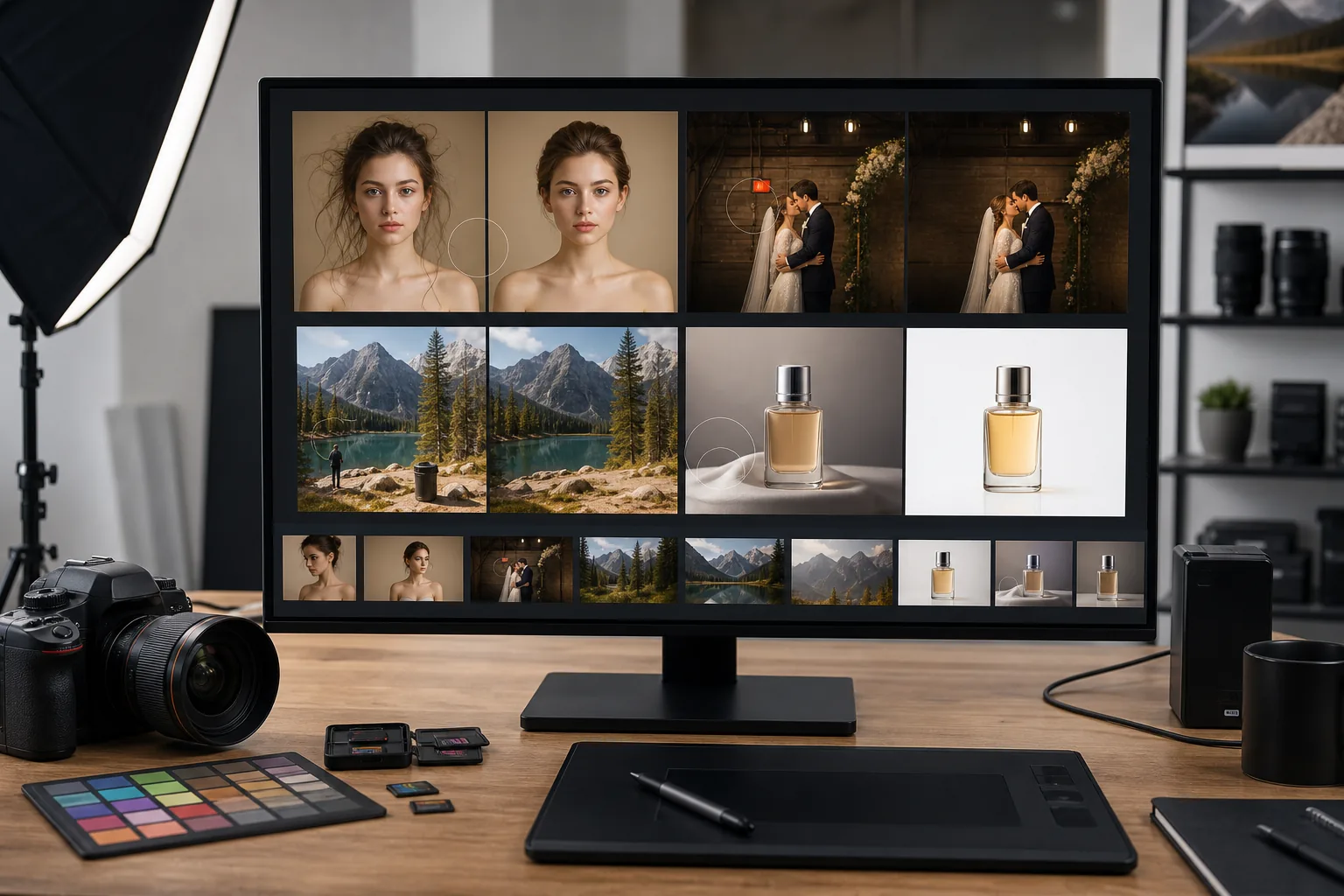
Magic Eraser は、写真家にあらゆるショットから不要な要素を迅速かつ正確に削除する方法を提供します。ポートレートの背景をクリーンアップする場合でも、風景からフォトボムを削除する場合でも、結婚式のギャラリーをバッチ処理する場合でも、AI 搭載ツールは退屈な編集を数秒で処理するため、クリエイティブなビジョンに集中できます。ポートレート スタジオから屋外アドベンチャー撮影まで、Magic Eraser は、フル機能のデスクトップ アプリケーションと、毎日のポストプロダクション ワークロードの大半を占める迅速で的を絞った修正との間のギャップを埋めます。その結果、よりクリーンで高速なパイプラインが実現し、クリーンアップを繰り返すのではなく、創造的な意思決定に時間を費やすことができるようになります。
写真家にとっての主なメリット
クリエイティブな品質を損なうことなく、ポストプロダクションのワークフローを加速します。
劇的に高速なレタッチ
画像ごとに数分ではなく数秒で気を散らすものを取り除くことで、ポストプロダクション時間を短縮します。結婚式やイベントなどの大量撮影の場合、これは 1 回のギャラリー配信で数時間の節約になります。
非破壊的な精度
AI を活用した除去により、目に見えるアーチファクトを残さずに背景を自然に再構築します。結果は、元の構成の完全性を維持しながら、レタッチの専門家によって手作業で編集されたように見えます。
大規模なバッチ処理
1 つのイベントまたはセッションからの数百の画像を 1 つのワークフローで処理します。ギャラリー全体に一貫した編集を適用することで、配信されるすべての画像が同じ品質基準を満たすようになります。
拡張されたクリエイティブ オプション
セットでは実現できなかった構図を試してみましょう。撮影後に初めて気づいた気が散る要素を削除したり、背景を拡張したり、合成作業のために被写体を分離したりできます。
クライアント対応のターンアラウンド
最も時間のかかるレタッチ作業を排除することで、洗練されたギャラリーを数日早くクライアントに提供します。納品が早ければ、顧客の満足度が高まり、より多くの紹介が得られます。
追加のソフトウェアは必要ありません
高価なデスクトップ レタッチ サブスクリプションをスキップして、簡単なクリーンアップ タスクを実行できます。 Magic Eraser は、最も一般的な削除および拡張ジョブをブラウザーで直接処理します。
一般的な使用例
ポートレートレタッチ
すべての細部を手動でマスキングすることなく、ヘッドショットやポートレートセッションから傷、抜け毛、背景の乱雑さを除去します。
バックグラウンドのクリーンアップ
電線、ゴミ箱、駐車中の車、その他被写体から注意をそらすような気を散らす要素を消去します。
結婚式とイベントの一括編集
式典や披露宴の写真から出口標識、電線、不要なゲストを削除して、数百枚のイベント写真を迅速に処理します。
製品および静物写真
きれいな背景に製品を分離し、ガラス表面からの反射を除去し、スタジオ撮影からダストスポットを除去します。
顔写真と企業写真
あらゆる場所にポータブル スタジオをセットアップする必要がなく、企業の顔写真、LinkedIn プロフィール、会社ディレクトリのオフィスや会議室の背景をクリーンアップします。
Magic Eraser 写真撮影用ツール
| Tool | How It Helps |
|---|---|
| オブジェクトの削除 | AI が自然な背景を再構築しながら、あらゆるシーンからフォトボンバー、レンズ フレア、漂流物体を消去します。 |
| Background Eraser | コンポジット、クライアントのプルーフ、または白い背景のポートフォリオ ショットの混雑した背景から被写体を即座に分離します。 |
| AIフィル | 削除された要素を状況に応じて正確な塗りつぶしで置き換えます。空を延長したり、エッジを再構築したり、オブジェクトを削除した後にギャップを埋めるのに最適です。 |
| イメージエンハンサー | 細部を鮮明にし、露出を正しくし、高級な画像を作成することで、すべての印刷物とデジタル配信がプロの基準を満たします。 |
仕組み
アップロード
RAW エクスポート、JPEG、または PNG を Magic Eraser にドラッグ アンド ドロップします。開始するのにアカウントは必要ありません。
編集
ワンクリック AI ツールを使用して、不要なオブジェクトをブラシで消去したり、背景を削除したり、画質を向上させたりできます。
輸出
編集した写真を高解像度でダウンロードすると、すぐにクライアントに配信したり、ポートフォリオに公開したりできます。
よくある質問
Magic Eraser は元の画像の解像度を維持しますか?
+
はい。 Magic Eraser は写真をフル解像度で処理するため、エクスポートされた画像は元の画像と同じピクセル寸法と品質を維持します。
RAW ファイルに Magic Eraser を使用できますか?
+
Magic Eraser は JPEG、PNG、および WebP ファイルで動作します。最初に Lightroom または Capture One から RAW ファイルをエクスポートし、次に結果として得られた JPEG または PNG を編集用にアップロードします。
Magic Eraser は大量のイベント写真撮影に適していますか?
+
絶対に。バッチ処理機能を使用すると、何百もの画像に編集を適用できるため、結婚式、会議、スポーツ イベントに最適です。
Magic Eraser は Lightroom からのバッチエクスポートで動作しますか?
+
はい。編集した画像を Lightroom から JPEG または PNG としてエクスポートし、オブジェクトの削除と背景のクリーンアップのためにバッチを Magic Eraser にアップロードします。ワークフローは既存のパイプラインに統合されます。
フェンスや木の枝などの複雑なオブジェクトを削除できますか?
+
はい。 AI は単純な削除と複雑な削除の両方を処理します。重なり合う要素、繰り返しのパターン、複数のテクスチャにまたがるオブジェクトはすべて自然に再構築されます。
アップロードのファイルサイズ制限はありますか?
+
Magic Eraser は最大 25 MB の画像を処理します。非常に高解像度のスタジオ ファイルの場合は、最初に標準の Web 解像度でエクスポートするか、エクスポート時に組み込みの圧縮を使用します。
完璧な写真をより速く配信
Magic Eraser を無料で試して、気を散らすものを取り除き、背景をクリーンアップし、写真ワークフローのすべてのショットを強化します。
Magic Eraser を無料でお試しくださいMore Industries
See how Magic Eraser helps professionals in other industries.
Magic Eraserは、不動産業者や写真家が気になる物や視覚的な散らかりを取り除き、物件写真を整えるのに役立ちます。画像が物件を正確に表すよう、各編集を確認し、地域の掲載サイトの開示ルールに従ってください。
オンライン買い物客は画像で商品を判断します。 Magic Eraser は、乱雑な背景を削除し、気を散らす要素を消去し、購入者の信頼を築き、コンバージョン率を高める市場ですぐに使える製品写真を作成します。
ソーシャル メディアの動きは速く、ビジュアルもそれに追いつく必要があります。 Magic Eraser は、クリエイター、マーケティング担当者、ブランドが気を散らすものを取り除き、背景を交換し、画像を磨き上げるのに役立ちます。これにより、Instagram、TikTok、Twitter の混雑したフィードの中ですべての投稿が目立つようになります。
食欲をそそる画像は注文と客足を促進します。 Magic Eraser は、レストラン、カフェ、食品ブランドが料理の写真を整理し、テーブルの乱雑さを取り除き、メニュー、配達アプリ、ソーシャル メディア マーケティングの料理のプレゼンテーションを強化するのに役立ちます。
ルックブックから商品ページに至るまで、ファッション ブランドには大規模な完璧なビジュアルが必要です。 Magic Eraser は、デザイナー、スタイリスト、ファッション マーケティング担当者が背景を削除し、モデルの写真をレタッチし、すべての衣服を最高の状態で見せる洗練されたフラット レイを作成するのに役立ちます。
旅行マーケティングの命はイメージによって決まります。 Magic Eraser は、ホテル、ツアー オペレーター、目的地のマーケティング担当者がランドマークから群衆を排除し、物件の写真をクリーンアップし、ブラウザーを予約者に変える風景写真を強化するのに役立ちます。
卒業アルバムのポートレートからキャンパスのマーケティングまで、教育機関にはクリーンでプロフェッショナルな画像が必要です。 Magic Eraser は、学校、大学、e ラーニング プラットフォームが写真から気を散らすものを取り除き、キャンパスのイメージを強化し、あらゆる視聴者向けに洗練されたビジュアルを作成するのに役立ちます。
車の購入者はオンラインから始めます。出品写真はショールームのようなものです。 Magic Eraser は、ディーラーや個人販売者が反射を除去し、敷地の背景をクリーンアップし、車両の画像を強化するのに役立ちます。これにより、すべての出品商品がショールームですぐに使用できるようになり、試乗できるようになります。