
見た目を売りにするファッション画像
ルックブックから商品ページに至るまで、ファッション ブランドには大規模な完璧なビジュアルが必要です。 Magic Eraser は、デザイナー、スタイリスト、ファッション マーケティング担当者が背景を削除し、モデルの写真をレタッチし、すべての衣服を最高の状態で見せる洗練されたフラット レイを作成するのに役立ちます。
Last updated
ファッション専門家がMagic Eraserを選ぶ理由
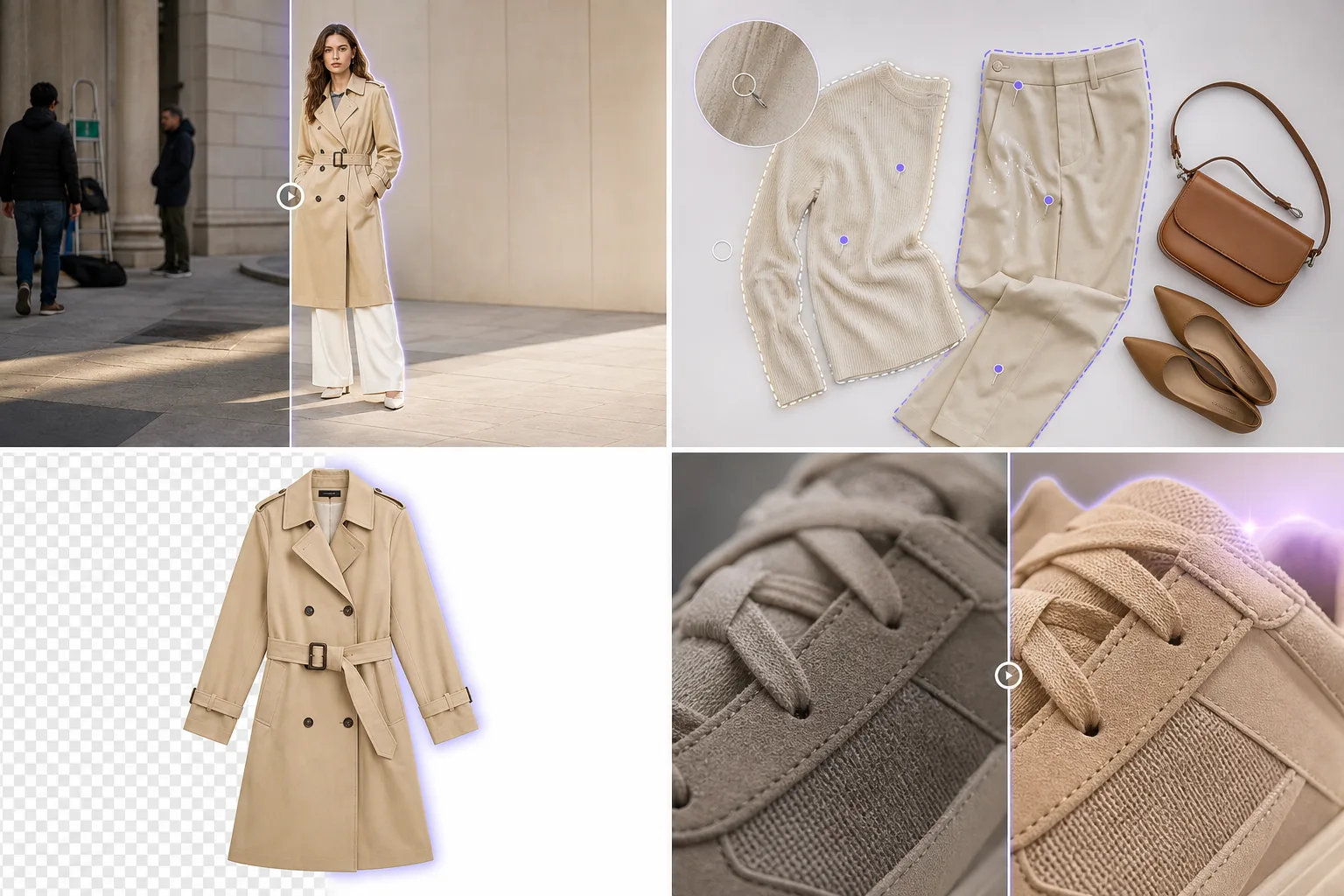
ファッションはトレンドのスピードで移り変わりますが、写真の編集も同様です。 Magic Eraser を使用すると、高価なレタッチ サービスを使用せずにルックブック品質の画像を作成できます。衣服をきれいな背景に分離し、平らなレイアウトにしわを取り除き、すべての製品ショットが電子商取引に対応できるようにします。ファッション小売サイクルにはスピードが求められます。新しいコレクションは毎週発表され、トレンドに敏感なコンテンツは即日対応が必要で、数百の SKU にわたる視覚的な一貫性により、プレミアム ブランドと商品販売者が区別されます。 Magic Eraser は、ファッション バイヤーが期待するディテール重視の品質を損なうことなく、クリエイティブ チームに必要なスピードを提供します。
ファッション ブランドにとっての主なメリット
デザインを紹介し、売上を促進するルックブック品質の製品画像を作成します。
完璧な衣服のプレゼンテーション
衣類の写真から糸くず、しわ、背景の邪魔になるものを取り除き、購入者がデザイン、生地、フィット感に集中できるようにします。きれいな画像は、顧客が製品に触れる前に品質を伝えます。
迅速なルックブック制作
背景を削除して交換することで、1 回の写真撮影を完全なルックブックに変え、再撮影することなくコレクション全体で一貫した白またはライフスタイルの設定を作成します。
マーケットプレイス対応のフラット レイ
ASOS、Nordstrom、Farfetch などのファッション マーケットプレイスの画像基準を満たす、きれいなフラット レイおよびゴースト マネキンの商品画像を作成します。
季節ごとのコレクションのターンアラウンド
新しいコレクションの写真を数日ではなく数時間で編集して公開できます。迅速な対応により、ポストプロダクションのボトルネックになることなく、スケジュールどおりに季節ドロップをリリースできます。
インフルエンサーのコンテンツの再利用
公式ブランド チャンネルで使用するために、背景の乱雑な要素を削除し、照明を強化し、画質を標準化することで、インフルエンサーとユーザーが作成したコンテンツをクリーンアップします。
大規模なコスト効率の高いコンテンツ
数百または数千の SKU を持つ大規模なカタログ全体で画像ごとの編集コストを削減します。 AI を活用したバッチ処理により、手作業のレタッチが数分の 1 の時間とコストで置き換えられます。
一般的な使用例
ルックブックとキャンペーン撮影
ファッション ストーリーを損なうトラフィック コーン、傍観者、その他の環境上の邪魔物を取り除き、ロケ地でのショットをクリーンアップします。
平置き写真
衣服のオーバーヘッドショットから糸くず、しわ、表面の欠陥、スタイリングピンを消去して、雑誌品質のフラットレイ画像を作成します。
モデルのレタッチ
自然な肌の質感や生地のディテールを維持しながら、モデルの写真から抜け毛、衣類のタグ、ワードローブの不具合を除去します。
電子商取引の商品ページ
Shopify ストア、卸売ポータル、マーケットプレイス チャネル全体で一貫した商品リストを得るために、アパレルを白または透明な背景に分離します。
アクセサリーと靴の詳細ショット
ハンドバッグ、靴、ベルト、アクセサリーの細部を、職人技が物語る鮮明さときれいな背景で捉えます。
Magic Eraser ファッションのためのツール
| Tool | How It Helps |
|---|---|
| オブジェクトの削除 | スタイリング クリップ、表示されているタグを消去し、不完全な部分を設定して、すべてのショットを公開できるようにします。 |
| Background Eraser | 製品ページ、ラインシート、卸売カタログのきれいな背景に衣服やアクセサリーを分離します。 |
| AIフィル | 雑然とした背景を、コレクションの美しさを引き立てる精選されたテクスチャ (大理石、コンクリート、布地) に置き換えます。 |
| イメージエンハンサー | 生地の質感を鮮明にし、色の見え方を整えます。ただし、画面や印刷で実物の衣服色と正確に合わせるには、最後に人の目で確認してください。 |
仕組み
アップロード
撮影した写真 (カメラやスマートフォンからのモデル ショット、フラット レイ、細部のクローズアップなど) をアップロードします。
編集
背景を削除し、欠陥を消去し、色の精度を高めて、衣服の実際の外観に一致させます。
輸出
オンライン ストア、ルックブック PDF、ソーシャル メディア、またはプレス キット用に洗練された画像をダウンロードします。
よくある質問
Magic Eraser はレースやフリンジなどの細かい衣服の端を処理できますか?
+
はい。 AI を活用した Background Eraser は、レース、フリンジ、メッシュ、薄手の素材などの細かい生地の端を検出し、衣服のディテールを維持するきれいなカットアウトを生成します。
補正後の色は正確ですか?
+
画像エンハンサーは、自然な色を保つことを目指しながら明瞭さとシャープさを高めます。ECで正確な色を示すには、公開前に調整済みの照明下で実物の衣服と最終画像を照合してください。
1 回のセッションでコレクション全体を編集できますか?
+
はい。バッチ処理により、製品画像のコレクション全体にわたって背景の削除と補正を適用でき、一貫性を維持しながら編集時間を何時間も節約できます。
Magic Eraser はゴーストマネキン効果を作成できますか?
+
Magic Eraser は背景の除去とクリーンアップに優れていますが、ゴーストマネキン効果を発生させるには、マネキンを取り外して衣服の内部を再構築する必要があります。 Background Eraser は最初のステップを効率的に処理します。
テキスタイルのクローズアップや細部のショットでも機能しますか?
+
はい。 Magic Eraser は、クリーンアップや強化の際に、細かい生地の質感やステッチの詳細を保持します。これは、オンライン買い物客に素材の品質を伝えるために重要です。
ルックブックやキャンペーン画像に使用してもいいですか?
+
絶対に。邪魔な場所を取り除き、背景を交換し、ルックブック、ウェブサイト、ソーシャル チャネル、および卸売ライン シート全体で使用できるようにモデル ショットを強化します。
ファッションビジュアルを向上させる
Magic Eraser を無料で試して、ファッション ブランドの洗練されたルックブック、きれいな製品ショット、キャンペーンに使える画像を作成してください。
Magic Eraser を無料でお試しくださいMore Industries
See how Magic Eraser helps professionals in other industries.
写真家はポストプロダクションに何時間もかけて、気を散らすものを取り除き、ポートレートをレタッチし、背景を完璧に仕上げます。 Magic Eraser は編集ワークフローを高速化するため、品質を犠牲にすることなく洗練された画像をより迅速にクライアントに提供できます。
Magic Eraserは、不動産業者や写真家が気になる物や視覚的な散らかりを取り除き、物件写真を整えるのに役立ちます。画像が物件を正確に表すよう、各編集を確認し、地域の掲載サイトの開示ルールに従ってください。
オンライン買い物客は画像で商品を判断します。 Magic Eraser は、乱雑な背景を削除し、気を散らす要素を消去し、購入者の信頼を築き、コンバージョン率を高める市場ですぐに使える製品写真を作成します。
ソーシャル メディアの動きは速く、ビジュアルもそれに追いつく必要があります。 Magic Eraser は、クリエイター、マーケティング担当者、ブランドが気を散らすものを取り除き、背景を交換し、画像を磨き上げるのに役立ちます。これにより、Instagram、TikTok、Twitter の混雑したフィードの中ですべての投稿が目立つようになります。
食欲をそそる画像は注文と客足を促進します。 Magic Eraser は、レストラン、カフェ、食品ブランドが料理の写真を整理し、テーブルの乱雑さを取り除き、メニュー、配達アプリ、ソーシャル メディア マーケティングの料理のプレゼンテーションを強化するのに役立ちます。
旅行マーケティングの命はイメージによって決まります。 Magic Eraser は、ホテル、ツアー オペレーター、目的地のマーケティング担当者がランドマークから群衆を排除し、物件の写真をクリーンアップし、ブラウザーを予約者に変える風景写真を強化するのに役立ちます。
卒業アルバムのポートレートからキャンパスのマーケティングまで、教育機関にはクリーンでプロフェッショナルな画像が必要です。 Magic Eraser は、学校、大学、e ラーニング プラットフォームが写真から気を散らすものを取り除き、キャンパスのイメージを強化し、あらゆる視聴者向けに洗練されたビジュアルを作成するのに役立ちます。
車の購入者はオンラインから始めます。出品写真はショールームのようなものです。 Magic Eraser は、ディーラーや個人販売者が反射を除去し、敷地の背景をクリーンアップし、車両の画像を強化するのに役立ちます。これにより、すべての出品商品がショールームですぐに使用できるようになり、試乗できるようになります。