
食欲をそそる食べ物の写真
食欲をそそる画像は注文と客足を促進します。 Magic Eraser は、レストラン、カフェ、食品ブランドが料理の写真を整理し、テーブルの乱雑さを取り除き、メニュー、配達アプリ、ソーシャル メディア マーケティングの料理のプレゼンテーションを強化するのに役立ちます。
Last updated
食品および飲料の専門家がMagic Eraserを選ぶ理由
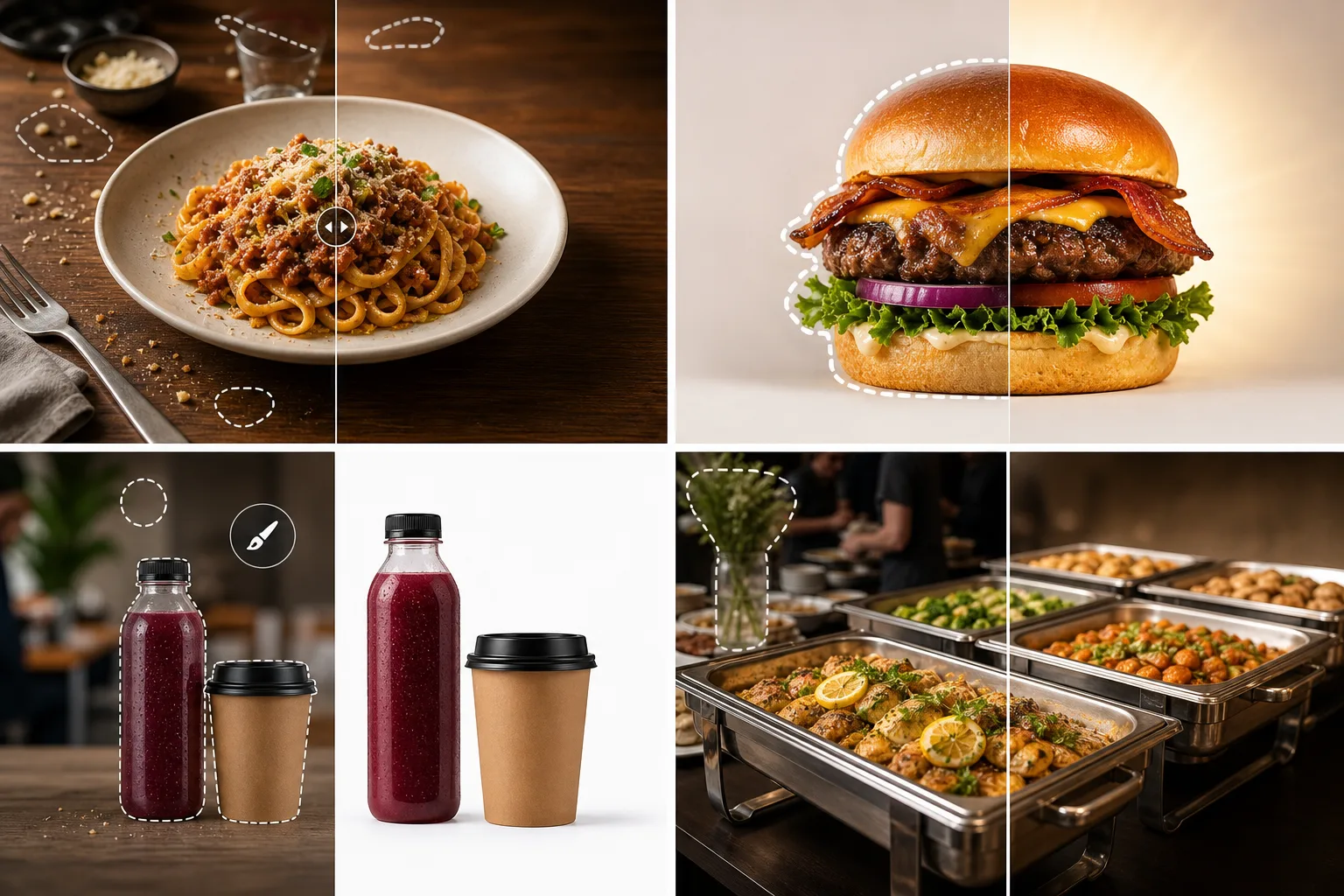
お客さんはまず目で食べます。 Magic Eraser を使用すると、乱雑な背景を削除し、邪魔な食器を消去し、食べ物を魅力的に見せる色や質感を強調することで、何気ないキッチンの写真をメニューにふさわしい画像に変えることができます。料理の写真には独特の課題があります。料理の新鮮な外観が失われるまでの限られた時間、一貫性のないレストランの照明、乱雑なキッチンの背景などです。 Magic Eraser がクリーンアップを処理するため、すばやくキャプチャして後で磨きをかけることができ、料理の写真を効果的に撮影できる鮮度を保つことができます。
食品および飲料ビジネスにとっての主なメリット
AI を活用した写真編集で、メニュー項目やパッケージを魅力的なものにしましょう。
食欲をそそるメニューの写真撮影
料理の写真から皿の汚れ、気を散らすテーブルの乱雑さ、背景ノイズを取り除き、料理自体が主役になるようにします。きれいな画像は、顧客をお腹が空かせ、すぐに注文できるようにします。
配信アプリの最適化
DoorDash、Uber Eats、Grubhub、および画質が注文量に直接影響するその他の配信プラットフォームのサムネイル グリッドで目立つ、鮮明でクリーンなメニュー項目の写真を作成します。
パッケージングとラベルのショット
あらゆる環境でボトル、缶、箱を撮影し、背景を削除して、卸売カタログ、提案デッキ、小売パートナーの提出物に適したきれいな製品ショットを撮影します。
ソーシャルレディな食品コンテンツ
日常のキッチンの写真を洗練されたソーシャル メディア投稿に変えましょう。色を強調し、背景の乱雑さを取り除き、料理の質感と新鮮さを強調します。
季節限定メニューの更新
メニュー変更のたびにプロのフードカメラマンを予約することなく、新しい季節のアイテムをすばやく撮影して編集できます。最小限の労力でビジュアル マーケティングを最新の状態に保ちます。
一貫したブランドイメージ
すべてのメニュー項目、プロモーションバナー、ソーシャル投稿が同じビジュアル品質とスタイルを維持していることを確認し、すべての顧客タッチポイントにわたってレストランまたはブランドのアイデンティティを強化します。
一般的な使用例
メニュー&印刷物写真
汚れたナプキン、置き忘れた食器、背景の乱雑さを取り除き、印刷されたメニュー、テーブル カード、宣伝用チラシの料理写真をクリーンアップします。
配信アプリ一覧
サムネイルの品質が注文量に直接影響する DoorDash、Uber Eats、Grubhub のリスト用に食欲をそそる画像を作成します。
レストランのソーシャルメディア
Instagram、Facebook、Google ビジネス プロフィール用にキッチンの舞台裏の写真や盛り付けられた料理を磨き上げ、地元の客を惹きつけます。
飲料とパッケージのショット
ラベル デザインのモックアップ、電子商取引のリスト、卸売用の売り込みデッキ用に、きれいな背景にボトル、缶、カップを分離します。
ケータリングおよびイベントフードプレゼンテーション
ケータリング イベント、ビュッフェ、フード フェスティバルの写真を整理するには、料理を紹介するための配膳設備、イベントの看板、背景の邪魔になるものを取り除きます。
Magic Eraser 食品および飲料用のツール
| Tool | How It Helps |
|---|---|
| オブジェクトの削除 | パンくず、散らかった食器、指、テーブルの散らかったものを消去して、集中力が皿に完全に残るようにします。 |
| Background Eraser | メニュー レイアウト、配信アプリのサムネイル、プロモーション グラフィック用に、料理と飲み物をきれいな背景に分離します。 |
| AIフィル | 乱雑なテーブルの表面を、料理のスタイルを引き立てる清潔な大理石、木、またはリネンの質感に置き換えます。 |
| イメージエンハンサー | Boost 色の彩度、シャープネス、温かみのある色調で、料理を盛り付けたてのように見せ、カメラにすぐに対応できるようにします。 |
仕組み
アップロード
料理や飲み物の写真を撮って、携帯電話またはコンピューターから Magic Eraser にアップロードします。
編集
フレームから邪魔な要素を削除し、背景を整理し、色を強調して料理を最高に美しく見せます。
輸出
完成した画像をダウンロードして、メニュー、配達アプリのリスト、Web サイト、またはソーシャル メディア アカウントで使用します。
よくある質問
Magic Eraser を使用すると、食べ物をより美味しそうに見せることができますか?
+
はい。画像エンハンサー Boost の色の鮮やかさ、暖かさ、鮮明さは、実際の料理を変えることなく料理の写真を食欲をそそるようにする重要な視覚的手がかりです。
これは配信アプリの写真要件に適していますか?
+
絶対に。 Magic Eraser は、DoorDash、Uber Eats、Grubhub、および同様のプラットフォームのサイズと品質のガイドラインを満たす、きれいで明るい画像を作成できます。
プロ仕様の撮影機材が必要ですか?
+
いいえ、Magic Eraser はスマートフォンの写真を強化するように設計されています。携帯電話で簡単に撮影してアップロードし、編集ツールを使用してプロのような仕上がりを実現します。
Magic Eraser は不自然に見えることなく食品の色を強調できますか?
+
はい。イメージエンハンサーは、彩度、暖かさ、シャープネスを調整して、リアルな色を維持しながら料理を食欲をそそる見た目にします。結果は人工的にフィルターをかけられたのではなく、専門的に照明されたように見えます。
飲み物やボトルの写真撮影には使えますか?
+
はい。 Magic Eraser は、ガラス瓶、缶、金属製の包装などの反射面を処理します。背景の乱雑さや反射を除去して、きれいな製品ショットを作成します。
Magic Eraser をメニューのデザインに使用できますか?
+
はい。料理の写真をクリーンアップして、印刷メニュー、デジタル メニュー ボード、デリバリー アプリのリストに必要な正確なサイズでエクスポートします。
More Industries
See how Magic Eraser helps professionals in other industries.
写真家はポストプロダクションに何時間もかけて、気を散らすものを取り除き、ポートレートをレタッチし、背景を完璧に仕上げます。 Magic Eraser は編集ワークフローを高速化するため、品質を犠牲にすることなく洗練された画像をより迅速にクライアントに提供できます。
Magic Eraserは、不動産業者や写真家が気になる物や視覚的な散らかりを取り除き、物件写真を整えるのに役立ちます。画像が物件を正確に表すよう、各編集を確認し、地域の掲載サイトの開示ルールに従ってください。
オンライン買い物客は画像で商品を判断します。 Magic Eraser は、乱雑な背景を削除し、気を散らす要素を消去し、購入者の信頼を築き、コンバージョン率を高める市場ですぐに使える製品写真を作成します。
ソーシャル メディアの動きは速く、ビジュアルもそれに追いつく必要があります。 Magic Eraser は、クリエイター、マーケティング担当者、ブランドが気を散らすものを取り除き、背景を交換し、画像を磨き上げるのに役立ちます。これにより、Instagram、TikTok、Twitter の混雑したフィードの中ですべての投稿が目立つようになります。
ルックブックから商品ページに至るまで、ファッション ブランドには大規模な完璧なビジュアルが必要です。 Magic Eraser は、デザイナー、スタイリスト、ファッション マーケティング担当者が背景を削除し、モデルの写真をレタッチし、すべての衣服を最高の状態で見せる洗練されたフラット レイを作成するのに役立ちます。
旅行マーケティングの命はイメージによって決まります。 Magic Eraser は、ホテル、ツアー オペレーター、目的地のマーケティング担当者がランドマークから群衆を排除し、物件の写真をクリーンアップし、ブラウザーを予約者に変える風景写真を強化するのに役立ちます。
卒業アルバムのポートレートからキャンパスのマーケティングまで、教育機関にはクリーンでプロフェッショナルな画像が必要です。 Magic Eraser は、学校、大学、e ラーニング プラットフォームが写真から気を散らすものを取り除き、キャンパスのイメージを強化し、あらゆる視聴者向けに洗練されたビジュアルを作成するのに役立ちます。
車の購入者はオンラインから始めます。出品写真はショールームのようなものです。 Magic Eraser は、ディーラーや個人販売者が反射を除去し、敷地の背景をクリーンアップし、車両の画像を強化するのに役立ちます。これにより、すべての出品商品がショールームですぐに使用できるようになり、試乗できるようになります。