
より多くの入札を獲得するプロのプロジェクト写真
あなたの職人技は明確に評価されるべきです。 Magic Eraser は、請負業者、建設業者、商人がプロジェクトの写真から現場の雑然としたものを取り除き、説得力のある前後の比較を作成し、新しいビジネスを獲得するためのポートフォリオを構築するのに役立ちます。
Last updated
建設専門家がMagic Eraserを選ぶ理由
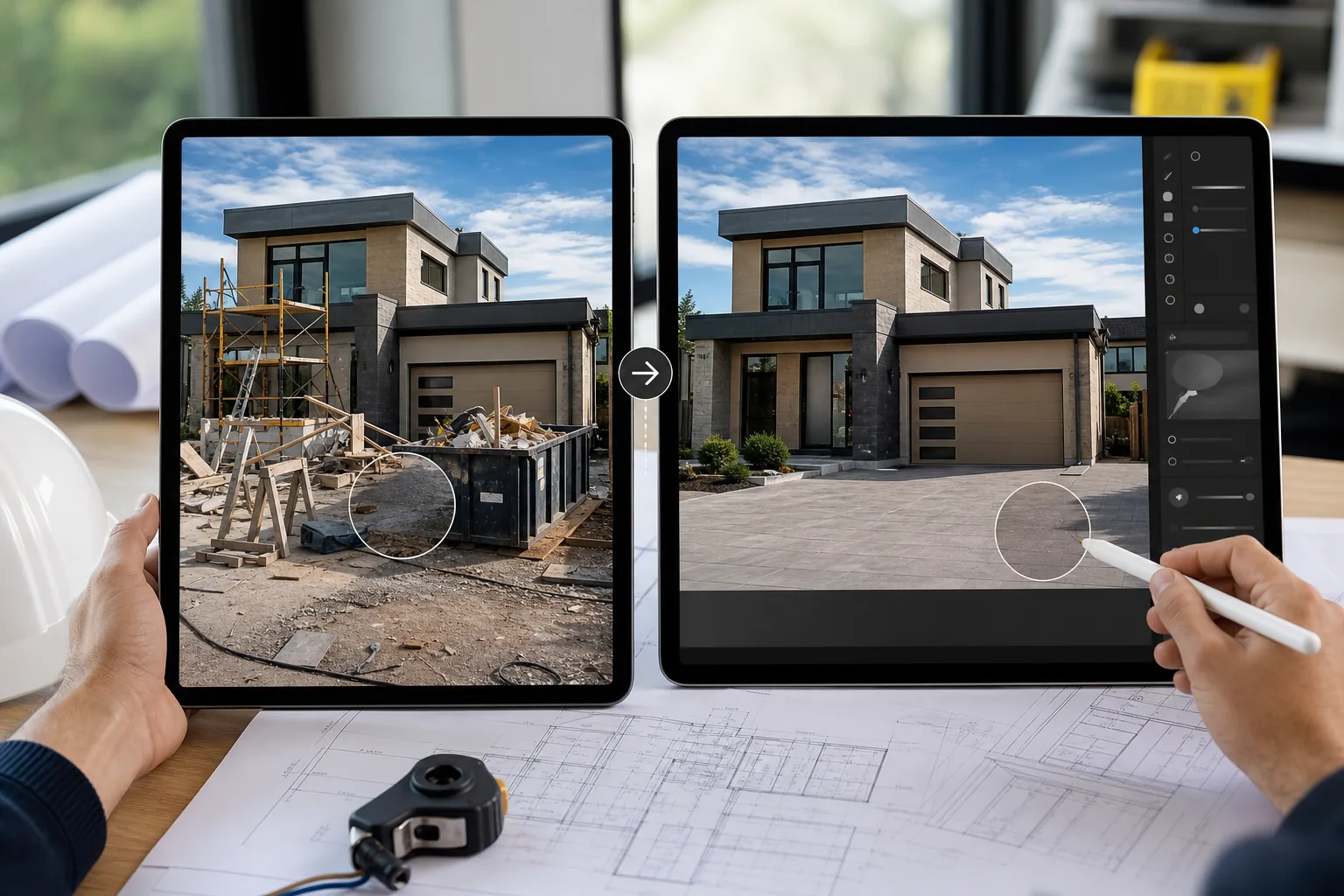
現場は散らかっており、足場、ゴミ箱、工具、材料がショットごとに乱雑に散らばっています。 Magic Eraser により、請負業者は建設残骸や仮設設備を撤去することで、完成した作業を最良の状態で提示できるようになります。現場の生の写真をクライアントに好印象を与え、入札を勝ち取るためのポートフォリオ作品に変えます。建設業や熟練した業界では、職人技の視覚的な証拠が最も強力な販売ツールとなります。潜在的な顧客は、レビューを 1 つ読む前に、プロジェクトの写真に基づいて請負業者を評価します。完了した作業を専門的に文書化することで信頼性が高まり、プレミアム価格が正当化されます。
建設業と貿易業にとっての主なメリット
プロジェクトを文書化し、プロの画像を使ってあなたの職人技を売り込みます。
プロジェクト完成写真撮影
完成したプロジェクトの写真から建設の破片、安全装置、現場の雑然としたものを取り除き、完成した作業の品質をアピールします。
前後の文書
「後」のショットをクリーンアップして、完成結果を曖昧にするツール、材料のスクラップ、ステージングアイテムを除去して、説得力のある変形の比較を作成します。
入札および提案ポートフォリオ
職人技と細部へのこだわりを示す洗練された画像を使用して、入札書類やクライアントの提案で最高の作品を提示してください。
安全性とトレーニング資料
安全文書、トレーニングマニュアル、コンプライアンスレポートに使用するために現場の写真をクリーンアップします。
社会的証明とレビューのコンテンツ
Google ビジネス プロフィール、Houzz、Angi、ウェブサイトで、プロ品質のプロジェクト写真をクライアントの声とともに公開します。
フリートおよび機器のマーケティング
トラック、設備、ブランド車両の写真を撮影し、乱雑な背景を削除して、Web サイトやマーケティングに適したクリーンな画像を作成します。
一般的な使用例
プロジェクトのドキュメントとポートフォリオ
完成したプロジェクトの写真から足場、ゴミ箱、工具の山を削除します。完成した作品をウェブサイトや提案書で紹介します。
改修前後の画像
「前」の写真を本物に保ちながら、「後」のショットから建設の破片を除去することで、きれいな比較画像を作成します。コントラストはリノベーションの専門知識を売りにします。
入札提案書と見積書のビジュアル
専門的な入札パッケージに含めるために、参考写真と現地調査をクリーンアップします。現場の文書化に焦点を当てて、車両、標識、近隣の土地を撤去します。
貿易認証およびトレーニング資料
安全トレーニング、実習用資料、認定ポートフォリオで使用される現場の写真から無関係な背景の詳細を削除して、明確な説明用画像を準備します。
保険と保証に関する文書
保証記録、保険文書、紛争解決ファイル用にプロジェクト完了写真を強化し、画像の鮮明さが実行された作業の品質を証明します。
Magic Eraser 建設用ツール
| Tool | How It Helps |
|---|---|
| オブジェクトの削除 | シンプルなブラシ ストロークで、完成したプロジェクトの写真からゴミ箱、足場、工具の山、車両を消去します。 |
| AIフィル | 除去された建設廃棄物を、サイディング、レンガ、芝生、私道の表面などの適合する材料に置き換えて、自然な仕上がりの外観を実現します。 |
| イメージエンハンサー | 薄暗い環境で撮影した屋内の写真を明るくし、厳しい真昼の太陽や曇天で撮影した屋外の写真を鮮明にします。 |
| Background Eraser | 製品ショーケースやサプライヤーのプレゼンテーション用に、完成した備品、設備、または工場をきれいな背景に隔離します。 |
仕組み
アップロード
現場の写真を携帯電話やタブレットから直接アップロードします。最初にコンピュータに転送する必要はありません。
編集
ゴミ箱、足場、または散らかったものをブラシで拭きます。 AI はそれらを削除し、一致するサーフェスで埋めます。
輸出
ポートフォリオ、入札提案書、または Web サイトのギャラリー用に、クリーンアップされたプロジェクトの写真をダウンロードします。
よくある質問
建物の写真から足場を取り除くことはできますか?
+
はい。足場をブラシでなぞると、Magic Eraser が足場を削除し、周囲になじむ外壁テクスチャでその部分を補います。入札資料や記録に使う前に、重要な細部を確認してください。
クライアントは写真が編集されたことに気づくでしょうか?
+
AI は、削除された領域を一致するテクスチャとマテリアルで埋めます。結果は自然に見えます。クライアントには編集の証拠ではなく、完成した作品が表示されます。
現場で携帯電話で使用できますか?
+
絶対に。 Magic Eraser はどのモバイル ブラウザでも動作します。完成した作品の写真を撮り、その場でクリーンアップして、すぐにクライアントと共有します。
携帯電話で撮影した現場の写真に Magic Eraser を使用できますか?
+
はい。 Magic Eraser はスマートフォンの写真を扱うように設計されています。携帯電話のカメラロールから直接アップロードして、現場の写真をポートフォリオ品質の画像に変換します。
屋外や造園プロジェクトの写真にも使用できますか?
+
絶対に。造園やハードスケープのプロジェクト写真から、建設の破片、公共施設の標識、近隣の敷地の邪魔になるものを取り除きます。
業界の認定や賞用の画像を作成できますか?
+
はい。貿易認証申請、業界賞の提出、および協会のディレクトリリスト用に、洗練されたプロジェクト写真を準備します。
あなたの最高の作品を紹介してください
Magic Eraser を使用して、雑然とした現場の写真を、より多くのビジネスを獲得できる洗練されたポートフォリオ画像に変える請負業者や業者に加わりましょう。
Magic Eraser を無料でお試しくださいMore Industries
See how Magic Eraser helps professionals in other industries.
写真家はポストプロダクションに何時間もかけて、気を散らすものを取り除き、ポートレートをレタッチし、背景を完璧に仕上げます。 Magic Eraser は編集ワークフローを高速化するため、品質を犠牲にすることなく洗練された画像をより迅速にクライアントに提供できます。
Magic Eraserは、不動産業者や写真家が気になる物や視覚的な散らかりを取り除き、物件写真を整えるのに役立ちます。画像が物件を正確に表すよう、各編集を確認し、地域の掲載サイトの開示ルールに従ってください。
オンライン買い物客は画像で商品を判断します。 Magic Eraser は、乱雑な背景を削除し、気を散らす要素を消去し、購入者の信頼を築き、コンバージョン率を高める市場ですぐに使える製品写真を作成します。
ソーシャル メディアの動きは速く、ビジュアルもそれに追いつく必要があります。 Magic Eraser は、クリエイター、マーケティング担当者、ブランドが気を散らすものを取り除き、背景を交換し、画像を磨き上げるのに役立ちます。これにより、Instagram、TikTok、Twitter の混雑したフィードの中ですべての投稿が目立つようになります。
食欲をそそる画像は注文と客足を促進します。 Magic Eraser は、レストラン、カフェ、食品ブランドが料理の写真を整理し、テーブルの乱雑さを取り除き、メニュー、配達アプリ、ソーシャル メディア マーケティングの料理のプレゼンテーションを強化するのに役立ちます。
ルックブックから商品ページに至るまで、ファッション ブランドには大規模な完璧なビジュアルが必要です。 Magic Eraser は、デザイナー、スタイリスト、ファッション マーケティング担当者が背景を削除し、モデルの写真をレタッチし、すべての衣服を最高の状態で見せる洗練されたフラット レイを作成するのに役立ちます。
旅行マーケティングの命はイメージによって決まります。 Magic Eraser は、ホテル、ツアー オペレーター、目的地のマーケティング担当者がランドマークから群衆を排除し、物件の写真をクリーンアップし、ブラウザーを予約者に変える風景写真を強化するのに役立ちます。
卒業アルバムのポートレートからキャンパスのマーケティングまで、教育機関にはクリーンでプロフェッショナルな画像が必要です。 Magic Eraser は、学校、大学、e ラーニング プラットフォームが写真から気を散らすものを取り除き、キャンパスのイメージを強化し、あらゆる視聴者向けに洗練されたビジュアルを作成するのに役立ちます。