
クリエイティブな作品を完璧にプレゼンテーションする
アーティストやデザイナーは自分の作品に何時間も費やします。プレゼンテーションを後回しにしてはいけません。 Magic Eraser は、アートワークの写真をクリーンアップし、スタジオの反射を除去し、ギャラリー、クライアント、印刷用に元のポートフォリオ画像を準備します。
Last updated
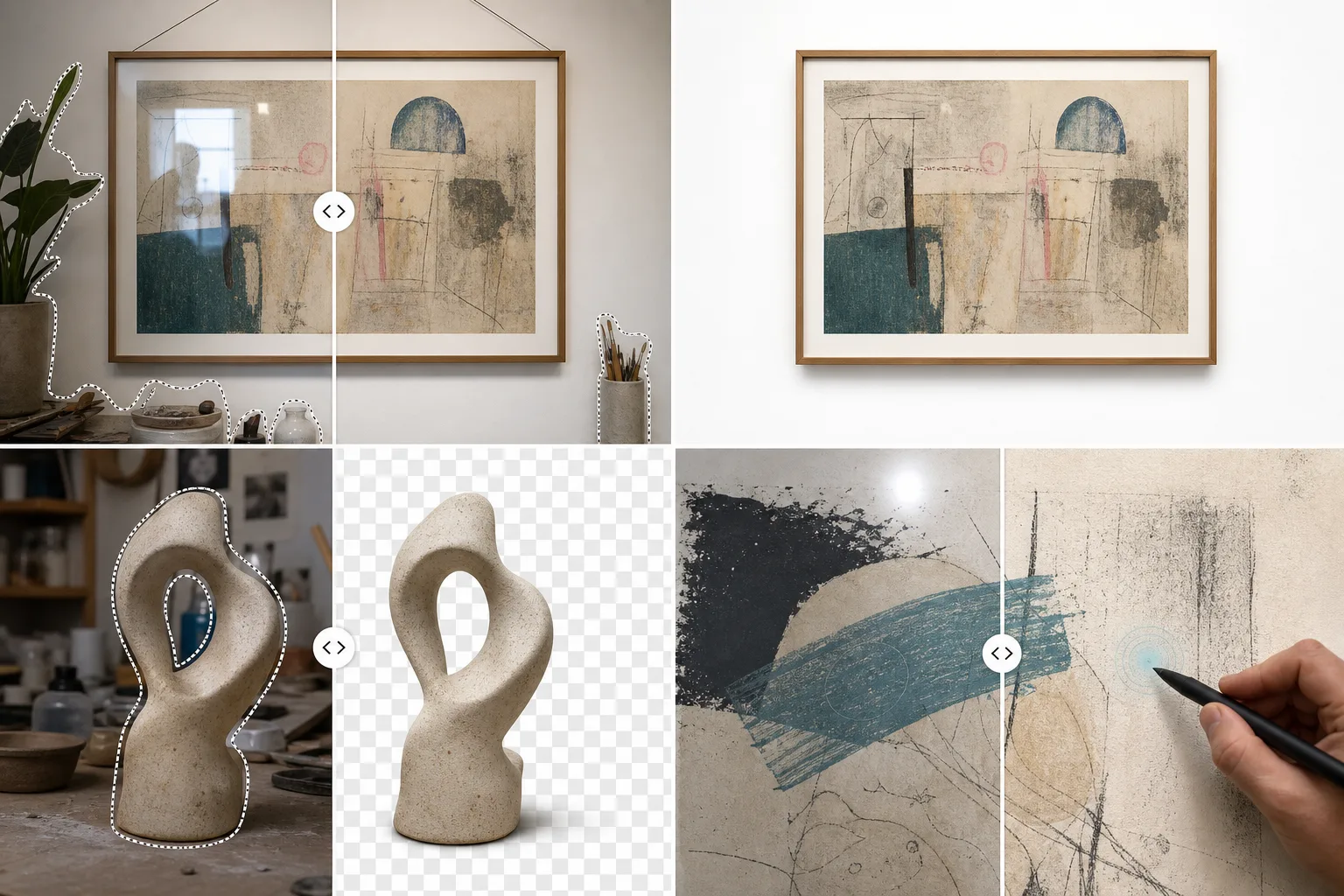
アートとデザインの専門家がMagic Eraserを選ぶ理由
アートワークを撮影すると、不要な影、反射、吊り金具、背景のテクスチャが発生します。 Magic Eraser はこれらの邪魔を取り除き、絵画、彫刻、デザインが意図したとおりに表示されるようにします。ポートフォリオ Web サイト、ギャラリーへの投稿、印刷カタログに最適です。アーティストやデザイナーにとって、ポートフォリオのドキュメントの品質はキャリアの機会に直接影響します。ギャラリーへの投稿、オンライン販売、顧客の獲得はすべて、作品を正確に表現する画像にかかっています。プロのドキュメントは、物理的なアートワークを、あらゆるプラットフォームや媒体で機能するデジタル資産に変換します。
アーティストとデザイナーにとっての主なメリット
ギャラリー品質のデジタル画像を使用して作品を文書化し、提示します。
クリーンなポートフォリオのドキュメント
インスタレーション写真からギャラリーの照明金具、吊り下げワイヤー、周囲のアート作品を削除し、各作品が独立して表示されるようにします。
印刷と複製の準備
ほこり、フレームのエッジ、反射を除去してアートワークの高解像度写真をクリーンアップし、印刷物の複製や商品用に正確なデジタル ファイルを準備します。
展示会とショーのマーケティング
インスタレーションビューから会場の邪魔になるものを取り除くことで、展覧会のお知らせ、ギャラリーのウェブサイト、アートフェアの申し込み用に洗練された画像を作成します。
オンラインギャラリーとマーケットプレイスへの出品
背景を削除し、色の精度を高めて、Saatchi Art、Etsy、個人の Web サイト、ソーシャル メディア用にクリーンで一貫性のある製品画像を作成します。
クライアントプレゼンテーション資料
クライアントの提案、コミッションのディスカッション、プロジェクトの振り返り用に、きれいなモックアップとドキュメント画像を準備します。
ソーシャルメディアスタジオのコンテンツ
クリエイティブな雰囲気を維持しながら背景の雑然としたものを取り除くことで、乱雑なスタジオのスナップショットを洗練されたプロセスと舞台裏のコンテンツに変換します。
一般的な使用例
ポートフォリオプレゼンテーション
アートワークの写真から壁のテクスチャ、吊り下げワイヤー、フレーム金具を削除します。それぞれの作品を、作品自体が語るように、清潔なギャラリーのような白の背景に提示します。
アートワークの写真のクリーンアップ
絵画、版画、ミクストメディア作品の撮影時に発生するガラスの反射、スタジオライトのまぶしさ、カメラの影を除去します。
ギャラリーとコンテストへの応募
一貫した背景、適切なトリミング、目に見える取り付け金具のない、気を散らすことのない画像を提供することで、厳格な提出ガイドラインを満たします。
印刷と複製の準備
ジークレープリント、ポストカード、商品のオリジナルアートワークの高解像度スキャンと写真をクリーンアップして、ほこり、エッジアーティファクト、スキャン欠陥を除去します。
ワークショップとクラスのマーケティング
スタジオ写真を磨き、背景の乱雑さを取り除くことで、アート ワークショップ、クラス、クリエイティブなリトリート用のクリーンなプロモーション画像を作成します。
Magic Eraser アートとデザインのためのツール
| Tool | How It Helps |
|---|---|
| オブジェクトの削除 | アートワークの写真から吊り金具、ギャラリーラベル、取り付けクリップ、スタジオ設備を消去します。 |
| Background Eraser | ポートフォリオ サイト、カタログ、プリント オン デマンドのモックアップでは、アートワークを純粋な白または透明な背景に分離します。 |
| AIフィル | 反射やハードウェアが除去されたキャンバスのテクスチャや紙目をシームレスに再構築します。 |
| イメージエンハンサー | 不完全な照明の下で撮影されたアートワーク写真の真の色の忠実度を復元し、細かい筆致のディテールを鮮明にします。 |
仕組み
アップロード
アートワークの写真、スキャン、スタジオ撮影を一般的な画像形式でアップロードします。
編集
反射、垂れ下がったワイヤー、背景の乱雑な部分をブラシで取り除きます。 AI はアートワークのディテールを維持しながらそれらを削除します。
輸出
ポートフォリオ サイト、提出フォーム、または高解像度の印刷複製用にギャラリー対応の画像をダウンロードします。
よくある質問
フレームに入れられたアートワークの写真からガラスの反射を取り除くことはできますか?
+
はい。グレアをブラシで取り除くと、AI が基礎となるアートワークの詳細を再構築し、意図したとおりに作品を示す反射のない画像を生成します。
アートワークの色の精度に影響しますか?
+
Magic Eraser は、オブジェクト除去や背景整理の際に作品の色を安定して保つよう設計されています。色再現が重要な印刷では、制作前に書き出し画像をキャリブレーション済みの元データと比較してください。
解像度はジークレー印刷に十分ですか?
+
このツールはソースの解像度を維持します。高 DPI スキャンまたは写真をアップロードすると、出力は大判再生用に完全な詳細を保持します。
Magic Eraser はアートワークの色を正確にキャプチャできますか?
+
イメージ エンハンサーはホワイト バランスと色温度を補正するため、撮影されたアートワークがオリジナルの作品により近くなるようにします。これはオンライン販売や複製にとって重要です。
彫刻や 3D アートワークにも使用できますか?
+
はい。奥行き、影、3 次元のディテールを維持しながら、彫刻写真から台座、ギャラリーのハードウェア、背景の邪魔なものを削除します。
審査付き番組の提出用に画像を準備できますか?
+
絶対に。ほとんどの審査番組では、クリーンで一貫性のあるドキュメント画像が必要です。 Magic Eraser は、スタジオで撮影した写真からギャラリー標準のプレゼンテーションを実現するのに役立ちます。
あなたのアートを美しく見せましょう
Magic Eraser を使用して、完璧なポートフォリオ画像、ギャラリーへの投稿、印刷用のアートワーク写真を作成するアーティストやデザイナーに加わりましょう。
Magic Eraser を無料でお試しくださいMore Industries
See how Magic Eraser helps professionals in other industries.
写真家はポストプロダクションに何時間もかけて、気を散らすものを取り除き、ポートレートをレタッチし、背景を完璧に仕上げます。 Magic Eraser は編集ワークフローを高速化するため、品質を犠牲にすることなく洗練された画像をより迅速にクライアントに提供できます。
Magic Eraserは、不動産業者や写真家が気になる物や視覚的な散らかりを取り除き、物件写真を整えるのに役立ちます。画像が物件を正確に表すよう、各編集を確認し、地域の掲載サイトの開示ルールに従ってください。
オンライン買い物客は画像で商品を判断します。 Magic Eraser は、乱雑な背景を削除し、気を散らす要素を消去し、購入者の信頼を築き、コンバージョン率を高める市場ですぐに使える製品写真を作成します。
ソーシャル メディアの動きは速く、ビジュアルもそれに追いつく必要があります。 Magic Eraser は、クリエイター、マーケティング担当者、ブランドが気を散らすものを取り除き、背景を交換し、画像を磨き上げるのに役立ちます。これにより、Instagram、TikTok、Twitter の混雑したフィードの中ですべての投稿が目立つようになります。
食欲をそそる画像は注文と客足を促進します。 Magic Eraser は、レストラン、カフェ、食品ブランドが料理の写真を整理し、テーブルの乱雑さを取り除き、メニュー、配達アプリ、ソーシャル メディア マーケティングの料理のプレゼンテーションを強化するのに役立ちます。
ルックブックから商品ページに至るまで、ファッション ブランドには大規模な完璧なビジュアルが必要です。 Magic Eraser は、デザイナー、スタイリスト、ファッション マーケティング担当者が背景を削除し、モデルの写真をレタッチし、すべての衣服を最高の状態で見せる洗練されたフラット レイを作成するのに役立ちます。
旅行マーケティングの命はイメージによって決まります。 Magic Eraser は、ホテル、ツアー オペレーター、目的地のマーケティング担当者がランドマークから群衆を排除し、物件の写真をクリーンアップし、ブラウザーを予約者に変える風景写真を強化するのに役立ちます。
卒業アルバムのポートレートからキャンパスのマーケティングまで、教育機関にはクリーンでプロフェッショナルな画像が必要です。 Magic Eraser は、学校、大学、e ラーニング プラットフォームが写真から気を散らすものを取り除き、キャンパスのイメージを強化し、あらゆる視聴者向けに洗練されたビジュアルを作成するのに役立ちます。