
視覚的に気を散らすことなくデザインをプレゼンテーション
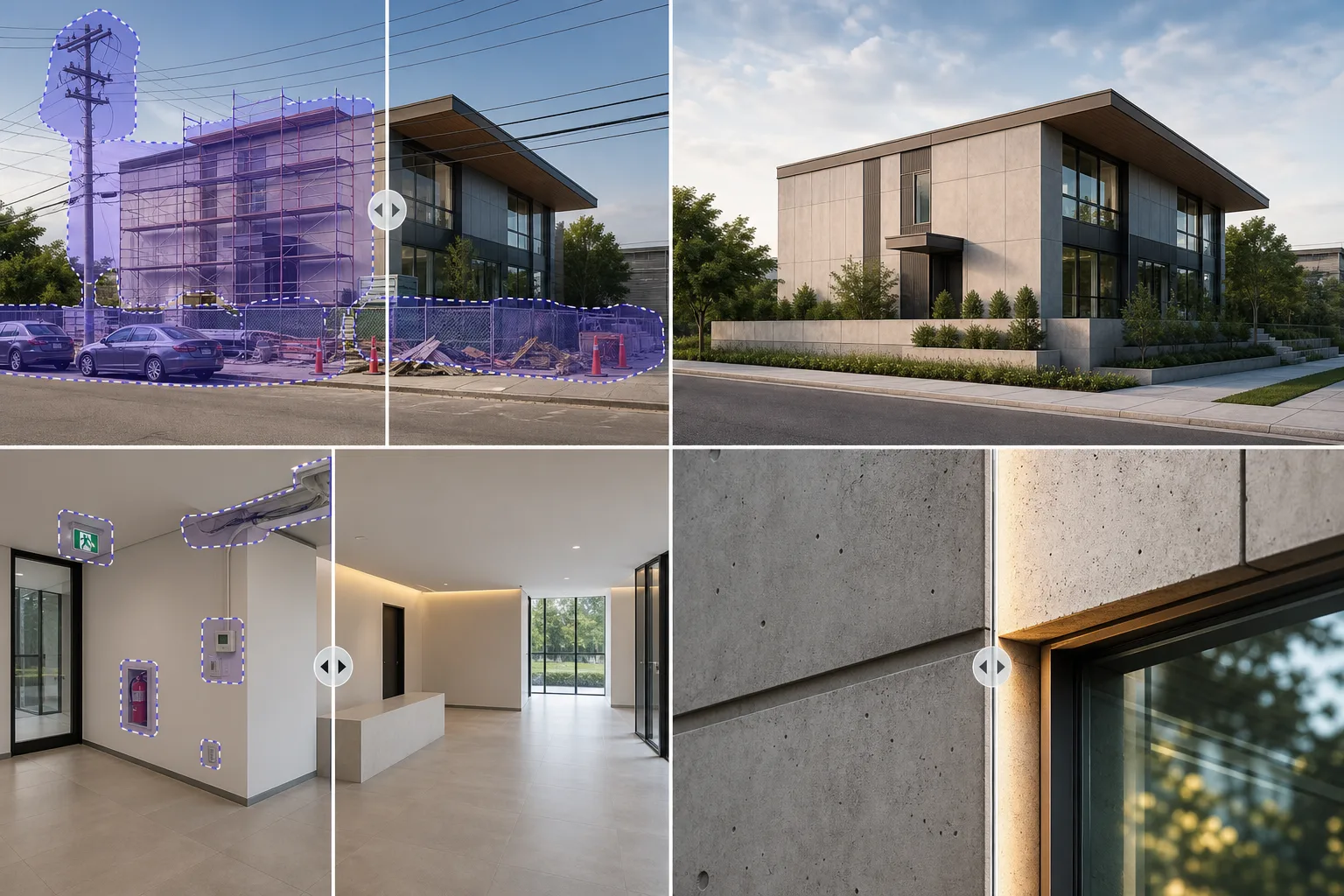
建設の破片、駐車中の車、足場、公共の配線などにより、建築作品の美しさが見えにくくなることがあります。 Magic Eraser は、建築家、会社、ビジュアライゼーション スタジオが、純粋にデザインに焦点を当てたポートフォリオ画像やクライアント プレゼンテーションを提供できるように支援します。
Last updated
建築専門家がMagic Eraserを選ぶ理由
建築写真は設計意図を示すものであり、駐車場やゴミ箱を記録するものではありません。 Magic Eraser は、建物の外装、内装、レンダリングから現実世界の気を散らす要素を取り除き、設計ビジョンがクライアントや審査員に明確に伝わるようにします。建築会社は視覚的なストーリーテリングを通じてコミッションを獲得します。完成したプロジェクトを建設上のアーチファクトや現場の雑然とした状態から解放して最高の状態で提示できる能力は、クライアントの獲得に直接影響します。クライアントが主要プロジェクトで競合企業を評価する際、強力なポートフォリオのイメージが決定要因となることがよくあります。
アーキテクチャとデザインに対する主な利点
新規クライアントを獲得するクリーンなポートフォリオグレードの画像をプロジェクトに提示します。
建設アーチファクトの除去
プロジェクト写真から足場、安全柵、建設機械、現場の破片を取り除き、完成したデザインがすべての画像の焦点となるようにします。
ポートフォリオグレードのプレゼンテーション
現場のプロジェクト写真をクリーンアップし、賞の提出、クライアントのプレゼンテーション、デザイン コンペティションのエントリーに使用する照明を強化します。
前後の文書
デザインの影響を示す建築上の詳細を維持しながら、「後」のショットから気が散る要素を削除することで、洗練された前後の比較を作成します。
一貫したしっかりとしたブランディング
すべてのプロジェクト文書にわたって均一なビジュアル品質を維持し、画像がスタッフ、クライアント、または請負業者によって撮影されたかどうかにかかわらず、会社のポートフォリオが一貫して見えるようにします。
不動産デベロッパーとの連携
販売前のマーケティング、賃貸パンフレット、投資家向けプレゼンテーションで使用するクリーンなプロジェクト画像を不動産パートナーや開発業者に配信します。
出版可能な画像
写真の視覚的な乱雑さを取り除き、自然光や素材のテクスチャを強調することで、建築雑誌、デザイン ブログ、報道特集用の画像を準備します。
一般的な使用例
建物外装の清掃
ポートフォリオのプレゼンテーションや賞の提出用に、完成した建物の写真から駐車中の車、ゴミ箱、足場、工事看板を削除します。
レンダリングと視覚化の修正
クライアントやレビューボードに提示する前に、レンダリングアーティファクトを修正し、プレースホルダー要素を削除し、3D ビジュアライゼーションのエクスポートをクリーンアップします。
インテリアスペースの写真
内部の建築写真から消火器、非常口標識、サーモスタットボックス、ケーブル配線を削除し、空間デザインと素材の選択を強調します。
コンテストおよび出版物の画像
デザインのストーリーを損なう仮設要素、電柱、隣接する建物を削除して、プロジェクトのドキュメント写真を磨きます。
材質と仕上げに関するドキュメント
設計仕様書、サプライヤーのプレゼンテーション、クライアントの承認委員会向けに、材料の選択、仕上げ、建築の詳細に関する詳細な文書を作成します。
Magic Eraser 建築用ツール
| Tool | How It Helps |
|---|---|
| オブジェクトの削除 | 建物の外側から車両、電柱、足場、標識を消去して、きれいな建築構成を明らかにします。 |
| Background Eraser | 図のオーバーレイやプレゼンテーション ボード用に、建物の立面図や内部要素を周囲から分離します。 |
| AIフィル | 削除されたオブジェクトの背後にある空、景観、ファサードのサーフェスを再構築して、編集内容が構築された環境に自然に溶け込むようにします。 |
| イメージエンハンサー | 高コントラストの建築シーンで露出を補正し、コンクリート、ガラス、スチール表面のマテリアルのディテールを鮮明にします。 |
仕組み
アップロード
建物の写真、レンダリングのエクスポート、または内部のショットを Magic Eraser に直接アップロードします。
編集
車、足場、公共施設の配線、標識など、気を散らすものを払いのけると、建築の細部を維持したままそれらが消えます。
輸出
ポートフォリオ、プレゼンテーション、出版物、またはコンテストのエントリー用に、きれいな建築画像を高解像度でダウンロードしてください。
よくある質問
Magic Eraser は建物の写真から電線や電柱を削除できますか?
+
はい。送電線に沿って電柱の上をブラシで移動すると、Magic Eraser はその背後にある空と建物のファサードを再構築して、きれいな建築ショットを実現します。
大判ポートフォリオ印刷でも解像度は維持されますか?
+
Magic Eraser は、ポートフォリオ、プレゼンテーション、出版ワークフロー向けに編集済み画像を書き出せます。大判プリントや展示パネルに使う場合は、できるだけ高解像度の元画像から始め、入稿前に細かな建築ディテールを確認してください。
Magic Eraser は写真だけでなく 3D レンダリングでも使用できますか?
+
はい。 Magic Eraser は、エクスポートされた 3D レンダリングを含む、あらゆるラスター イメージで動作します。これは、プレースホルダー オブジェクトの削除、アーティファクトの修正、視覚化出力の磨き上げに役立ちます。
Magic Eraser は建築レンダリングで動作しますか?
+
はい。 3D レンダリングの不完全性をクリーンアップし、混合メディア プレゼンテーションから不要な要素を削除し、クライアント対応プレゼンテーションのレンダリング出力を強化します。
屋内と屋外のショットを同等にうまく処理できますか?
+
絶対に。 AI は、制御された室内照明条件と変化する屋外環境の両方に適応し、影、反射、空の置き換えを自然に処理します。
ドローン調査や現場記録の写真を編集できますか?
+
はい。プロジェクト記録にとって重要な地形的および構造的コンテキストを維持しながら、航空記録ショットから一時的な現場要素を削除します。
あなたのデザインにはきれいなキャンバスが必要です
建築のビジョンを妨げる視覚的なノイズを除去します。 Magic Eraser は、企業がクライアント、出版物、賞の審査員に最高の作品を発表するのに役立ちます。
Magic Eraser を無料でお試しくださいMore Industries
See how Magic Eraser helps professionals in other industries.
写真家はポストプロダクションに何時間もかけて、気を散らすものを取り除き、ポートレートをレタッチし、背景を完璧に仕上げます。 Magic Eraser は編集ワークフローを高速化するため、品質を犠牲にすることなく洗練された画像をより迅速にクライアントに提供できます。
Magic Eraserは、不動産業者や写真家が気になる物や視覚的な散らかりを取り除き、物件写真を整えるのに役立ちます。画像が物件を正確に表すよう、各編集を確認し、地域の掲載サイトの開示ルールに従ってください。
オンライン買い物客は画像で商品を判断します。 Magic Eraser は、乱雑な背景を削除し、気を散らす要素を消去し、購入者の信頼を築き、コンバージョン率を高める市場ですぐに使える製品写真を作成します。
ソーシャル メディアの動きは速く、ビジュアルもそれに追いつく必要があります。 Magic Eraser は、クリエイター、マーケティング担当者、ブランドが気を散らすものを取り除き、背景を交換し、画像を磨き上げるのに役立ちます。これにより、Instagram、TikTok、Twitter の混雑したフィードの中ですべての投稿が目立つようになります。
食欲をそそる画像は注文と客足を促進します。 Magic Eraser は、レストラン、カフェ、食品ブランドが料理の写真を整理し、テーブルの乱雑さを取り除き、メニュー、配達アプリ、ソーシャル メディア マーケティングの料理のプレゼンテーションを強化するのに役立ちます。
ルックブックから商品ページに至るまで、ファッション ブランドには大規模な完璧なビジュアルが必要です。 Magic Eraser は、デザイナー、スタイリスト、ファッション マーケティング担当者が背景を削除し、モデルの写真をレタッチし、すべての衣服を最高の状態で見せる洗練されたフラット レイを作成するのに役立ちます。
旅行マーケティングの命はイメージによって決まります。 Magic Eraser は、ホテル、ツアー オペレーター、目的地のマーケティング担当者がランドマークから群衆を排除し、物件の写真をクリーンアップし、ブラウザーを予約者に変える風景写真を強化するのに役立ちます。
卒業アルバムのポートレートからキャンパスのマーケティングまで、教育機関にはクリーンでプロフェッショナルな画像が必要です。 Magic Eraser は、学校、大学、e ラーニング プラットフォームが写真から気を散らすものを取り除き、キャンパスのイメージを強化し、あらゆる視聴者向けに洗練されたビジュアルを作成するのに役立ちます。