
Foto prodotto orologio
Presenta gli orologi con la precisione che meritano. Questo modello affina i dettagli del quadrante e gli indici, controlla i riflessi del vetro, esalta le texture metalliche di bracciale e cassa, rimuove polvere e impronte dalle superfici lucide e prepara l'immagine per le schede e-commerce di lusso e l'uso a catalogo.
Prova gratis questo modelloE-commerce template preview
Cosa fa questo modello
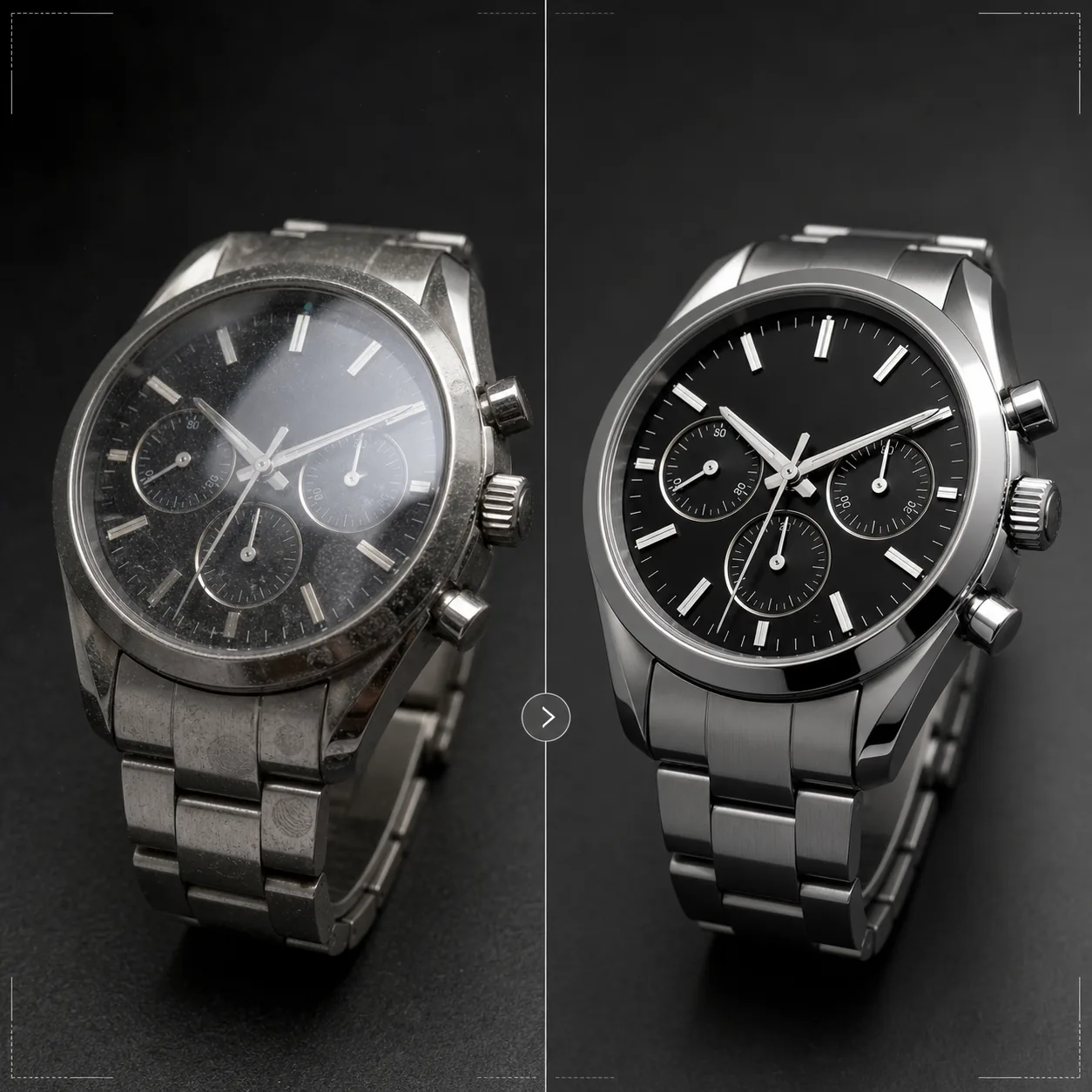
Affronta le sfide specifiche della fotografia di orologi, dove i minimi dettagli contano enormemente per gli acquirenti. I quadranti degli orologi contengono dettagli intricati — indici, contatori, finestrelle della data, testo stampato — che devono essere nitidissimi perché l'immagine trasmetta qualità. Questo modello usa AI Enhance per affinare in modo selettivo gli elementi del quadrante mantenendo naturale l'immagine complessiva. Magic Eraser rimuove le particelle di polvere, le impronte sulle casse lucide e i piccoli graffi sui vetri che emergono ad alto ingrandimento. I riflessi del vetro vengono ridotti affinché il quadrante sottostante sia chiaramente visibile, e le texture metalliche di casse e bracciali vengono esaltate per mostrare la differenza tra finitura spazzolata e lucida che gli acquirenti di orologi valutano con attenzione.
Impostazioni del modello
| Nitidezza del quadrante | Miglioramento selettivo dei microdettagli (indici, lancette, testo) |
| Riflesso del vetro | Riduci abbagliamento e riflessi su vetro zaffiro/minerale |
| Texture metallica | Esalta la distinzione tra superfici spazzolate e lucide |
| Pulizia della superficie | Rimuovi polvere, impronte e piccoli graffi |
| Risoluzione di output | 4000 × 4000 px (dettaglio macro per la visualizzazione ingrandita) |
| Sfondo | Bianco puro, scuro pieno o sfumatura (standard dei prodotti di lusso) |
Come usare questo modello
Carica la foto del tuo orologio
Carica una foto prodotto dell'orologio — al polso, in flat lay o in allestimento da studio su cuscino o supporto. Sono supportati anche i primi piani macro del quadrante e le viste laterali della cassa. Per risultati ottimali, fotografa l'orologio con le lancette in posizione 10:10, lo standard del settore che incornicia il logo e crea una composizione equilibrata e simmetrica.
Miglioramento di quadrante e dettagli
AI Enhance affina in modo selettivo il quadrante — indici delle ore, lancette, contatori, finestrella della data e testo stampato diventano nitidi e leggibili. I punti luminescenti sugli indici vengono leggermente schiariti per mostrarne la presenza. Il miglioramento rispetta la profondità di campo dello scatto originale, mantenendo morbide le aree volutamente sfocate.
Pulizia della superficie e controllo dei riflessi
Magic Eraser rimuove le particelle di polvere sul quadrante, le impronte su cassa e bracciale e i piccoli graffi superficiali sul vetro. I riflessi del vetro vengono ridotti per rivelare l'intero quadrante sottostante mantenendo riflessi sufficienti a trasmettere la presenza del vetro — eliminare del tutto i riflessi rende l'orologio innaturalmente piatto.
Esporta per scheda o catalogo
Scarica a 4000 × 4000 px per schede e-commerce con zoom, oppure a risoluzione di stampa per cataloghi e pubblicità. Le opzioni di sfondo includono il bianco puro per le schede dei marketplace, lo scuro pieno per l'estetica dei brand di lusso e le sfumature per l'uso editoriale.
Consigli da professionisti per risultati ottimali
- ✓Fotografa l'orologio con le lancette su 10:10 o 10:08 — questa posizione incornicia il logo del marchio tra le lancette, mostra chiaramente sia la finestrella della data sia i contatori e crea una composizione visivamente equilibrata usata in tutto il settore orologiero.
- ✓Usa un obiettivo macro o la modalità primo piano per catturare il massimo dettaglio del quadrante. Il modello può affinare il dettaglio esistente ma non può creare un dettaglio non catturato — un'immagine sorgente a risoluzione più alta, con più dettaglio del quadrante, offre risultati nettamente migliori.
- ✓Per gli orologi con bracciale in metallo, orienta la luce per evidenziare la differenza tra superfici spazzolate e lucide. Il modello esalta questo contrasto, ma partire da una differenziazione di superficie già visibile produce il risultato più sorprendente.
- ✓Pulisci l'orologio con un panno in microfibra subito prima dello scatto. Sebbene Magic Eraser rimuova polvere e impronte, partire da una superficie pulita significa meno ricostruzione da parte dell'IA e una conservazione più fedele della texture metallica nelle aree pulite.
Strumenti
E-commerce workflow
Product photo hub
Use this template with the full ecommerce product photo workflow for marketplace backgrounds, cleanup, compression, resizing, and listing-ready exports.
View ecommerce product photo workflowDomande frequenti
Può correggere foto in cui il quadrante è coperto da un riflesso?
+
I riflessi moderati possono essere ridotti per rivelare i dettagli del quadrante sottostante. Tuttavia, se il riflesso è così forte da non lasciare visibile alcun dettaglio del quadrante nella foto originale, l'IA non può creare un dettaglio mai catturato. Per risultati ottimali, fotografa con la fonte di luce posizionata in modo da ridurre al minimo il riflesso diretto sul vetro.
Funziona con gli smartwatch?
+
Sì. Gli schermi degli smartwatch vengono migliorati con elementi dell'interfaccia più nitidi e impronte ridotte sul vetro. Il modello riconosce sia i quadranti analogici tradizionali sia i display digitali e adatta di conseguenza il proprio approccio alla nitidezza.
E i cinturini e i bracciali dell'orologio?
+
I cinturini in pelle ricevono un miglioramento della texture che mostra grana e dettagli delle cuciture. I cinturini NATO e in tessuto ottengono una sottile accentuazione della texture. I bracciali in metallo ricevono il miglioramento delle superfici spazzolate/lucide. L'intero orologio — cassa, vetro, quadrante e cinturino — viene trattato come un prodotto completo.
Ogni dettaglio conta quando si vende un orologio
Carica le foto degli orologi e ottieni dettagli del quadrante nitidissimi, riflessi controllati e una qualità d'immagine da gioielleria per le tue schede.
Provalo gratisRelated templates
More e-commerce templates for your workflow.
Modello di sfondo bianco puro per le foto dei prodotti. Impostazioni pronte per Amazon, Shopify e marketplace per immagini di prodotti pulite e professionali che convertono.
Modello di foto per inserzioni ottimizzate per Etsy. Converte gli scatti lifestyle in sfondi bianchi puliti a 2000px, migliora i dettagli dei prodotti fatti a mano e soddisfa le linee guida sulle immagini di Etsy.
Modello di foto per inserzioni ottimizzate per eBay. Sfondo bianco per le immagini della galleria, miglioramento della documentazione sulle condizioni e layout multi-angolo che soddisfano gli standard delle immagini di eBay.
Modello professionale per fotografia di gioielli per anelli, collane e orologi. Controlla i riflessi, migliora la brillantezza delle pietre preziose e fornisce immagini pronte per il mercato su sfondi puliti.
Modello fotografico professionale per mobili per inserzioni sul marketplace. Rimuovi il disordine dalla stanza, mostra le dimensioni reali e presenta i pezzi su sfondi puliti o in contesti di stanze in stile.
Pulisci le foto piatte degli indumenti con rimozione delle rughe, pulizia dei pelucchi, sfondi bianchi puri e colori accurati del tessuto. Pronto per Shopify, Amazon e boutique.