
Foto per inserzione di mobili
Vendi i mobili più velocemente con foto per inserzioni pulite e professionali. Questo modello rimuove il disordine della stanza e gli oggetti personali dallo sfondo, corregge le distorsioni di colore dovute all'illuminazione interna e presenta ogni pezzo nelle migliori condizioni — sia che tu abbia bisogno di uno sfondo bianco per i requisiti del marketplace o di un contesto di stanza in stile per un appeal lifestyle.
Prova gratis questo modelloE-commerce template preview
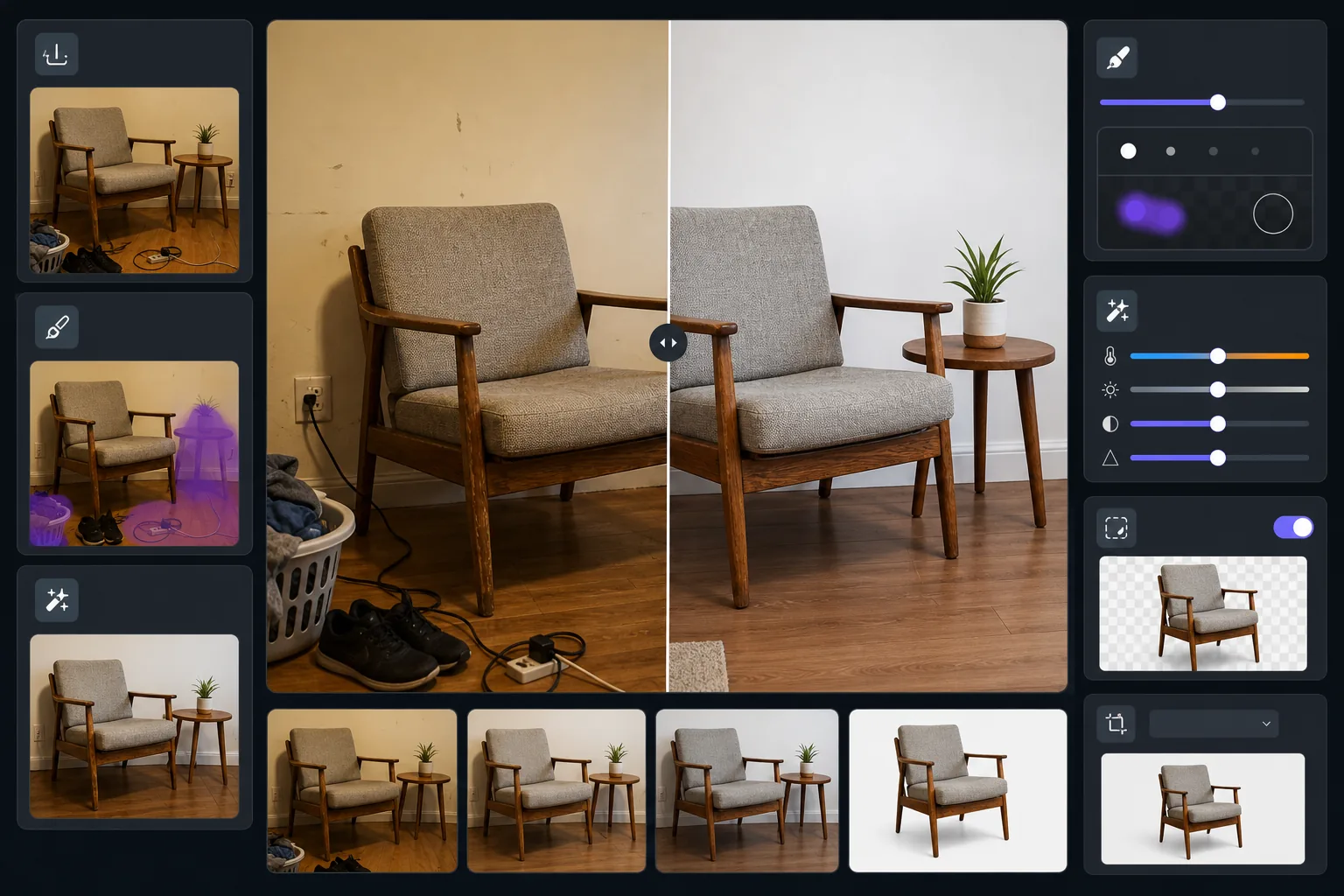
Cosa fa questo modello
Trasforma le foto di mobili scattate in stanze vissute in immagini di inserzione raffinate. Magic Eraser rimuove il disordine circostante, gli oggetti personali e i danni alle pareti visibili nello scatto. AI Enhance corregge la dominante gialla dell'illuminazione interna per mostrare le vere tonalità del legno e i colori dei tessuti. Background Eraser può isolare completamente il pezzo per uno sfondo bianco pulito conforme agli standard di inserzione di Facebook Marketplace, Craigslist e Chairish.
Impostazioni del modello
| Modalità sfondo | Bianco pulito o contesto di stanza riordinata (selezionabile) |
| Dimensione output | 2000×1500px (4:3 orizzontale, standard di inserzione) |
| Correzione del colore | Regolazione del bilanciamento del bianco da interno a luce diurna |
| Rimozione del disordine | Automatica — rimuove gli oggetti entro 12 inches dai bordi del mobile |
| Miglioramento dei dettagli | Sensibile alla texture — rende nitidi venatura del legno, trama del tessuto e ferramenta |
| Documentazione delle condizioni | Conserva segni di usura e patina per una rappresentazione onesta |
Come usare questo modello
Fotografa il mobile
Allontanati abbastanza da inquadrare l'intero pezzo con un po' di spazio attorno. Scatta all'altezza degli occhi da in piedi per sedie e tavoli, o all'altezza da seduto per pezzi bassi come i tavolini da caffè. Accendi tutte le luci della stanza e apri le tende per un'illuminazione uniforme.
Rimuovi il disordine circostante
Magic Eraser rileva e rimuove automaticamente gli oggetti vicini — scarpe sul pavimento, oggetti su superfici adiacenti, decorazioni murali e cavi di alimentazione. Il risultato mostra solo il mobile in un ambiente pulito.
Correggi il colore e migliora i dettagli
AI Enhance rimuove la dominante gialla calda o fluorescente fredda delle foto in interni, rivelando il vero colore delle tinte del legno, dei tessuti di rivestimento e della ferramenta metallica. La nitidezza della texture fa risaltare i motivi della venatura e i dettagli delle cuciture che gli acquirenti vogliono ispezionare.
Scegli lo sfondo ed esporta
Mantieni il contesto di stanza riordinata per un appeal lifestyle, oppure passa a uno sfondo bianco puro per la conformità al marketplace. Esporta in dimensioni ottimizzate per le inserzioni che si caricano rapidamente mantenendo dettagli degni di uno zoom.
Consigli da professionisti per risultati ottimali
- ✓Prima di rimuoverlo, posiziona un oggetto comune come un libro o una tazza sulla superficie del mobile — questo aiuta gli acquirenti a valutare le proporzioni dall'immagine prima, mentre il dopo resta pulito.
- ✓Fotografa i pezzi imbottiti da un'angolazione di tre quarti per mostrare sia la facciata frontale che il profilo laterale in un unico scatto.
- ✓Per i mobili in legno, scatta durante le ore diurne vicino a una finestra per catturare tonalità di legno accurate — la luce artificiale vira la quercia all'arancione e il noce a un marrone fangoso.
- ✓Scatta una ripresa ampia e un primo piano di eventuali dettagli notevoli (giunzioni, ferramenta, texture del tessuto) ed elabora entrambi con questo modello per un'inserzione completa.
E-commerce workflow
Product photo hub
Use this template with the full ecommerce product photo workflow for marketplace backgrounds, cleanup, compression, resizing, and listing-ready exports.
View ecommerce product photo workflowDomande frequenti
Questo nasconde i danni o l'usura del mobile?
+
No, e intenzionalmente. Il modello conserva segni di usura, graffi e patina esistenti sul mobile stesso — rimuove solo il disordine circostante e corregge il colore dell'illuminazione. Una rappresentazione onesta delle condizioni crea fiducia nell'acquirente e riduce le contestazioni sui resi.
Posso mostrare il pezzo in un ambiente di stanza senza il disordine?
+
Sì. La modalità di contesto di stanza riordinata rimuove oggetti personali, disordine e distrazioni mantenendo pareti, pavimento e l'ambiente generale della stanza. Gli acquirenti vedono il mobile in un'ambientazione realistica senza il rumore visivo di uno spazio vissuto.
Quali dimensioni funzionano per Facebook Marketplace e Craigslist?
+
L'output predefinito di 2000×1500px funziona su tutte le principali piattaforme. Facebook Marketplace mostra le immagini a 1200px di larghezza e Craigslist accetta fino a 600×450px — l'output del modello appare nitido a qualsiasi di queste dimensioni di visualizzazione.
Pubblica mobili che si vendono a prima vista
Carica la foto del tuo mobile e ottieni un'immagine di inserzione pulita e professionale in pochi secondi. Niente allestimenti, niente studio fotografico, nessuna competenza di design richiesta.
Provalo gratisRelated templates
More e-commerce templates for your workflow.
Modello di sfondo bianco puro per le foto dei prodotti. Impostazioni pronte per Amazon, Shopify e marketplace per immagini di prodotti pulite e professionali che convertono.
Modello di foto per inserzioni ottimizzate per Etsy. Converte gli scatti lifestyle in sfondi bianchi puliti a 2000px, migliora i dettagli dei prodotti fatti a mano e soddisfa le linee guida sulle immagini di Etsy.
Modello di foto per inserzioni ottimizzate per eBay. Sfondo bianco per le immagini della galleria, miglioramento della documentazione sulle condizioni e layout multi-angolo che soddisfano gli standard delle immagini di eBay.
Modello professionale per fotografia di gioielli per anelli, collane e orologi. Controlla i riflessi, migliora la brillantezza delle pietre preziose e fornisce immagini pronte per il mercato su sfondi puliti.
Pulisci le foto piatte degli indumenti con rimozione delle rughe, pulizia dei pelucchi, sfondi bianchi puri e colori accurati del tessuto. Pronto per Shopify, Amazon e boutique.
Crea foto di prodotti conformi ad Amazon con sfondi bianchi puri, corretta correzione dell'illuminazione e dimensioni ottimizzate per le immagini delle inserzioni principali e secondarie.