
Pulizia di abbigliamento piatto
Trasforma le foto grezze di capi distesi in piano in immagini di prodotto pronte per i marketplace. Questo modello elimina rughe, pelucchi, peli di animali e fili sporgenti, sostituisce gli sfondi disordinati con il bianco puro e corregge il colore del tessuto affinché ciò che i clienti vedono sullo schermo corrisponda a ciò che ricevono nel pacco.
Prova questo modello gratisE-commerce template preview
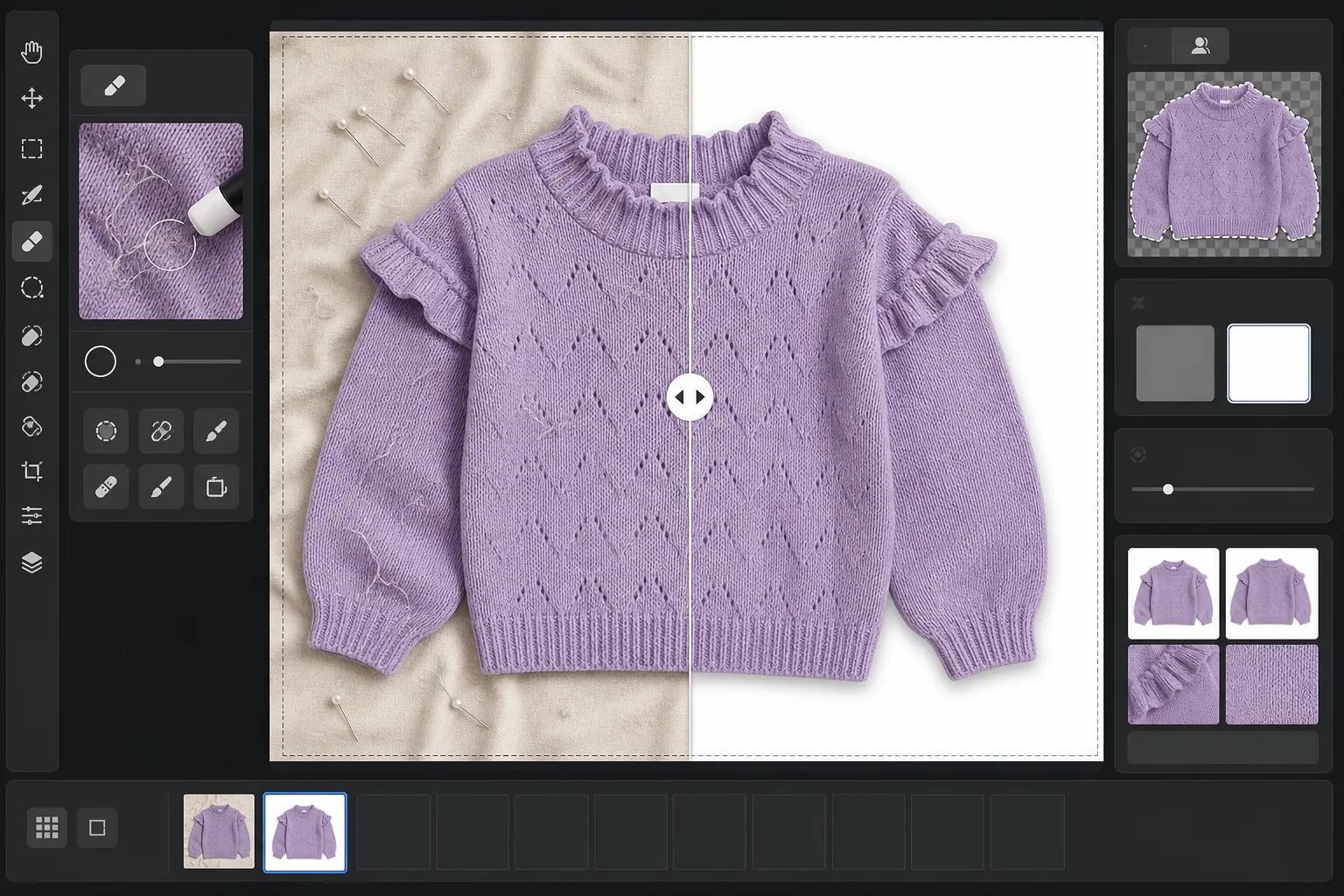
Cosa fa questo modello
Affronta i problemi più comuni nella fotografia di capi distesi in piano: le rughe del tessuto dovute a piegatura e spedizione, i pelucchi e i peli di animali che la fotocamera cattura ma l'occhio non nota, gli sfondi irregolari dovuti a lenzuola o giunzioni dei pannelli di cartone e i colori del tessuto inesatti causati da illuminazione mista. Magic Eraser rimuove i residui in superficie, i fili sporgenti e le etichette di lavaggio che spuntano dalle scollature. Background Eraser isola il capo e lo colloca su uno sfondo bianco pulito. AI Enhance corregge la temperatura del colore affinché le tinte del tessuto appaiano fedeli su monitor e cataloghi stampati.
Impostazioni del modello
| Sfondo | Bianco puro (#FFFFFF) con sfumatura morbida dei bordi di 2px |
| Riduzione delle rughe | Media (leviga le pieghe da spedizione, conserva le pieghe volute) |
| Precisione del colore | sRGB con calibrazione automatica del punto di bianco su scheda grigia neutra |
| Rimozione dei pelucchi | Rilevamento automatico di fibre, peli e polvere oltre i 3px |
| Ombra | Ombra discreta (offset di 4px, opacità del 15%) per dare profondità |
| Dimensioni di output | Ritaglio quadrato 2000×2000px con margine del 10% |
Come utilizzare questo modello
Carica la tua foto in piano
Fotografa il capo disteso su qualsiasi superficie pulita — un letto, un tavolo o un pannello di cartone. Lo sfondo non deve essere perfettamente bianco né privo di pieghe perché verrà sostituito. La luce naturale del giorno vicino a una finestra produce i colori del tessuto più fedeli.
Rimuovi pelucchi, fili ed etichette
Magic Eraser rileva e rimuove automaticamente pelucchi, peli di animali, fili sporgenti ed etichette di lavaggio visibili sopra la scollatura o la fascia in vita. Puoi inoltre selezionare e rimuovere manualmente grucce, clip o spilli da styling rimasti nello scatto.
Sostituisci lo sfondo
Background Eraser isola il capo dalla superficie su cui è stato fotografato e lo colloca su uno sfondo bianco puro. Il rilevamento dei bordi segue il contorno reale del capo, comprese balze, frange e dettagli in pizzo, senza tagliare i particolari più fini.
Correggi il colore ed esporta
AI Enhance regola il bilanciamento del bianco affinché il colore del tessuto sullo schermo corrisponda il più fedelmente possibile al capo reale. Scarica l'immagine finale come JPEG quadrato 2000x2000px pronta per Shopify, Amazon, Etsy o il tuo negozio — dimensionata per soddisfare i requisiti immagine della maggior parte dei marketplace.
Consigli professionali per risultati ottimali
- ✓Se possibile, tratta il capo a vapore o con il ferro prima dello scatto. La riduzione delle rughe gestisce bene le lievi pieghe da spedizione, ma le linee di piega marcate da un lungo periodo di stoccaggio sono più difficili da levigare senza alterare la cadenza e la texture naturali del tessuto.
- ✓Inserisci una piccola scheda grigia o una scheda di riferimento per il bilanciamento del bianco sul bordo dell'inquadratura (fuori dall'area di ritaglio finale). L'algoritmo di precisione del colore la utilizza per calibrare il punto di bianco, producendo colori del tessuto nettamente più fedeli del solo bilanciamento del bianco automatico.
- ✓Per i tessuti scuri su sfondo bianco, assicurati che la foto originale abbia un contrasto sufficiente tra il bordo del capo e la superficie. Un capo nero su legno scuro è più difficile da scontornare in modo pulito rispetto a un capo nero su un lenzuolo grigio chiaro o bianco.
- ✓Fotografa tutti i capi nello stesso lotto con la stessa illuminazione per mantenere la coerenza cromatica nel tuo catalogo. Elaborarli insieme con questo modello garantisce un bilanciamento del bianco uniforme su tutta la linea di prodotti.
E-commerce workflow
Product photo hub
Use this template with the full ecommerce product photo workflow for marketplace backgrounds, cleanup, compression, resizing, and listing-ready exports.
View ecommerce product photo workflowDomande comuni
La rimozione delle rughe rende il tessuto artificialmente liscio?
+
La riduzione delle rughe è calibrata per eliminare le pieghe da piegatura e spedizione preservando la texture naturale del tessuto — l'intreccio del lino, il twill del denim, le coste del cotone e i motivi della maglia vengono tutti mantenuti. Il risultato sembra un capo appena stirato a vapore, non una superficie dipinta digitalmente.
I colori corrisponderanno tra la foto e il capo reale?
+
La precisione del colore dipende dall'illuminazione della tua foto originale. Con luce naturale del giorno o luci da studio calibrate, l'algoritmo di correzione del colore produce risultati entro un delta-E di 3 rispetto al capo reale su un monitor calibrato. Sotto una forte luce fluorescente o al tungsteno il miglioramento è notevole, ma una corrispondenza esatta richiede una scheda grigia di riferimento.
Quali marketplace accettano queste dimensioni?
+
L'output quadrato 2000x2000px soddisfa i requisiti immagine di Amazon, Shopify, Etsy, eBay, Poshmark e della maggior parte delle altre piattaforme di e-commerce. Amazon consiglia almeno 1000px sul lato più lungo per la funzione di zoom, e 2000px supera questo valore con un comodo margine.
Metti in vendita capi che online appaiono belli quanto dal vivo
Carica le foto in piano e ottieni immagini di prodotto senza pelucchi, con le rughe levigate e sfondo bianco, pronte per qualsiasi piattaforma di e-commerce.
Provalo gratisRelated templates
More e-commerce templates for your workflow.
Modello di sfondo bianco puro per le foto dei prodotti. Impostazioni pronte per Amazon, Shopify e marketplace per immagini di prodotti pulite e professionali che convertono.
Modello di foto per inserzioni ottimizzate per Etsy. Converte gli scatti lifestyle in sfondi bianchi puliti a 2000px, migliora i dettagli dei prodotti fatti a mano e soddisfa le linee guida sulle immagini di Etsy.
Modello di foto per inserzioni ottimizzate per eBay. Sfondo bianco per le immagini della galleria, miglioramento della documentazione sulle condizioni e layout multi-angolo che soddisfano gli standard delle immagini di eBay.
Modello professionale per fotografia di gioielli per anelli, collane e orologi. Controlla i riflessi, migliora la brillantezza delle pietre preziose e fornisce immagini pronte per il mercato su sfondi puliti.
Modello fotografico professionale per mobili per inserzioni sul marketplace. Rimuovi il disordine dalla stanza, mostra le dimensioni reali e presenta i pezzi su sfondi puliti o in contesti di stanze in stile.
Crea foto di prodotti conformi ad Amazon con sfondi bianchi puri, corretta correzione dell'illuminazione e dimensioni ottimizzate per le immagini delle inserzioni principali e secondarie.