
Foto di prodotto di gioielleria
Trasforma qualsiasi scatto di gioielleria in un'immagine di prodotto professionale, degna di un catalogo di lusso. Questo modello affronta le sfide specifiche della fotografia di metalli riflettenti e pietre preziose traslucide: controlla i riflessi indesiderati, esalta la brillantezza e garantisce una riproduzione fedele del colore delle pietre.
Prova gratis questo modelloE-commerce template preview
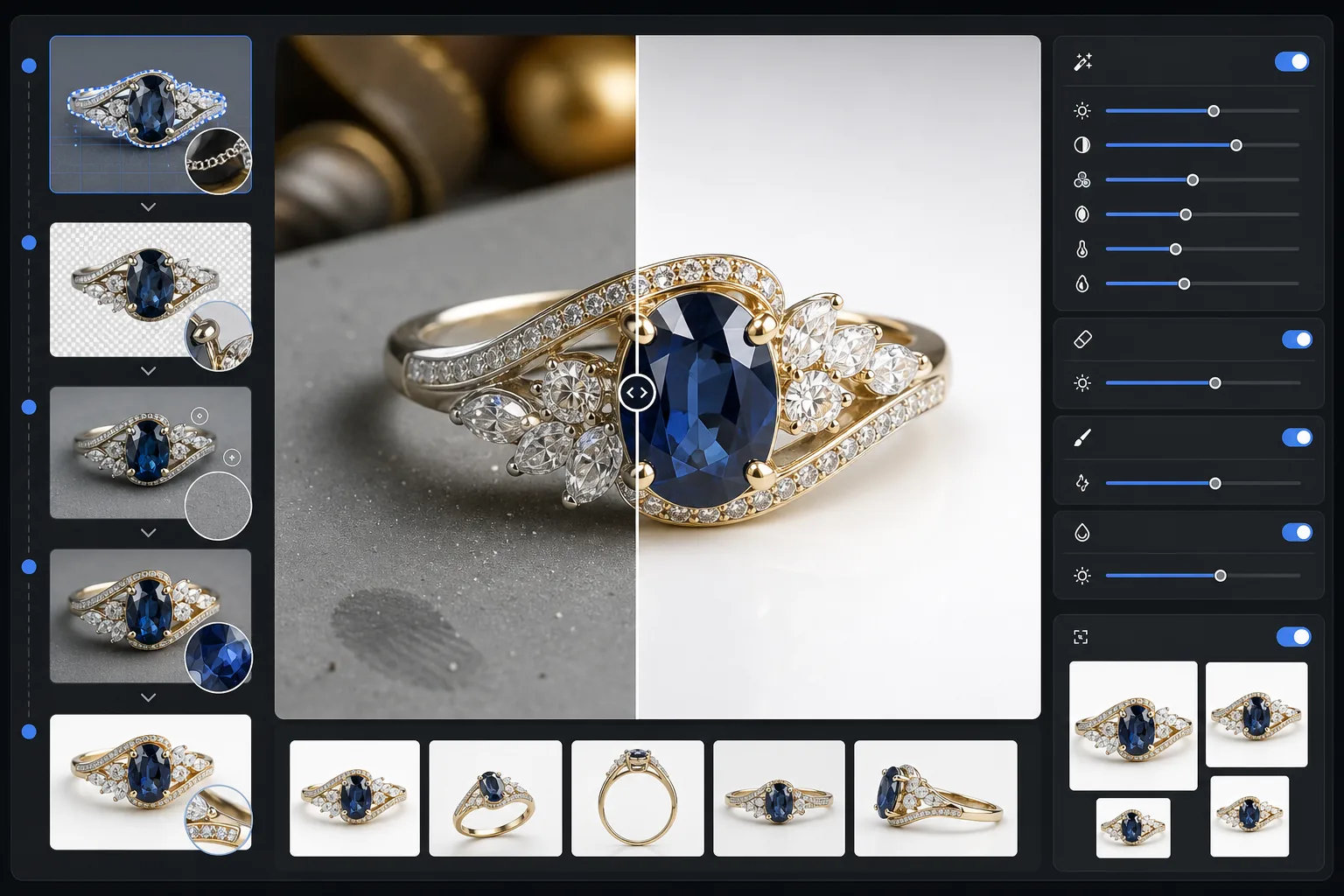
Cosa fa questo modello
Rimuove gli sfondi disordinati dalle foto di gioielli e li sostituisce con una superficie pulita e priva di distrazioni. Il miglioramento con IA rende quindi più nitidi i dettagli delle sfaccettature, bilancia le luci del metallo senza bruciarle e ripristina il vero colore delle gemme che l'illuminazione interna spesso altera. Magic Eraser elimina i granelli di polvere, le impronte digitali sul metallo e i riflessi vaganti, quasi impossibili da evitare quando si fotografano piccoli oggetti riflettenti.
Impostazioni del modello
| Sfondo | Bianco puro o grigio sfumato (selezionabile) |
| Dimensione di output | 2400×2400px (zoom ad alta risoluzione per i dettagli fini) |
| Esaltazione della brillantezza | Media (conserva la brillantezza naturale senza riflessi artificiali) |
| Controllo dei riflessi | Morbido — riduce i riflessi a specchio intensi sul metallo lucido |
| Precisione del colore | sRGB calibrato per gemme (ottimizzato per smeraldo, rubino, zaffiro, diamante) |
| Nitidezza dei dettagli | Livello macro — esalta sfaccettature, griffe e incisioni |
Come usare questo modello
Fotografa il tuo gioiello
Posiziona il pezzo su una superficie opaca non riflettente. Usa luce naturale diffusa o un lightbox per ridurre al minimo i riflessi intensi sul metallo. Fotografa leggermente dall'alto, con un angolo di 30-45 gradi, per catturare la faccia delle pietre preziose.
Rimuovi lo sfondo
Background Eraser isola il gioiello da qualsiasi superficie, gestendo i bordi complicati in cui griffe sottili, catene delicate e piccole chiusure incontrano lo sfondo, anche sui pezzi molto riflettenti.
Migliora dettagli e colore
AI Enhance rende più nitidi i bordi delle sfaccettature e le incisioni visibili in zoom, corregge il colore delle gemme alterato dall'illuminazione artificiale e bilancia le luci del metallo, così l'oro appare caldo e l'argento freddo, senza zone bruciate.
Pulisci ed esporta
Usa Magic Eraser per rimuovere particelle di polvere, macchie di impronte digitali o riflessi indesiderati sulla superficie del metallo. Esporta a 2400px per la compatibilità con lo zoom dei marketplace e una resa accurata dei dettagli.
Consigli da professionista per risultati ottimali
- ✓Fotografa su un cartoncino grigio medio anziché bianco: offre all'IA una separazione dei bordi più pulita sui pezzi in argento e oro bianco.
- ✓Per i pezzi in diamante e le gemme trasparenti, posiziona un piccolo foglio di carta bianca sotto la pietra per catturare la trasmissione della luce e il fuoco.
- ✓Fotografa gli anelli in posizione verticale usando cera da museo o un porta-anello, poi cancella il supporto con Magic Eraser per una presentazione sospesa.
- ✓Cattura più angolazioni di ogni pezzo ed elaborale in batch con le stesse impostazioni del modello per un aspetto da catalogo coerente.
E-commerce workflow
Product photo hub
Use this template with the full ecommerce product photo workflow for marketplace backgrounds, cleanup, compression, resizing, and listing-ready exports.
View ecommerce product photo workflowDomande frequenti
La brillantezza dei miei diamanti apparirà naturale?
+
Sì. L'esaltazione della brillantezza amplifica i riflessi di luce già presenti nella tua foto anziché aggiungere riflessi artificiali. Il risultato sembra uno scatto in studio illuminato in modo professionale e conserva il pattern di fuoco naturale di ogni pietra.
Può gestire oro e platino lucidi molto riflettenti?
+
Assolutamente. L'impostazione di controllo dei riflessi riduce i riflessi a specchio intensi preservando al contempo la lucentezza caratteristica di ogni metallo. L'oro mantiene il suo bagliore caldo e il platino la sua brillantezza fredda, senza zone bianche bruciate.
Quale sfondo funziona meglio per gli annunci di gioielli di lusso?
+
Il bianco puro soddisfa i requisiti dei marketplace di Amazon ed Etsy. Per il tuo sito web o per un branding di fascia alta, l'opzione grigio sfumato aggiunge profondità e una sensazione premium. Entrambe le opzioni sono incluse in questo modello.
Fai vendere le tue foto di gioielli
Carica la foto di un anello, una collana, un bracciale o un orologio e ottieni in pochi secondi un'immagine di prodotto di qualità da catalogo. Ogni sfaccettatura, ogni dettaglio, presentato alla perfezione.
Provalo gratisRelated templates
More e-commerce templates for your workflow.
Modello di sfondo bianco puro per le foto dei prodotti. Impostazioni pronte per Amazon, Shopify e marketplace per immagini di prodotti pulite e professionali che convertono.
Modello di foto per inserzioni ottimizzate per Etsy. Converte gli scatti lifestyle in sfondi bianchi puliti a 2000px, migliora i dettagli dei prodotti fatti a mano e soddisfa le linee guida sulle immagini di Etsy.
Modello di foto per inserzioni ottimizzate per eBay. Sfondo bianco per le immagini della galleria, miglioramento della documentazione sulle condizioni e layout multi-angolo che soddisfano gli standard delle immagini di eBay.
Modello fotografico professionale per mobili per inserzioni sul marketplace. Rimuovi il disordine dalla stanza, mostra le dimensioni reali e presenta i pezzi su sfondi puliti o in contesti di stanze in stile.
Pulisci le foto piatte degli indumenti con rimozione delle rughe, pulizia dei pelucchi, sfondi bianchi puri e colori accurati del tessuto. Pronto per Shopify, Amazon e boutique.
Crea foto di prodotti conformi ad Amazon con sfondi bianchi puri, corretta correzione dell'illuminazione e dimensioni ottimizzate per le immagini delle inserzioni principali e secondarie.