
Foto inventario veicoli
Trasforma le foto scattate nel piazzale in immagini di veicoli di qualità da showroom per gli elenchi di inventario online. Questo modello rimuove gli sfondi disordinati della concessionaria — altre auto, insegne, edifici — e li sostituisce con uno sfondo bianco, grigio o in stile studio ben pulito. Magic Eraser ripulisce i riflessi del parabrezza, i dettagli della targa e gli adesivi del piazzale, mentre la correzione del colore garantisce che la vernice appaia fedele alla realtà sotto qualsiasi illuminazione.
Prova gratis questo modelloE-commerce template preview
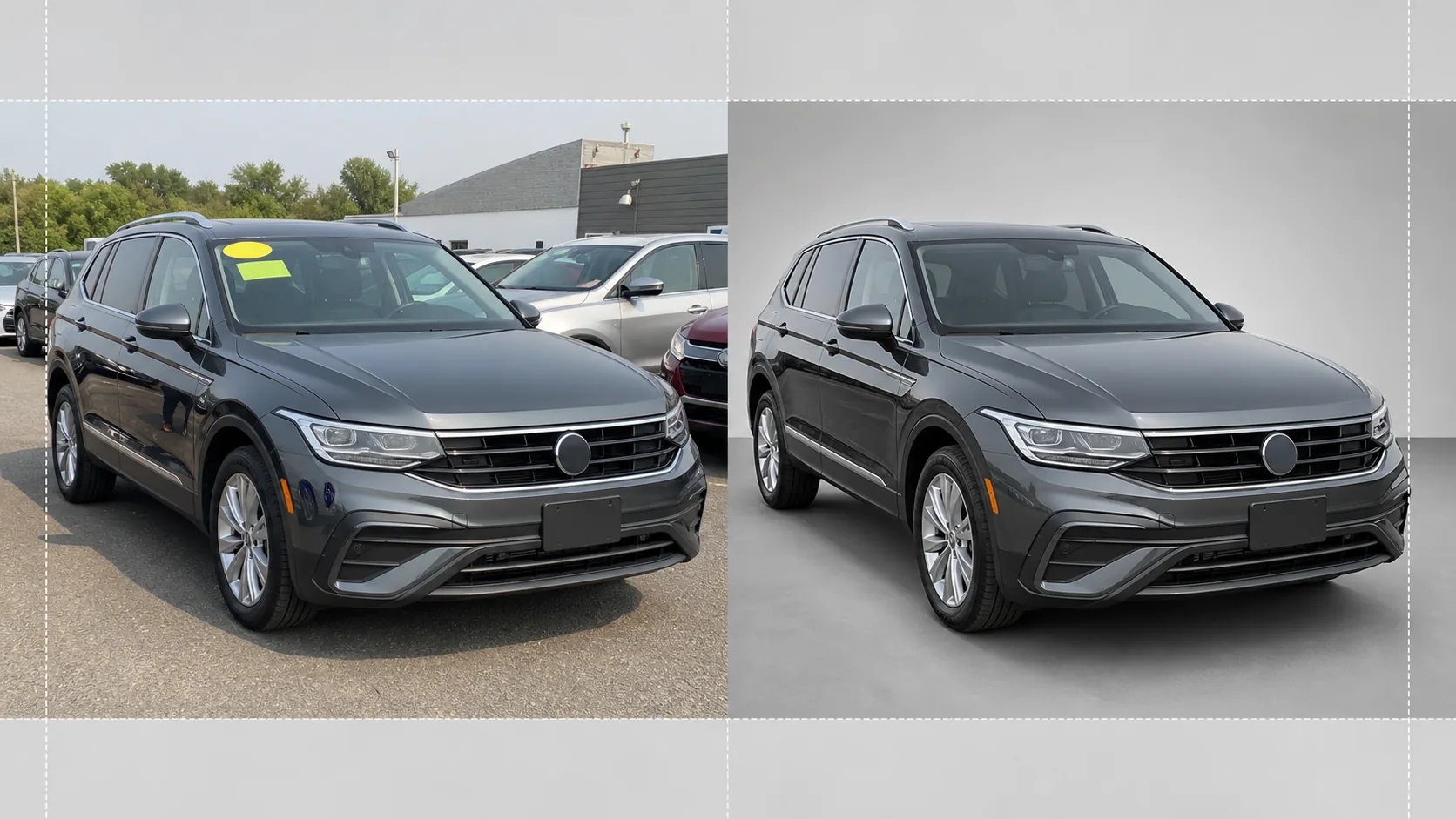
Cosa fa questo modello
Gestisce l'intero flusso di lavoro per la fotografia dell'inventario della concessionaria. Background Eraser isola il veicolo dall'ambiente del piazzale e sostituisce lo sfondo con uno sfondo in stile studio ben pulito che concentra tutta l'attenzione sull'auto, sul camion o sul SUV. Magic Eraser rimuove gli adesivi dei prezzi dal parabrezza, le etichette del piazzale, le targhe (per la privacy) e i riflessi del fotografo o dei veicoli circostanti nella vernice lucida e nei vetri. La correzione del colore normalizza il colore della vernice in modo che le foto scattate sotto cieli nuvolosi, sotto le luci al sodio del parcheggio o sotto il sole intenso di mezzogiorno mostrino tutte la stessa tonalità di vernice precisa. L'immagine finale viene ritagliata e raddrizzata in modo che il veicolo risulti centrato e orizzontale in tutto il tuo inventario.
Impostazioni del modello
| Sfondo | Bianco studio, grigio neutro o pavimento da showroom con sfumatura |
| Pulizia dei riflessi | Rimuove il fotografo, il disordine del piazzale e le auto adiacenti dai riflessi su vernice e vetro |
| Correzione del colore della vernice | Normalizza all'aspetto del codice vernice del produttore sotto luce diurna neutra |
| Oscuramento per la privacy | Sfoca o rimuove automaticamente le targhe |
| Ritaglia e raddrizza | Centra automaticamente il veicolo, livella l'orizzonte, proporzioni 16:9 |
| Risoluzione di output | 3000×1688px (ottimizzata per AutoTrader, Cars.com e i siti web dei concessionari) |
Come usare questo modello
Carica la foto del piazzale
Carica una foto del veicolo scattata nel piazzale della concessionaria. L'angolazione frontale di tre quarti è l'ideale, ma funzionano anche i profili laterali e le angolazioni posteriori. Il modello gestisce allo stesso modo smartphone, fotocamere compatte e configurazioni professionali.
Rimuovi sfondo e distrazioni
Background Eraser ritaglia l'ambiente del piazzale e lo sostituisce con uno sfondo pulito. Magic Eraser rimuove gli adesivi dal parabrezza, le etichette con il numero di piazzale, i decalcomani dei prezzi e il testo della targa. I riflessi delle auto vicine e del fotografo nella vernice e nei finestrini vengono ripuliti automaticamente.
Correggi colore ed esposizione
Il colore della vernice viene normalizzato per corrispondere alla tonalità prevista dal produttore sotto luce diurna neutra. Le alte luci sovraesposte su cromature e vetro vengono recuperate e i dettagli delle ombre sotto i passaruota e i paraurti vengono schiariti per un aspetto uniforme, di qualità da showroom.
Esporta per l'elenco dell'inventario
Scarica l'immagine finita in 3000×1688px con proporzioni 16:9. Il formato è ottimizzato per AutoTrader, Cars.com, CarGurus, Facebook Marketplace e il tuo sistema di gestione della concessionaria. L'elaborazione in batch è disponibile per i servizi fotografici dell'intero piazzale.
Consigli da professionisti per risultati ottimali
- ✓Fotografa il veicolo da un'angolazione frontale di tre quarti, all'altezza del paraurti. Questo cattura sia il frontale sia il profilo laterale in un'unica inquadratura ed è l'angolazione più cliccata negli elenchi di inventario online.
- ✓Evita di scattare sotto il sole diretto allo zenit: crea ombre dure sotto l'auto e alte luci bruciate su tetto e cofano. Le giornate nuvolose o le zone in ombra del piazzale producono l'illuminazione più uniforme con cui l'IA può lavorare.
- ✓Se possibile, rimuovi l'adesivo del prezzo dal parabrezza prima dello scatto. Sebbene l'IA possa cancellarlo digitalmente, gli adesivi grandi che coprono i dettagli del cruscotto a volte lasciano un debole contorno che richiede un ritocco manuale.
- ✓Tieni il veicolo pulito prima di fotografarlo. Il modello corregge illuminazione e sfondo, ma sporco, macchie d'acqua ed escrementi di uccelli sulla vernice si gestiscono meglio con un rapido lavaggio che con il ritocco dell'IA.
Strumenti
E-commerce workflow
Product photo hub
Use this template with the full ecommerce product photo workflow for marketplace backgrounds, cleanup, compression, resizing, and listing-ready exports.
View ecommerce product photo workflowDomande frequenti
Posso elaborare un intero inventario in una sola volta?
+
Sì. Carica più foto di veicoli e il modello applica a ciascuna le stesse impostazioni di sfondo, correzione del colore e pulizia. Questo garantisce coerenza visiva su tutto il tuo inventario online.
Il colore della vernice sarà accurato?
+
La correzione del colore normalizza la vernice in modo che corrisponda al suo aspetto sotto luce diurna neutra (5500K). Se conosci il codice vernice del produttore, l'IA lo usa come riferimento per garantire che il colore a schermo corrisponda il più possibile al veicolo reale.
Funziona per moto e barche?
+
Sì. La rimozione dello sfondo e la pulizia dei riflessi funzionano per qualsiasi tipo di veicolo, comprese moto, barche, camper e camion pesanti. La centratura automatica e il rapporto di ritaglio potrebbero richiedere una regolazione manuale per proporzioni di veicolo non standard.
Fai sembrare ogni veicolo del tuo piazzale pronto per lo showroom
Carica le foto del piazzale della concessionaria e ottieni in pochi secondi immagini di inventario pulite, coerenti e professionali.
Provalo gratisRelated templates
More e-commerce templates for your workflow.
Modello di sfondo bianco puro per le foto dei prodotti. Impostazioni pronte per Amazon, Shopify e marketplace per immagini di prodotti pulite e professionali che convertono.
Modello di foto per inserzioni ottimizzate per Etsy. Converte gli scatti lifestyle in sfondi bianchi puliti a 2000px, migliora i dettagli dei prodotti fatti a mano e soddisfa le linee guida sulle immagini di Etsy.
Modello di foto per inserzioni ottimizzate per eBay. Sfondo bianco per le immagini della galleria, miglioramento della documentazione sulle condizioni e layout multi-angolo che soddisfano gli standard delle immagini di eBay.
Modello professionale per fotografia di gioielli per anelli, collane e orologi. Controlla i riflessi, migliora la brillantezza delle pietre preziose e fornisce immagini pronte per il mercato su sfondi puliti.
Modello fotografico professionale per mobili per inserzioni sul marketplace. Rimuovi il disordine dalla stanza, mostra le dimensioni reali e presenta i pezzi su sfondi puliti o in contesti di stanze in stile.
Pulisci le foto piatte degli indumenti con rimozione delle rughe, pulizia dei pelucchi, sfondi bianchi puri e colori accurati del tessuto. Pronto per Shopify, Amazon e boutique.